](https://deep-paper.org/en/paper/2403.18252/images/cover.png)
Introduction
Imagine showing an AI a picture of a U.S. five-dollar bill. A standard computer vision model looks at the pixels and recognizes patterns: it sees paper, a face, and numbers. It can tell you “this is a banknote.”
But what if you ask, “Who is the person in the portrait, and what specific historical event did he lead the country through?”
To answer this, the model needs more than just visual pattern matching. It needs world knowledge. It needs to know that the face belongs to Abraham Lincoln, that Lincoln was the 16th U.S. President, and that he led the U.S. through the Civil War. Standard visual embeddings—the vector representations models use to “see”—often fail to capture this depth of instance-level knowledge.
This is the core problem addressed in the paper “Beyond Embeddings: The Promise of Visual Table in Visual Reasoning.” The researchers propose a shift from abstract visual vectors to a structured, text-based representation called a Visual Table.
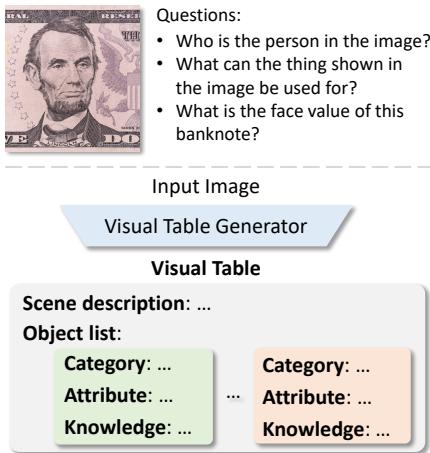
As illustrated in Figure 1, while CLIP-type embeddings struggle with deep reasoning, the Visual Table explicitly lists the scene description, objects, attributes, and critical world knowledge in a structured format. This blog post will dive deep into how this new representation works, how it is generated, and why it might be the future of visual reasoning.
Background: The Evolution of Visual Representations
To understand why Visual Tables are innovative, we first need to understand how computers currently “see.”
From Labels to Embeddings
In the early days of computer vision, we relied on supervised labels. Humans painstakingly drew boxes around cats and dogs, and models learned to mimic those boxes. While effective for detection, this approach was rigid and expensive.
The field then evolved toward Visual Embeddings (like CLIP). Instead of fixed labels, models learned to align images with natural language descriptions from the internet. This was a massive leap forward, allowing models to generalize to new objects they hadn’t explicitly seen before.
The Reasoning Gap
However, visual embeddings are “black boxes.” They are dense vectors of numbers that are hard to interpret. More importantly, they are often disconnected from external world knowledge. A CLIP model might recognize a “wrench,” but it doesn’t necessarily encode the knowledge that “a wrench is used for turning nuts and bolts” or how that interacts with other objects in a complex scene.
Structured Representations
Researchers have also explored Scene Graphs, which map objects and their relationships (e.g., Man – holding –> Cup). While structured and interpretable, scene graphs often lack the rich semantic details and broader context required for complex reasoning.
This brings us to the Visual Table. The authors propose combining the best of both worlds: the structure of a graph and the descriptive power of natural language, augmented with explicit world knowledge.
Core Method: What is a Visual Table?
A Visual Table is not a picture; it is a text-based, hierarchical description of a visual scene. Think of it as a metadata file or a database entry for an image.
A Visual Table consists of two main components:
- Scene Description: A high-level summary of the global context (e.g., location, time of day, event).
- Object-Centric Descriptions: A list of objects, where each object is broken down into:
- Category: What is it?
- Attributes: Visual details (color, shape, material, action).
- Knowledge: Instance-level facts, affordances (what the object can do), and background information.
This textual format offers unique advantages. It is interpretable (humans can read it), editable (we can tweak the table to test the model), and knowledge-rich.
The Visual Table Generator
You might be wondering: “Who writes these tables? Do humans have to sit down and type out encyclopedic entries for every image?”
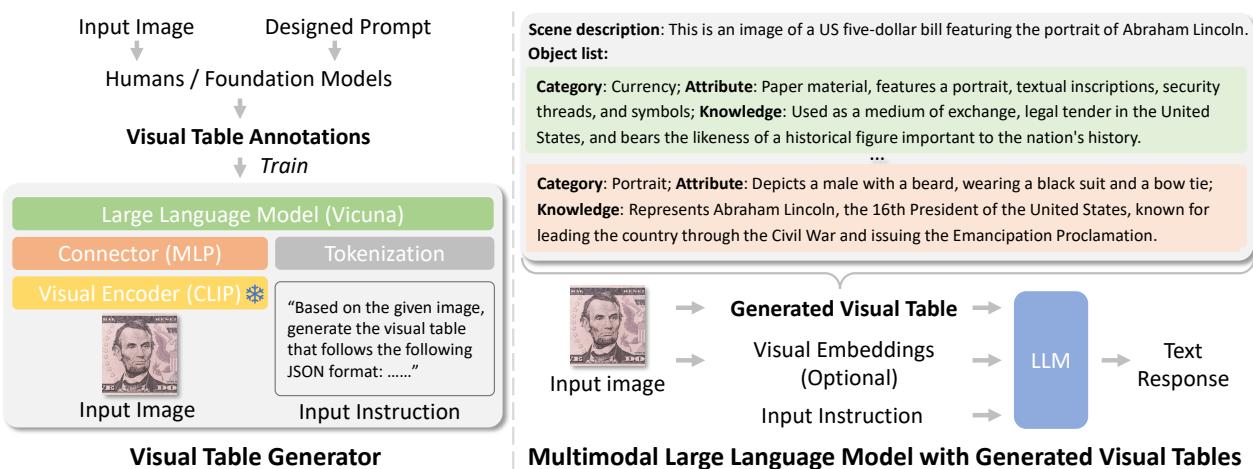
That would be impossibly expensive. Instead, the researchers developed a semi-automated pipeline to create a Visual Table Generator.
Step 1: Data Collection via Foundation Models
The researchers utilized powerful foundation models (specifically GPT-4V) to generate ground-truth annotations. They designed a prompt schema that forces the model to output descriptions in a strict JSON format.
By running this prompt on a dataset of 61,000 images, they created a high-quality training set of Visual Tables. This dataset serves as the “textbook” for teaching a smaller, faster model how to generate these tables.
Step 2: Training the Generator
The generator is built on a Multimodal Large Language Model (MLLM) architecture, specifically LLaVA-1.5. It consists of:
- Visual Encoder: A CLIP (ViT-L/14) model that processes the image.
- Connector: An MLP that projects visual features into the language space.
- LLM: A Vicuna-13B model that generates the text.
The training process involves teaching the model to predict the Visual Table text tokens (\(T_a\)) given the image input (\(I\)) and an instruction (\(T_{instruct}\)).

This equation represents the auto-regressive training objective. The model learns to generate the visual table token by token, conditioned on the image embeddings (\(h(I)\)) and the previous tokens.
Step 3: Application in Reasoning
Once the generator is trained, it can be deployed on any new image. In the inference phase (as shown on the right side of Figure 2), the system works as follows:
- Input: An image is fed into the Visual Table Generator.
- Generation: The generator outputs the structured Visual Table text.
- Reasoning: This text table—either alone or combined with standard visual embeddings—is fed into an LLM to answer user questions.
This turns a visual task into a reading comprehension task, which LLMs excel at.
Experiments & Results
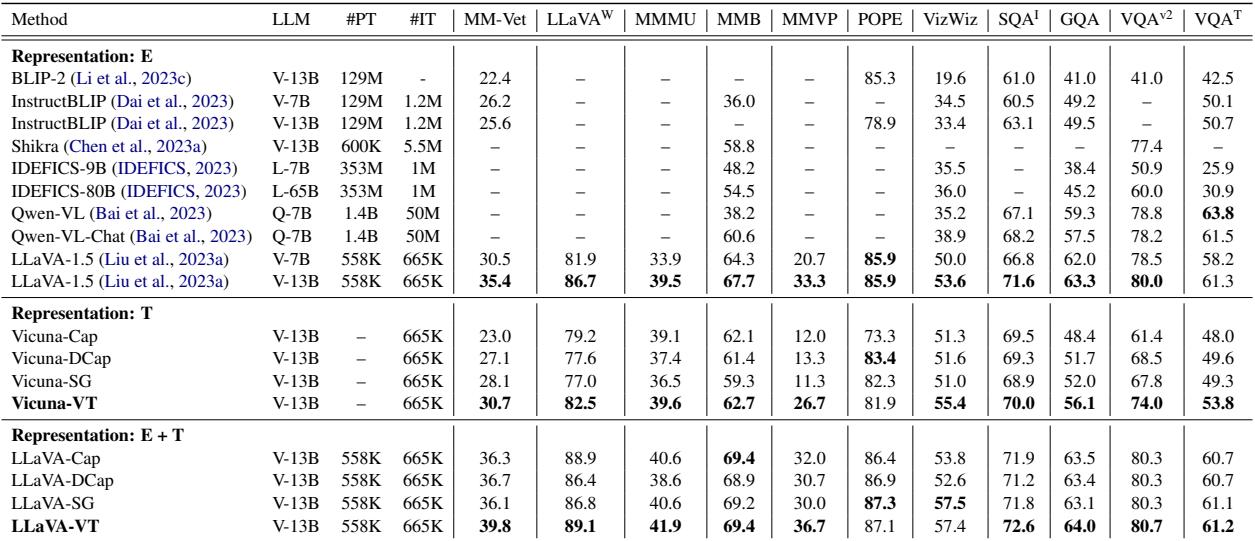
The researchers rigorously tested whether Visual Tables actually help models understand the world better. They evaluated their method across 11 diverse benchmarks, ranging from standard Visual Question Answering (VQA) to complex reasoning and hallucination tests.
Comparison with Text-Based Representations
They compared Visual Tables against other text-based ways of representing images:
- Captions: Short, descriptive sentences.
- Detailed Captions: Longer, paragraph-style descriptions.
- Scene Graphs: Structured node-edge representations.
Key Takeaways from the Results:
- Visual Tables Win on Text: When used as the only visual representation (the “Vicuna-VT” rows), Visual Tables significantly outperform captions and scene graphs. For example, on the MMVP benchmark (which tests fine-grained visual perception), Visual Tables scored 26.7, compared to just 11.3 for scene graphs.
- Enhancing SOTA Models: The most impressive result is the “LLaVA-VT” section. Even when added to LLaVA-1.5 (a state-of-the-art model that uses visual embeddings), Visual Tables provided a consistent performance boost. This proves that the tables provide complementary information—knowledge that the visual embeddings missed.
The Importance of “Knowledge”
Is the performance boost simply because there is more text, or does the specific structure matter? The researchers performed an ablation study to find out. They selectively removed parts of the table (Scene Description, Attributes, Knowledge) and measured the impact.
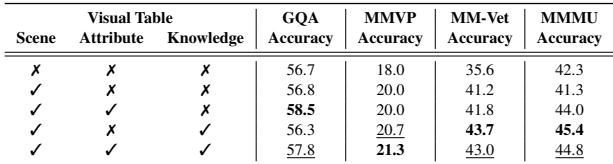
The results are telling. On benchmarks that require deep reasoning (like MMMU and MM-Vet), removing the “Knowledge” component caused a sharp drop in accuracy. This validates the hypothesis that instance-level world knowledge—explicitly stating what an object is and does—is crucial for high-level visual reasoning.
Visualizing the Reasoning Process
One of the greatest benefits of Visual Tables is interpretability. Unlike a vector, you can read the table to see exactly what the model “saw.”
Consider this example of the famous “Monday” dog meme:

In the comparison above:
- Standard LLaVA (Red): Hallucinates that the dog is “relaxed and enjoying its time.” It misses the joke entirely.
- Visual Table (Green): Explicitly notes the dog is “possibly sad” and links the text “MONDAY” to the “feeling of dread or reluctance associated with the start of the work week.”
- Result: The model using the Visual Table correctly explains the meme.
Another powerful example is the ability to handle maps and geography, a weakness of many vision models:
Here, the Visual Table acts as a lookup system, listing the states highlighted in green (Maine, New Hampshire, Vermont, etc.). This allows the LLM to perform accurate retrieval and reasoning to answer the multiple-choice question correctly.
Conclusion & Implications
The “Visual Table” paper introduces a refreshing perspective on visual representation learning. By moving away from purely implicit embeddings and embracing structured, knowledge-rich text, the researchers have created a system that is both more powerful and more transparent.
Key Takeaways:
- Structure Matters: Organizing visual data into hierarchical tables (Scene -> Object -> Attribute -> Knowledge) helps LLMs reason more effectively.
- Knowledge is Power: Visual recognition is not enough; explicit world knowledge (affordances, history, context) is necessary for answering complex questions.
- Interpretability: Visual Tables allow us to inspect the model’s intermediate reasoning steps, building trust and allowing for easier debugging.
This work suggests that the future of computer vision might not just be about larger visual encoders, but about better ways to bridge the gap between pixel perception and the rich, structured knowledge contained in language. As MLLMs continue to evolve, representations like Visual Tables could become a standard component in bridging the gap between “seeing” and “understanding.”