](https://deep-paper.org/en/paper/2405.17421/images/cover.png)
Imagine taking a quick video of a street performance or a friend jumping into a pool with your smartphone. Now, imagine being able to freeze that video at any moment, rotate the camera to see the action from a completely new angle, or even remove a person from the scene entirely while keeping the background intact.
This is the promise of 4D reconstruction—capturing both 3D geometry and its movement over time. However, doing this from a “casual monocular video” (a fancy term for a video shot with a single camera, like a phone, without fancy studio equipment) is one of the hardest problems in computer vision.
In this post, we are diving deep into a new paper titled “MoSca: Dynamic Gaussian Fusion from Casual Videos via 4D Motion Scaffolds.” The researchers propose a novel system that combines the power of modern 2D AI models with a clever 3D structure called a “Motion Scaffold” to turn flat videos into fully navigable 4D experiences.
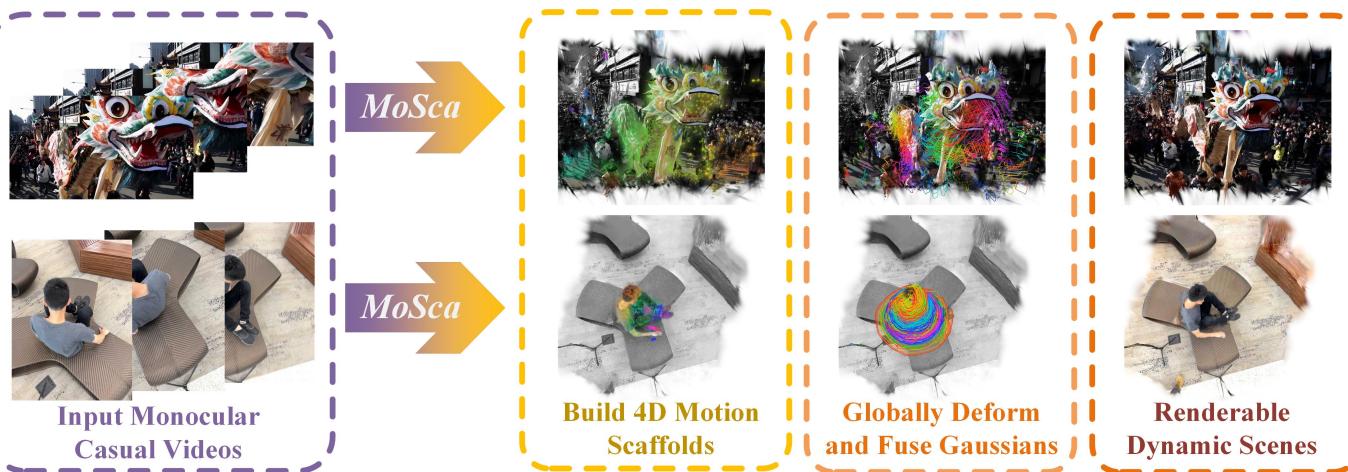
As shown above, MoSca takes a standard video (left) and processes it through stages of motion scaffolding and fusion to create a renderable dynamic scene (right), where even the motion of a dragon dance or people sitting can be viewed from new perspectives.
The Challenge: Why is this Hard?
Reconstructing a static object from photos is a solved problem (thanks to Photogrammetry and NeRFs). But a dynamic scene is a nightmare for a computer because everything is changing at once.
- The Ambiguity: If a pixel moves in the video, did the object move, or did the camera move? Or both?
- Occlusion: When a person walks behind a tree, the camera loses track of them. How do we reconstruct what we can’t see?
- Ill-Posed Problem: We are trying to solve for 3D shape, appearance, camera pose, and motion simultaneously, all from a single 2D viewpoint. Mathematically, there are infinitely many solutions that could fit the video, but most of them would look like garbage.
The authors of MoSca tackle this by relying on two key insights:
- Stand on the shoulders of giants: Use pre-trained “Foundation Models” (big AI models that already understand depth and tracking) to get a head start.
- Simplify the motion: Instead of tracking every single atom, they use a Motion Scaffold—a sparse graph that acts like a skeleton to guide the deformation of the scene.
The MoSca Pipeline: An Overview
The system is fully automated and consists of four main stages. Let’s look at the high-level roadmap before diving into the math.
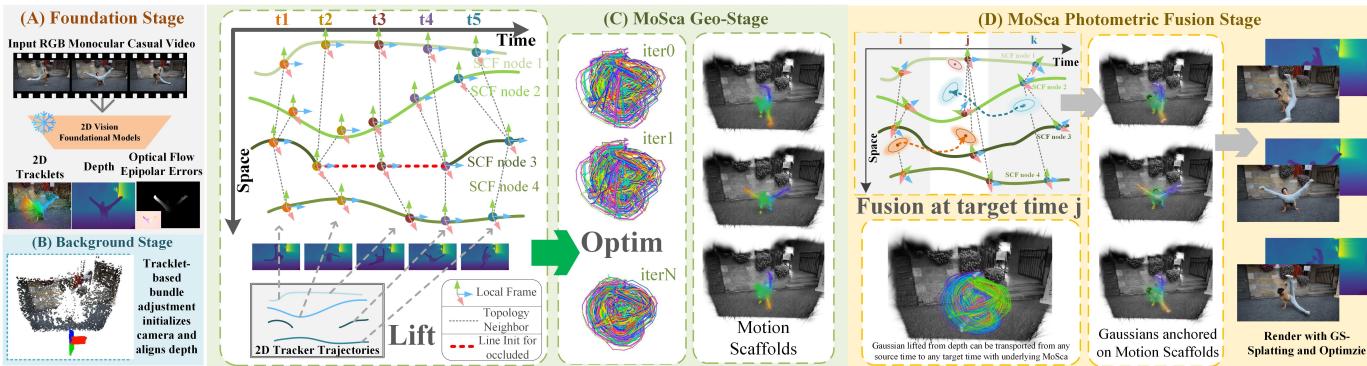
- Foundation Stage (A): The system feeds the video into pre-trained 2D models to get initial estimates for depth, optical flow, and point tracking.
- Camera Initialization (B): It figures out where the camera is and how it moved, without needing external tools like COLMAP (which often fails on moving scenes).
- MoSca Geometric Stage (C): It builds the “Motion Scaffold”—the core structure that defines how the scene moves.
- Photometric Fusion (D): It attaches 3D Gaussians (little blobs of color and opacity) to the scaffold to create the final visual appearance.
Let’s break these down step-by-step.
Step 1 & 2: Foundations and Camera Solving
Leveraging 2D Priors
The researchers don’t start from zero. They use off-the-shelf models to get:
- Depth Maps: Estimated distance of pixels from the camera.
- Long-term Trajectories: Tracking specific points across the video duration (using a model called BootsTAPIR).
- Epipolar Error Maps: Clues that help distinguish moving objects from the static background.
Solving the Camera
Before reconstructing the scene, MoSca needs to know where the camera was. While many methods assume you already have this data, MoSca calculates it. It identifies “static” parts of the scene (background) and performs Bundle Adjustment.
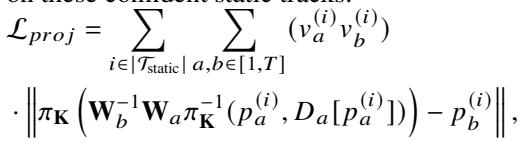
They optimize the camera poses (\(W\)) and focal lengths (\(K\)) by minimizing two errors:
- Reprojection Error: Do the static points stay in the right place when projected back onto the image?
- Depth Alignment: Does the estimated 3D structure match the depth maps provided by the foundation model?
Here are the equations driving this initialization. First, the projection loss:
And the depth alignment loss, which ensures the scale of the scene remains consistent:
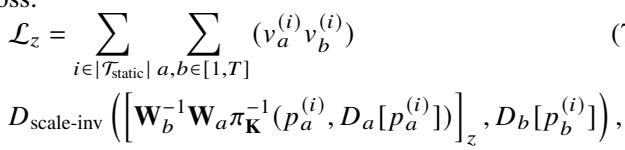
This step effectively locks down the “world” so the system can focus on the moving objects.
Step 3: Building the Motion Scaffold (MoSca)
This is the core contribution of the paper. Real-world motion is usually “low-rank” and smooth. Even if a dragon dancer’s costume has thousands of wrinkles moving chaotically, the overall motion is driven by the dancer’s body.
MoSca represents this underlying motion using a Graph of Trajectories.
The Node
A node in this graph isn’t just a point; it’s a 6-DoF (Degrees of Freedom) trajectory. It describes how a specific region moves and rotates through time (\(t=1\) to \(T\)).

- \(\mathbf{Q}_t^{(m)}\): The rigid transformation (position and rotation) of node \(m\) at time \(t\).
- \(r^{(m)}\): A control radius, defining how much influence this node has on its neighbors.
The Topology (Edges)
To ensure the scene moves coherently, nodes need to be connected. If Node A moves, Node B should probably move too, provided they are close. However, simply measuring Euclidean distance is dangerous—two points might be close in 3D space but belong to unconnected objects (like a hand passing near a face).
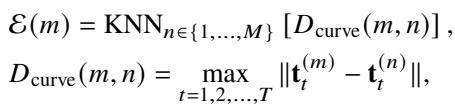
MoSca solves this by connecting nodes based on a Curve Distance metric. Nodes are neighbors only if their trajectories remain close across the entire video.
Lifting to 3D
The system initializes these nodes by “lifting” the 2D tracks from the foundation models into 3D space using the depth maps.

If a point is visible (\(\nu_t=1\)), they back-project it. If it’s occluded (\(\nu_t=0\)), they linearly interpolate the position between the last known locations. This fills in the gaps where the camera lost sight of the object.
Step 4: The Math of Deformation
Once we have this scaffold (skeleton), how do we move the rest of the scene? We need to interpolate the motion of the sparse nodes to fill the dense space.
Dual Quaternion Blending (DQB)
Standard linear blending (averaging matrices) causes artifacts—objects lose volume or “candy-wrapper” twist when rotating. MoSca uses Dual Quaternion Blending, a sophisticated method that operates on the SE(3) manifold. It handles rotation and translation smoothly.

Here, \(\hat{\mathbf{q}}_i\) represents the transformation of a node as a dual quaternion. The system blends these based on weights \(w_i\).
The Deformation Field
For any point \(\mathbf{x}\) in space, its motion from a source time (\(t_{src}\)) to a destination time (\(t_{dst}\)) is calculated by looking at its nearest scaffold nodes and blending their movements.

The weights \(w_i\) are determined by how close the point is to the node, using a Gaussian falloff (Radial Basis Function):

Geometric Optimization
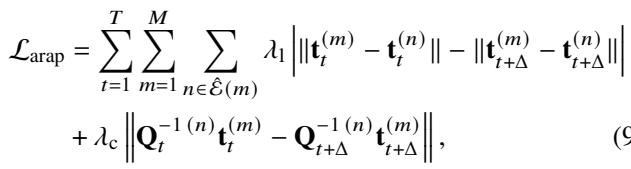
Before adding color, the system optimizes the scaffold to obey physics. It applies As-Rigid-As-Possible (ARAP) regularization. This forces the deformation to be locally rigid—meaning the scaffold shouldn’t stretch or squash unnaturally unless the data strictly demands it.
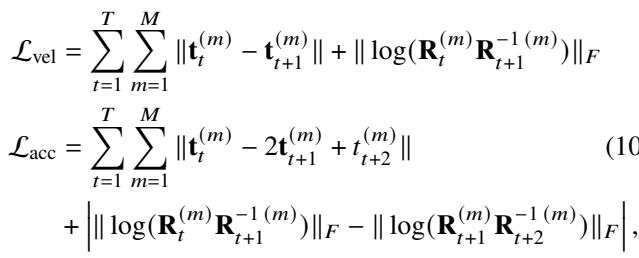
They also enforce smooth velocity and acceleration constraints to prevent jittery motion:
Step 5: Photometric Optimization (Fusion)
Now that we have a moving skeleton, we need the “skin”—the visual appearance. MoSca uses 3D Gaussian Splatting, a state-of-the-art rendering technique.
However, instead of just creating Gaussians for one frame, MoSca performs Global Fusion. It initializes Gaussians from all frames in the video and anchors them to the Motion Scaffold.
Dynamic Gaussians
Each Gaussian is defined by standard properties (color, opacity, scale) plus a reference time \(t^{ref}\) and a learnable skinning weight correction \(\Delta \mathbf{w}\).

Deform and Render
To render the scene at time \(t\), the system takes every Gaussian from the entire video, deforms it from its birth time (\(t^{ref}\)) to the current time (\(t\)) using the scaffold, and then renders the image.

By fusing observations from all timesteps, MoSca can reconstruct parts of an object that might be occluded in the current frame but were visible in a previous one.
The final optimization uses a combination of RGB loss, depth loss, and tracking loss to ensure the rendered image matches the input video.

Experimental Results
The researchers tested MoSca on challenging “in-the-wild” videos, including movie clips and smartphone footage.
Visual Quality
MoSca demonstrates an ability to handle complex motions—like a dragon dance or a crowded street—while maintaining realistic geometry.
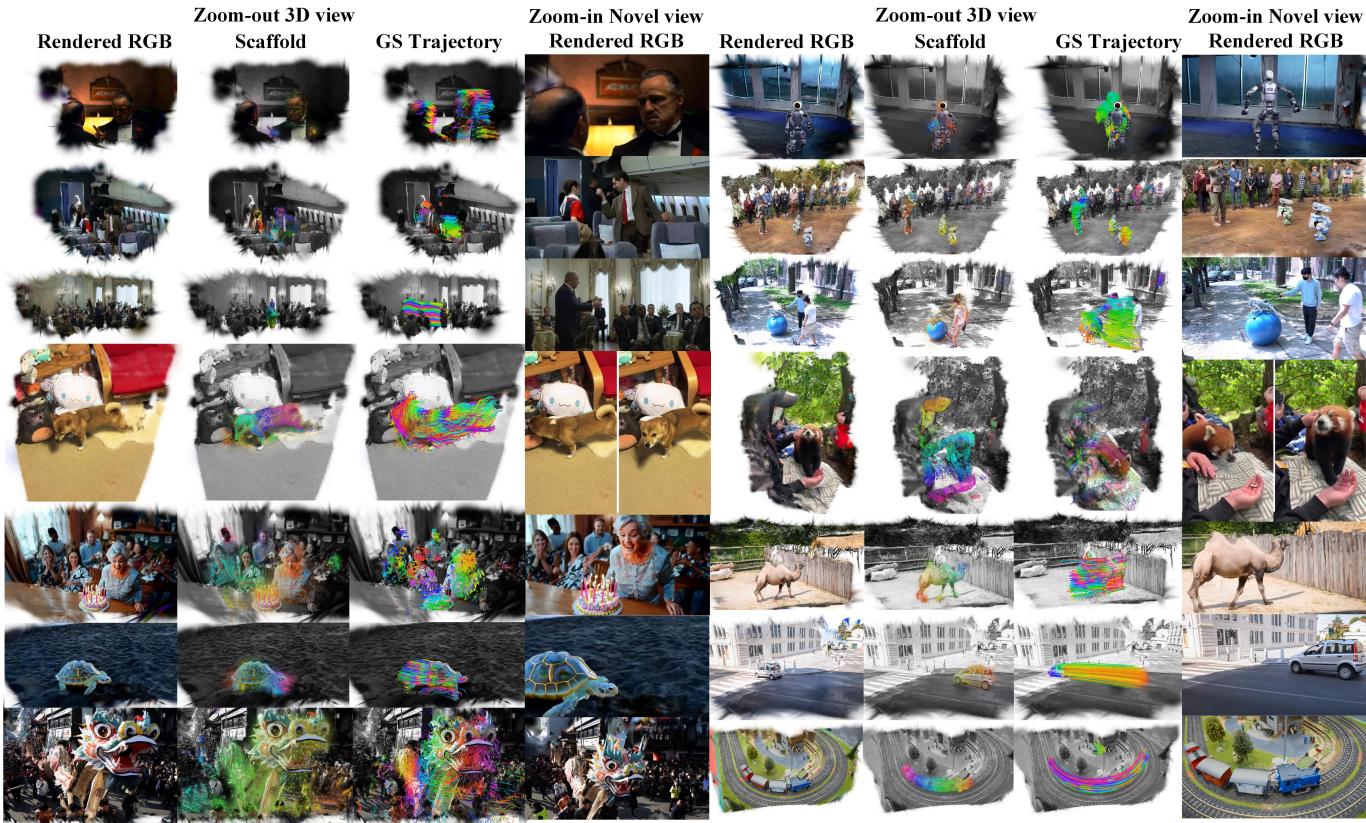
Notice in the figure above how the “Scaffold” (the graph) captures the essential movement, while the “Rendered RGB” fills in the high-frequency details.
Comparison on Benchmarks
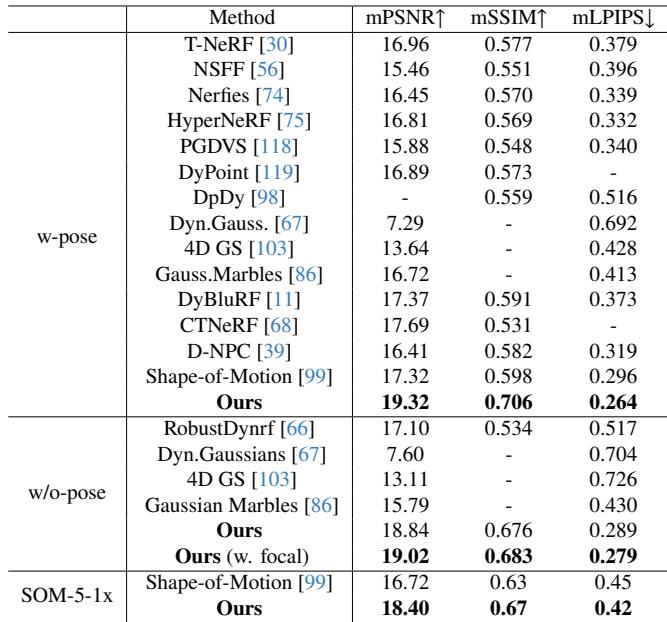
The team evaluated MoSca on the DyCheck dataset, a standard benchmark for dynamic scene reconstruction. They compared performance with and without providing camera poses.
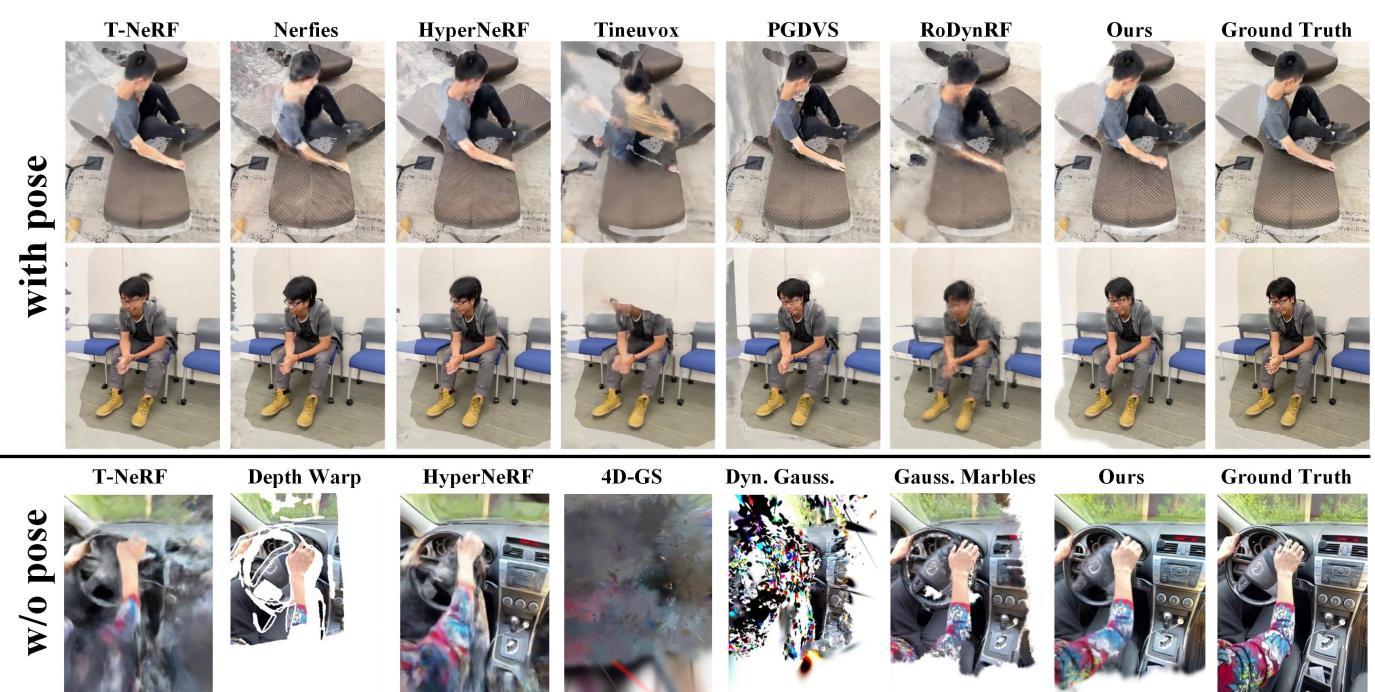
In the comparison above, look at the bottom row (“w/o pose”). Other methods (like T-NeRF or HyperNeRF) completely fall apart, creating blurry messes or missing geometry. MoSca (“Ours”) retains sharp details and correct structure, even inside a moving car.
The quantitative results back this up. MoSca achieves state-of-the-art scores in PSNR (Peak Signal-to-Noise Ratio) and LPIPS (perceptual similarity).
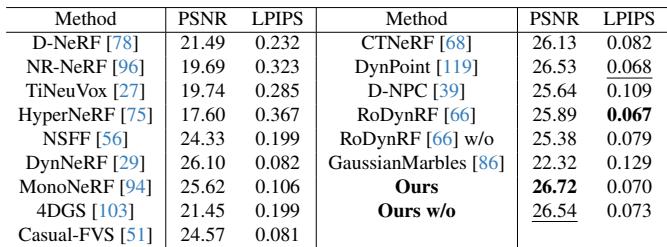
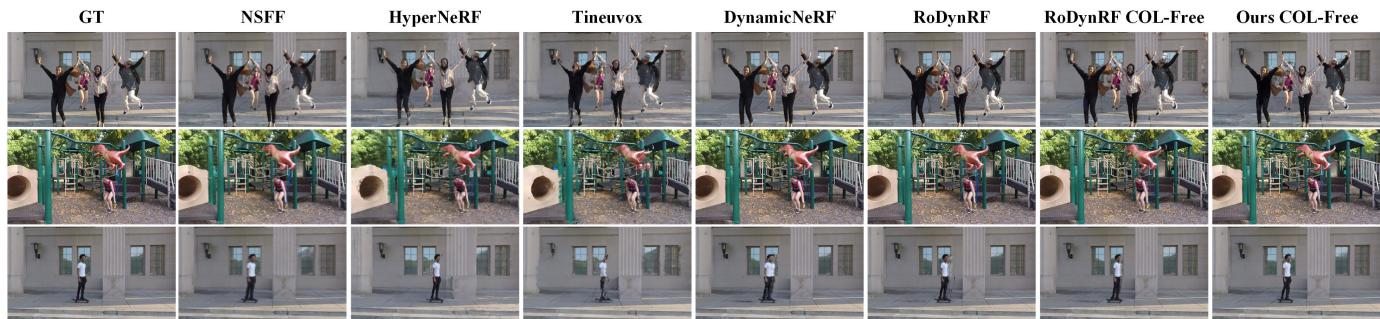
They also tested on the NVIDIA dataset, which is slightly easier (forward-facing cameras), but MoSca still holds its ground or outperforms competitors, especially in detailed metrics like LPIPS.
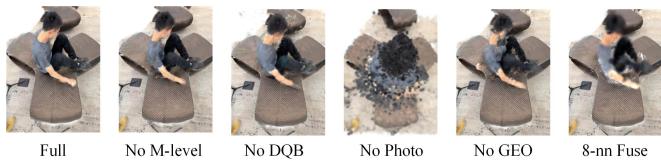
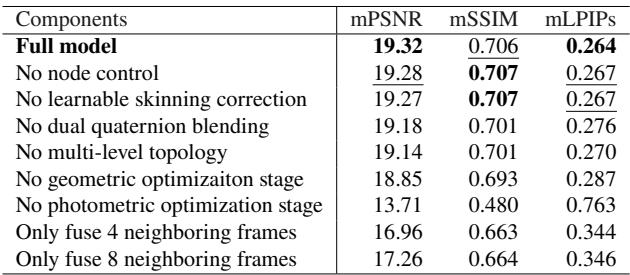
Ablation Study: What Matters?
The authors performed an ablation study to see which components were doing the heavy lifting.
- Removing Node Control (adaptive densification of the graph) hurt detail.
- Removing Dual Quaternion Blending caused artifacts.
- Removing Photometric Optimization resulted in a geometric mesh with no texture.
Applications: Beyond Just Watching
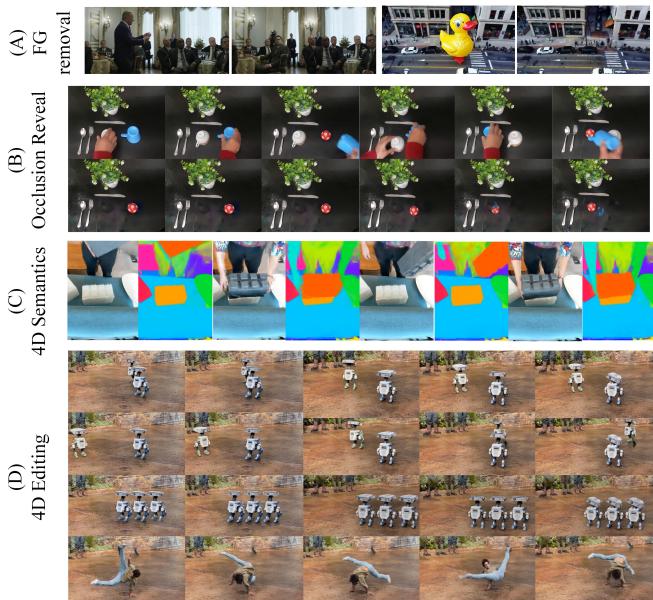
Because MoSca disentangles motion, geometry, and appearance, it allows for powerful editing capabilities.
- Foreground Removal: You can delete the moving object to see the background.
- Occlusion Reveal: By aggregating information over time, you can see what was behind an object after it moves away.
- 4D Semantics: You can label objects in 3D space and track them through time.
- 4D Editing: You can duplicate actors or change their trajectories.
Conclusion
MoSca represents a significant step forward in 3D vision. By combining the robustness of 2D foundation models with a physics-inspired, graph-based 3D scaffold, it turns messy, casual videos into structured 4D assets.
While it still relies on the accuracy of the initial 2D trackers and struggles with effects like changing shadows or reflections, the ability to perform global fusion—aggregating visual data from an entire video into a single coherent model—is a game-changer for content creation, VR, and embodied AI. It moves us closer to a world where our memories aren’t just flat videos, but immersive spaces we can revisit.