](https://deep-paper.org/en/paper/2406.19263/images/cover.png)
Graphical User Interfaces (GUIs) are the visual language of the digital world. Whether you are scrolling through Instagram, organizing files on Windows, or shopping on a mobile app, you rely on a complex arrangement of icons, text, and spatial relationships to make sense of the screen.
For human users, this process is intuitive. We see a “Checkout” button and immediately understand it belongs to the “Shopping Cart” panel because of its proximity and grouping. However, for Multimodal Large Language Models (MLLMs) and accessibility tools, this remains a significant challenge. While AI has gotten very good at describing an image generally, it struggles with the specific task of Screen Point-and-Read (ScreenPR).
Imagine a visually impaired user touching a specific point on a screen. Current tools might read the text under the finger, but they often fail to explain context. Is this “Delete” button for the email or the draft? Is this price tag for the shoes or the socks?
In this post, we will dive deep into a paper titled “Read Anywhere Pointed”, which introduces a novel solution called the Tree-of-Lens (ToL) Agent. This agent doesn’t just read text; it understands the hierarchical layout of a screen, mimicking how humans focus on details while keeping the big picture in mind.
The Problem: Missing the Forest for the Trees
Current GUI agents and accessibility tools suffer from a lack of spatial awareness. If you input a screenshot and a coordinate point into a standard MLLM (like GPT-4o) and ask, “What is here?”, it often hallucinates or gives a vague answer. It might recognize the text, but it misses the layout.
Why does layout matter? Consider a shopping app with two identical items listed, but one is in your “Cart” and one is in “Recommended.” If the AI simply says “Item: Tumbler, $1.99,” the user has no idea which list they are interacting with.
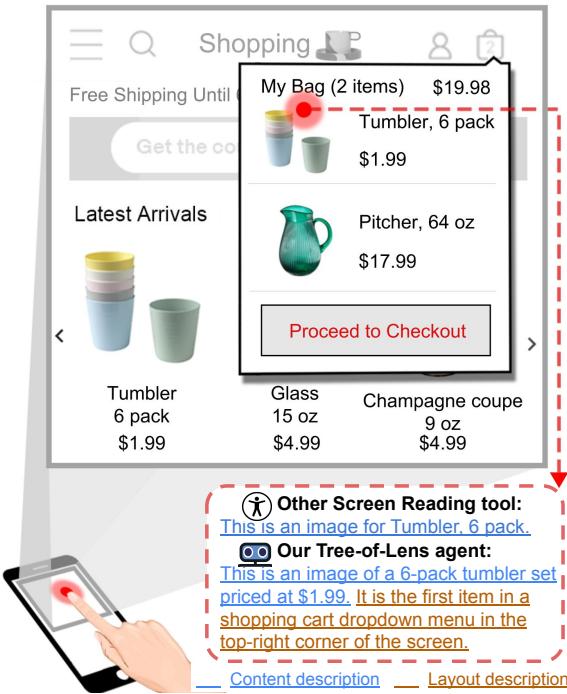
As shown in Figure 1, the ToL agent solves this by providing a description that includes both content (“Proceed to Checkout”) and layout context (“located at the bottom of the My Bag dropdown menu”).
The Solution: The Tree-of-Lens (ToL) Agent
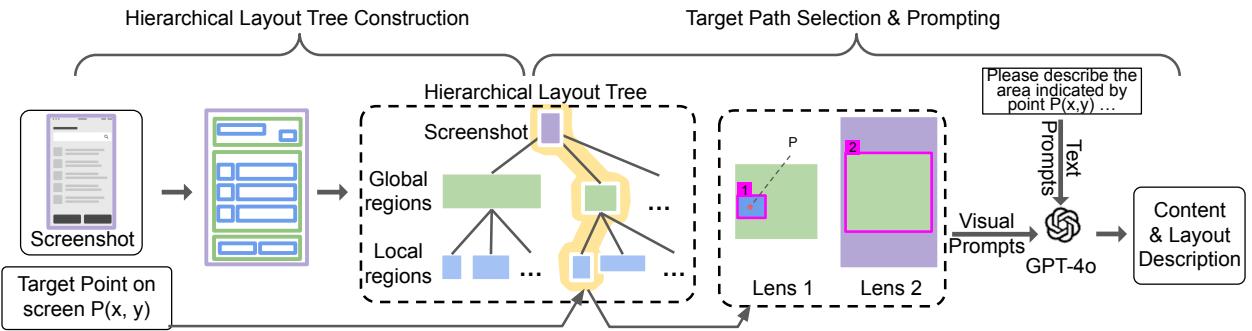
The researchers propose a method inspired by how humans process visual information: we zoom in to see details and zoom out to understand context. They call this the Tree-of-Lens (ToL) grounding mechanism.
The core logic of the ToL agent operates in two phases:
- Hierarchical Layout Tree Construction: Understanding the screen’s structure.
- Target Path Selection & Multi-lens Prompting: Generating visual prompts for the MLLM.
Let’s break down the architecture.
Phase 1: Building the Hierarchical Layout Tree
A GUI is essentially a tree structure—a main window contains panels, which contain groups, which contain buttons. The ToL agent attempts to reconstruct a simplified version of this tree (Global Regions vs. Local Regions) purely from the screenshot, without needing access to the underlying code.
To do this, the authors trained a specialized object detection model (fine-tuned on a DINO detection model) using a new dataset called the Android Screen Hierarchical Layout (ASHL) dataset. This model looks at a screenshot and predicts bounding boxes for different elements.
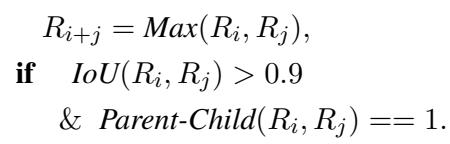
However, raw detection boxes are messy. The system needs to organize them into a tree. It does this by merging overlapping regions. If two detected regions overlap significantly (IoU > 0.9) and have a parent-child relationship in the code structure, they are merged.
The merging logic is defined mathematically as:
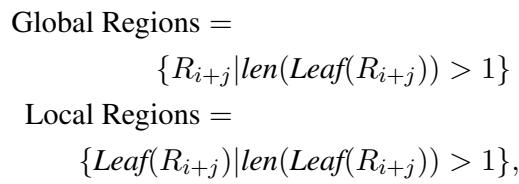
Once the regions are merged, the system classifies them into Global Regions (the containers) and Local Regions (the specific interactive elements). A node is considered “Global” if it contains multiple leaf nodes, while “Local” regions are the leaves themselves.
This results in a clean 3-layer tree:
- Root: The full screenshot.
- Middle: Global regions (e.g., a navigation bar, a product card).
- Leaf: Local regions (e.g., the “Home” icon, the “Buy” button).
Phase 2: Multi-lens Prompting
Once the tree is built, the agent needs to explain a specific point \(P(x,y)\) indicated by the user.
Instead of just sending the MLLM a cropped image of the button, the ToL agent generates a series of images called Lenses. This mimics a camera zooming out.
- Lens 1 (Fine-grained): Shows the Global Region cropped out, with the Local Region marked with a box (Label ‘1’) and the specific point marked with a dot.
- Lens 2 (Coarse-grained): Shows the Full Screenshot, with the Global Region marked with a box (Label ‘2’).
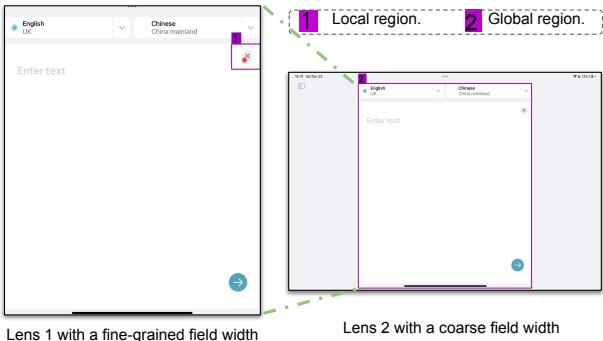
As seen in Figure 3, Lens 1 helps the AI identify exactly what the user is pointing at (the text input field). Lens 2 helps the AI understand where that input field sits within the whole app (in the main content area, below the header).
The agent then feeds these lenses into GPT-4o with a specific prompt asking it to describe the content of Box 1 and its spatial relationship to Box 2.
The ScreenPR Benchmark
To evaluate this new approach, the researchers realized existing benchmarks were insufficient. They created the Screen Point-and-Read (ScreenPR) Benchmark.
This benchmark is diverse, covering three major domains:
- Web
- Mobile
- Operating Systems (Desktop)
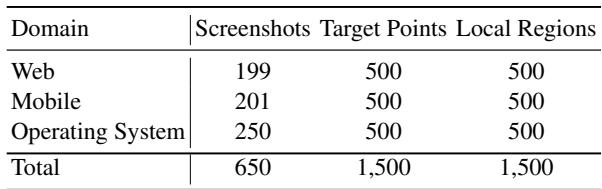
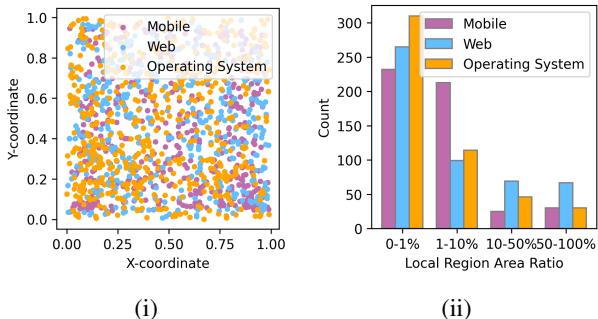
The benchmark includes 650 screenshots with 1,500 target points. The researchers ensured the points were distributed evenly across the screen space, rather than just centering on obvious elements.
Experimental Results
So, does adding “lenses” actually help? The results suggest a resounding yes.
The authors compared the ToL Agent against strong baselines, including vanilla GPT-4o, LlaVA-NeXT, and CogAgent. They used two types of evaluation:
- Human Evaluation: Real people rating the descriptions.
- Cycle Consistency: An automated method where another AI (GPT-4V) tries to guess the correct screenshot crop based only on the text description generated by the ToL agent. If the description is good, the second AI should guess correctly.
Performance Comparison

The ToL Agent outperforms the baselines significantly. Looking at Layout Accuracy in the Cycle Consistency Evaluation:
- GPT-4o: 21.87%
- ToL Agent: 39.67%
This is a massive jump, nearly doubling the layout understanding capability. It shows that simply giving a powerful model like GPT-4o the raw screenshot isn’t enough; it needs the visual guidance (grounding) provided by the lenses.
Why does it work? (Ablation Study)
The researchers stripped parts of the system away to see what mattered most.
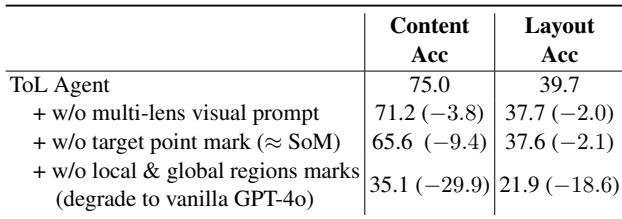
- Without Multi-lens: Performance drops slightly.
- Without Point Marks: Performance drops further.
- Without Local & Global Marks: Performance collapses to near-baseline levels.
This confirms that the Hierarchical Layout Tree—identifying those local and global boxes—is the critical component driving the success.
Beyond Accessibility: Verifying Mobile Agents
The ToL Agent isn’t just for reading screens to humans; it can act as a “supervisor” for other AI agents.
Mobile navigation agents (bots that click through apps to do tasks) often make mistakes. They might get stuck in loops or click the wrong icon. The ToL agent can be used to verify these actions.

Here is how it works:
- The Navigation Agent plans an action (e.g., “Click Settings”).
- The ToL Agent analyzes the coordinate the Navigation Agent intends to click.
- ToL describes the region (e.g., “This is the Search icon”).
- A verifier (GPT-4) compares the instruction (“Settings”) with the description (“Search”).
- If they don’t match, the action is flagged as incorrect.
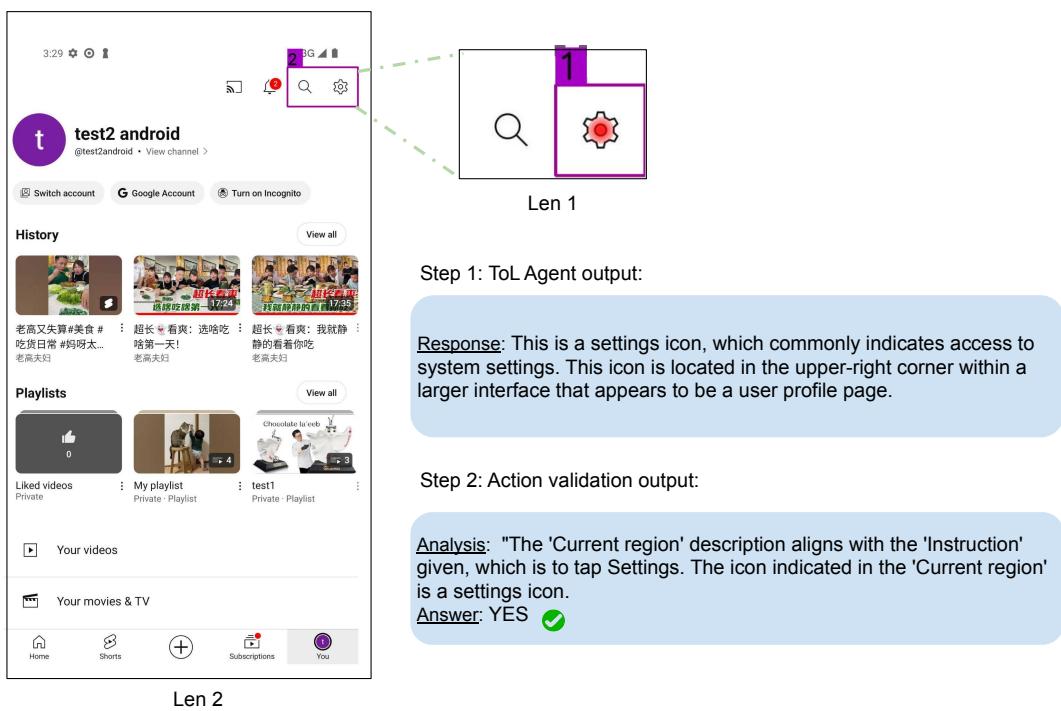
In the example above, the agent correctly verifies that the intended click is indeed on the “Settings” icon.
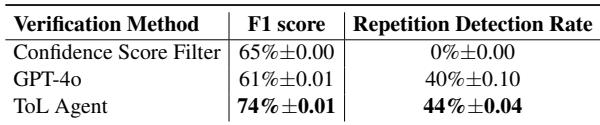
The experiments showed that the ToL Agent is excellent at detecting “execution loops”—where a bot keeps clicking the same thing over and over without progress.
Conclusion
The Tree-of-Lens (ToL) Agent represents a significant step forward in fine-grained GUI understanding. By moving away from processing raw screenshots as flat images and instead modeling them as hierarchical trees, the researchers have enabled AI to “see” screens more like humans do.
The combination of the Hierarchical Layout Tree and Multi-lens Prompting allows the model to capture both the minute details of a button and its broader context within a panel or window. This is a game-changer for accessibility, enabling screen readers to answer not just “What is this?” but “Where is this?”
As MLLMs continue to evolve, techniques like ToL grounding demonstrate that how we present visual data to a model is just as important as the model itself. Whether for helping visually impaired users navigate complex apps or ensuring autonomous agents don’t get lost in menus, layout-aware understanding is key to the next generation of intelligent interfaces.