](https://deep-paper.org/en/paper/2407.15711/images/cover.png)
Introduction
Imagine you are planning a move to a new city. You need to find a high-rise apartment in a specific neighborhood that sold for a certain price range in 2021. Or perhaps you are a fitness enthusiast visiting New York, and you need to find a gym near Tompkins Square Park that offers classes specifically before 7:00 AM.
For a human, these tasks are tedious but straightforward. They require opening a browser, searching for locations, opening multiple tabs (maps, gym websites, schedules), comparing information, and synthesizing an answer. It takes time—minutes, not seconds—and requires “navigation logic.”
For Artificial Intelligence, however, this is an immense challenge. While Large Language Models (LLMs) like GPT-4 are incredibly knowledgeable, they lack direct access to the live web and often hallucinate facts when asked about specific, real-time data. Retrieval-Augmented Generation (RAG) systems try to bridge this gap by fetching documents, but they often struggle when the answer requires browsing through a site rather than just keyword matching.
This brings us to the concept of Web Agents: AI systems designed to navigate the web, click buttons, and scroll through pages just like a human would.
In the research paper ASSISTANTBENCH: Can Web Agents Solve Realistic and Time-Consuming Tasks?, researchers from Tel Aviv University, UPenn, Allen Institute for AI, UW, and Princeton explore the current limits of these agents. They introduce a rigorous new benchmark, AssistantBench, and a novel agent architecture called SeePlanAct (SPA). Their findings reveal a significant gap between the hype of AI assistants and their actual ability to perform useful, time-consuming web tasks.
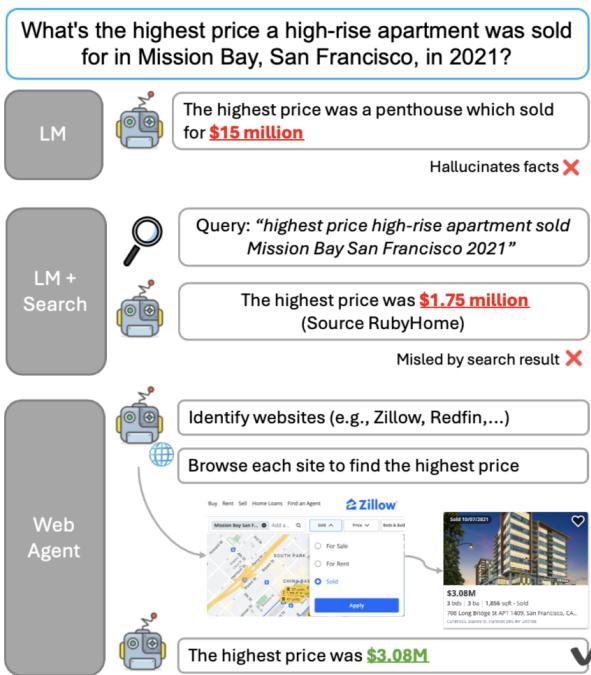
As shown in Figure 1, while standard LMs might guess (hallucinate) a house price and RAG might retrieve irrelevant search results, a true Web Agent attempts to navigate a real estate site like Zillow to find the verified answer.
Background: The Limits of Static Benchmarks
To understand why this paper is significant, we must look at how AI agents are currently evaluated. Previous benchmarks for web agents often relied on:
- Simulated Environments: Sandboxes where the “web” is a simplified, static version of reality.
- Single-Site Tasks: Challenges that require interacting with only one website (e.g., booking a ticket on a specific airline site).
- Short-Horizon Tasks: Tasks that can be solved in one or two clicks.
However, the real world is messy. A user’s query often requires visiting a map to identify candidates, visiting their individual websites to find details, and then cross-referencing that data. This process is time-consuming and requires planning. If an agent cannot handle the open web with its pop-ups, dynamic layouts, and navigational dead-ends, it cannot truly assist humans.
The authors argue that existing benchmarks fail to capture the difficulty of these “assistance” tasks. To fix this, they built AssistantBench.
AssistantBench: Designing a Realistic Test
AssistantBench is a dataset of 214 realistic, automatically verifiable tasks. The key differentiator here is the focus on “time-consuming” tasks—problems that would take a human several minutes to solve because they involve multiple steps and websites.
The Data Collection Pipeline
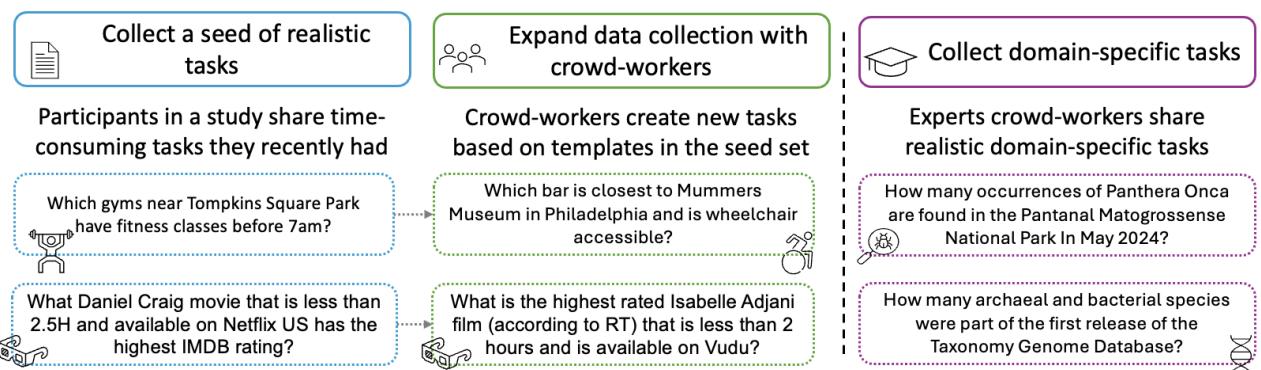
The researchers didn’t just scrape random questions from the internet. They used a human-centric approach to ensure relevance:
- Seed Tasks: They asked actual users to recall recent, difficult web searches they had performed personally.
- Crowd Expansion: They used crowd-workers to take those seed tasks and use them as templates to generate new, similar questions (e.g., changing the city or the specific criteria).
- Expert Domains: To ensure the benchmark covered professional needs, they recruited domain experts (biologists, lawyers, etc.) to create tasks that require specific professional websites.
What Does a Task Look Like?
A typical task in AssistantBench isn’t a simple factoid query like “Who is the president of France?” Instead, it looks like this:
“Which gyms near Tompkins Square Park have fitness classes before 7am?”
To solve this, an agent cannot simply “know” the answer. It must:
- Open a map tool (like Google Maps).
- Search for gyms near the specific park.
- Identify a list of candidate gyms.
- Navigate to the website of each gym.
- Find the “Schedule” or “Classes” page.
- Check the times.
- Compile the final list.
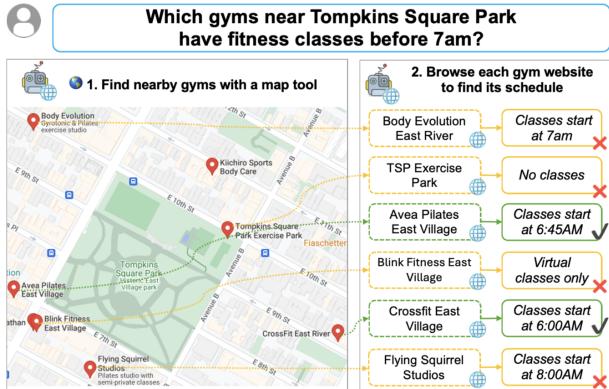
As illustrated in Figure 2, the “gold trajectory” (the correct path to the solution) involves hopping between a map application and various commercial websites, verifying specific constraints (time < 7 AM) along the way.
Core Method: SeePlanAct (SPA)
The paper evaluates several state-of-the-art models, including SeeAct, a prominent web agent. However, they found that existing agents often behave reactively—they look at a screen and click the most obvious button without a long-term strategy.
To address this, the authors introduce SeePlanAct (SPA).
The Problem with “See and Act”
Traditional web agents operate on a simple loop:
- See: Take a screenshot of the current page.
- Act: Predict the next mouse click or keyboard input based on that screenshot.
The flaw here is a lack of continuity. If the agent visits a page, reads a crucial piece of information (like a gym schedule), and then navigates back to the search results, it might “forget” what it just saw because the new screenshot doesn’t contain that info.
The SPA Architecture
SPA adds two critical components to the standard loop: Planning and Memory.
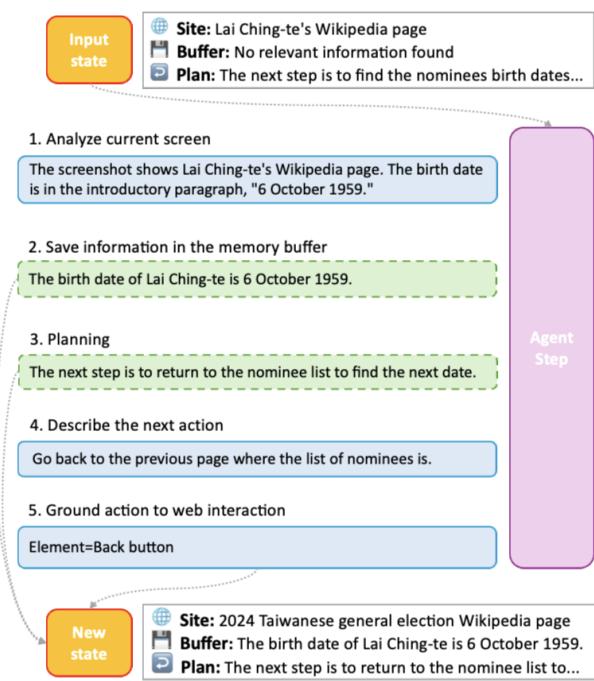
As detailed in Figure 4, the SPA process is more sophisticated:
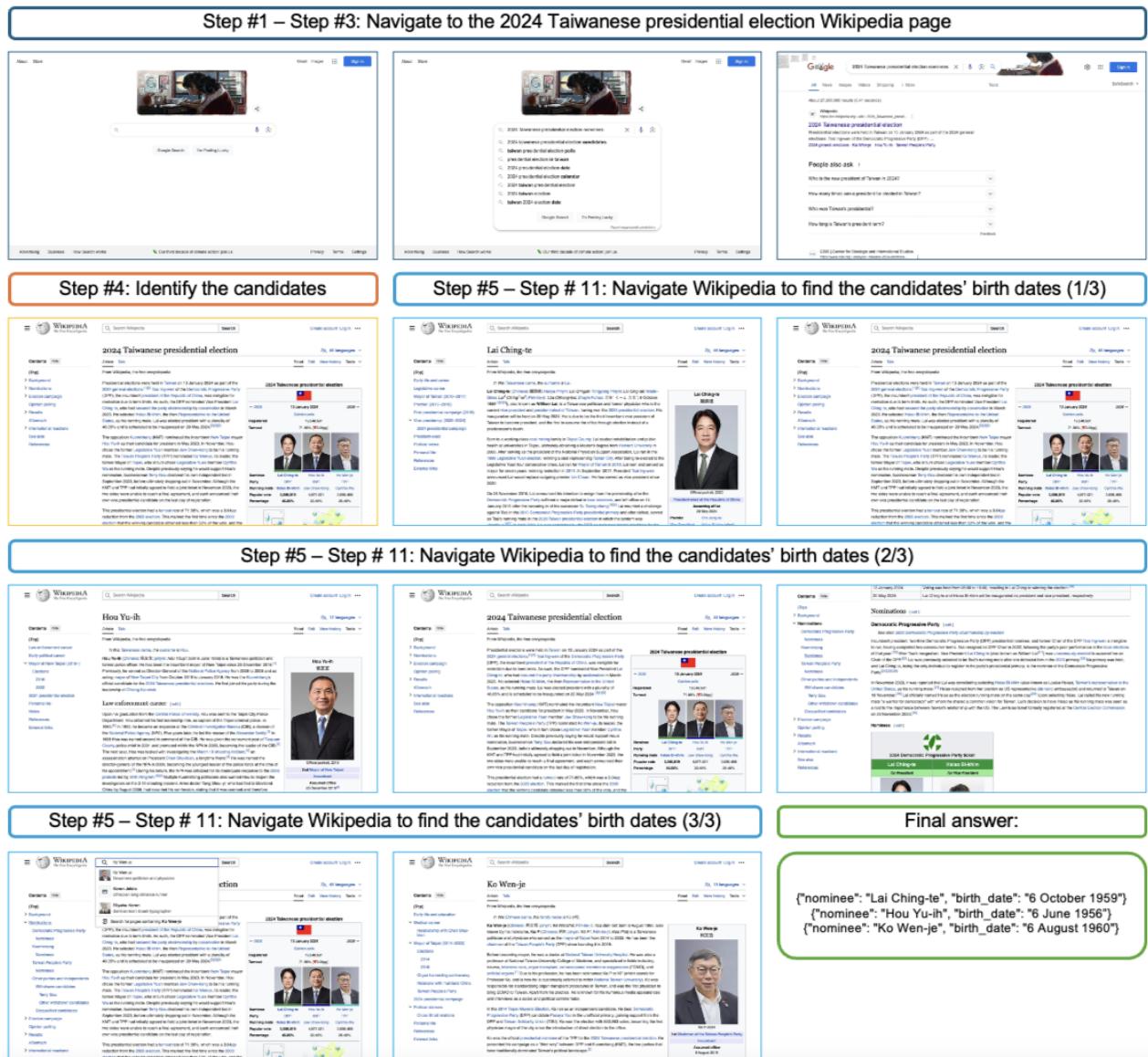
- Analyze Current Screen: The agent looks at the webpage (e.g., a Wikipedia page).
- Update Memory Buffer: If the agent finds relevant info (e.g., “Lai Ching-te’s birth date is 6 October 1959”), it writes this into a persistent memory text buffer. This buffer stays with the agent even when it leaves the page.
- Refine Plan: The agent explicitly states its plan. For example, “The next step is to return to the nominee list to find the next date.”
- Describe Next Action: It generates a natural language description of what to do (e.g., “Go back to the previous page”).
- Ground Action: Finally, it translates that description into a specific interaction with an HTML element (e.g., clicking the “Back” button).
This architecture allows SPA to handle multi-hop tasks. It can visit a page, extract data, store it, leave the page, and continue searching without losing track of its progress.
The authors also equipped SPA with new navigation actions essential for the open web, such as:
GOBACK: Returning to the previous page (crucial for “hub-and-spoke” browsing).GOTO: Navigating directly to a URL.SEARCH: Using a search engine query directly.
To illustrate SPA’s capability, Figure 11 (below) shows how it handles a question requiring it to “fan out” to multiple Wikipedia pages to gather birth dates for different candidates.
Experiments & Results
The researchers tested a variety of systems on AssistantBench:
- Closed-Book LLMs: GPT-4 and Claude-3.5 prompted to answer without web access.
- RAG (Retrieval-Augmented Generation): Models that use a search engine to retrieve text snippets.
- SeeAct: A standard web agent.
- SPA: The authors’ new agent.
The Hard Truth: It’s Difficult
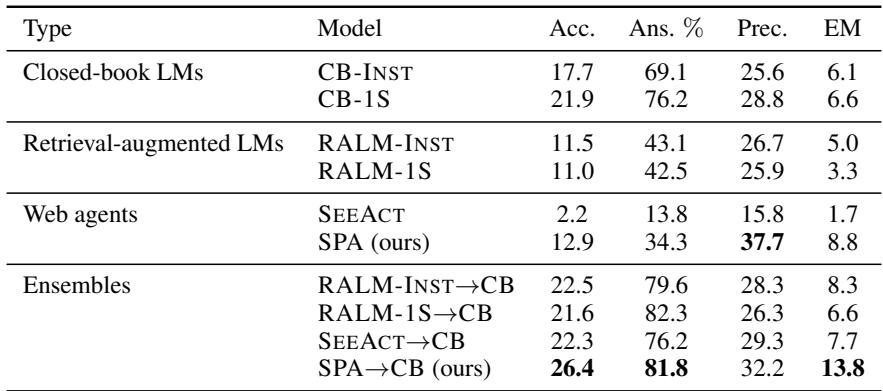
The headline result is sobering: No model achieved an accuracy higher than 26%.
This low ceiling demonstrates just how difficult realistic web assistance is for current AI. AssistantBench effectively exposes the limitations of today’s systems.
- Web Agents vs. LLMs: Surprisingly, closed-book LLMs often had higher accuracy scores than web agents. However, this is misleading. LLMs had high “Answer Rates” (they almost always guessed), but low precision (they hallucinated frequently). Web agents often crashed or got stuck, leading to them abstaining from answering.
- SPA vs. SeeAct: When comparing agents, SPA significantly outperformed the baseline SeeAct.
- SPA answered twice as many questions.
- SPA had higher precision (it was more likely to be right when it did answer).
Table 7 (below) shows the breakdown using Claude-3.5-Sonnet. Notice how the SPA -> CB ensemble (using SPA, but falling back to a closed-book model if the agent fails) achieves the highest accuracy (26.4), but pure web agents still struggle.
Why Do They Fail?
The authors conducted a deep error analysis to understand why performance was so low.
1. Navigation Loops: Web agents struggle with the “infinite loop” problem. They might scroll down a page, miss the information, scroll up, and repeat this indefinitely. Or they might click a link, realize it’s wrong, go back, and accidentally click it again.
Figure 14 shows a visual example of a navigation failure where the agent gets stuck scrolling up and down on a travel guide website.

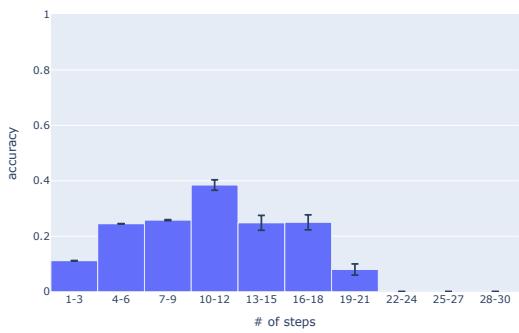
2. Trajectory Length: There is a “Goldilocks” zone for web agents. If a task requires too few steps, it might be trivial. If it requires too many, the probability of error compounds.
Figure 5 shows the accuracy of SPA relative to the number of steps taken. Performance peaks around 10 steps. If a task requires 20+ steps, accuracy drops to near zero because the agent inevitably loses its way or crashes.
3. Grounding Issues:
“Grounding” refers to the agent’s ability to match its intention (“Click the search bar”) with the actual technical element on the screen (Concept <input id="search">). Roughly 20% of errors came from the agent simply failing to click the right button.
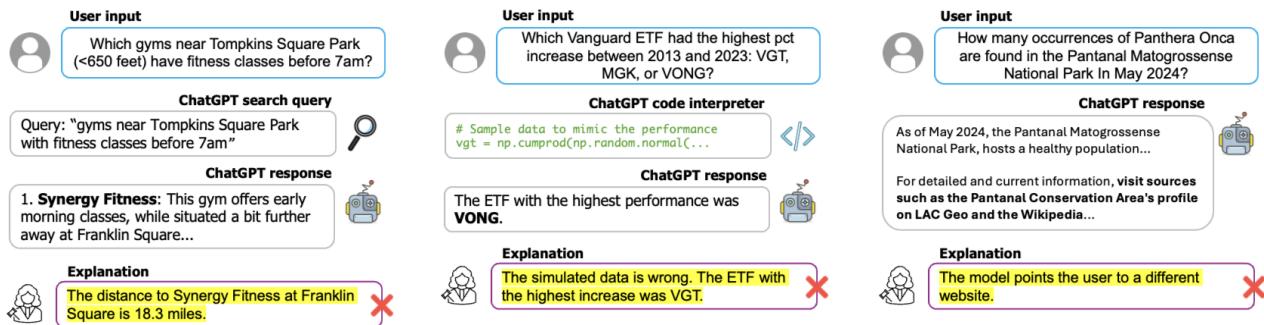
4. Commercial Chatbots Aren’t Safe Either: The authors also tested ChatGPT (with browsing enabled) on these tasks. As shown in Figure 6, even commercial products fail significantly. Common errors included:
- Over-reliance on Search Snippets: ChatGPT often reads the Google summary (which might be wrong) rather than clicking into the site to verify.
- Code Interpreter Hallucinations: When trying to calculate data, the underlying code environment sometimes hallucinated variables.
Conclusion & Implications
AssistantBench serves as a reality check for the AI industry. While we often see impressive demos of agents booking flights or ordering pizza, these are usually in controlled environments. When faced with the “wild” open web—with its pop-ups, complex DOM structures, and need for multi-step reasoning—current agents falter.
The introduction of SPA (SeePlanAct) offers a blueprint for improvement. By decoupling memory (what I know) and planning (what I need to do) from the immediate visual action, agents can handle more complex, multi-hop tasks.
Key Takeaways
- Benchmarks Matter: We cannot improve what we cannot measure. AssistantBench provides the difficult, realistic metric needed to push web agents forward.
- Navigation is the Bottleneck: The primary failure mode isn’t “understanding” text; it’s navigating the environment (loops, wrong paths).
- Hybrid Approaches Win: The best current results come from ensembles—using an agent to browse, but having a knowledgeable LLM as a backup.
For students and researchers, this paper highlights that “Open Web Navigation” is a solved problem in theory, but very much an unsolved problem in practice. The future of helpful AI assistants relies on solving the problems of long-horizon planning and robust grounding that AssistantBench has so clearly identified.