](https://deep-paper.org/en/paper/2407.19726/images/cover.png)
In the rapidly evolving world of Large Language Models (LLMs), the ability to turn a simple text prompt into a visual graph is a “killer app.” Imagine typing “Show me the sales trend over the last five years compared to marketing spend,” and having an AI instantly generate the perfect Python code to render that chart. This task is known as Text-to-Vis.
To build these systems, researchers rely on benchmarks—standardized datasets used to train and evaluate performance. But here is the critical question: Do these benchmarks actually reflect how human beings create visualizations in the real world?
If the benchmarks are artificial or biased, we might be training AI models to pass a test that has nothing to do with reality. In the paper “Do Text-to-Vis Benchmarks Test Real Use of Visualisations?”, researchers from the University of Sydney and CSIRO’s Data61 undertook a massive empirical study to answer this question. By comparing popular benchmarks against millions of lines of real-world code, they uncovered a significant gap between academic tests and practical reality.
The Problem with Synthetic Benchmarks
The core issue lies in “Ecological Validity”—the extent to which experimental findings can be generalized to real-world settings. In the niche of Text-to-Vis, benchmarks are often synthetically generated.
For example, a dataset creator might define a rule that says, “Create a prompt for a bar chart,” and then automatically generate thousands of variations. While this creates a large dataset, it relies on the creator’s assumption of what a user might ask for, rather than what users actually do.
To understand the current landscape, the researchers examined three prominent benchmarks:
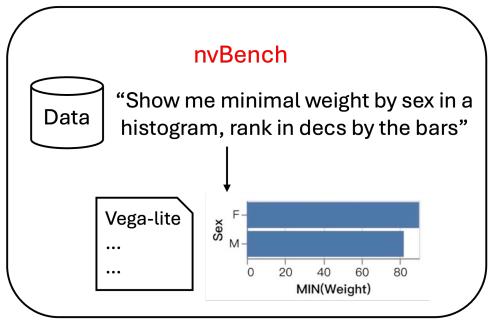
- nvBench: Derived from SQL queries, focusing on generating a visualization from a dataset and a prompt.
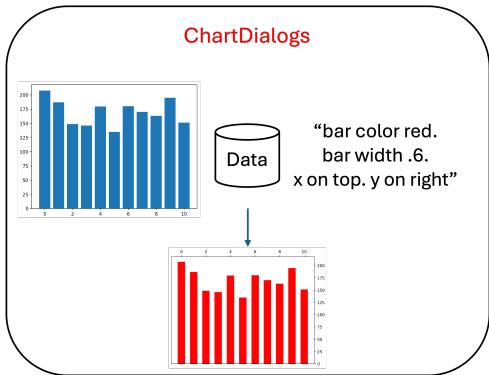
- ChartDialogs: Focuses on conversational interactions (e.g., “Make the bars red”).
- PlotCoder: Focuses on generating code based on a prompt and existing code context.
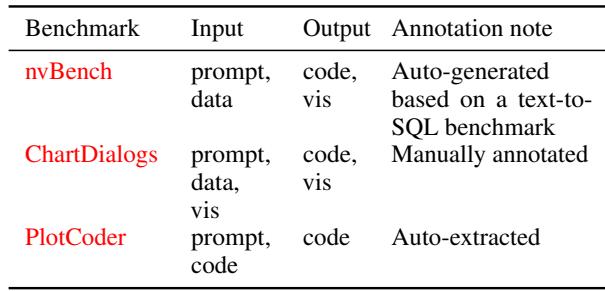
As shown in Table 2, these datasets vary in input and output. However, identifying whether these inputs and outputs align with reality requires a baseline of “real” behavior.
To establish this baseline, the authors turned to The Stack, a massive collection of open-source code from GitHub. They extracted visualization code across four major programming ecosystems:
- Python: Specifically using the Matplotlib library (both in standard scripts and Jupyter Notebooks).
- R: Using the Graphics package.
- Javascript: Using ChartJS.
- JSON/Schema: Using Vega-Lite.
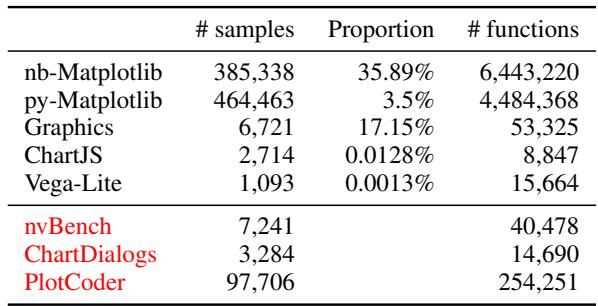
Table 1 highlights the scale of this investigation. The researchers analyzed over 385,000 Jupyter notebooks and 464,000 Python files, vastly outnumbering the samples found in benchmarks like nvBench (7,241 samples) or ChartDialogs (3,284 samples).
The Core Method: Bridging the Language Gap
Comparing a Python script to a Vega-Lite JSON specification is not straightforward. Different libraries use different names for the same concept. For instance, to set a plot title:
- Matplotlib uses
plt.title()orax.set_title(). - Vega-Lite uses a
titleproperty within a JSON object. - R might use the
mainargument inplot().
To perform a fair comparison, the researchers had to normalize this data. They developed a Cross-Language Mapping Table.
Step 1: Parsing the Code
First, they used Abstract Syntax Tree (AST) parsers to convert raw code into a “universal format.” This involved extracting function names, arguments, and assigned values, stripping away the syntax specific to the programming language to reveal the user’s intent.
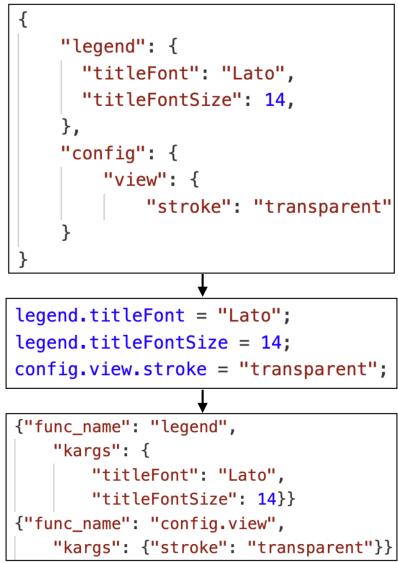
As illustrated in Figure 4 above, complex nested configurations (common in Vega-Lite or ChartJS) were flattened into a standardized structure of functions and keyword arguments (kargs).
Step 2: The Mapping Table
Once the code was parsed, the researchers mapped the top 500 most frequently used parameters from real-world data into 62 distinct attributes across 8 categories (such as Axes, Legend, Title, and Grid).
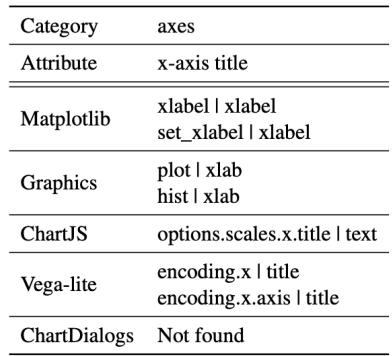
Figure 1 demonstrates how this mapping works for the “x-axis title” attribute. Regardless of whether the original code was Python, R, or Javascript, if the user was trying to label the x-axis, it was mapped to this single attribute. This rigorous normalization process allowed the authors to compare apples to apples across millions of distinct code files.
Experiments & Results: The Reality Gap
With the data normalized, the researchers compared the “Real-World” datasets (from GitHub) against the “Benchmark” datasets. The results revealed striking discrepancies in three key areas: chart types, aesthetic attributes, and program complexity.
1. The Disconnect in Chart Types
Do benchmarks test the chart types that people actually use? The answer, largely, is no.
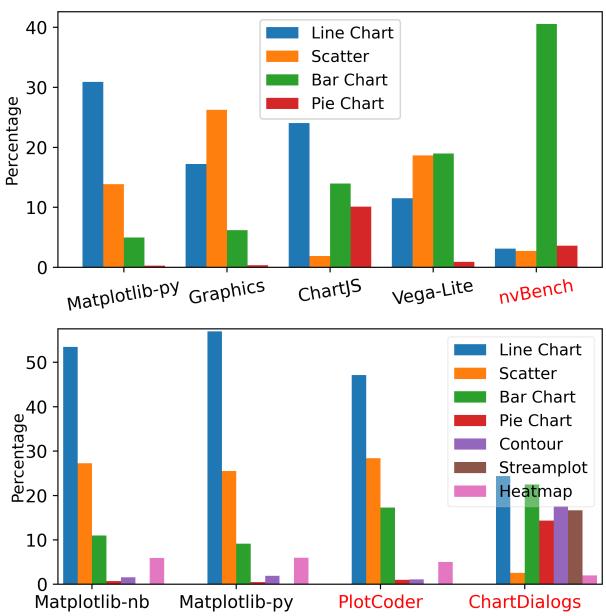
Figure 2 (Upper) reveals a massive skew in the nvBench dataset. While the real-world usage of Vega-Lite (the library nvBench targets) shows a relatively balanced use of line, scatter, and bar charts, nvBench is dominated by bar charts (over 80%).
Figure 2 (Lower) compares Python-based datasets.
- Real World (Matplotlib): Users overwhelmingly prefer Line Charts (blue) and Scatter Plots (orange).
- ChartDialogs: This benchmark creates an artificial balance, including a very high number of Pie Charts and Stream Plots—types that are statistically rare in actual Python usage.
Takeaway: If an AI is trained primarily on nvBench, it might become excellent at making bar charts but fail when asked for a scatter plot, simply because the benchmark misrepresented the importance of different chart types.
2. Missing Aesthetic Attributes
Beyond the type of chart, visualizations rely heavily on “attributes”—the customization of titles, colors, legends, and axes.
The researchers calculated the Spearman’s rank correlation coefficient to see if the frequency of attribute usage in benchmarks matched real-world usage.
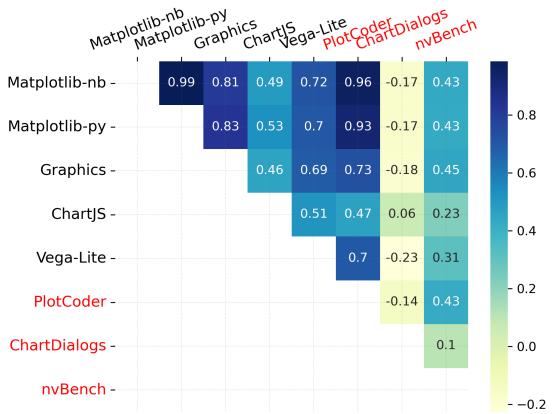
In Figure 3, a high correlation (dark blue) indicates a strong match.
- Real-world datasets (Matplotlib, Graphics, ChartJS) generally correlate well with each other (scores > 0.7).
- ChartDialogs and nvBench show weak correlation with real-world data. They fail to test attributes that users value highly.
What exactly are benchmarks missing? The analysis showed that real-world users frequently customize titles, axis limits, tick labels, legend visibility, and grid lines. However, benchmarks like nvBench often ignore these completely, focusing only on the data binding.
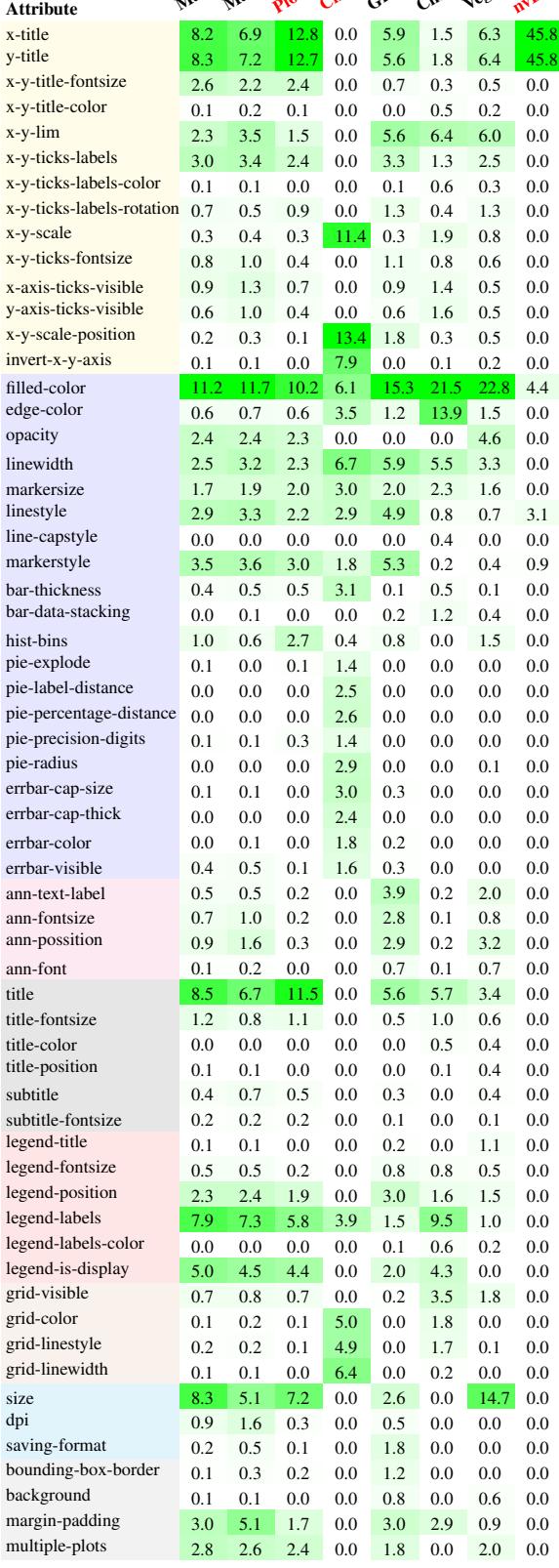
The heatmap in Figure 8 visualizes this frequency. Green blocks represent high usage. Notice how the real-world datasets (the first few columns) have distributed green blocks across “Axes” and “Titles.” In contrast, datasets like nvBench (far right) have large white gaps, indicating these features are rarely, if ever, present in the benchmark.
3. Complexity of Code
Finally, the study looked at the complexity of the code generated. Real-world plotting scripts usually aren’t “one-liners.” They involve setting up the figure, plotting the data, adjusting the axes, adding annotations, and saving the file.
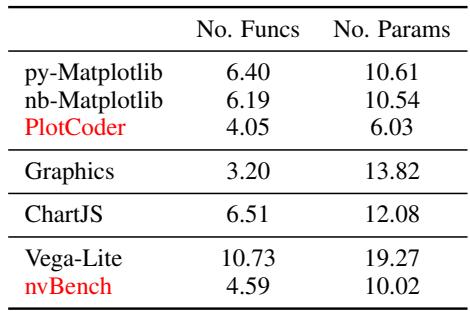
Table 3 highlights a stark difference in complexity.
- Real-world Matplotlib code uses an average of 6+ functions and 10+ parameters per visualization.
- PlotCoder (highlighted in red) drops to roughly 4 functions and 6 parameters.
- nvBench is even simpler in terms of function calls.
This suggests that benchmarks are testing “toy” problems. An AI that solves a benchmark problem might struggle with the complexity of a real-world data science script where multiple function calls are required to achieve the desired output.
The Benchmark Dilemma: PlotCoder’s Potential
Among the benchmarks tested, PlotCoder stood out as the most realistic. It uses data extracted from notebooks, so its distribution of chart types and attributes aligns more closely with real-world Matplotlib usage (Spearman correlation of 0.7 - 0.9).
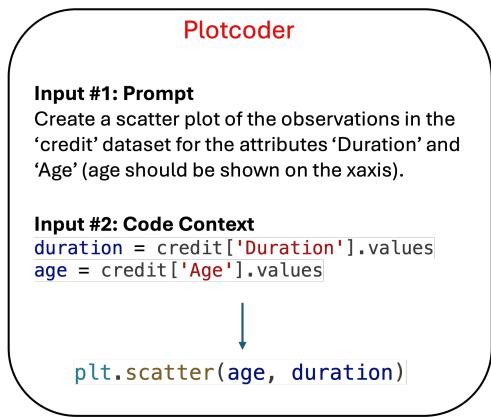
However, PlotCoder has a fatal flaw: executability. As shown in Figure 7, PlotCoder provides code context and a prompt, but it does not include the actual data files necessary to run that code. Without the data, the code cannot be executed to verify if the output chart is correct. This makes it useful for checking if an AI can write syntax, but useless for checking if the AI visualized the data correctly.
In contrast, nvBench (Figure 5 below) is end-to-end executable but suffers from the ecological validity issues discussed earlier (too many bar charts, too few attributes).
ChartDialogs (Figure 6 below) relies on a slot-filling approach which, while executable, restricts the AI to a very narrow set of pre-defined actions that don’t match the flexibility of real programming.
Conclusion & Implications
The findings of this paper serve as a reality check for the Text-to-Vis community. The authors demonstrated that current benchmarks generally focus on only one aspect of the problem—either code synthesis or data presentation—and rarely capture the full “distribution of intent” seen in the wild.
Key Takeaways:
- Skewed Priorities: Benchmarks over-represent simple chart types (Bar/Pie) and under-represent complex ones (Scatter/Line) compared to professional usage.
- Aesthetic Blindness: Benchmarks often ignore the “polish” of a chart—titles, legends, and axis scaling—which are critical for real-world readability.
- Complexity Gap: Real-world code is significantly more complex and verbose than the sanitized code found in benchmarks.
For students and future researchers, this paper highlights a clear path forward: we don’t just need more benchmarks; we need better ones. Future datasets should be constructed by mining real-world repositories (like The Stack) to ensure they capture the messy, complex, and highly customized nature of how humans actually visualize data. Only then can we build AI tools that truly assist users in their daily workflows.