](https://deep-paper.org/en/paper/2408.08461/images/cover.png)
Introduction
Imagine you are a graphic designer working on an advertisement. You have a perfect photo of a car on a mountain road, but the client wants the car to look “golden” instead of red. Traditionally, this means opening Photoshop, carefully tracing a mask around the car to separate it from the background, and then applying color grading layers.
Now, imagine you could just type “Golden car” and an AI would handle the rest—changing the car’s texture while leaving the mountain road completely untouched.
This is the promise of Text-Driven Object-Centric Style Editing. While AI tools like DALL-E or Midjourney can generate images from scratch, editing existing images is much harder. The main challenge is the “spillover” effect: when you ask an AI to apply a style (like “oil painting” or “neon”), it often stylizes the entire image, ruining the background. Or, it might change the object so drastically that it loses its original shape.
In this post, we are diving into a research paper titled “Style-Editor: Text-driven object-centric style editing” by researchers from DGIST. They propose a novel architecture that allows for precise, text-based editing of specific objects without requiring manual segmentation masks.
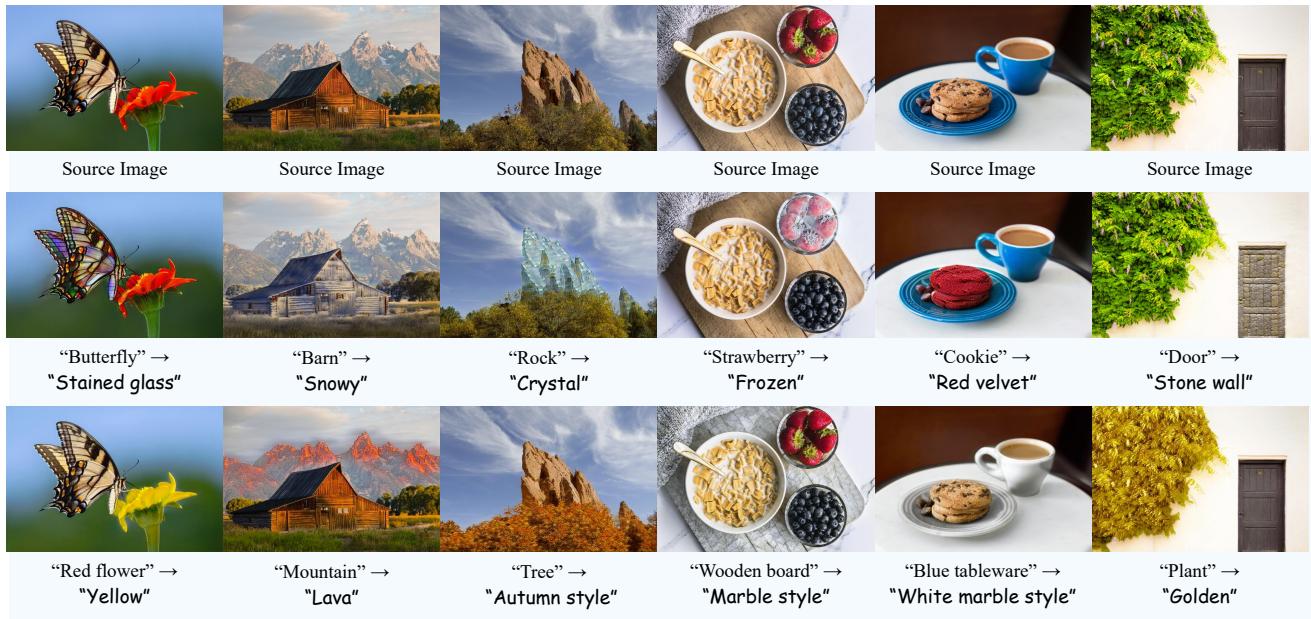
As shown in Figure 1 above, the model can turn a butterfly into stained glass, make a barn look snowy, or turn a strawberry frozen—all while keeping the surrounding environment surprisingly intact. Let’s explore how they achieved this.
The Problem: Background Bleeding and Identity Loss
Before understanding the solution, we need to define the problem clearly. In the field of Neural Style Transfer (NST), early methods required a “style reference image” (like a Van Gogh painting) to transfer textures. Modern approaches use CLIP (Contrastive Language-Image Pretraining) to allow users to just type a text prompt.
However, existing text-guided methods (like StyleGAN-NADA or CLIPstyler) struggle with two things:
- Localization: They don’t naturally know where the “object” ends and the “background” begins. If you prompt “Gold,” the whole image tends to turn yellow.
- Structure Preservation: If the style is too strong, the object might warp into an unrecognizable blob, losing its semantic identity.
The researchers behind Style-Editor set out to build a system that identifies the object automatically (using text) and restricts the style transfer to only that area.
The Solution: Style-Editor Architecture
The Style-Editor framework is built on a standard U-Net architecture (StyleNet), but the innovation lies in how it is trained and guided. The system essentially needs to answer three questions for every edit:
- Where is the object described in the text?
- How should the style be applied to match the text?
- What parts of the image should remain exactly the same?
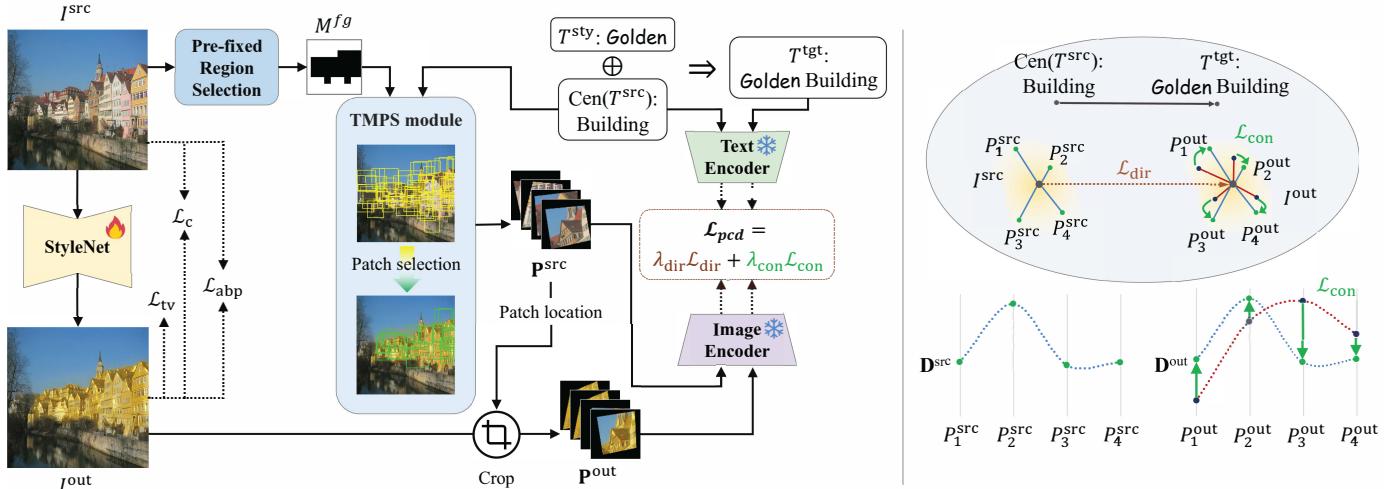
Figure 3 (Left) illustrates the overall pipeline. The process involves taking a source image (\(I^{src}\)) and source text (\(T^{src}\)), and passing them through a network to generate an output (\(I^{out}\)). The magic happens in the specific modules and loss functions used to guide this transformation.
1. Finding the Object: TMPS and PRS
One of the paper’s biggest contributions is eliminating the need for manual masks. Instead, they use the semantic power of CLIP to find the object. They introduce two modules for this: Pre-fixed Region Selection (PRS) and Text-Matched Patch Selection (TMPS).
Pre-fixed Region Selection (PRS)
Scanning every pixel of an image is computationally expensive. To speed things up, the PRS module acts as a coarse filter. It divides the image into a grid (e.g., \(9 \times 9\)) and generates cropped patches from these grids.
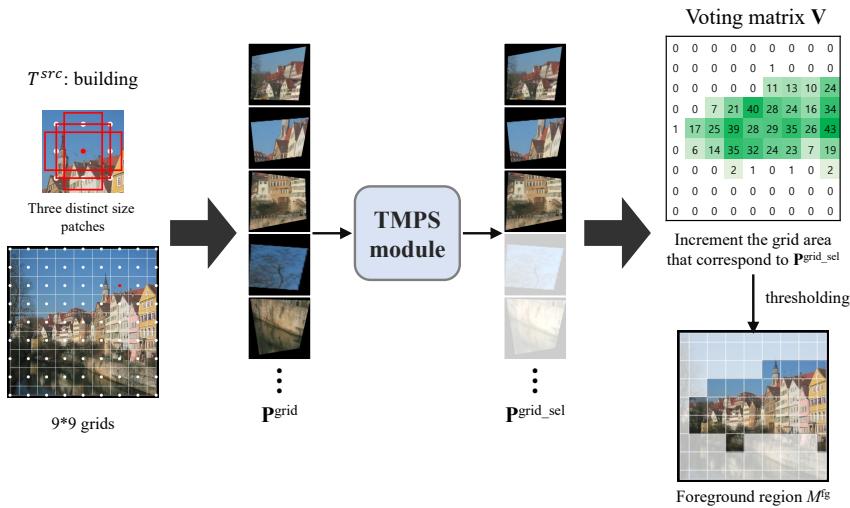
As visualized in Figure 8 above, the system checks these grid patches against the source text (e.g., “Building”). If a grid section has high similarity to the text, it is flagged as a foreground region (\(M^{fg}\)). This creates a rough “map” of where the object likely sits, allowing the model to focus its computing power on relevant areas in later iterations.
Text-Matched Patch Selection (TMPS)
Once the general area is found via PRS, the TMPS module gets precise. It extracts multiple patches from the foreground region. It then uses CLIP to compare these patches against the source text embedding.
The algorithm essentially asks: * “Does this small square look like a ‘red car’?”*
If the answer is yes, that patch is selected for stylization. If the answer is no (e.g., it’s a patch of the road next to the car), it is ignored. This ensures that the style direction is calculated based only on the pixels that actually belong to the object.
2. Applying the Style: Patch-wise Co-Directional Loss
Now that the model knows where the object is, it needs to apply the new style (e.g., “Golden”). Standard directional losses often fail to maintain the semantic richness of an object. To fix this, the authors propose Patch-wise Co-Directional (PCD) Loss.

As shown in the equation above, PCD loss combines two distinct forces:
- Directional Loss (\(\mathcal{L}_{dir}\)): This pushes the image features in the direction of the target text. If the text says “Golden,” the vectors move toward the concept of gold in CLIP space.
- Consistency Loss (\(\mathcal{L}_{con}\)): This is crucial for preventing distortion. It ensures that the distribution of features in the stylized patches matches the distribution in the source patches.
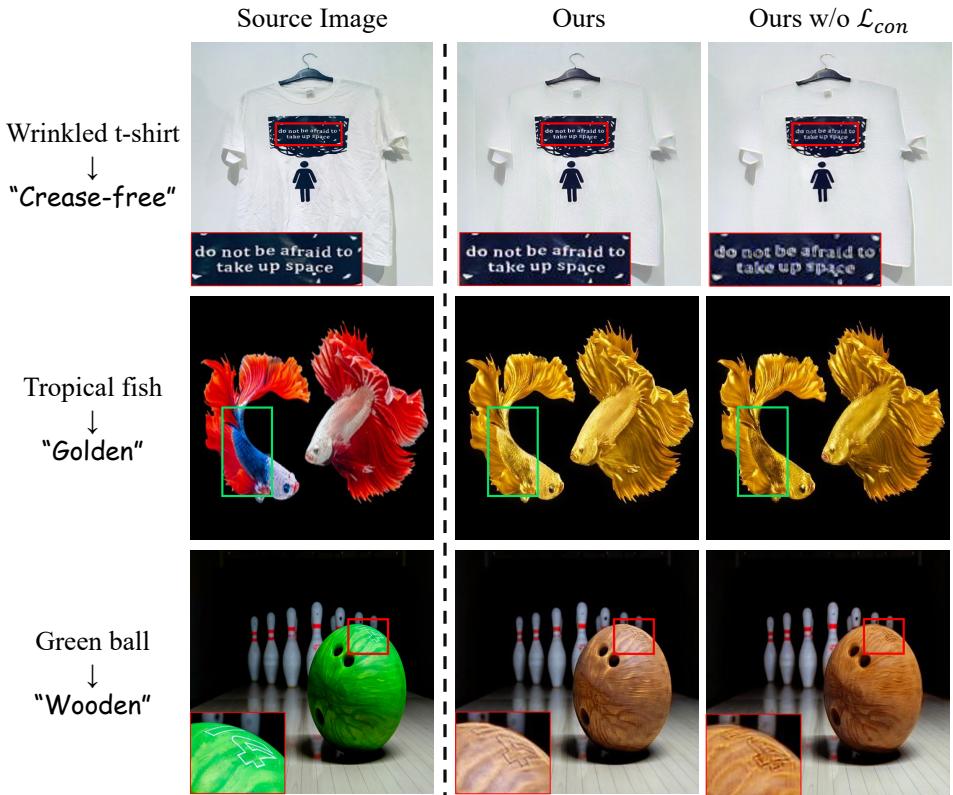
Figure 9 provides a fantastic visualization of why Consistency Loss (\(\mathcal{L}_{con}\)) matters. Look at the “Tropical fish” row. Without \(\mathcal{L}_{con}\) (the third column), the fish turns gold but loses its intricate texture and fin details. With the consistency loss (middle column), the “Gold” style is applied, but the fish retains its specific biological patterns. The same applies to the bowling ball; without consistency, the reflections and shape become muddy.
3. Protecting the Rest: Adaptive Background Preservation
The final piece of the puzzle is keeping the background safe. Since the TMPS module identifies which patches are the object, the system implicitly knows which patches are not the object.
The researchers introduce Adaptive Background Preservation (ABP) Loss.

This loss function (Eq. 6) penalizes the model if the background pixels change. It uses an adaptive mask (\(M^{bg*}\)) that updates dynamically during training.
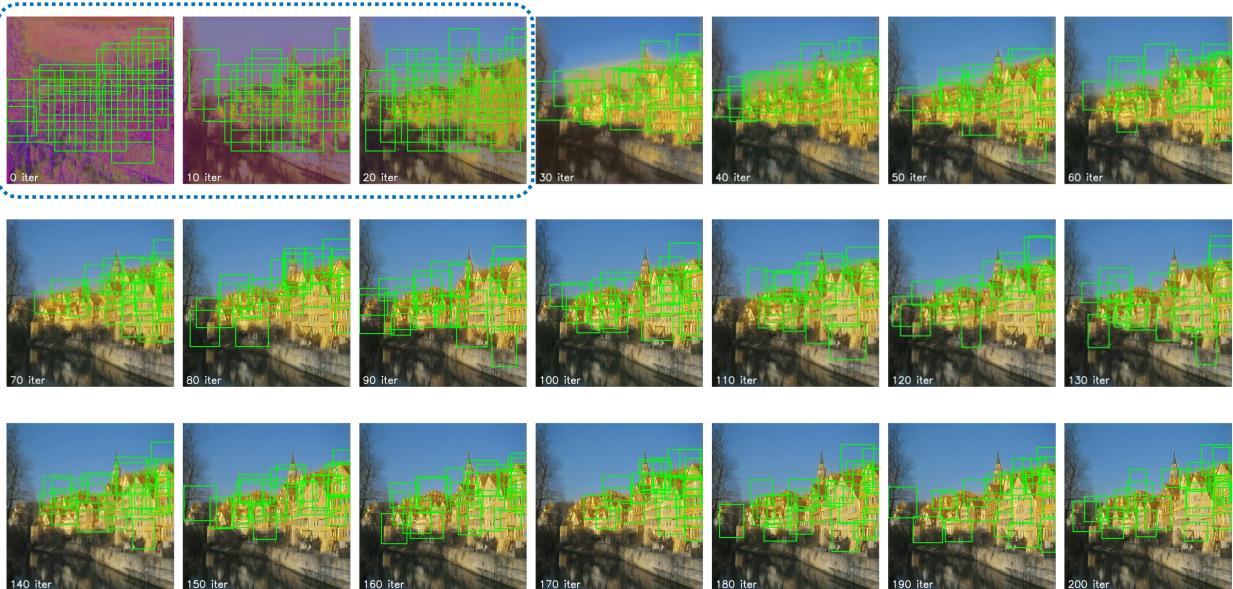
Figure 10 shows this process in action. In the early iterations (0-10 iter), the green boxes (object detection) are scattered. As training progresses, the model narrows down the “Building” accurately. The areas outside those green boxes are protected by the ABP loss. By iteration 200, the style is applied strongly to the architecture, while the river and sky remain blue and clear.
Putting it Together: The Total Loss
The final objective function combines all these elements.

The total loss (\(\mathcal{L}_{total}\)) balances the PCD loss for styling, the ABP loss for background protection, a content loss (\(\mathcal{L}_c\)) to preserve general structure, and a total variation loss (\(\mathcal{L}_{tv}\)) to reduce noise.
Experiments and Results
The authors compared Style-Editor against several state-of-the-art methods, including diffusion-based models (like Text2LIVE and CLIPstyler) and GAN-inversion methods.
Qualitative Comparison
Let’s look at the visual evidence.
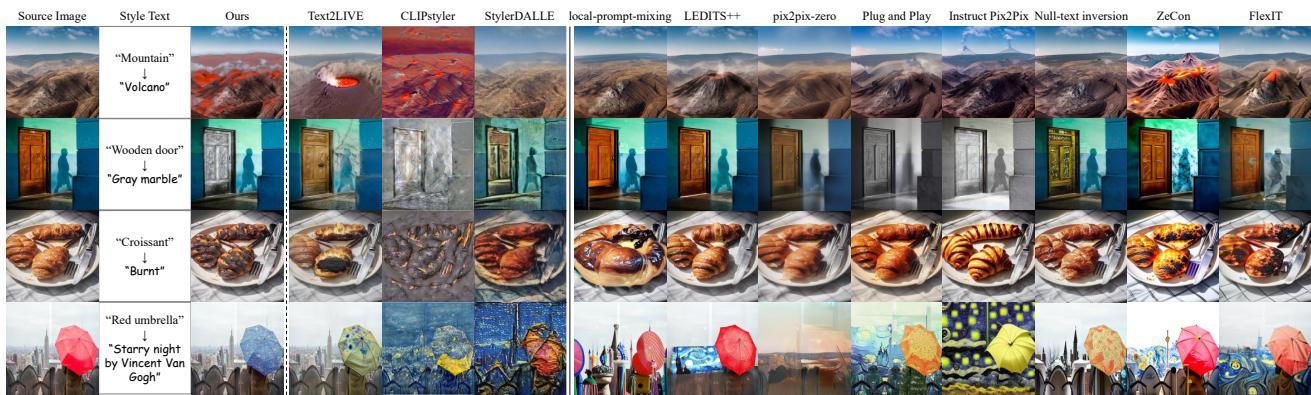
In Figure 4, we see a comparison across different methods.
- Row 1 (Mountain \(\to\) Volcano): Style-Editor turns the mountain dark and fiery while keeping the shape. Text2LIVE creates a massive hole in the mountain (interpreting “volcano” as a crater shape change), and CLIPstyler colors the whole image red.
- Row 3 (Croissant \(\to\) Burnt): Style-Editor specifically burns the pastry. Other methods darken the background or fail to change the texture convincingly.
The comparison highlights that Style-Editor is significantly better at decoupling the object from its environment.
Quantitative Analysis
The researchers didn’t just rely on pretty pictures; they ran extensive numbers. They used metrics that measure foreground quality (how well the style matches the text) and background quality (how little the background changed).
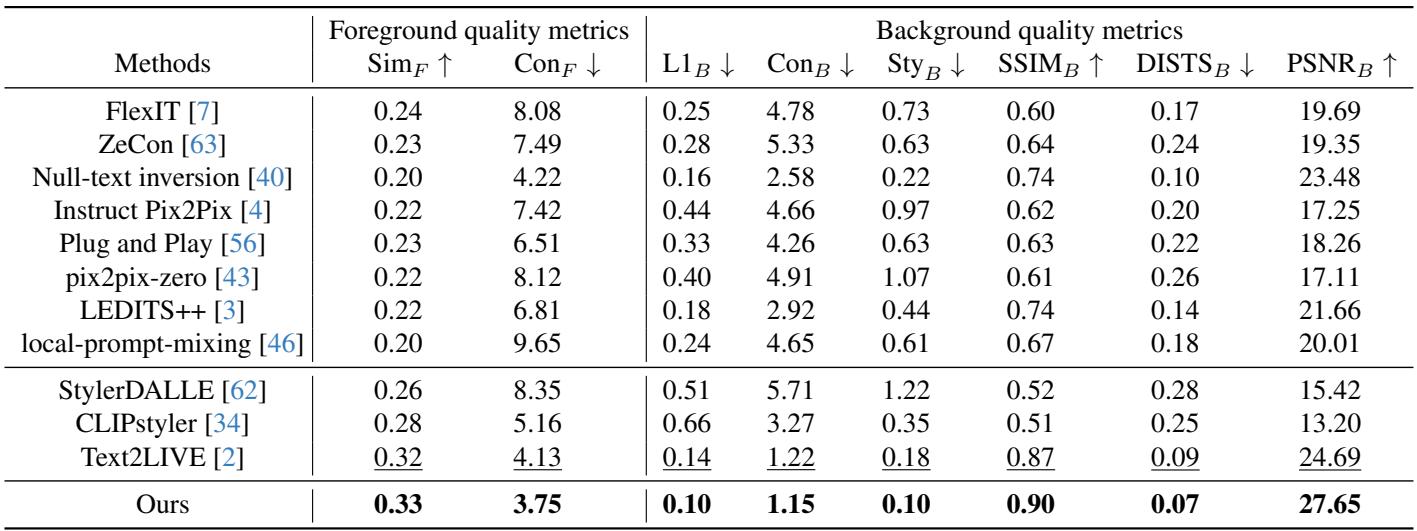
Table 1 shows that Style-Editor achieves the highest Foreground Similarity (\(Sim_F\), 0.33) and the lowest Background L1 Error (\(L1_B\), 0.10). This statistically confirms that it offers the best trade-off between accurate styling and background preservation.
Ablation Study
Do we really need all these complex modules? The ablation study answers this.
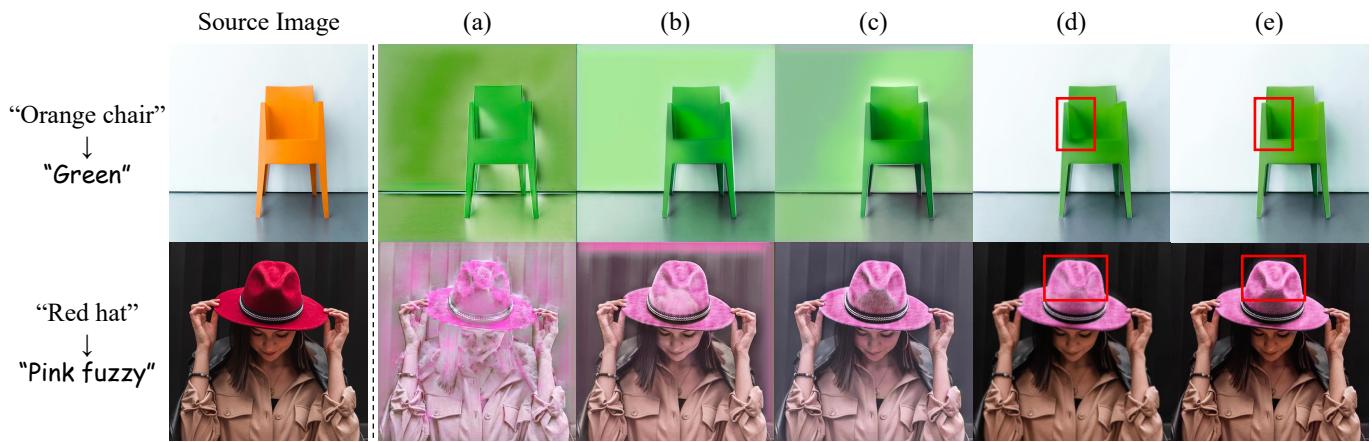
Figure 5 shows what happens when you strip parts away:
- (a) Random Patches: The whole image turns green.
- (b) w/o ABP (Background Loss): The chair is green, but the white wall behind it also gets a greenish tint.
- (c) w/o Consistency: The chair loses some of its detailed shading.
- (e) Ours: The chair is vibrant green, and the wall remains perfectly white.
This confirms that TMPS is needed for localization, and ABP is strictly required to keep the background clean.
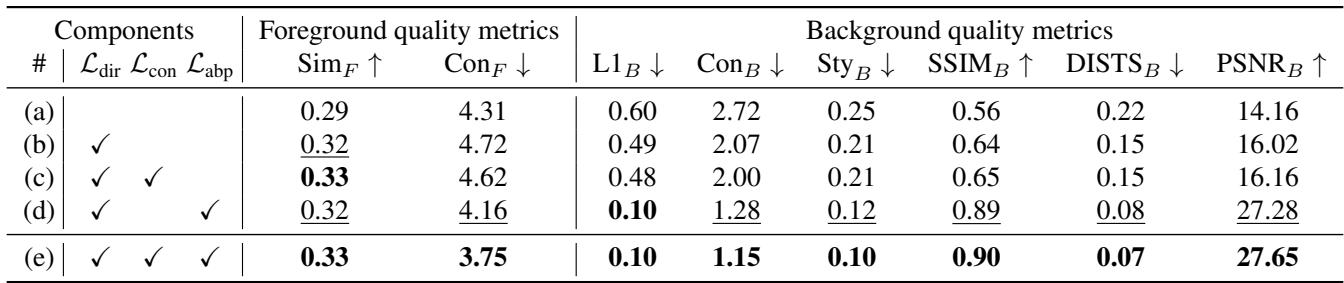
Table 2 supports the visual findings. Removing ABP (row c) causes the background error (\(L1_B\)) to skyrocket from 0.10 to 0.48.
vs. Mask-Based Methods
One might argue, “Why not just use a segmentation model to create a mask first?” The authors compared Style-Editor to mask-guided generative models.
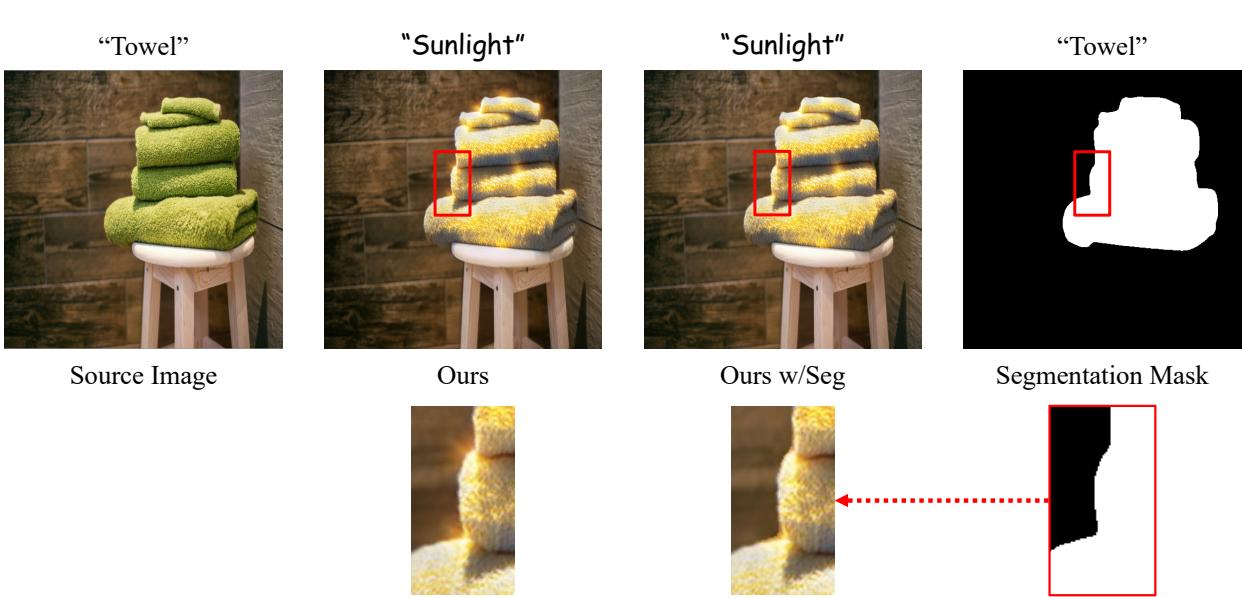
Figure 11 compares Style-Editor (Ours) against a version using explicit segmentation masks. Look closely at the “Towel” example. When using a binary segmentation mask (Right), the lighting effect cuts off abruptly at the edge of the towel. It looks pasted on.
Style-Editor (Middle-Left), however, allows for a more natural transition. The light hitting the towel naturally diffuses slightly, creating a more realistic integration with the environment because it isn’t bound by a hard binary mask.
Limitations
No model is perfect. The authors note that Style-Editor relies heavily on the CLIP embedding space. If CLIP doesn’t understand a specific style or object well, Style-Editor will fail.
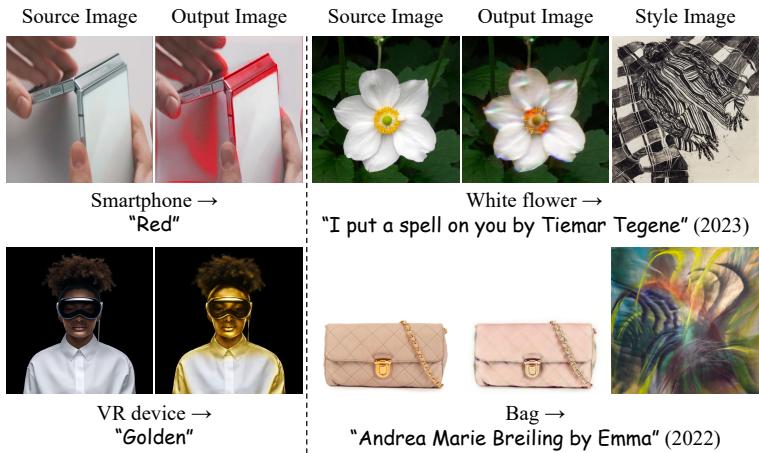
Figure 14 shows some failure cases. For example, when asking to style a bag based on a specific, obscure artist (“Andrea Marie Breiling”), the model struggles to capture the nuance, likely because that specific artistic style isn’t well-represented in CLIP’s training data.
Conclusion
Style-Editor represents a significant step forward in text-driven image editing. By moving away from global style transfer and inventing specific mechanisms for object localization (TMPS and PRS) and preservation (PCD and ABP losses), the researchers have created a tool that feels much closer to how a human designer works.
Key Takeaways:
- No Masks Needed: The model finds objects using text descriptions alone.
- Background Safety: It mathematically enforces background preservation, solving the “bleeding” issue common in AI art.
- Semantic Consistency: It changes the style but keeps the “soul” (structure and details) of the object intact.
For students and researchers in computer vision, this paper serves as an excellent example of how to constrain generative models. It shows that sometimes, the key to better generation isn’t a bigger model, but smarter loss functions that tell the model exactly where to look and what to protect.