](https://deep-paper.org/en/paper/2409.19499/images/cover.png)
If you have ever tried to train a robot to perform a simple household task, like folding a towel or opening a jar, you have likely run into the “Data Problem.” Humans can perform these tasks effortlessly, but teaching a robot requires thousands of examples. This is where Imitation Learning (IL) comes in—showing the robot what to do so it can copy you.
However, collecting high-quality demonstration data is notoriously difficult. Teleoperation (controlling a robot with a joystick or VR rig) is slow, expensive, and often unintuitive. Recent innovations like the Universal Manipulation Interface (UMI) attempted to solve this by allowing humans to collect data with a handheld gripper. But even UMI had a flaw: it was “picky.” It required specific grippers, rigid hardware setups, and a finicky software pipeline that often broke when the camera view was blocked.
Enter FastUMI.
In this post, we are doing a deep dive into “FastUMI: A Scalable and Hardware-Independent Universal Manipulation Interface with Dataset.” This paper presents a complete redesign of the data collection pipeline, decoupling the hardware so that almost any robot arm or gripper can benefit from high-quality, handheld human demonstrations.
The Bottleneck: Why Data Collection is Hard
To understand why FastUMI is necessary, we first need to look at the limitations of previous systems. The standard UMI system was a breakthrough because it allowed data collection to happen away from the robot. A human could walk around a kitchen with a handheld gripper, recording actions that would later be transferred to a robot arm.
However, the original UMI had two major constraints:
- Hardware Coupling: It was tightly coupled to specific components, like the Weiss WSG-50 gripper. If your lab used a Franka Emika Panda or a Kinova arm with a different gripper, adapting UMI required extensive mechanical redesigns and sensor recalibration.
- Visual-Inertial Odometry (VIO) Fragility: UMI relied on a GoPro camera and open-source SLAM algorithms to track where the gripper was in 3D space. This works well in open spaces, but manipulation tasks often involve occlusions. When you open a cabinet or reach into a box, the camera view gets blocked. When the camera is blocked, the tracking fails, and the data becomes useless.
FastUMI addresses these issues with a philosophy of decoupling. It separates the hardware dependencies and robustifies the software tracking, making the system “plug-and-play.”
The Hardware: A Decoupled Design
The core innovation of FastUMI is its physical architecture. The goal was to create a system where the data collected by a human hand looks identical to the data processed by a robot arm, regardless of the robot’s physical shape.
1. The Handheld Device (The Data Collector)
The handheld device is what the human operator uses. Unlike previous iterations that relied solely on a GoPro for both vision and tracking, FastUMI introduces a dedicated tracking module.
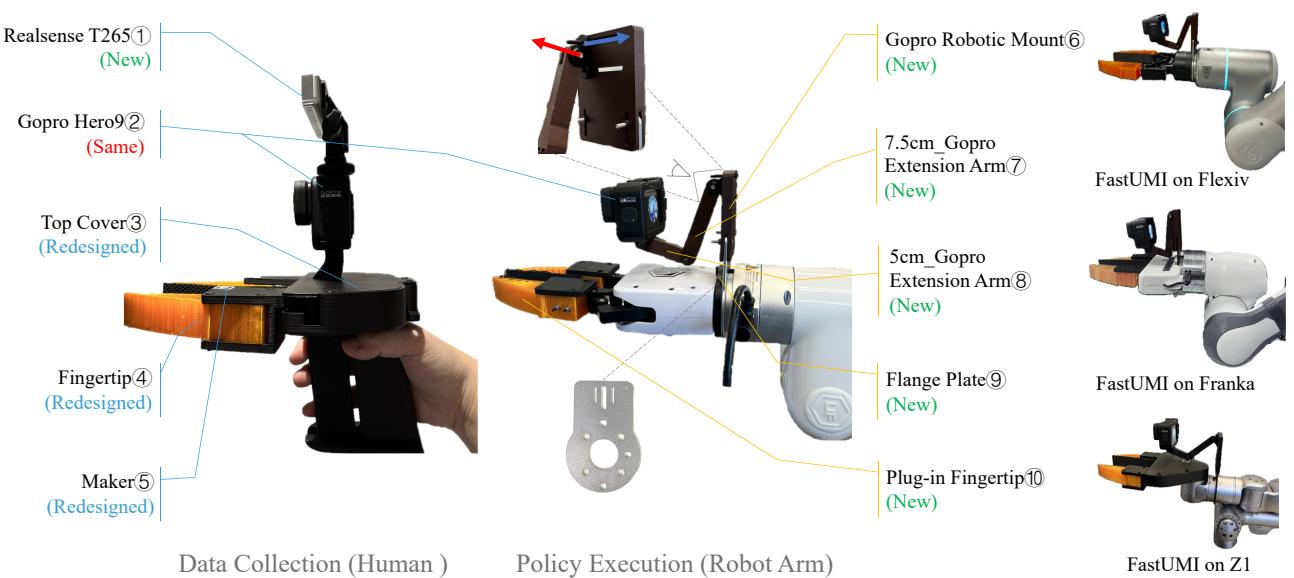
As shown in Figure 1 above (Left), the handheld device consists of:
- The Eyes (GoPro): A GoPro camera captures the visual context. It uses a fisheye lens to get a wide 155-degree field of view, ensuring the robot can see the environment even when close to objects.
- The Brains (RealSense T265): This is a crucial upgrade. Instead of relying on the GoPro for tracking, FastUMI uses a RealSense T265. This sensor combines stereo cameras with an Inertial Measurement Unit (IMU) to provide robust pose tracking, even when the visual field is partially blocked.
- Fingertips & Markers: Standardized fingertip markers allow the software to track exactly how wide the gripper is opened.
2. The Robot-Mounted Device (The Executor)
The magic happens when we move to the robot (Figure 1, Middle/Right). The system uses an ISO-standard flange plate, meaning it can attach to almost any standard robot arm (Franka, Flexiv, Z1, etc.).
The critical design challenge here is Visual Consistency. If the camera on the robot is positioned differently than the camera on the handheld device, the trained model will fail because the world looks “wrong.”
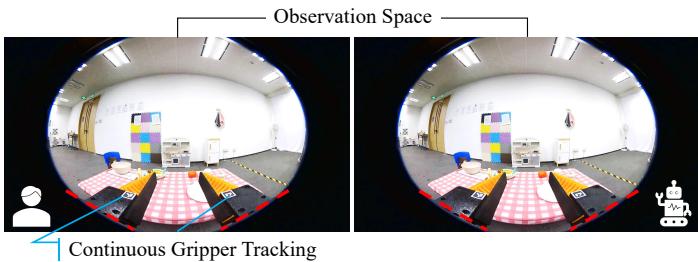
To solve this, FastUMI utilizes an adjustable camera mounting structure. As seen in Figure 3, the goal is to align the bottom of the fisheye lens image with the bottom of the gripper’s fingertips. Whether you are holding the device or it is mounted on a massive industrial arm, the camera’s perspective relative to the gripper remains constant. This allows the AI model to transfer human skills to the robot seamlessly.
Furthermore, the system accommodates different gripper geometries. Not all grippers are parallel-jaw; some are angled or have different stroke lengths.
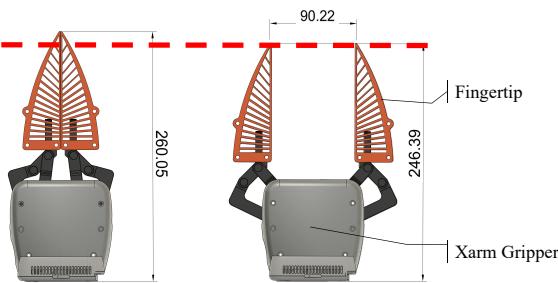
Figure 4 illustrates the plug-in fingertip design. Even if the underlying robot gripper is different (like the xArm gripper shown), the contact points and the visual markers remain consistent with the handheld device.
The Software: Tracking and Data Processing
FastUMI replaces the complex VIO pipeline of the original UMI with a streamlined approach using the T265 sensor.
Robust Tracking with Loop Closure
One of the biggest headaches in handheld data collection is “drift.” Over time, sensors lose track of where they are. The T265 helps, but it isn’t perfect. FastUMI implements a clever hardware-software trick for Loop Closure.
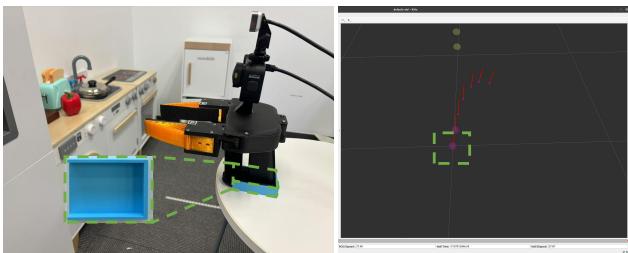
They place a blue 3D-printed groove on the table (Figure 5). When the data collection session starts and ends, the device is placed in this groove. The visual uniqueness of the groove allows the tracking software to “snap” back to a known zero-position, correcting any drift that accumulated during the task.
Data Harmonization
Because the hardware is decoupled, the software needs to bridge the gap mathematically. We need to translate the camera’s movement into the robot’s coordinate system.
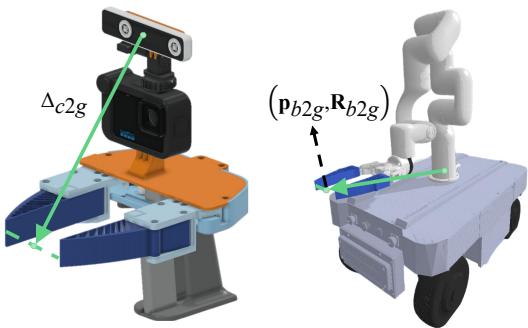
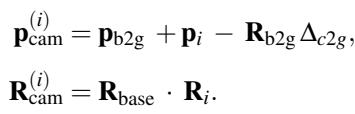
Figure 6 shows the coordinate frames. We have the camera center and the gripper center. The system calculates the absolute position of the camera in the robot’s base frame using the following transformation:
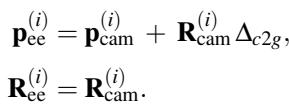
From there, we derive the Absolute TCP (Tool Center Point) Trajectory. This tells us exactly where the gripper needs to be:
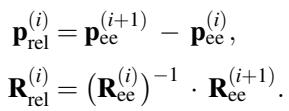
However, absolute positioning can be brittle if the robot’s base moves. To make the learning more robust, FastUMI also computes the Relative TCP Trajectory, which looks at how the gripper moves from one frame to the next, regardless of where it is in the room:
Universal Gripper Tracking
Different grippers open to different widths. To make the software hardware-independent, FastUMI tracks the pixel distance between ArUco markers on the fingertips. It then normalizes this distance:
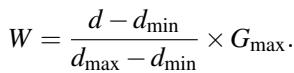
Here, \(d\) is the pixel distance, and \(G_{max}\) is the physical maximum opening of the specific gripper being used. This allows the AI to learn a “percentage open” value rather than a specific motor count, making it transferable across robots.
Algorithmic Adaptations: Helping the AI See Depth
Hardware decoupling is great for logistics, but it introduces new challenges for the AI. Specifically, relying on a single wrist-mounted fisheye camera creates a First-Person Perspective problem.
- Limited Visibility: The camera can’t see the robot arm, only the hand. The AI might try to move the arm in impossible ways because it doesn’t know where the elbow is.
- No Depth: A single image doesn’t tell you how far away the table is. This makes precision tasks (like threading a needle or pressing a button) very hard.
The authors adapted two popular algorithms, ACT (Action Chunking with Transformers) and Diffusion Policy (DP), to handle these issues.
Smooth-ACT and PoseACT
For ACT, they added a Smoothness constraint. Since the tracking data can sometimes be jittery, they introduced a Gated Recurrent Unit (GRU) to smooth out the predicted actions, preventing the robot from making jerky, dangerous moves.

This equation adds a penalty for jerky movements (\(||\hat{a}_{GRU} - a||_1\)), forcing the model to predict fluid trajectories.
Depth-Enhanced Diffusion Policy
Diffusion Policy is powerful, but it struggled with depth in the FastUMI tests. To fix this without adding expensive LiDAR or depth cameras, the researchers used a software solution: Depth Anything V2.
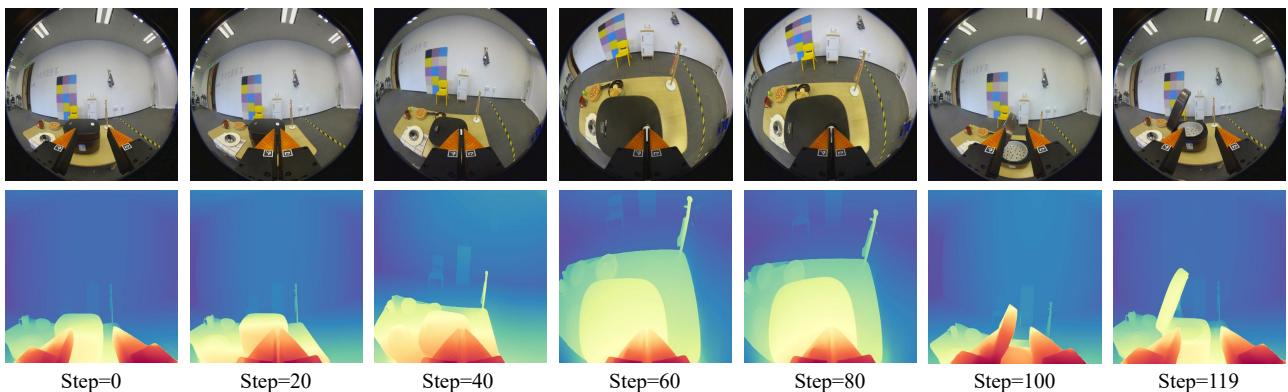
As shown in Figure 7, they take the RGB frames from the GoPro (Top Row), crop them to remove the black borders, and run them through a depth estimation model to generate pseudo-depth maps (Bottom Row). These depth maps are fed into the policy alongside the color images, giving the robot a sense of 3D geometry.
Dynamic Error Compensation
Finally, there is a subtle mechanical issue with many grippers: when they close, the fingertips don’t just move continuously inward; they often shift slightly forward or backward relative to the mounting plate. This can cause the robot to miss a grasp.
FastUMI implements a dynamic compensation algorithm. It calculates a “compensation distance” \(d(i)\) based on how closed the gripper is:

It then adjusts the target position along the gripper’s Z-axis (the forward direction):
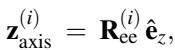

This ensures that as the gripper closes, the “virtual” center point stays exactly where it should be on the object.
The FastUMI Dataset
To prove the system works, the authors didn’t just write a paper; they collected a massive dataset.
- Size: 10,000 demonstration trajectories.
- Scope: 22 everyday tasks across 19 object categories.
- Environments: Diverse domestic settings (kitchens, tables, etc.).
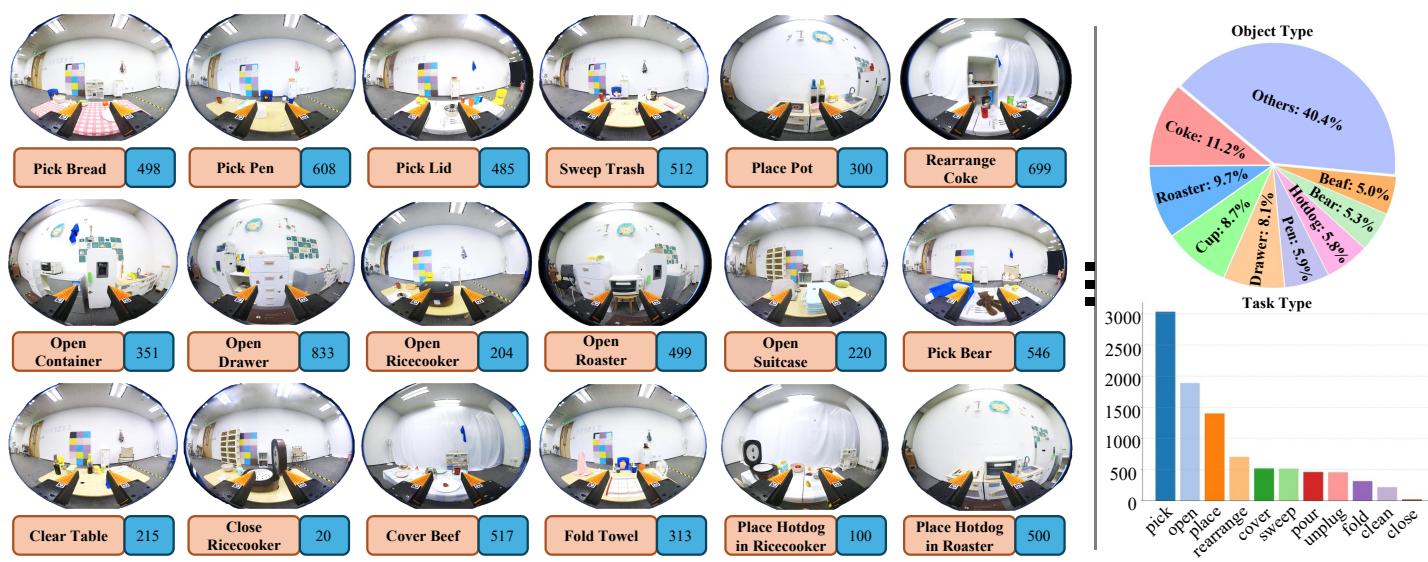
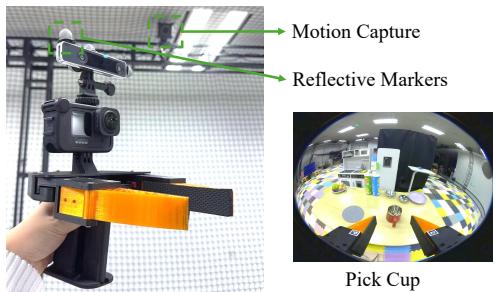
Figure 8 gives a glimpse of the dataset diversity, ranging from “Pick Cup” to “Fold Towel.” The sheer variety of tasks helps test the generalization capabilities of the robot policies.
Experiments & Results
So, does it work? The evaluation focused on data quality, task success rates, and the impact of the algorithmic improvements.
1. Data Quality: T265 vs. The Rest
The researchers compared the tracking accuracy of the RealSense T265 against other tracking methods like the RoboBaton MINI.
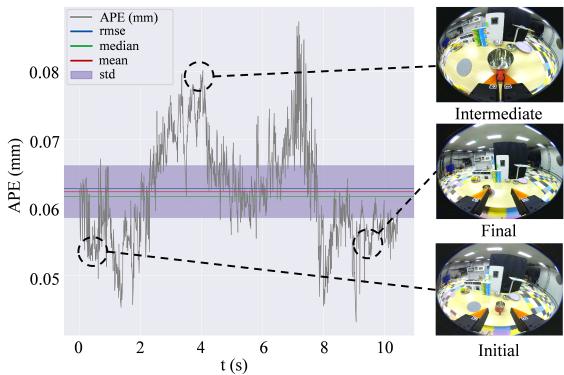
Figure 11 shows the error accumulation during a “Pick Cup” task. Notice the peaks in the middle? That’s where the gripper gets close to the table, and the camera view is occluded. However, the error remains low (< 1-2 cm), and the loop closure mechanism brings it back down at the end. The T265 proved much more robust to these occlusions than pure visual odometry.
2. Baseline Performance
They tested the system on 12 distinct tasks.
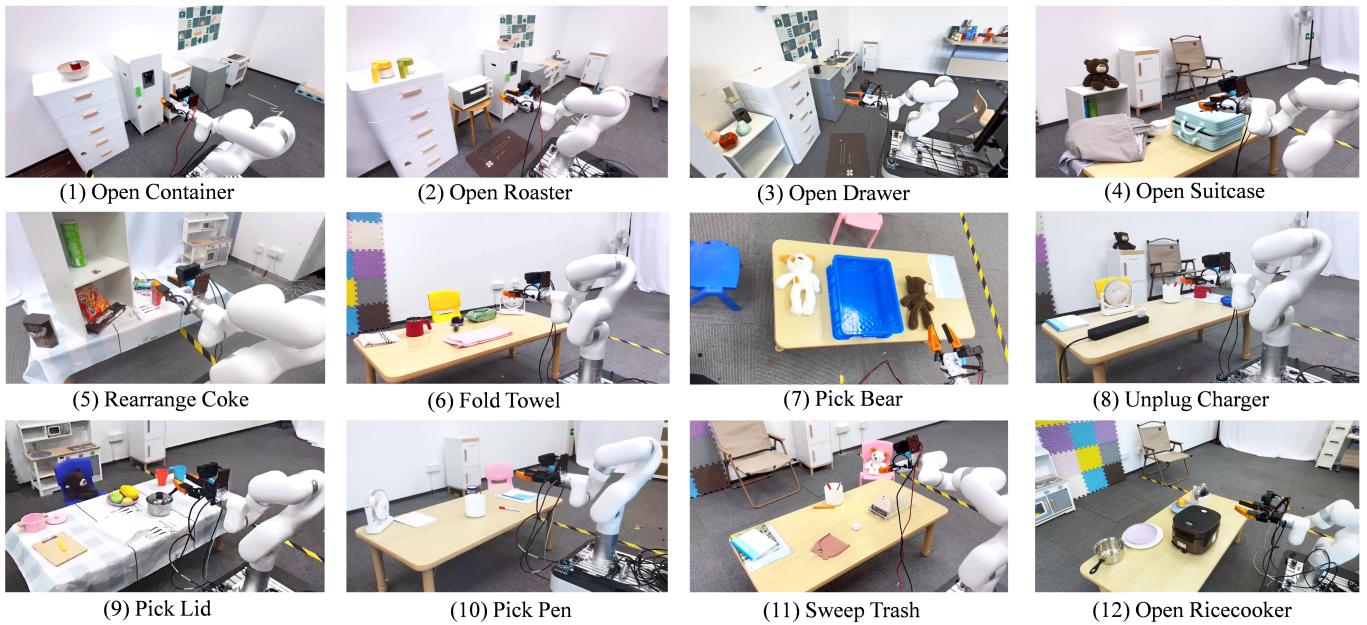
The success rates were promising. As shown in Table II below, Diffusion Policy (DP) generally outperformed ACT, particularly in tasks involving complex movements like “Fold Towel” (93.33% success).

However, notice the lower scores for “Open Ricecooker” (20% for DP). This task requires pressing a button—a precision action that demands depth perception.
3. The Power of Algorithms
This is where the algorithmic adaptations shined. By adding the generated depth maps to the Diffusion Policy (Depth-Enhanced DP), the success rate for the Ricecooker task jumped from 20% to 93.33%.
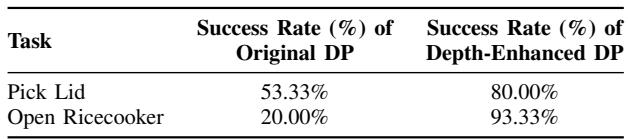
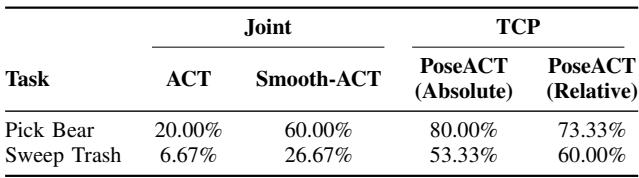
Similarly, the PoseACT and Smooth-ACT variants significantly improved performance over the standard ACT baseline, particularly for tasks requiring extended trajectories like “Sweep Trash.”
4. Why Data Size Matters
Finally, the authors validated a core premise of deep learning: more data = better robots.

In the “Pick Cup” task, increasing the number of demonstrations from 200 to 800 more than doubled the success rate. Because FastUMI makes data collection cheap and fast, getting to 800 or even 8,000 demonstrations is now actually feasible.
Conclusion and Implications
FastUMI represents a significant step forward in democratizing robot learning. By decoupling the data collection hardware from the robot hardware, it allows researchers to collect data once and deploy it on many different robots. The switch to T265 tracking makes the system robust enough for real-world clutter, and the algorithmic updates prove that low-cost visual sensors can handle high-precision tasks if processed correctly.
While limitations remain—such as the lack of tactile feedback and the need for wired connections—FastUMI provides a blueprint for scalable, “in-the-wild” robot teaching. It moves us closer to a future where we can teach robots simply by showing them, without needing a PhD in control theory or a million-dollar lab setup.
If you are a student looking to get into robotic manipulation, the FastUMI framework and its open-source dataset are excellent resources to explore how modern imitation learning bridges the gap between human intent and robotic action.