](https://deep-paper.org/en/paper/2410.03061/images/cover.png)
Introduction
In the world of Artificial Intelligence, document understanding—the ability for a machine to read, interpret, and extract data from scanned PDFs, forms, and invoices—is a massive bottleneck. While we have powerful Large Language Models (LLMs) like GPT-4 or Claude, they are computationally expensive and slow to run on millions of documents. Ideally, we want smaller, faster models (Student models) that can do the job just as well.
However, training these smaller models usually requires massive datasets labeled by humans. This is slow, expensive, and rigid. If you train a model on receipts, it fails on medical forms. This is the Open-World Document Understanding problem: how do we create models that can handle document types they’ve never seen before, without needing a human to label thousands of new examples?
A recent paper, DocKD, proposes a fascinating solution: Knowledge Distillation. Instead of humans labeling data, why not let a massive LLM do it?
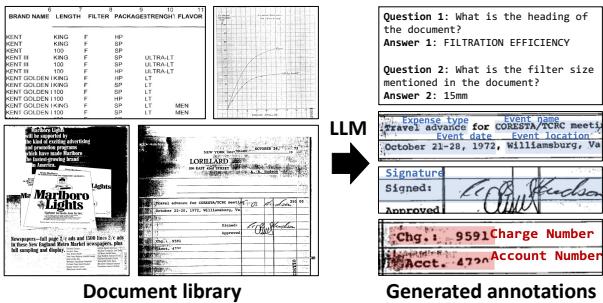
As shown in Figure 1 above, the idea is to take an unlabeled document library, feed it to a smart LLM to generate “synthetic” annotations (Questions & Answers, summaries, etc.), and use that data to train a smaller, efficient model.
But there is a catch. LLMs are trained on text, not visual layouts. If you just copy-paste OCR (Optical Character Recognition) text into an LLM, it often loses the context of tables and forms. DocKD (Document Knowledge Distillation) introduces a framework to inject “visual knowledge” into the LLM, allowing it to create high-quality training data that rivals human annotation.
In this post, we will break down how DocKD works, the specific techniques used for different document tasks, and why this method allows small models to outperform their teachers in specific scenarios.
Background: The Visual Document Understanding Gap
To understand why DocKD is necessary, we first need to understand the limitations of current Visual Document Understanding (VDU) approaches.
The Challenge of Layout
Documents are not just strings of text; they are spatial arrangements. A date in the top right corner means something different than a date in the body paragraph. A number inside a table cell relates to the headers above and to the left of it.
Traditional text-only models struggle here. They receive a serialized stream of text that destroys this spatial relationship. Recent VDU models (like LayoutLM or DocFormer) solve this by processing the image and the text together. However, these models need supervision. They need to be told “This box is a total,” or “This text is an address.”
Knowledge Distillation (KD)
Knowledge Distillation is a technique where a large “Teacher” model generates predictions (soft labels) to train a smaller “Student” model. In the context of documents, we want an LLM (the Teacher) to look at a document and generate training examples.
The problem identified by the researchers is that standard prompting fails. If you simply give an LLM raw text from a scanned invoice and ask it to “Generate questions,” it produces low-quality, repetitive, or hallucinated data because it cannot “see” the document structure.
The Core Method: DocKD Framework
The DocKD framework is designed to bridge the gap between text-heavy LLMs and visually-rich documents. The core premise is that we can prompt an LLM to generate better training data if we provide it with external document knowledge—specifically, structural and visual cues that standard OCR misses.
The Pipeline

As visualized in Figure 2, the process is split into two phases:
- Data Generation (Teacher): An image undergoes OCR. The text is fed into the LLM along with a specific prompt (\(\mathbf{p}_{gen}\)) and, crucially, external knowledge (like layout info or key-value pairs). The LLM generates answers (\(\mathbf{a}_{gen}\)), which are converted into training tasks.
- Training (Student): The generated pairs are used to train a smaller VDU model (like DocFormer).
The researchers applied this framework to three distinct tasks, each requiring a unique strategy to inject visual knowledge.
Task 1: Visual Question Answering (VQA)
The Problem: When OCR scans a document, it usually scans left-to-right, top-to-bottom. If you scan a table this way, row data gets mixed up, making it impossible for an LLM to understand which value belongs to which column.
The Solution: The authors use a Linearization Model. Instead of raw text, they convert the document into a Markdown-style format that preserves the structure (e.g., using pipes | for table columns).
This equation simply represents the LLM taking the text and a generation prompt to output pairs of Questions and Answers.
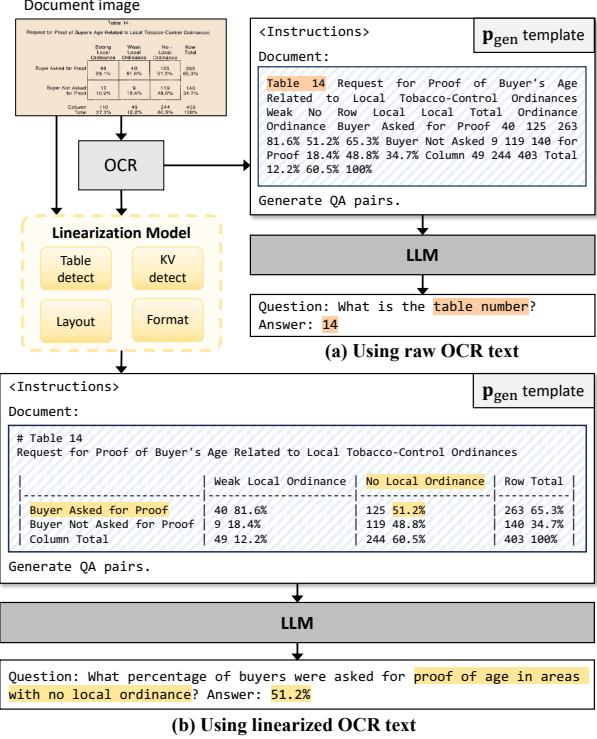
Look at Figure 3 above.
- In (a) Using raw OCR text: The text is jumbled. The LLM generates a trivial question (“What is the table number?”).
- In (b) Using linearized text: The markdown format tells the LLM “This is a table.” The LLM can now generate a complex reasoning question (“What percentage of buyers were asked for proof… in areas with no local ordinance?”).
By teaching the LLM the layout via Markdown, the synthetic questions become much harder and more useful for training.
Task 2: Entity Extraction
The Problem: Entity extraction involves finding specific fields (like “Total Amount” or “Vendor Name”). If you ask an LLM to “find all entities,” it tends to list only the most obvious ones or hallucinate fields that don’t exist.
The Solution: The authors introduce a Key-Value (KV) Detection Model as an intermediate step.
- An external tool detects potential Key-Value pairs (e.g., “Date: 12/01/2023”).
- These pairs are fed into the LLM iteratively.
- The LLM assigns a semantic field name to the value (e.g., it sees “Date:…” and assigns the label
Invoice_Date). \[ f _ { \mathrm { T } } ( \mathbf d _ { \mathrm { t e x t } } , \mathbf p _ { \mathrm { g e n } - k \nu } , ( \mathbf f _ { i } , \mathbf e _ { i } ) _ { 1 : n } , \mathrm e _ { n + 1 } ) \to \mathbf a _ { \mathrm { g e n } - k \nu } = \mathbf f _ { n + 1 } \] This approach ensures the LLM doesn’t miss the small details. It forces the model to look at every detected visual component and categorize it.
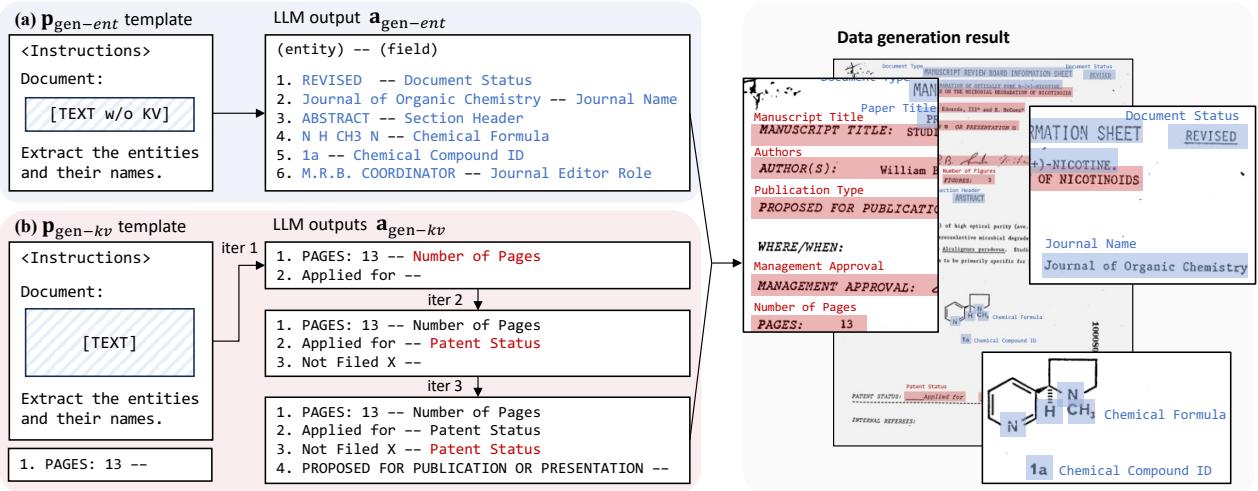
As shown in Figure 4, the iterative process helps the LLM refine its understanding, moving from raw text to structured, semantic field names suitable for training a student model.
Task 3: Document Classification
The Problem: To train a classifier, you need diverse labels. If you show an LLM a scientific paper, it might just label it “Paper.” But for a robust system, you might need it to be labeled “Scientific Journal Article” or “Research Report.” Furthermore, training a discriminator requires negative samples—knowing what a document is not.
The Solution: The authors use a three-step prompting strategy:
- Description: Ask the LLM to describe the document in one sentence. This forces the model to “read” the content deeply.
- Positive Labels: Based on the description, generate a list of plausible labels.
- Negative Labels: Generate a list of labels that definitely do not match the document.
The student model is then trained to pick the correct positive label from a list containing the positive and several negatives. The generated description is also fed to the student model as context, enriching the training signal.
Experiments and Results
The researchers compared their DocKD method against a standard Knowledge Distillation (KD) baseline (which uses raw OCR text without the fancy layout injection). They tested on standard benchmarks like DocVQA, CORD (receipts), and RVL-CDIP (document classification).
Does Visual Knowledge Matter?
The results were significant. By injecting visual knowledge (linearization, KV pairs, descriptions), the quality of the synthetic data skyrocketed.
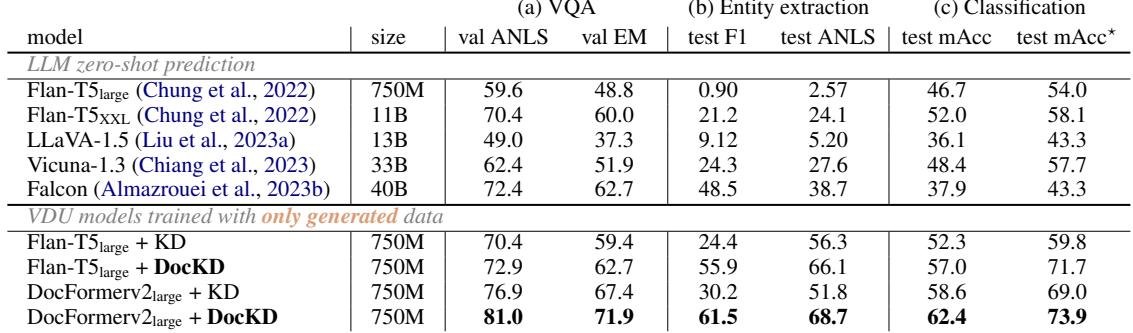
Table 1 presents the key findings:
- VQA (Column a): The student model trained with DocKD (81.0 ANLS) significantly outperformed the standard KD model (76.9). Amazingly, the small student model even outperformed its own Teacher (Claude-2) on the validation set because it was specialized on the task.
- Entity Extraction (Column b): The performance gap is massive. DocKD scored 61.5, while standard KD only managed 30.2. This proves that without the KV-detection guidance, standard LLMs are terrible at generating training data for entity extraction.
- Classification (Column c): DocKD improved accuracy from 58.6% to 62.4%.
The Power of Data Quality
Why did DocKD work better? It wasn’t just about the amount of data, but the quality.

Figure 6 shows a side-by-side comparison.
- Top (VQA): The standard KD asks a simple question: “What are the sample codes?” DocKD asks a complex intersectional question: “What is the mean moisture content… for sample code J112?”
- Middle (Entity): DocKD extracts twice as many relevant fields as the standard KD.
- Bottom (Classification): DocKD provides a rich description (“A recommendation letter outlining…”) which leads to a more precise label (“Technical recommendation letter”) compared to the generic “Research proposal” from standard KD.
Open-World Generalization
The “Holy Grail” of this research is Open-World understanding—handling documents the model has never seen before.
The researchers tested this by training a student model only on synthetic data generated by the LLM (unsupervised), and then testing it on out-of-domain datasets (like IRS tax forms or Wikipedia screenshots).
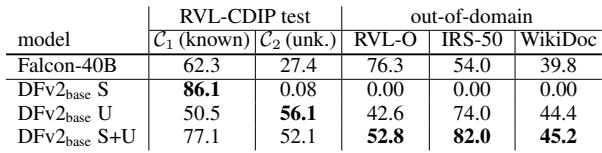
Table 5 shows a crucial result.
- DFv2-base (S): A model trained on human labels (Supervised) gets 86.1% on known categories but 0.0% on unknown categories. It fails completely in the open world.
- DFv2-base (U): The model trained via DocKD (Unsupervised) gets 56.1% on unknown categories and performs well on completely different datasets (IRS-50, WikiDoc).
This confirms that distilling knowledge from an LLM imparts “general wisdom” to the student model, allowing it to adapt to new documents much better than a model trained on a rigid human-labeled dataset.
Conclusion & Implications
The DocKD paper presents a compelling argument for the future of Document AI. It demonstrates that we don’t always need massive human-annotated datasets to train effective models. Instead, we can leverage the general intelligence of Large Language Models, provided we communicate with them correctly.
Key Takeaways:
- Context is King: You cannot simply treat documents as text. Injecting visual knowledge (layout, linearization, KV pairs) is essential for generating high-quality synthetic data.
- Small Models can be Mighty: A small student model, when trained on high-quality synthetic data, can rival or beat much larger models, especially in speed and efficiency.
- Open-World Ready: Models trained this way are less brittle. They handle unseen document types significantly better than traditional supervised models.
This research paves the way for systems where a single LLM can “teach” a fleet of smaller, specialized models to handle invoices, medical records, or legal contracts, democratizing access to powerful document understanding tools without the massive labeling costs.