](https://deep-paper.org/en/paper/2411.16683/images/cover.png)
Introduction
Video editing is fundamentally different from image editing for one frustrating reason: pixels in a video are flat. When you watch a movie, you see actors, shadows, and backgrounds, but the computer just sees a grid of changing colors. If you want to remove a person from a scene, you can’t just click “delete.” You have to fill in the background behind them, frame by frame. If you want to move a car slightly to the left, you have to hallucinate what the road looked like underneath it.
For years, computer vision researchers have tried to solve this by treating video like a stack of transparent sheets, similar to layers in Photoshop. If we could automatically decompose a standard video into a background layer and separate foreground layers (with transparency), editing would become trivial. This concept is called an Omnimatte.
However, existing Omnimatte methods have been brittle. They rely on math that breaks down the moment a camera shakes too much, or if there is a shadow on rippling water. They assume the world is static and rigid.
Enter Generative Omnimatte. In a new paper from Google DeepMind, researchers propose a method that stops trying to calculate the layers using geometry alone and starts dreaming them using Generative AI. By fine-tuning a video diffusion model, they can decompose complex, hand-held videos into clean layers, handling shadows, reflections, and occlusions that were previously impossible.
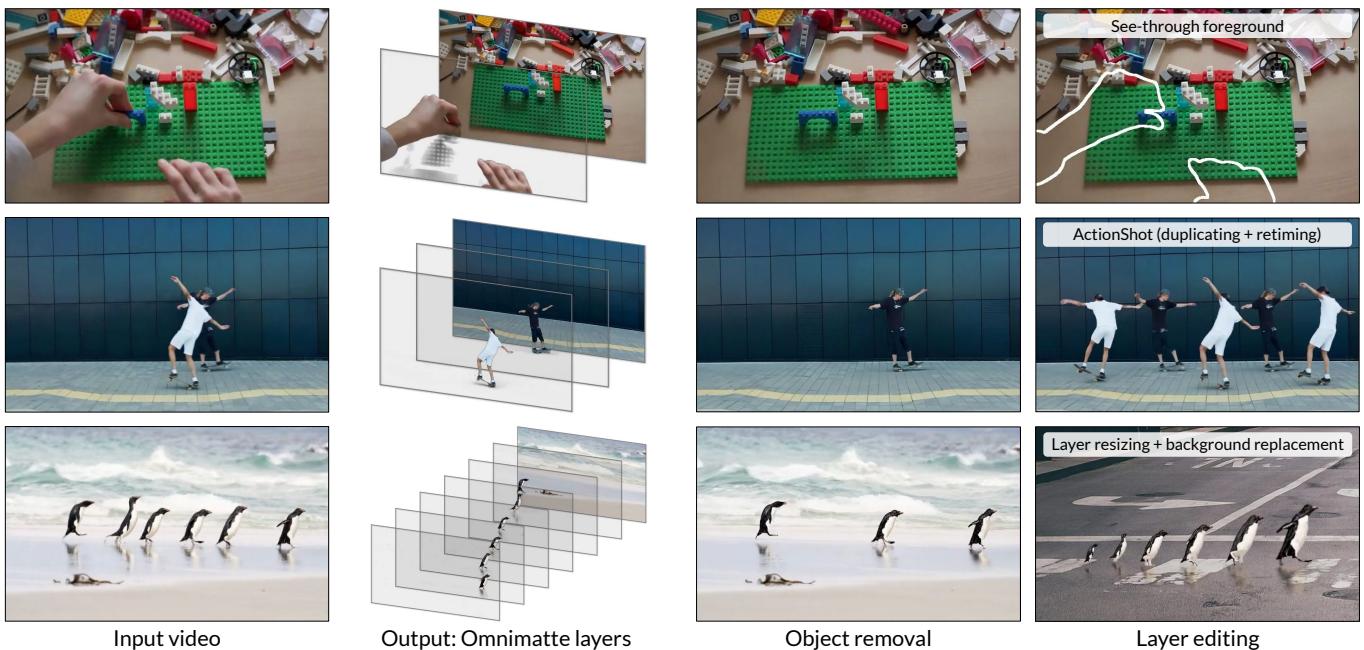
In this post, we will tear down this paper to understand how they turned a video generation model into a video decomposition tool.
Background: The Problem with Layers
To understand why this paper is significant, we first need to understand the limitations of the “classic” approach.
An Omnimatte layer isn’t just a cutout of an object (like a segmented mask). It is the object plus all the effects it causes in the scene—its cast shadow, its reflection in a puddle, or the light bouncing off it.
Traditional methods solve this by looking at motion. If an object moves differently than the background, algorithms can try to separate them. This works great if the camera is on a tripod and the background is a brick wall. But the real world is messy.
- Dynamic Backgrounds: Trees blow in the wind, and water ripples. Traditional methods confuse this background motion with foreground objects.
- Occlusion: If a person walks behind a lamp post, traditional methods don’t know what the person looks like behind the post. They can’t “invent” missing pixels.
- Complex Camera Motion: If the camera is handheld and moving, calculating the geometry becomes incredibly difficult.
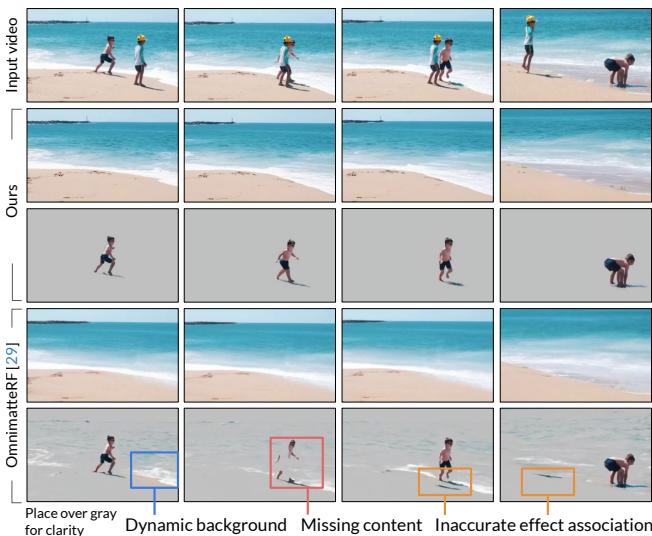
As shown in Figure 2 above, previous methods (like OmnimatteRF) struggle when assumptions are violated. Notice the “ghosting” artifacts and the inability to handle the dynamic ocean background. To solve this, we need a model that understands what the world looks like—a model that has a “prior” on natural video.
The Generative Solution
The core insight of Generative Omnimatte is that modern video diffusion models (like Lumiere or Sora) have seen billions of videos. They “know” that when a person stands on sand, there should be a shadow. They “know” that water reflects objects.
The researchers realized that instead of calculating layers from scratch, they could teach a diffusion model to remove objects and their effects. If you can perfectly remove an object and its shadow to reveal the clean background, and you can also generate a video of just that object, you have successfully decomposed the video.
The Framework Overview
The method operates in two distinct stages:
- The “Casper” Stage: Use a diffusion model to generate “clean plate” backgrounds and “solo” videos for each object.
- The Optimization Stage: Use those generated videos to mathematically solve for the precise RGBA (Red, Green, Blue, Alpha) layers.
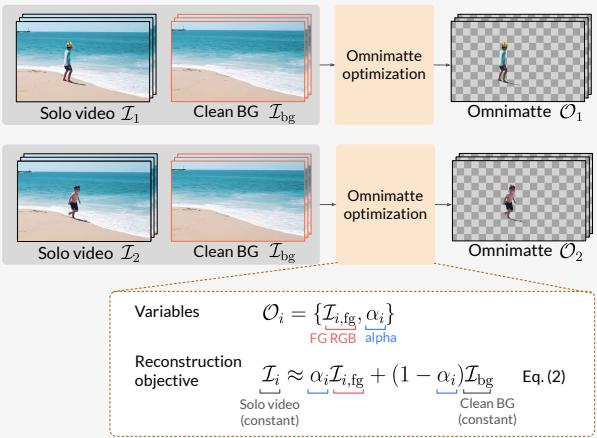
Let’s break these down.
Stage 1: Casper (The Object-Effect Removal Model)
The researchers built a model nicknamed Casper (after the Friendly Ghost), based on the Lumiere video diffusion model. The goal of Casper is simple: take a video and a mask of an object, and produce a video where that object and its effects are gone.
Why not standard Inpainting?
You might ask, “Why not just use standard video inpainting?” Standard inpainting models are trained to fill in a masked area. If you mask a person, the inpainting model fills in the hole. However, it leaves the shadow behind because the shadow was outside the mask.
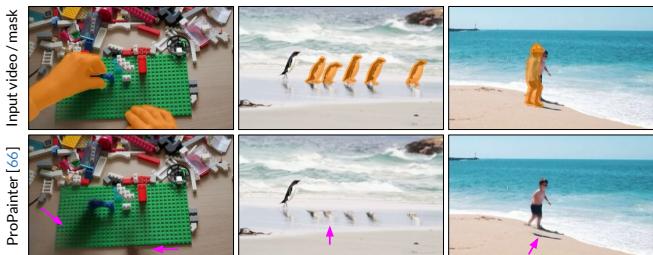
As Figure 3 shows, standard inpainting (like ProPainter) creates a “ghost” effect where the person is gone, but their shadow or reflection remains. To get a true layer decomposition, the shadow must go too.
The Trimask
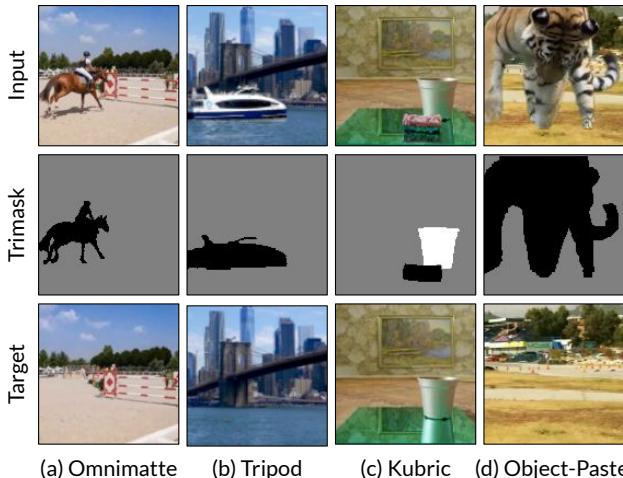
To fix this, the authors introduced a Trimask. Instead of a binary mask (0 for background, 1 for foreground), the Trimask has three states:
- Remove (Black): The object we definitely want gone.
- Preserve (White): The things we definitely want to keep.
- Uncertain (Gray): The background area where shadows or reflections might exist.
By feeding this Trimask into the diffusion model, the model learns that it is allowed to modify the “Gray” pixels (to remove shadows) but must respect the structure of the background.
Finding the Hidden Connections
Why does a diffusion model know how to remove a shadow that isn’t masked? It turns out, pre-trained video generators already have an internal understanding of cause and effect.
The researchers analyzed the attention maps inside the Lumiere model. When the model looks at a shadow pixel, its attention mechanism heavily attends to the object casting that shadow.
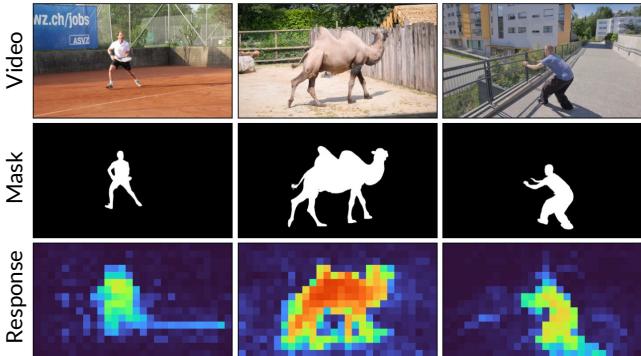
Figure 5 visualizes this. The “Response” map shows that the model internally links the pixels of the tennis player to the pixels of the shadow on the court. Casper is simply fine-tuning this innate ability.
Training Casper
To train Casper, the researchers needed pairs of videos: one with an object/effect, and one without. Since this data doesn’t naturally exist in large quantities, they curated a mix of datasets:
- Synthetic Data (Kubric): 3D rendered scenes where they can toggle objects and shadows on and off perfectly.
- Real Data (Omnimatte & Tripod): High-quality results from previous methods and static camera shots used as ground truth.
- Object-Paste: Taking objects from one video and pasting them into another, creating artificial “ground truth” for removal.
Stage 2: Omnimatte Optimization
Once Casper has run, we have:
- A Clean Background Video (\(I_{bg}\)): The scene with no foreground objects.
- Solo Videos (\(I_i\)): A video containing only Object A and the background, with all other objects removed.
However, Casper outputs RGB videos. It doesn’t output transparency (Alpha). We need to extract the precise Alpha matte to create a true layer.
The researchers solve this via Test-Time Optimization. They treat the decomposition as a math problem. They want to find an RGBA layer (\(O_i\)) such that when you composite it over the clean background (\(I_{bg}\)), it looks exactly like the Solo Video (\(I_i\)).
The composition equation is standard alpha blending:

Here, \(\mathcal{I}_{i, fg}\) is the color of the object, and \(\alpha_i\) is the transparency.
They freeze the background video generated by Casper and use a small neural network (a U-Net) to predict the Alpha and Foreground Color for the object. They train this small network on just this specific video to minimize the reconstruction error:

They also add a sparsity loss. This forces the Alpha channel to be mostly zero (transparent), ensuring that the layer only captures the object and its shadows, not the whole background.

This optimization step is crucial because it sharpens the results and ensures mathematical consistency between the layers, fixing small hallucinations that the diffusion model might have introduced.
Experiments and Results
The results represent a significant leap forward, particularly for “casual” videos—the kind you take with a smartphone where the camera moves and the lighting isn’t perfect.
Qualitative Comparison
In comparisons against state-of-the-art methods (Omnimatte, Omnimatte3D, OmnimatteRF), Generative Omnimatte handles difficult cases much better.
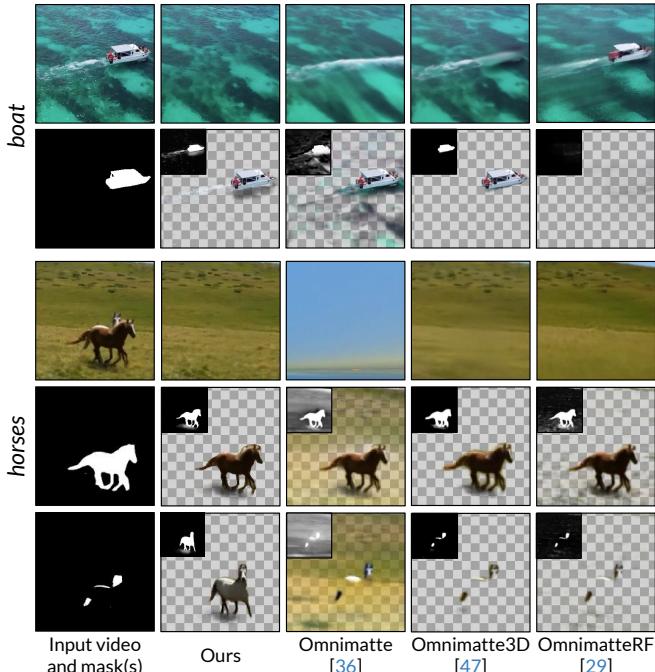
In Figure 7:
- Boat (Left): Look at the wake of the boat. Previous methods struggle to separate the white water (effect) from the blue water (background). Generative Omnimatte captures the wake in the foreground layer perfectly.
- Horses (Right): This is an occlusion test. The horse in the back is partially blocked. Previous methods leave a hole or a blur. Generative Omnimatte hallucinates the missing parts of the horse, creating a complete layer.
Object Removal
Because the core engine is an “Object-Effect Removal” model, the system excels at simply deleting things from videos.
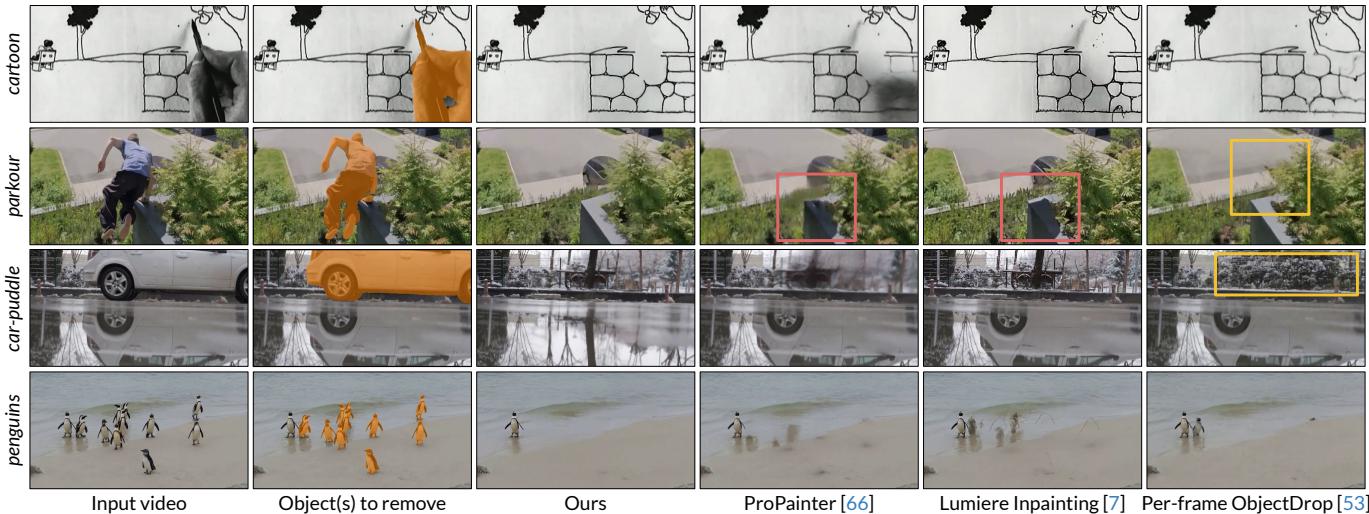
Figure 8 highlights the “Parkour” example (2nd column). Look at the shadow on the wall.
- ProPainter & Lumiere Inpainting: The person is gone, but a ghostly shadow remains on the wall.
- Ours (Generative Omnimatte): The person and the shadow are gone, and the wall behind them is reconstructed cleanly.
Quantitative Success
The researchers didn’t just rely on pretty pictures. They benchmarked their method using PSNR (Peak Signal-to-Noise Ratio) and LPIPS (a perceptual metric). Higher PSNR and lower LPIPS indicate better quality.

As shown in Table 1 (and Table 2 in the appendix), their method consistently outperforms competitors, particularly in perceptual quality (LPIPS), which measures how “natural” the video looks to the human eye.
Applications and Limitations
Creative Possibilities
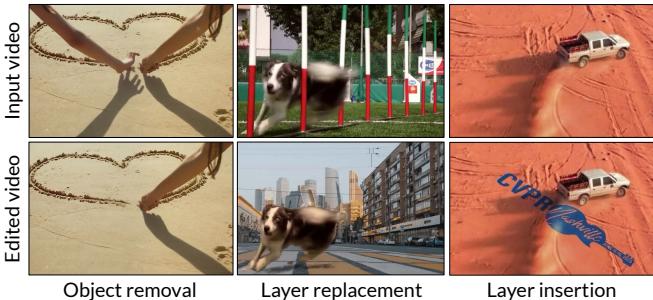
Once a video is decomposed into layers, you have full creative control. You can:
- Retime: Make one person move in slow motion while the other moves at normal speed.
- Remove: Delete a photobomber and their shadow.
- Insert: Put text or new objects behind existing objects.
What Can’t It Do?
No model is perfect. The reliance on a generative prior (the diffusion model) is a double-edged sword.
- Hallucinations: Sometimes the model invents details that weren’t there.
- Physics Failures: If a trampoline bends when someone jumps on it, the model might remove the person but leave the trampoline bent, because it doesn’t fully understand the physics of deformation.
- Identity Confusion: In scenes with many similar objects (like a flock of birds or a crowd), the model might struggle to separate individual effects for specific instances.
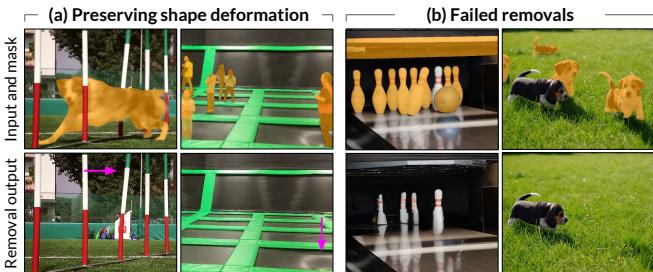
Figure 11(a) shows the “deformation” issue—the dog is removed, but the poles remain slightly bent/distorted where the dog touched them.
Conclusion
Generative Omnimatte marks a shift in how we approach video processing. We are moving away from purely geometric solutions toward semantic solutions. By using a diffusion model that “understands” objects and shadows, we can solve inverse problems—like unbaking a video into layers—that were previously intractable.
For students and researchers, this paper demonstrates the power of adapting generative models. The authors didn’t build a new architecture from scratch; they took a powerful existing model (Lumiere), designed a clever conditioning scheme (Trimask), and wrapped it in an optimization loop. It is a prime example of how generative priors can be harnessed for precise, analytical tasks.