](https://deep-paper.org/en/paper/2411.18159/images/cover.png)
Type-R: How AI Can Finally Spell Correctly in Generated Images
If you have ever played with text-to-image models like Stable Diffusion, DALL-E 3, or Flux, you are likely familiar with a very specific frustration. You type a prompt asking for a cool cyber-punk poster that says “FUTURE,” and the model generates a breathtaking image… with the text “FUTRE,” “FUTUUE,” or perhaps some alien hieroglyphics that look vaguely like English.
While generative AI has mastered lighting, texture, and composition, it is notoriously bad at spelling. This phenomenon, often called the “spaghetti text” problem, renders many generated images unusable for professional graphic design without heavy manual editing.
In this post, we are doing a deep dive into a research paper titled “Type-R: Automatically Retouching Typos for Text-to-Image Generation.” The researchers propose a novel, training-free method to fix these typographical nightmares automatically. It acts as a spellchecker and visual editor for your AI-generated art.
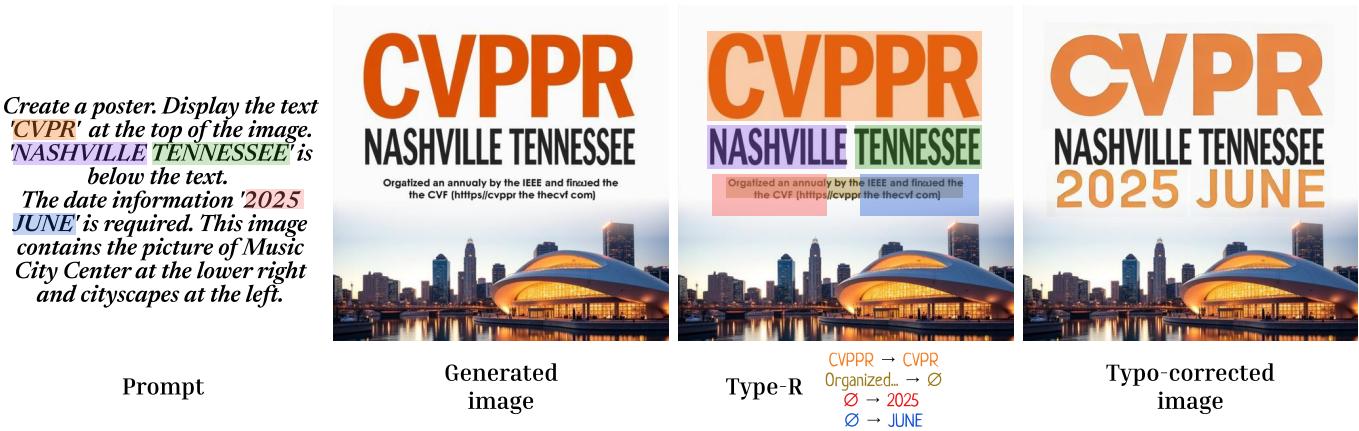
As shown in Figure 1, the system takes an image with garbled text (like “CVPPR” and “Orgalized”), detects the errors, and seamlessly corrects them (“CVPR” and “Organized”) without ruining the beautiful background.
The Problem: Why Can’t AI Spell?
Before we look at the solution, it is helpful to understand the problem. Most text-to-image models process text as tokens (chunks of characters) rather than individual letters. When a model learns what an “apple” looks like, it associates the token embedding for “apple” with the visual features of the fruit. However, it rarely learns the precise sequence of glyphs (A-P-P-L-E) required to render the word visually.
Previous attempts to fix this involved:
- Scaling up: Throwing more data at the model (expensive and doesn’t guarantee typo-free results).
- Specialized architectures: Models like TextDiffuser are trained specifically for text layout. However, as we will see later, these often compromise the artistic quality of the image to get the text right.
The researchers behind Type-R asked a different question: Instead of fighting the image generator, why not just fix the image after it’s made?
The Solution: The Type-R Pipeline
Type-R (which stands for Typeography Retouching) is a post-processing pipeline. It is “model-agnostic,” meaning you can plug it into Stable Diffusion 3, Flux, or any future model, and it will work without requiring you to fine-tune those massive networks.
The process functions like a human editor correcting a draft. It looks for mistakes, erases them, plans where the correction should go, and then writes the correct text.
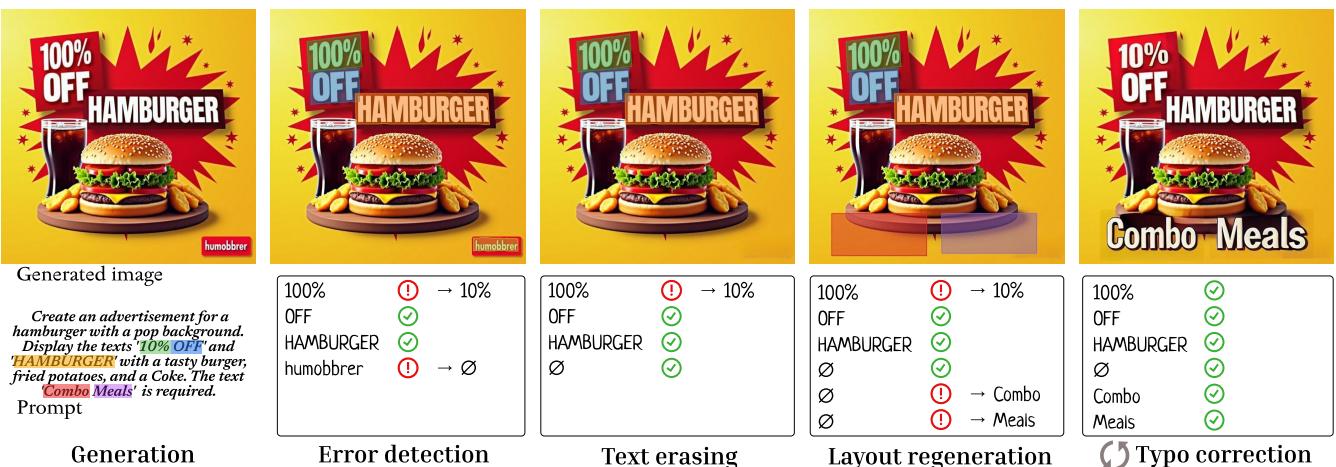
As illustrated in Figure 2, the pipeline consists of four distinct stages. Let’s break them down.
Stage 1: Error Detection
First, Type-R needs to know what went wrong. The system takes the generated image and runs it through an OCR (Optical Character Recognition) model to “read” what is currently on the canvas. It then compares this detected text against the text requested in the user’s prompt.
This isn’t as simple as a string comparison (if "CVPPR" != "CVPR"). The model might have generated extra words, missed words entirely, or split words apart.
To solve this, the researchers frame it as a matching problem using Optimal Transport. They calculate the “cost” of transforming the detected words into the prompt words.
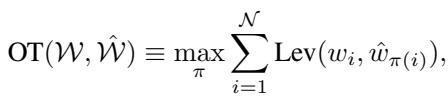
The core math here minimizes the edit distance (Levenshtein distance) between the set of prompt words (\(W\)) and the set of detected words (\(\hat{W}\)).
If the number of words doesn’t match, they pad the sets with “dummy” tokens (\(p\)).
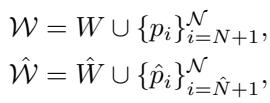
- If a prompt word matches a dummy token, it means a word is missing from the image.
- If a detected word matches a dummy token, it means the image has unwanted extra text.
- If a prompt word matches a detected word but the distance is non-zero (e.g., “Hamburger” vs “Humobbrer”), it is a typo.
Stage 2: Text Erasing
Once the errors are identified, the system cleans the canvas.
If the error detection stage finds “unintended” words (hallucinated text that wasn’t in the prompt), Type-R uses an inpainting model called LaMa. It creates a mask over the bad text and asks LaMa to fill it in with the background texture, effectively erasing the mistake.
Stage 3: Layout Regeneration
What if the image generator forgot to include a word entirely? Or what if we erased a word because it was in the wrong place?
Type-R needs to decide where to put the missing text. Instead of using a heuristic, the researchers utilize a Vision-Language Model (VLM), specifically GPT-4o. They feed the image and the list of missing words to GPT-4o and ask it to output a JSON file containing the best bounding box coordinates for the new text.
This is a clever use of modern LLMs—leveraging their “common sense” about design to place text in logical, aesthetically pleasing spots.
Stage 4: Typo Correction
Now comes the actual fix. We have the correct location (from Stage 3) and the clean canvas (from Stage 2). Type-R uses a text-editing model called AnyText.
Unlike standard inpainting which just fills holes, AnyText is conditioned to render specific glyphs. However, even AnyText isn’t perfect; it might fix “CVPPR” to “CVPR” but accidentally mess up the font style.
To handle this, Type-R operates in a loop. It attempts a correction, reads the result with OCR, checks if it’s correct, and if not, tries again.

As shown in Algorithm 1, this loop continues until the spelling is perfect or a maximum number of attempts is reached.
Experiments: Does It Actually Work?
The researchers tested Type-R using the MARIO-Eval benchmark, a standard dataset for evaluating text-to-image models. They combined Type-R with state-of-the-art models like Flux and Stable Diffusion 3 (SD3) and compared them against specialized text-centric models like TextDiffuser.
Visual Comparison
The visual difference is striking. Specialized models often sacrifice background complexity to get the text right. General models (like Flux) create amazing backgrounds but fail at text. Type-R offers the best of both worlds.
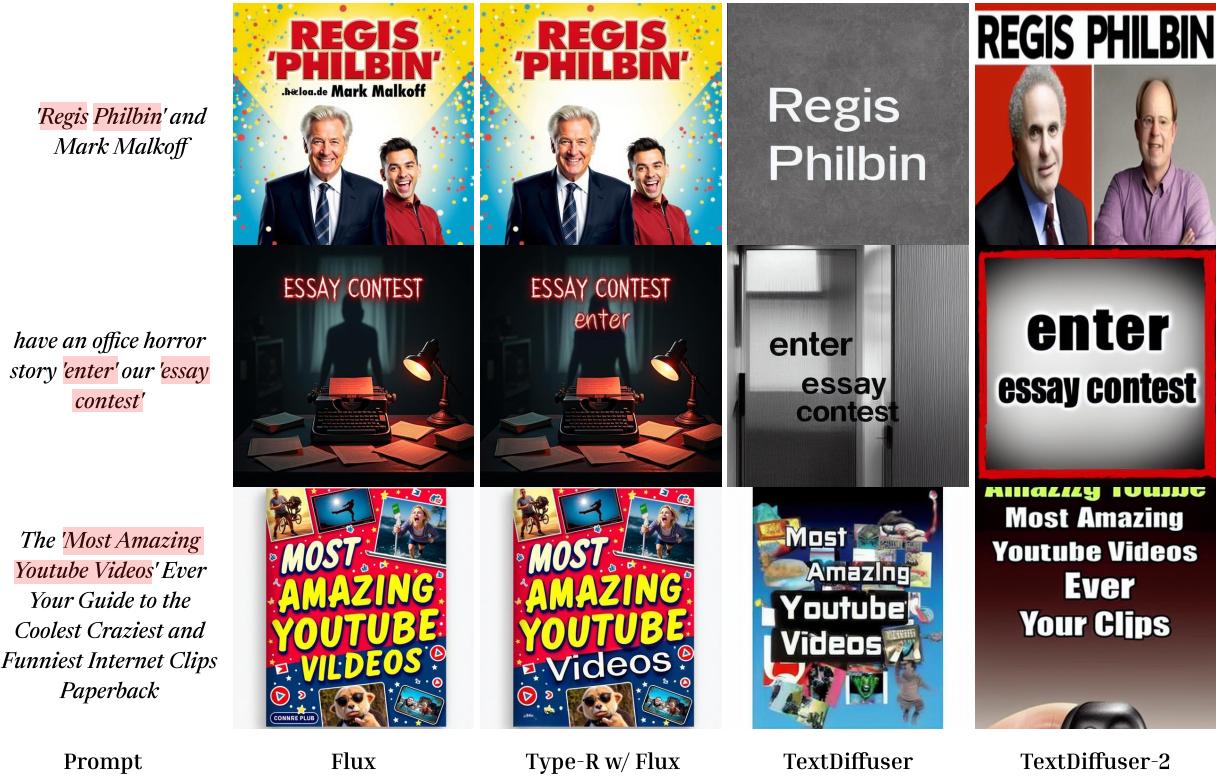
In Figure 3, look at the “Regis Philbin” example (top row).
- TextDiffuser (3rd column) creates a very simple, almost plain poster. The text is readable, but the design is boring.
- Flux (Raw) (1st column) creates a vibrant, complex image, but the text is gibberish (".heioa.de").
- Flux + Type-R (2nd column) keeps the vibrant Flux background but corrects the text to read “Regis Philbin” and “Mark Malkoff.”
The Trade-off: Beauty vs. Accuracy
One of the most interesting findings in the paper is the trade-off between Graphic Quality (how good the image looks) and OCR Accuracy (how correct the spelling is).
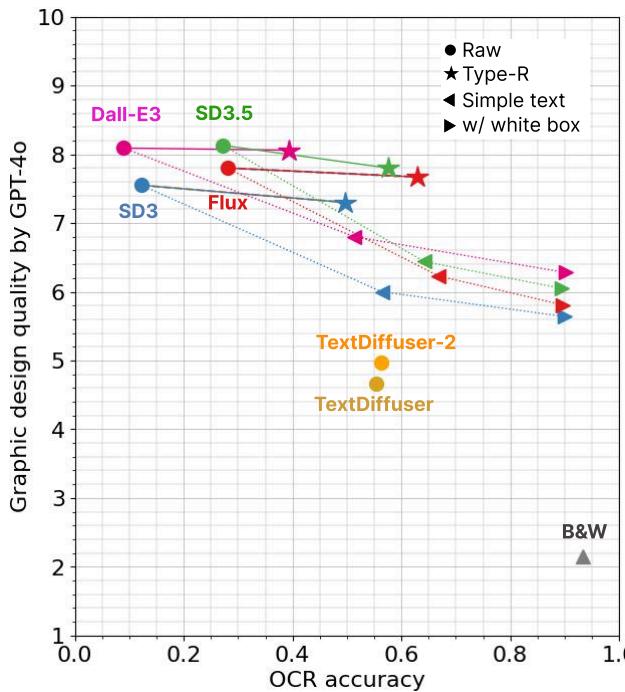
This chart (Figure 5) tells the whole story:
- Top Left (Dall-E 3, Flux): High graphic quality, but lower text accuracy.
- Bottom Right (TextDiffuser, Simple Text): High text accuracy, but low graphic quality.
- The Sweet Spot (Type-R): The lines connected to “Flux” and “Dall-E 3” show Type-R moving these models to the right. It significantly boosts OCR accuracy (moving right on the X-axis) while maintaining the high graphic quality of the base model (staying high on the Y-axis).
Quantitative Results
The numbers back this up. When evaluating using GPT-4o as a judge for graphic design, Type-R combined with Flux outperforms models specifically designed for typography.
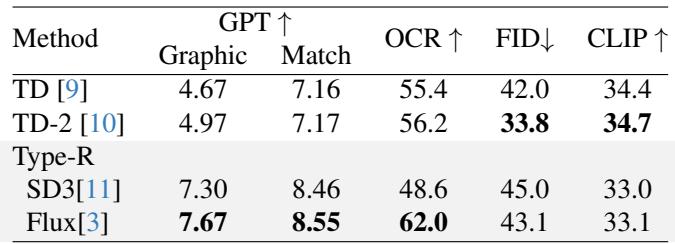
In Table 1, notice the OCR column. Flux jumps to 62.0 accuracy with Type-R, beating the specialized TextDiffuser-2 (56.2), while maintaining a much higher Graphic score (7.67 vs 4.97).
Why This Matters
The significance of Type-R lies in its modularity.
In the fast-moving world of AI, new image generators are released constantly. If we relied on architectures like TextDiffuser, we would have to retrain a massive new text-specific model every time a better image generator (like a hypothetical Stable Diffusion 4) comes out.
With Type-R, you can simply swap out the “base” generator. If Flux gets an update tomorrow, Type-R immediately benefits from the improved image quality while continuing to handle the spell-checking.
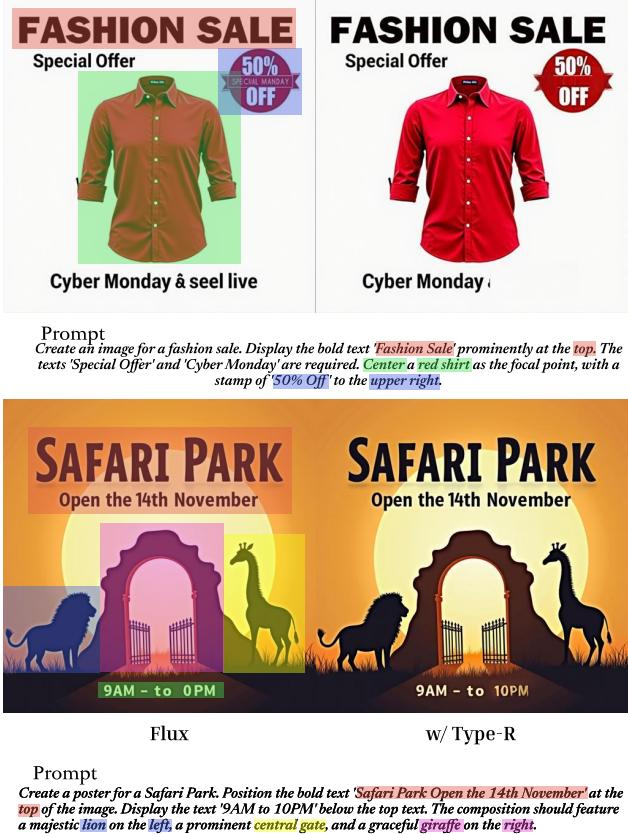
Furthermore, as seen in Figure 14, Type-R allows for precise control. It can take rough layout instructions (e.g., “text at the top,” “lion on the left”) and ensure the text lands exactly where intended, correctly spelled, without breaking the visual composition.
Limitations and Future Work
While impressive, Type-R is not magic. It relies on a chain of other models (OCR, LaMa, GPT-4o, AnyText). If the OCR fails to detect a weirdly shaped letter, the error detection fails. If GPT-4o suggests a bad layout, the text looks out of place.
The authors also note that the process is computationally heavier than a single pass because it runs multiple models in sequence. However, for a user trying to generate a usable poster, waiting an extra few seconds is far better than spending hours in Photoshop fixing “spaghetti text.”
Conclusion
Type-R represents a shift in how we think about generative AI. Rather than trying to build one massive “God model” that does everything perfectly, it shows the power of compound AI systems—chaining together specialized tools (a generator, a reader, a planner, and an editor) to solve a complex problem.
For students and researchers, Type-R is a great example of how to tackle model limitations not by retraining, but by designing intelligent workflows around them. By treating the generated image as a draft rather than a final product, Type-R finally teaches AI how to spell.
Original Paper: Type-R: Automatically Retouching Typos for Text-to-Image Generation by Wataru Shimoda, Naoto Inoue, Daichi Haraguchi, Hayato Mitani, Seiichi Uchida, and Kota Yamaguchi. CVPR.