](https://deep-paper.org/en/paper/2411.19108/images/cover.png)
Introduction
We are living in the golden age of generative video. From Sora to Open-Sora and Latte, Diffusion Transformers (DiTs) have unlocked the ability to generate high-fidelity, coherent videos from simple text prompts. However, there is a massive bottleneck keeping these tools from real-time applications: inference speed.
Generating a single second of video can take surprisingly long on consumer hardware. This is primarily due to the sequential nature of diffusion models. To create an image or video frame, the model must iteratively remove noise over dozens or hundreds of timesteps. It is a slow, methodical process where every step depends on the previous one.
To speed this up, researchers have looked into caching. The idea is simple: if the model’s output at timestep \(t\) is very similar to timestep \(t+1\), why calculate \(t+1\)? Just reuse the result from \(t\). Previous methods attempted this by caching uniformly—for example, calculating one step, skipping the next, calculating the third, and so on.
But here is the problem: not all timesteps are created equal. In some phases of generation, the video content changes drastically; in others, it barely shifts. Uniform caching ignores this reality, leading to a poor balance between speed and visual quality.
Enter TeaCache (Timestep Embedding Aware Cache). In a recent paper, researchers proposed a novel, training-free approach that intelligently decides when to cache. Instead of guessing or following a fixed schedule, TeaCache looks at the model’s inputs to predict if the output is worth calculating. The result? Significant speedups with negligible loss in quality.
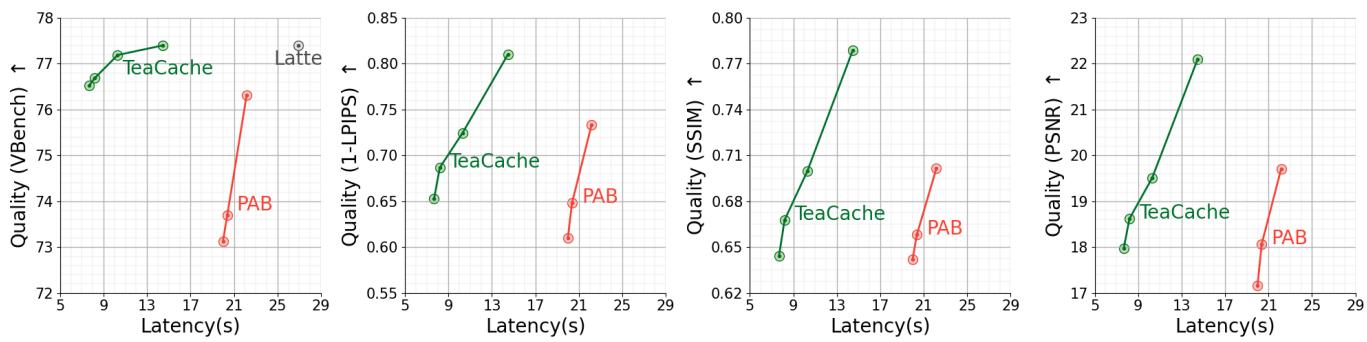
As shown in Figure 1, TeaCache pushes the envelope, achieving lower latency (further to the left) while maintaining higher quality (higher up) compared to previous state-of-the-art methods like PAB.
Background: The Diffusion Bottleneck
To understand why TeaCache is necessary, we first need to look at how video diffusion models work.
The Denoising Process
Diffusion models generate data by reversing a noise process. During training, we destroy an image by gradually adding Gaussian noise. During inference (generation), the model learns to remove that noise step-by-step to recover a clean video.
Mathematically, the forward process adds noise over \(T\) steps:

The reverse process, which is what happens when you click “Generate,” involves the model estimating the clean data distribution from the noisy input:

In modern video models, this is handled by Diffusion Transformers (DiTs). These are massive neural networks that process video frames as sequences of tokens. Because the reverse process is sequential (\(t=1000 \to t=999 \to \dots \to 0\)), you cannot parallelize these steps. If you want high quality, you need many steps. If you want speed, you reduce steps, but quality usually suffers.
The Concept of Caching
Since we can’t easily parallelize the steps, we try to skip computations. In many cases, the internal features or outputs of the model at step \(t\) are extremely similar to step \(t-1\).
Existing methods like PAB (Pyramid Attention Broadcast) use Uniform Caching. They might say, “Cache the output every odd step.”
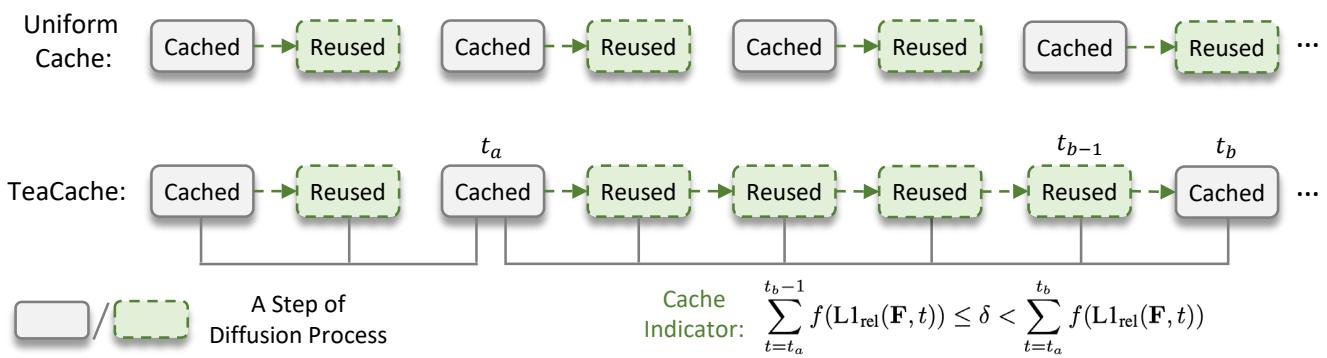
Figure 2 (top row) illustrates uniform caching. The model alternates rigidly between “Computed” (solid) and “Reused” (dashed). This is suboptimal because the difference between outputs fluctuates. Sometimes you need to compute 5 steps in a row; other times you can skip 5 in a row. Uniform caching is blind to this dynamic.
Core Method: TeaCache
The researchers behind TeaCache asked a critical question: How can we know if the output will change without actually running the heavy computation?
If we run the model to check the output difference, we’ve already wasted the time we wanted to save. We need a cheap “indicator” that tells us in advance if the output is going to be redundant.
The Hypothesis: Input Tells All
The core insight of TeaCache is that inputs correlate with outputs. If the inputs to the Transformer block barely change between timestep \(t\) and \(t-1\), the output likely won’t change much either.
But a diffusion model has several inputs. Which one tells the truth?
- Text Embedding: This represents your prompt (“A cat running”). It stays constant throughout the whole process. Useless for caching.
- Noisy Input: This is the video content being denoised. It changes slowly and contains the image data.
- Timestep Embedding: A vector representing the current time \(t\). This changes every step but doesn’t know anything about the image content.
The researchers analyzed these inputs against the actual model output. They looked at the “Timestep Embedding Modulated Noisy Input”—essentially the noisy image combined with the time signal inside the Transformer block.
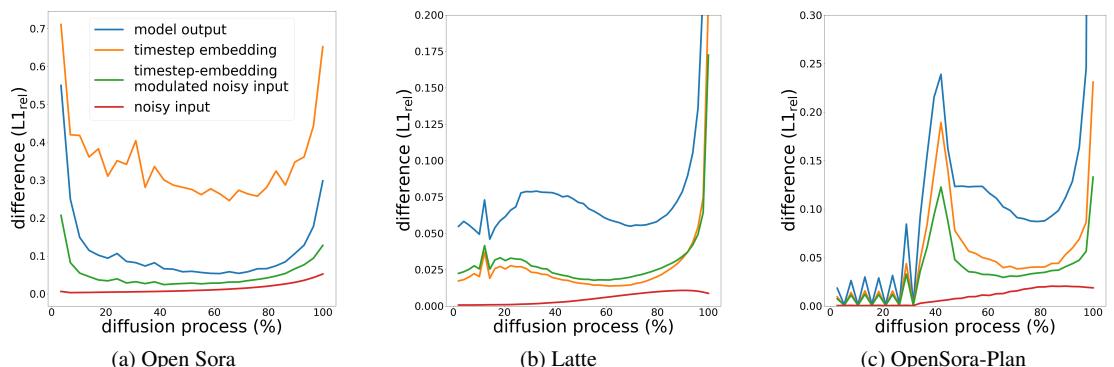
Figure 3 confirms their hypothesis. Look at the Blue Line (Model Output Difference) and the Green Line (Modulated Noisy Input Difference).
- In Open Sora (a), the output difference starts high, drops, and rises again (a ‘U’ shape). The Green line follows this trend.
- In Latte (b) and OpenSora-Plan (c), the trends are different, but the Green line consistently mirrors the Blue line’s behavior much better than the Red line (raw noisy input).
This means we can look at the cheap-to-compute Input to predict the expensive-to-compute Output.
The Architecture
Let’s visualize where this happens in the model.

As shown in Figure 4, the Timestep Embedding (yellow) modulates the Noisy Input before it enters the Self-Attention layers. This combined signal—the “Modulated Input”—is what TeaCache monitors.
The Metric
To quantify “difference,” the paper uses the Relative L1 Distance. If \(O_t\) is the output at time \(t\), the difference is:
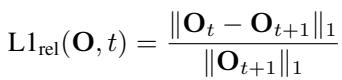
A large value means the output changed a lot (don’t cache!). A small value means the output is stable (safe to cache!).
The Rescaling Strategy (Polynomial Fitting)
There is one catch. While the trend of the input matches the output, the magnitude might be off. The relationship isn’t perfectly 1:1.
To fix this, TeaCache uses Polynomial Fitting. They take a few sample points and fit a curve to map the “Input Difference” to the expected “Output Difference.”
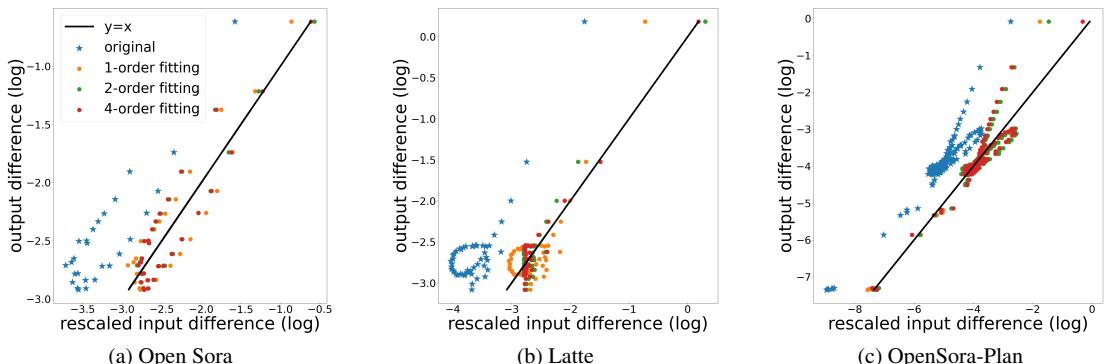
Figure 5 shows why this is needed. The raw data points (blue stars) are scattered. By applying a polynomial function \(f(x)\) (Equation below), they can adjust the input difference to be a highly accurate predictor of the output difference.

The TeaCache Algorithm
Putting it all together, TeaCache works by accumulating the estimated differences.
- Calculate the difference in inputs for the current step.
- Rescale it using the polynomial function \(f\).
- Add it to a running total.
- Decision Time:
- If the total is below a threshold \(\delta\), reuse the cached output.
- If the total is above \(\delta\), run the model to compute a new output and reset the total.
The logic is formalized in this inequality:

This creates a dynamic schedule (as seen in Figure 2, bottom) where the model works hard only when necessary.
Why not just reduce timesteps?
You might ask, “Why not just run the model for fewer steps (e.g., 50 instead of 100)?”
Reducing steps leads to a coarser noise schedule, which degrades quality significantly. TeaCache keeps the fine-grained noise schedule but skips the redundant calculations.

Figure 6 demonstrates this clearly. Reducing steps (middle column) washes out details. TeaCache (right column) preserves the texture and lighting of the original 30-step generation while being faster.
Experiments & Results
The researchers tested TeaCache on three major open-source video models: Open-Sora 1.2, Latte, and OpenSora-Plan. They compared it against T-GATE, \(\Delta\)-DiT, and PAB.
Quantitative Performance
The results were impressive. TeaCache consistently achieved higher speedups with better VBench (Video Benchmark) scores.
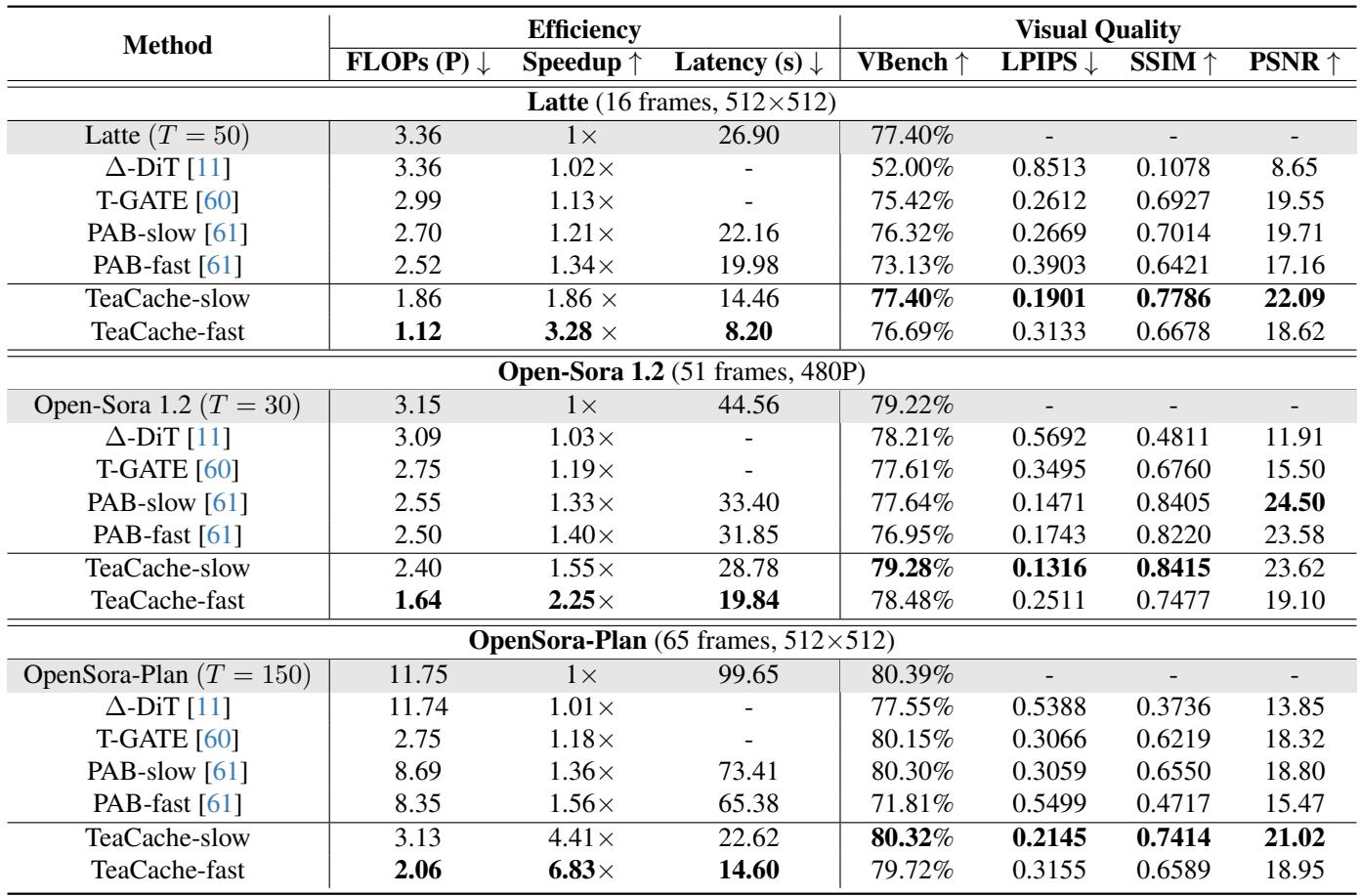
Looking at Table 1:
- Speed: On OpenSora-Plan, TeaCache achieved a massive 4.41x speedup while maintaining a VBench score of 80.32% (virtually identical to the baseline). A faster version hit 6.83x speedup.
- Quality: In almost every row, for a comparable speedup, TeaCache has higher PSNR, SSIM, and VBench scores than PAB.
Visual Quality
Numbers are good, but video generation is about visuals.

In Figure 7, we see side-by-side comparisons.
- Open-Sora (Top): The PAB result loses some texture in the woman’s hair compared to the original. The TeaCache result retains that sharpness while reducing inference time from 44s to 28s.
- Open-Sora-Plan (Bottom): TeaCache reduces the time from 99s down to just 22s—a game-changing acceleration for practical usage—without introducing obvious artifacts.
Efficiency at Scale
TeaCache also scales well with resolution and hardware.
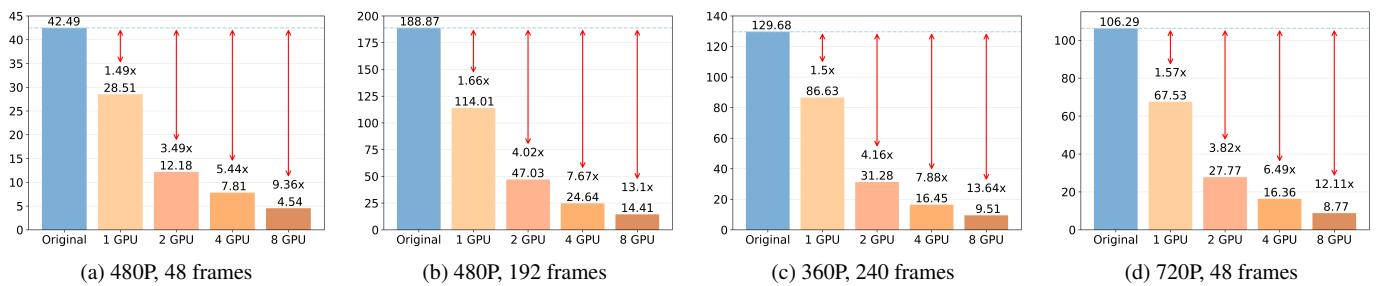
Figure 8 shows that whether you are generating 480p or 720p, or using 1 GPU vs 8 GPUs, TeaCache provides a consistent reduction in inference time (the orange bars are significantly lower than the blue “Original” bars).
The Importance of Rescaling
Finally, the researchers validated their polynomial fitting strategy.
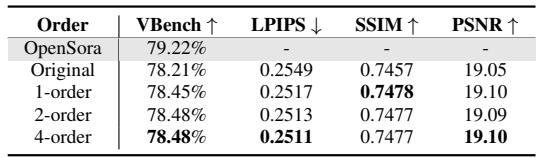
Table 3 shows that using a 4th-order polynomial fitting improves the VBench score compared to using the raw data. It confirms that accounting for the non-linear relationship between input and output is crucial for selecting the right moments to cache.
Conclusion
Video generation is moving fast, but inference latency remains a major hurdle. TeaCache offers a smart, training-free solution to this problem. Instead of blindly skipping steps, it listens to the model’s inputs. By tracking the “Timestep Embedding Modulated Noisy Input,” TeaCache identifies exactly when the model is doing redundant work and skips it.
The implications are significant:
- Drop-in Solution: It requires no retraining of the massive video models.
- High Fidelity: It preserves the visual details that simple step-reduction destroys.
- Speed: With speedups ranging from 1.5x to nearly 7x, it brings high-quality video generation much closer to real-time performance.
As diffusion models continue to grow in size and complexity, intelligent caching strategies like TeaCache will be essential for making these powerful tools accessible and efficient for everyone.