](https://deep-paper.org/en/paper/2412.03451/images/cover.png)
If you look around the room you are sitting in right now, what do you see? Ideally, you see walls, a floor, a ceiling, maybe a desk or a bookshelf. Geometrically speaking, you are surrounded by planes.
While humans instantly perceive these structured, flat surfaces, getting a computer to reconstruct them from 2D images is notoriously difficult. Traditional 3D reconstruction methods often output “point clouds” or “meshes” that look like melted wax—lumpy, noisy, and lacking the sharp geometric definition of a real wall or table.
Recent advancements like Gaussian Splatting (3DGS) have revolutionized how we render scenes, but even they struggle with the strict structural regularity of indoor environments. They represent the world as fuzzy blobs, which works great for a fur coat but terrible for a kitchen counter.
Enter PlanarSplatting, a new research paper that proposes a different approach. Instead of points or Gaussians, why not treat the world as a collection of 3D rectangular primitives? And more importantly, how can we do this fast?
In this post, we’ll dive deep into PlanarSplatting. We will explore how it achieves accurate planar reconstruction in just 3 minutes, how it mathematically defines a “plane splat,” and why it might be the perfect initialization step for your next NeRF or Gaussian Splatting project.
The Problem: Why is Indoor Reconstruction Hard?
Reconstructing indoor scenes has been a computer vision staple for decades. The challenge lies in the “Manhattan World” assumption—the idea that man-made scenes are dominated by orthogonal planes.
Previous approaches broadly fell into two camps:
- Geometric Fitting: These methods build a dense point cloud first (using classic photogrammetry) and then try to “fit” planes to that data using algorithms like RANSAC. This is slow and error-prone; if the initial point cloud is noisy (which it usually is in texture-less white rooms), the planes will be wrong.
- Deep Learning Pipelines: Methods like PlanarRecon or AirPlanes try to learn plane detection end-to-end. However, they rely heavily on annotated data (ground truth 3D planes), which is expensive and scarce. They also often struggle with “over-smoothing” details.
The authors of PlanarSplatting identified a gap: We need a method that optimizes explicit 3D plane primitives directly from images, without needing ground truth plane annotations, and it needs to be differentiable so we can use gradient descent to tune it.
The Solution: PlanarSplatting Overview
The core idea is simple yet powerful: Represent the scene as a bag of 3D Rectangles.
Instead of rendering pixels by checking if a ray hits a point, the system checks if a ray hits a rectangle. But here is the twist: to make this learnable (differentiable), they treat the rectangle similarly to how 3D Gaussian Splatting treats a Gaussian. They “splat” the plane onto the screen.
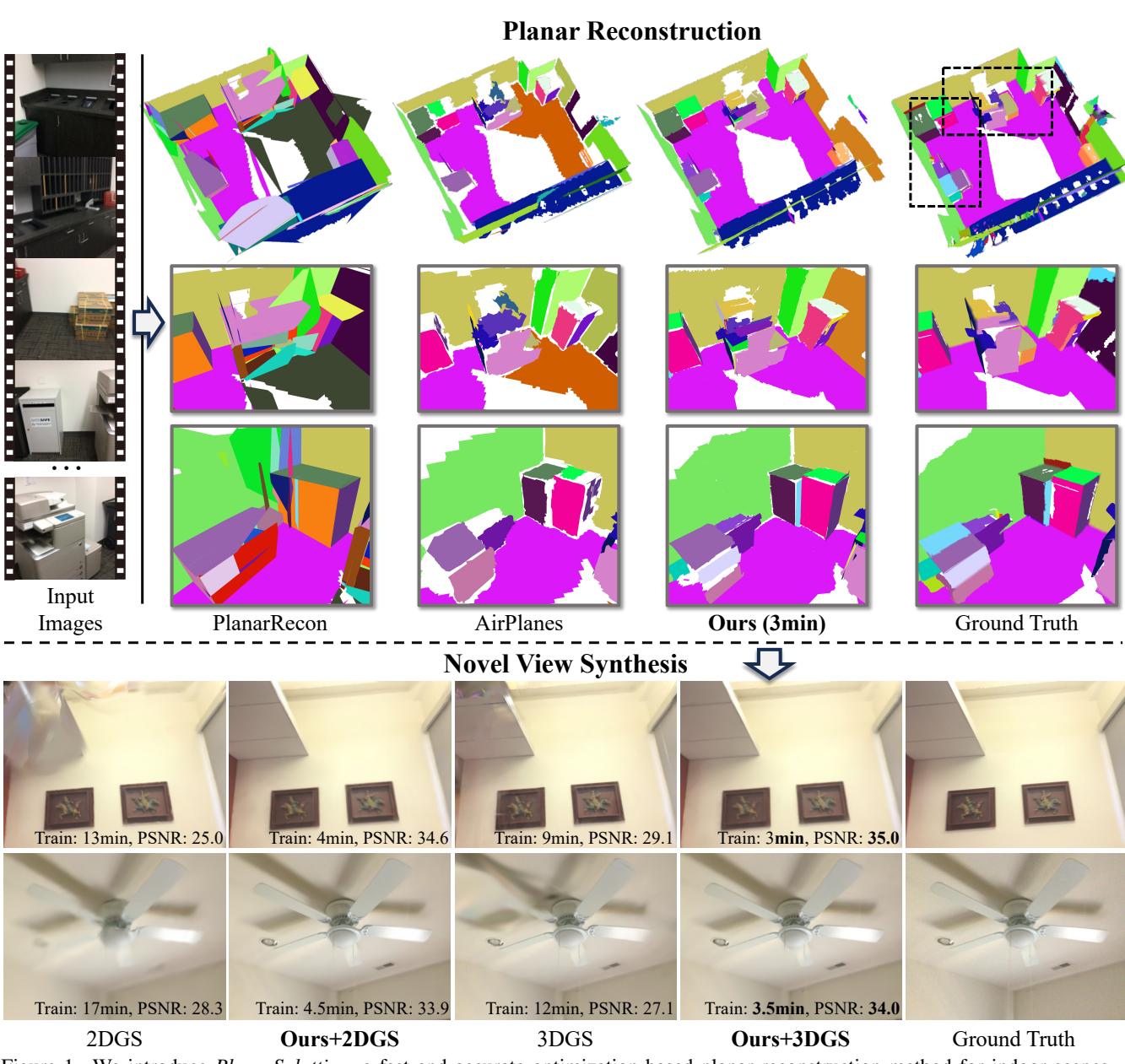
As shown in Figure 1, the results speak for themselves. The top section shows that PlanarSplatting (third column) produces clean, flat surfaces that closely match the Ground Truth, whereas baselines like PlanarRecon leave gaps or misalignment. Perhaps most impressively, the bottom section shows that this method can be combined with Gaussian Splatting to improve novel view synthesis (rendering new camera angles), achieving higher quality in less time.
Deep Dive: The Method
Let’s break down the architecture. How do we mathematically represent a “learnable wall”?
1. The Learnable Planar Primitive
In standard geometry, a plane is infinite. But in a room, a wall has boundaries. Therefore, the primitive must be a 3D Rectangle.
The authors define a planar primitive \(\pi\) with three sets of learnable parameters:
- Position (\(\mathbf{p}_{\pi}\)): The 3D center of the rectangle.
- Orientation (\(\mathbf{q}_{\pi}\)): A quaternion representing the rotation.
- Shape (\(\mathbf{r}_{\pi}\)): The dimensions of the rectangle.
Crucially, the authors do not just use a width and height. They use a Double Radii representation.
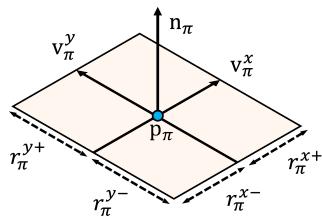
As illustrated in Figure 2, the shape is defined by four values: \(r^{x+}, r^{x-}, r^{y+}, r^{y-}\). This allows the center point \(\mathbf{p}_{\pi}\) to be essentially anywhere inside the rectangle, not necessarily the geometric centroid. This gives the optimizer much more flexibility to stretch the plane in specific directions to fit a wall or floor segment.
The mathematical definition of the radii vector is:

From the rotation quaternion, the system derives the local coordinate system of the plane (the X-axis vector \(\mathbf{v}^x\), Y-axis vector \(\mathbf{v}^y\), and the normal vector \(\mathbf{n}\)).


2. Differentiable Planar Primitive Rendering
This is the engine room of the paper. We have our 3D rectangles; now we need to render them into a 2D image so we can compare them with our input photos and calculate a loss.
The pipeline, visualized below, follows a “Splatting” paradigm.
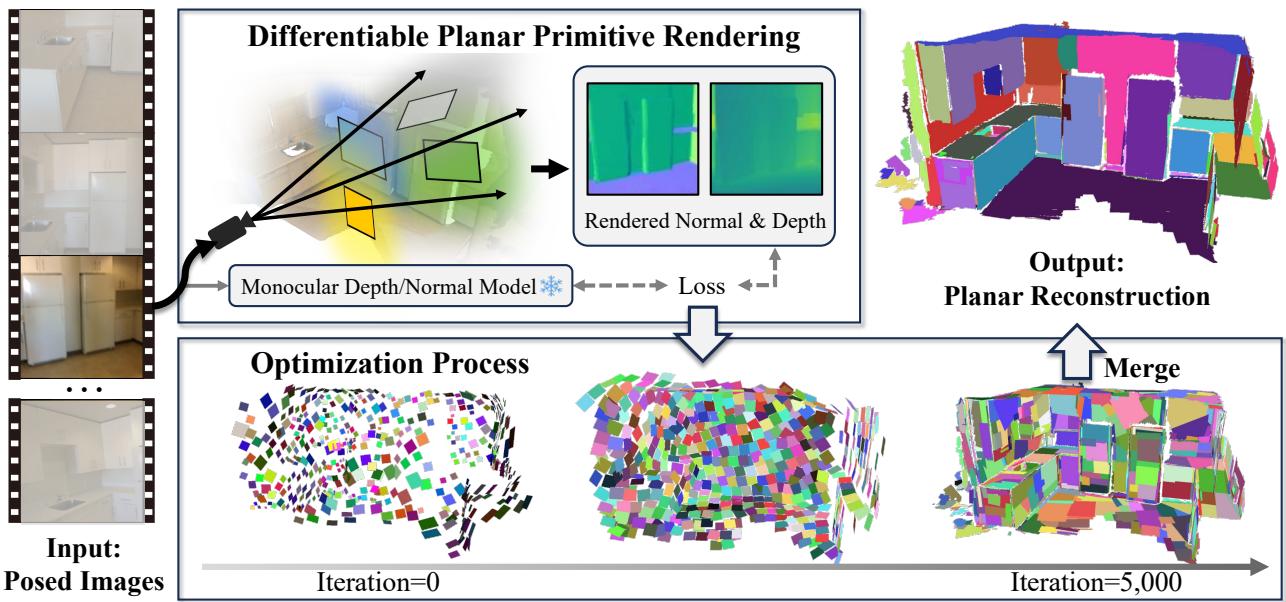
The process consists of three steps: Intersection, Splatting, and Blending.
Step A: Ray-to-Plane Intersection
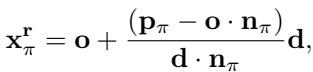
For a pixel in the image, we cast a ray \(\mathbf{r}\) into the scene. We calculate where this ray intersects with the infinite plane defined by our primitive. This gives us an intersection point \(\mathbf{x}_{\pi}^{\mathbf{r}}\).
Step B: The Plane Splatting Function (The Innovation)
Here is where the paper diverges from Gaussian Splatting. In 3DGS, the influence of a primitive falls off smoothly according to a Gaussian distribution (a bell curve). This is great for organic shapes but terrible for rectangles. A Gaussian splat has no hard edges—it fades out. A wall needs to stop abruptly at the corner.
If you use a Gaussian function on a rectangle, you get fuzzy, ambiguous boundaries. The authors propose a novel Rectangle-based Plane Splatting Function.
They define the “weight” (opacity/influence) of a point on the plane using a Sigmoid function rather than a Gaussian. The logic is:
- Calculate how far the intersection point is from the center (projected onto the local X and Y axes). Let’s call these distances \(\mathcal{P}_X\) and \(\mathcal{P}_Y\).
- Compare these distances to the radii (\(r^{x+}\), etc.).
- Feed the difference into a Sigmoid function.

The weight along the X-axis, \(w_X\), is calculated as:

And similarly for the Y-axis:

What does this math do? The term \((r - |\mathcal{P}|)\) measures how far “inside” the rectangle the point is.
- If the point is well inside the radius, this value is positive. \(\text{Sigmoid}(\text{positive large number}) \approx 1\). The plane is opaque.
- If the point is outside the radius, this value is negative. \(\text{Sigmoid}(\text{negative large number}) \approx 0\). The plane is transparent.
- Near the boundary, it transitions sharply.
The parameter \(\lambda\) controls the sharpness. As training progresses, \(\lambda\) is increased (annealed), making the edges sharper and sharper.
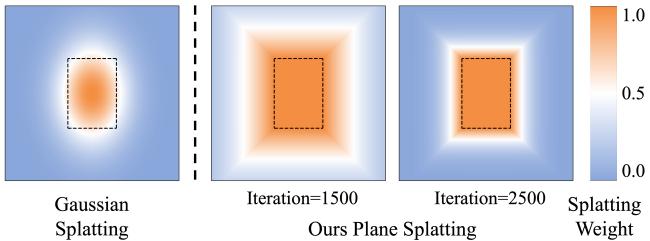
Figure 4 illustrates this beautifully. On the left, a standard Gaussian splat creates a soft blob. In the middle and right, the proposed Planar Splatting creates a shape that actually looks like a rectangle, with the boundary sharpening as iterations increase.
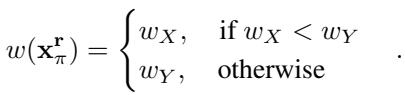
The final weight for a point is simply the minimum of the X and Y weights (intersection of the two bands):
Step C: Blending Composition
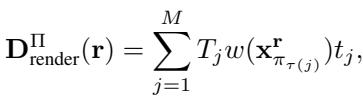
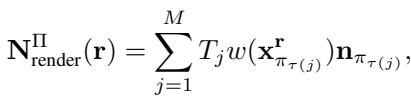
Once the weights are calculated, the renderer sorts the planes by depth and blends them using standard alpha composition—similar to how transparent layers are stacked in Photoshop or standard volume rendering.
The system renders two things:
- Depth Map: Expected distance to the surface.
- Normal Map: The surface orientation at each pixel.
3. Optimization and Supervision
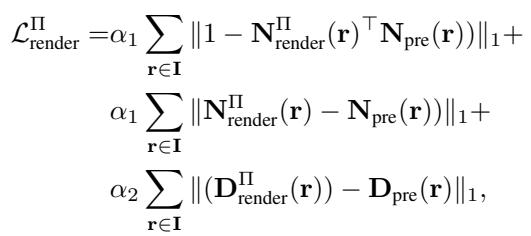
How does the system learn? It doesn’t use ground truth 3D planes (which are hard to get). Instead, it uses monocular cues.
The authors use off-the-shelf foundational models (like Metric3Dv2 for depth and Omnidata for normals) to generate “pseudo-ground-truth” maps for the input images. The loss function tries to minimize the difference between the rendered depth/normals and these predicted depth/normals.
Initialization and Splitting
To get that 3-minute speed, initialization is key. They don’t start from scratch. They use the monocular depth map to create a coarse point cloud, scatter random planes on it, and align them to the estimated normals.
During training, they also perform Plane Splitting. If a single plane primitive has high gradients (meaning it’s trying to stretch to fit a complex shape), the system cuts it in half, creating two new smaller planes.
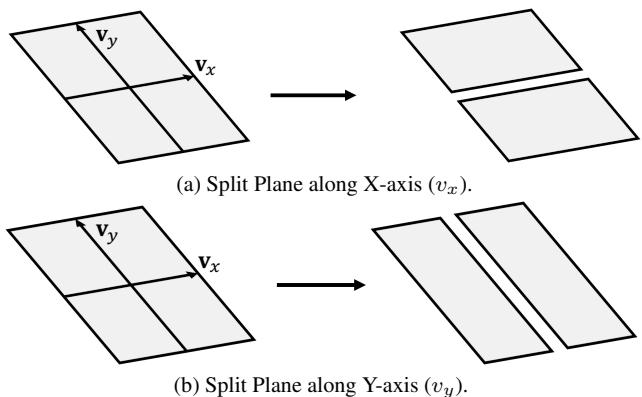
This adaptive splitting (shown in Figure S1) allows the system to capture finer details like the separation between a cabinet door and a drawer.
Experimental Results
The authors evaluated PlanarSplatting on the ScanNetV2 and ScanNet++ datasets.
Quantitative Accuracy
They compared their method against geometry-based approaches (like 2DGS + RANSAC) and learning-based approaches (PlanarRecon, AirPlanes).

Table 1 shows that PlanarSplatting (Ours) achieves the lowest Chamfer Distance (a measure of geometric error) at 4.83, significantly beating PlanarRecon (9.89) and AirPlanes (5.30). It is also the most accurate in terms of plane fidelity.
Visual Quality
The visual differences are stark. Standard Gaussian methods often produce messy, confetti-like artifacts near flat walls.
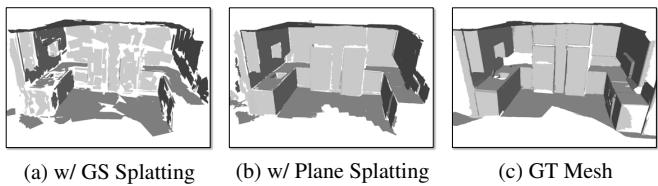
In Figure 5, look at the leftmost image (w/ GS Splatting). The wall is bumpy and irregular. The middle image (w/ Plane Splatting) is smooth and consistent, much closer to the Ground Truth mesh on the right.

Figure 6 further highlights the segmentation capabilities. The colors represent different plane instances. Notice how PlanarSplatting (column c) captures the distinct planes of the furniture and walls cleanly, whereas PlanarRecon (column a) misses entire sections.
Boosting Novel View Synthesis (NVS)
Perhaps the most exciting application for the broader community is the integration with 3D Gaussian Splatting (3DGS).
3DGS is famous for real-time rendering, but it can struggle with geometry. By using PlanarSplatting to initialize the scene (replacing the random point cloud initialization usually used in 3DGS), the authors achieved:
- Faster Convergence: The training time for NVS dropped significantly.
- Better Quality: Higher PSNR and SSIM scores.
- Fewer Primitives: The scene is represented more efficiently.
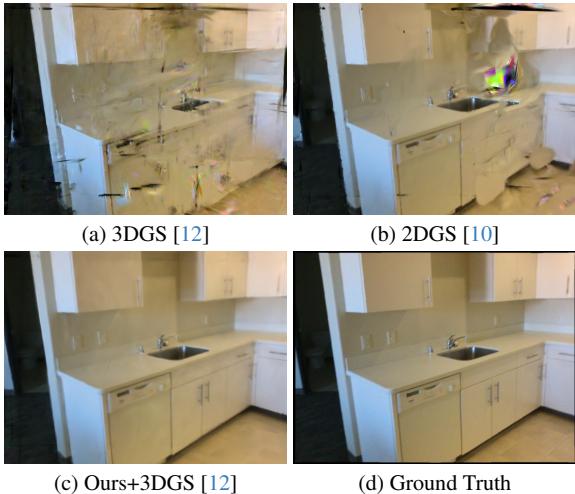
In Figure 7, compare (a) “3DGS” with (c) “Ours+3DGS”. The standard 3DGS result has “floaters” and blurriness around the cabinet. The PlanarSplatting-initialized version is sharp and clean.
Conclusion
PlanarSplatting represents a significant step forward for indoor 3D reconstruction. By respecting the structural nature of indoor scenes (they are made of planes!) and designing a differentiable rendering pipeline specifically for rectangles, the authors achieved a system that is both fast and accurate.
The key takeaways are:
- Representation Matters: Moving from generic Gaussians to Double-Radii Rectangles improves geometric fidelity for man-made scenes.
- Specialized Splatting: The Sigmoid-based splatting function effectively models hard edges, which is crucial for walls and furniture.
- Speed: Optimizing in 3 minutes makes this practical for real-world applications, from AR/VR to robotics.
As we move toward “Digital Twins” and more immersive virtual environments, tools that can quickly turn a video of a room into a structured, clean 3D model will be indispensable. PlanarSplatting proves that sometimes, it’s hip to be square.