](https://deep-paper.org/en/paper/2501.11515/images/cover.png)
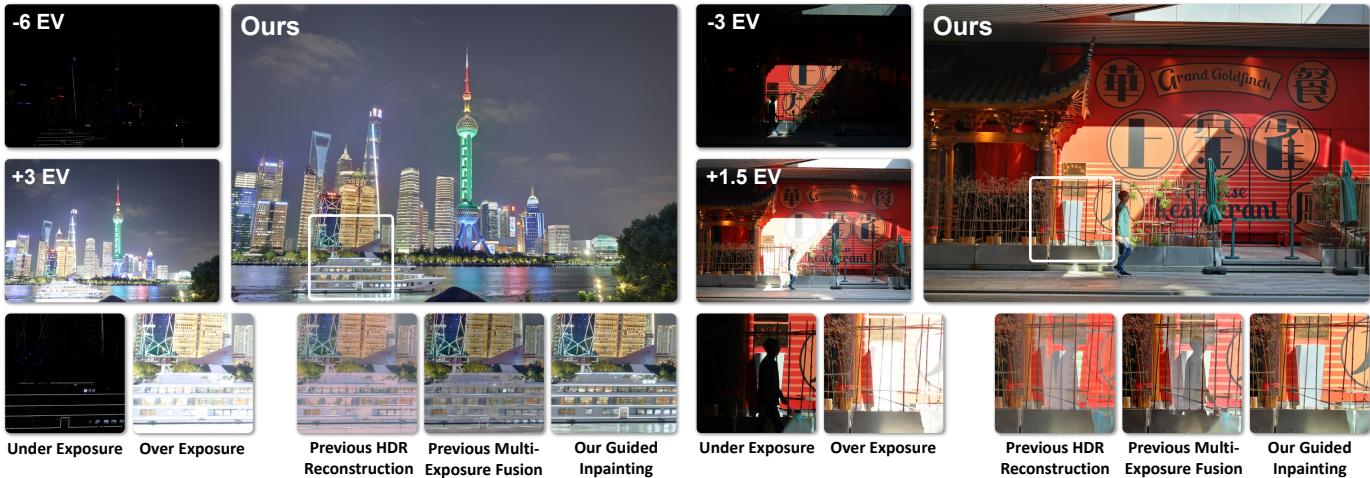
Have you ever tried to take a photo of a cityscape at night? You are usually faced with a frustrating choice: expose for the bright neon lights and the buildings become black silhouettes, or expose for the buildings and the lights turn into blown-out white blobs.
To solve this, modern cameras use High Dynamic Range (HDR) imaging. They take a burst of photos at different brightness levels and stitch them together. It works well for standard scenes—usually dealing with exposure differences of 3 to 4 “stops.” But what happens when the difference is extreme—say, 9 stops? Or when things are moving fast in the frame?
Most current algorithms fail spectacularly in these conditions, resulting in “ghosting” artifacts (where moving cars look transparent) or unnatural colors.
In this post, we are doing a deep dive into UltraFusion, a new research paper that flips the script on traditional HDR. Instead of trying to mash pixels together, the researchers propose a radical idea: treat HDR fusion as a guided inpainting problem. They use the power of diffusion models (like Stable Diffusion) to “paint” the missing details back into your photos, achieving results that were previously impossible.
The Problem: Why Traditional Fusion Fails
Before understanding the solution, we need to understand the bottleneck. There are two main ways to create an HDR image:
- HDR Reconstruction: The camera merges images into a 32-bit linear format and then “tone maps” them back down so your screen can display them. This is mathematically complex and often leads to weird halos or “cartoonish” looks.
- Multi-Exposure Fusion (MEF): This skips the 32-bit step and directly blends the images. It’s simpler but relies heavily on the images lining up perfectly.
When you have a 9-stop difference, the “under-exposed” image (dark) and the “over-exposed” image (bright) look completely different. Aligning them using standard optical flow is a nightmare because the computer can’t find matching features between a pitch-black shadow and a well-lit wall. Furthermore, if a person walks through the frame between shots, traditional methods blend the person from one frame with the background of another, creating ghost artifacts.
The UltraFusion Approach: Guided Inpainting
The researchers behind UltraFusion realized that Generative AI models, specifically diffusion models, are excellent at hallucinating details—that is, creating realistic textures where none exist.
Their core concept is straightforward but brilliant: Don’t just fuse; inpaint.
They take the over-exposed image (which has good shadow detail but blown-out white highlights) as the “canvas.” Then, they treat the blown-out highlight regions as “missing information.” They use the under-exposed image (which has good highlight details) as a guide to tell the AI what should go in those white spots.
Why not just use ControlNet?
If you are familiar with Generative AI, you might ask: “Can’t we just use ControlNet for this?”
The authors tried that. As shown below, standard ControlNet struggles because it doesn’t know which frame is the “ground truth” for position. In dynamic scenes, it gets confused about which object goes where, leading to weird artifacts.
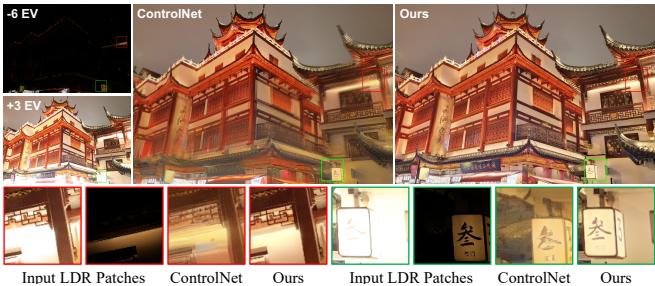
UltraFusion solves this by establishing a strict hierarchy: the over-exposed image is the geometric reference, and the under-exposed image is purely for information guidance.
The Architecture
UltraFusion is a 2-stage framework. Let’s break down how it works step-by-step.
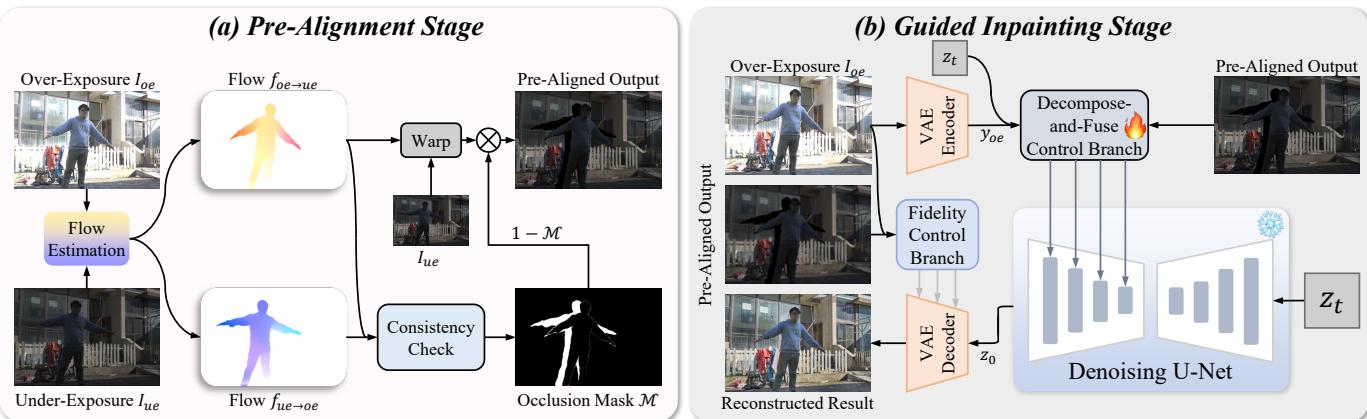
Stage 1: Pre-Alignment
Before the AI can paint, the images need to be roughly aligned. Since the brightness differences are huge, standard alignment fails. UltraFusion uses a clever trick:
- Intensity Mapping: They artificially adjust the brightness of the under-exposed image to match the over-exposed one solely for the purpose of calculating alignment.
- Optical Flow (RAFT): They calculate how pixels moved between the two frames.
- Consistency Check: This is crucial. If a pixel moves in a way that suggests it was occluded (e.g., a car moved behind a tree), the system marks it.
- Masking: The system warps the under-exposed image to match the over-exposed one but masks out the occluded regions to prevent ghosting.
The output of this stage is a mathematical operation described as:

Here, \(\mathcal{M}\) is the occlusion mask. By multiplying by \((1 - \mathcal{M})\), they ensure that ghosting artifacts are removed before the heavy AI processing begins.
Stage 2: Guided Inpainting
This is where the magic happens. The model uses a standard Stable Diffusion U-Net, but with two custom “Control Branches” designed specifically for HDR data.
1. The Decompose-and-Fuse Control Branch (DFCB)
Simply feeding a dark image to Stable Diffusion doesn’t work well; the model tends to ignore the faint details in the darkness. To fix this, the researchers decompose the under-exposed image into two components:
- Structure (\(S_{ue}\)): The normalized luminance (brightness), which captures edges and textures regardless of how dark they are.
- Color (\(C_{ue}\)): The chroma channels.
The structure is calculated using this normalization formula:

By separating structure from color, the model can “see” the details in the dark image much better.
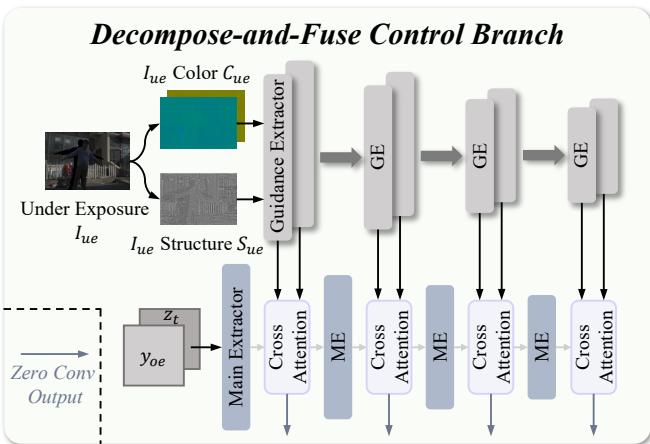
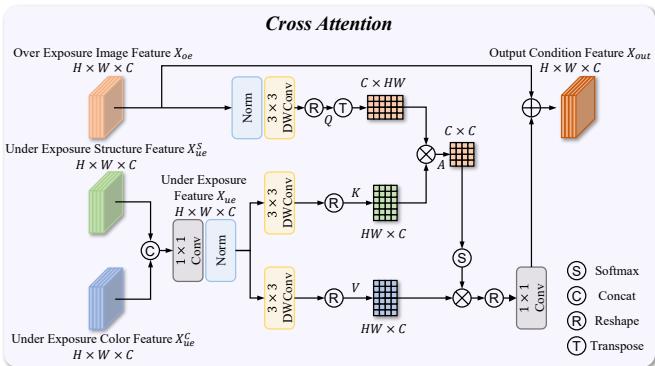
As shown in the architecture above, these decomposed features are injected into the main network using Multi-Scale Cross-Attention. This allows the model to pay attention to the guidance image at different levels of detail—from broad shapes to fine textures.
For the students interested in the math of the attention mechanism, the cross-attention block calculates the relationship between the over-exposed features and the guidance features using standard Query-Key-Value operations:

And visually, the cross-attention module looks like this:
2. The Fidelity Control Branch
Generative AI has a reputation for “hallucinating” or making things up. In HDR photography, you want the photo to look like reality, not a fantasy.
To ensure fidelity, UltraFusion adds a second control branch. This branch forces the VAE (Variational Autoencoder) decoder to respect the original structures of the input image, ensuring that the texture of a brick wall remains a brick wall, even after the AI has processed it.
The Data Problem: Synthetic Training
Here lies a major challenge in deep learning research: Data. To train a model to handle 9-stop dynamic range with motion, you need thousands of image pairs that have… 9-stop dynamic range and motion. Those datasets didn’t exist.
The researchers built a Training Data Synthesis Pipeline. They took video datasets (to get realistic motion) and static high-quality HDR datasets (to get light information).
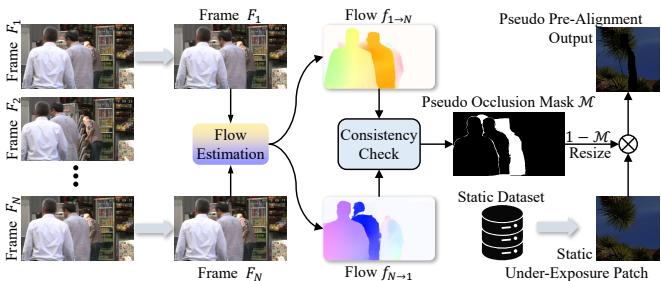
- Motion: Take frames \(N\) and \(N+k\) from a video to simulate object movement.
- Light: Take a patch from a static HDR dataset.
- Synthesis: Combine them using the calculated optical flow and occlusion masks.
This allowed the model to learn how to handle “real” motion without needing impossible-to-capture real-world ground truth data.
Experiments and Results
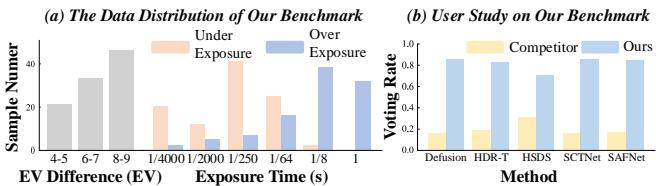
The team evaluated UltraFusion on existing datasets and a new benchmark they collected themselves, featuring challenging scenarios like night cityscapes and backlit indoor scenes.
Quantitative Analysis
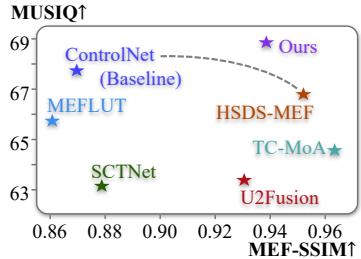
The results were measured using metrics like MUSIQ (image quality) and MEF-SSIM (structural similarity).
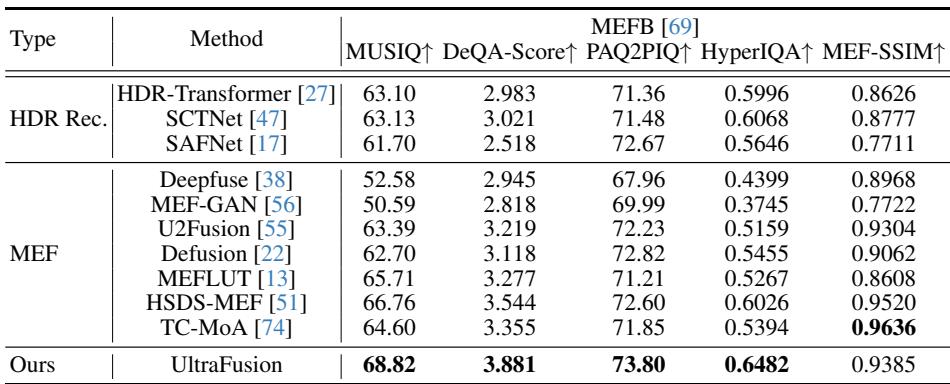
As seen in Table 1 and Table 2, UltraFusion consistently scores higher in perceptual quality (MUSIQ) compared to previous state-of-the-art methods like HDR-Transformer or HSDS-MEF.
There is usually a trade-off in fusion: you can either have high fidelity (keeping the original pixels) or high visual quality (looking good). UltraFusion manages to break this trade-off, achieving the best of both worlds.
Visual Comparisons
Numbers are great, but in imaging, seeing is believing. Let’s look at how UltraFusion compares to competitors in a difficult static scene.
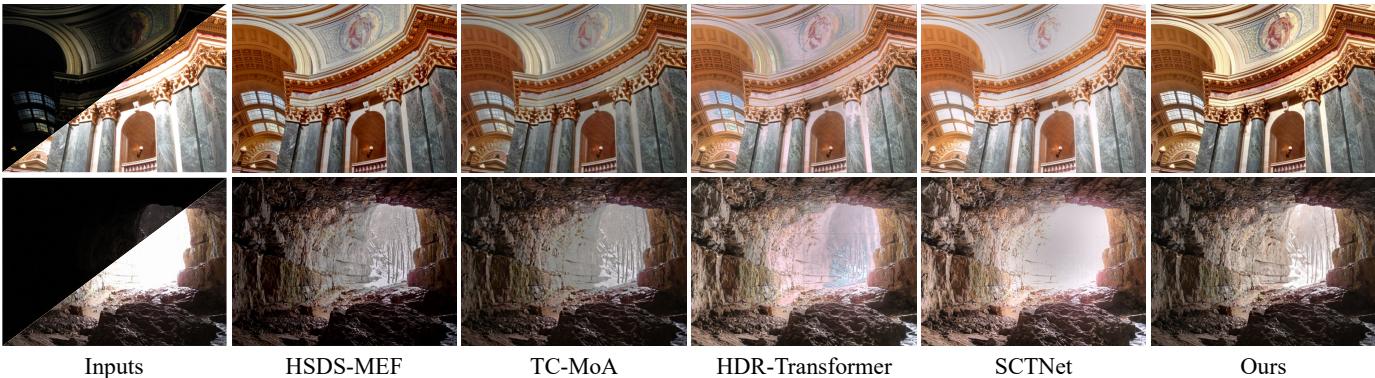
Notice the “Ours” column on the far right. The details in the bright window (top row) and the cave entrance (bottom row) are preserved perfectly, whereas other methods either wash them out or create unnatural gray patches.
The results are even more impressive on their new 9-stop benchmark. Look at the sun in the image below.
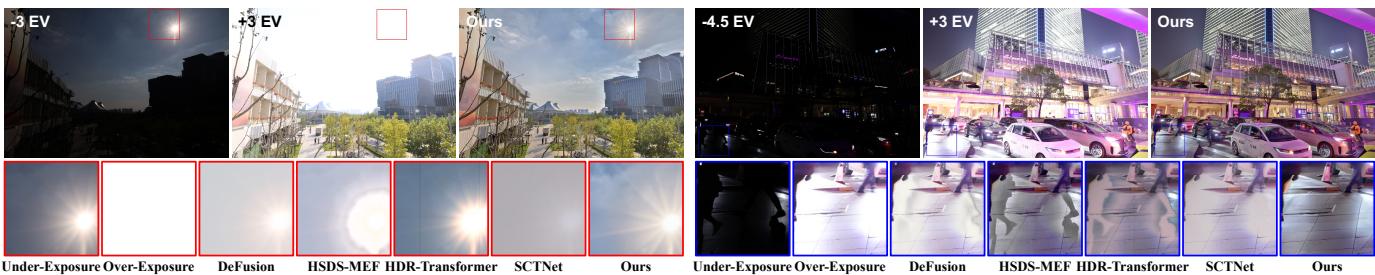
In the red zoom-in box, other methods turn the sun into a messy blob or a gray circle. UltraFusion reconstructs a natural, glowing light source while maintaining the color of the sky.
Handling Motion
The hardest test is dynamic motion. Below, a person moves their arm between shots.

Standard methods (like HSDS-MEF) create a transparent “ghost” arm. UltraFusion, thanks to its masking and inpainting approach, renders a solid, clean arm with no ghosting.
Why Each Part Matters (Ablation Studies)
To prove that every part of their complex architecture was necessary, the authors ran “ablation studies”—systematically removing parts of the model to see what breaks.
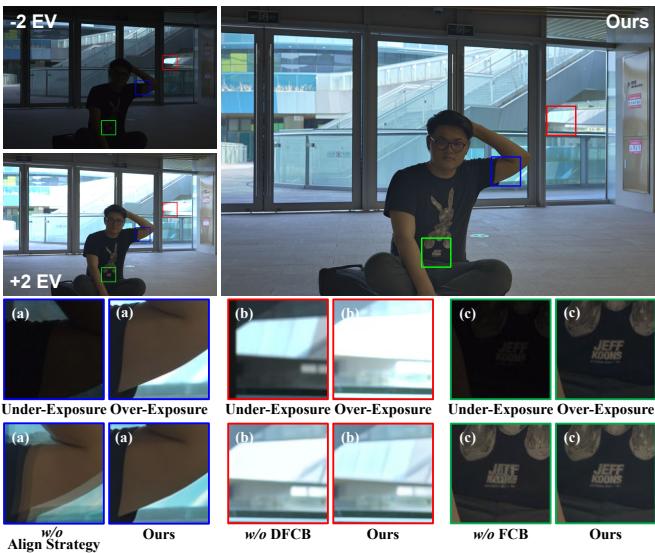
- Row (a) - w/o Alignment Strategy: If you remove the pre-alignment, the model fails to understand where the object is, resulting in a blurry mess.
- Row (b) - w/o DFCB: Removing the Decompose-and-Fuse branch makes the image look flat and lose detail.
- Row (c) - w/o Fidelity Control: Removing the fidelity branch leads to weird color shifts and texture loss.
They also specifically tested the alignment strategy:
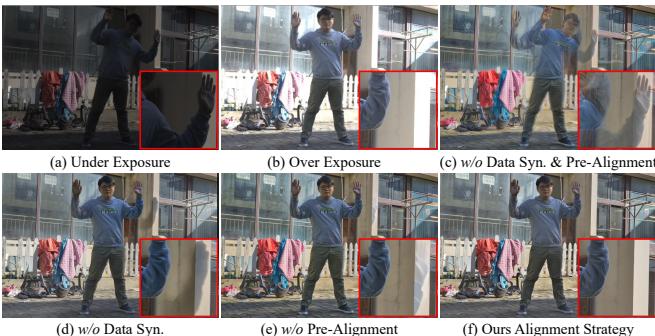
Without the data synthesis pipeline (d) or pre-alignment (e), the model cannot handle the large motion of the person in the foreground.
Finally, they validated their decision to decompose the image into Structure and Color.
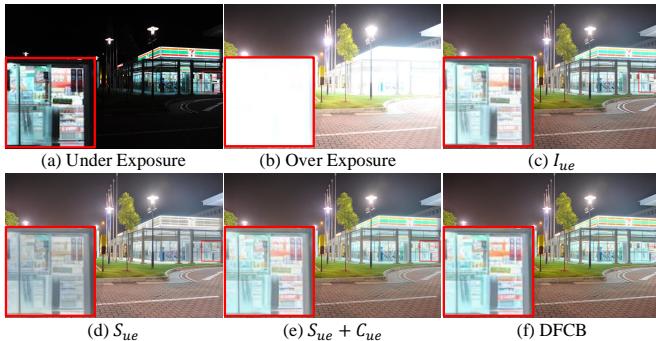
Simply using the raw under-exposed image (\(I_{ue}\)) isn’t enough (c). Using Structure (\(S_{ue}\)) + Color (\(C_{ue}\)) combined with the special control branch (f) yields the sharpest text on the neon sign.
Conclusion and Future Potential
UltraFusion represents a significant shift in how we think about computational photography. By framing Exposure Fusion as a Generative Inpainting task, it overcomes the physical limitations of camera sensors and the algorithmic limitations of traditional merging.
It successfully handles extreme 9-stop dynamic ranges and fast motion, producing artifact-free images that look natural.
Interestingly, this “guided inpainting” approach opens the door for other applications. Since the model paints the over-exposed area based on guidance, you could theoretically guide it with a completely different image.
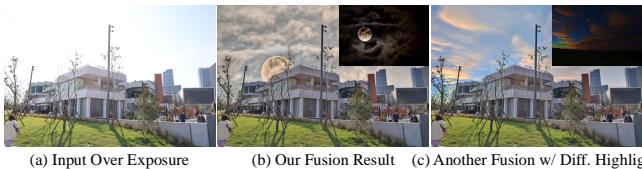
As shown above, the same architecture can be used to swap skies or merge two different scenes seamlessly—a glimpse into the future of creative image editing.
While the current implementation takes about 3.3 seconds per image on a high-end GPU (making it too slow for real-time mobile use right now), it paves the way for the next generation of camera algorithms. The days of blown-out skies and dark shadows are numbered.