](https://deep-paper.org/en/paper/2502.03297/images/cover.png)
Introduction
In the rapidly evolving field of robotics, data is the new oil. For a robot to learn how to fold laundry, cook a meal, or assemble a car, it usually needs to observe thousands of demonstrations of that task being performed. This is the foundation of Imitation Learning and Robot Learning.
However, teaching a robot isn’t as simple as showing it a video. The robot needs rich, 3D data about joint angles, spatial relationships, and physics. Traditionally, researchers have used keyboards, 3D mice, or expensive physical “puppet” robots to generate this data. These methods are often clunky, non-intuitive, or prohibitively expensive.
Extended Reality (XR)—an umbrella term for Virtual Reality (VR), Augmented Reality (AR), and Mixed Reality (MR)—offered a promising solution. Why not just put on a headset and “become” the robot? While this idea has existed for some time, the execution has been fragmented. Previous systems were “walled gardens”: built for one specific robot, one specific simulator, or one specific headset. If you wanted to switch from a Franka robot arm to a Boston Dynamics Spot, or from MuJoCo to IsaacSim, you often had to start from scratch.
Enter IRIS (Immersive Robot Interaction System).
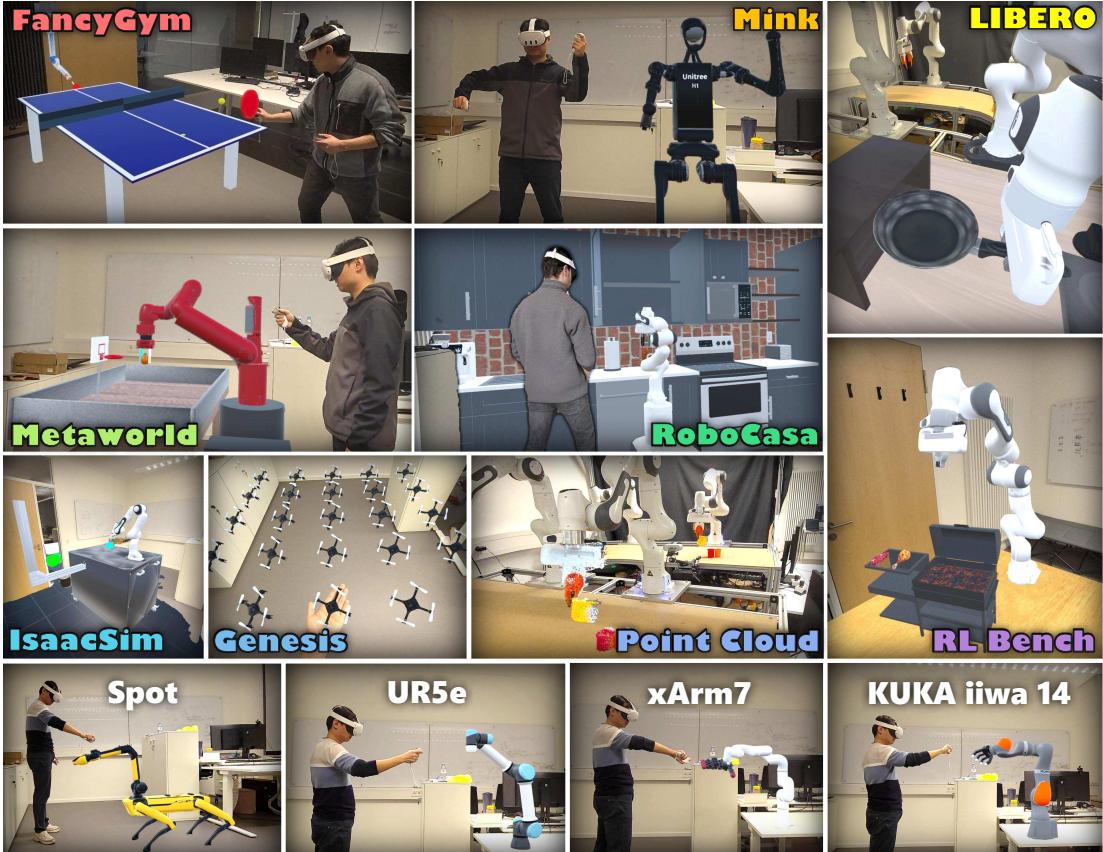
As illustrated in Figure 1 above, IRIS is a groundbreaking framework designed to break down these walls. It is an agnostic, universal system that connects the immersive power of modern XR headsets to virtually any robot, in any simulator, or even in the real world.
In this deep dive, we will explore how IRIS solves the “fragmentation problem” in robotic teleoperation. We will continuously break down its unique architecture, its novel “Unified Scene Specification,” and look at the experiments that prove it’s not just a cool toy—it’s a valid scientific tool for generating high-quality training data.
Background: The Bottleneck of Data Collection
To understand why IRIS is necessary, we first need to look at the current state of robot learning.
Modern robots are often trained using Reinforcement Learning (RL) or Imitation Learning (IL).
- Reinforcement Learning involves the robot trying a task millions of times in a simulation until it figures it out.
- Imitation Learning relies on a human expert providing successful examples (demonstrations) that the robot mimics.
Imitation learning is generally faster for complex manipulation tasks (like picking up a mug), but it suffers from a data bottleneck. How do you get a human to control a robot naturally?
- Direct Teleoperation: Using a joystick or keyboard. This is notoriously difficult. Imagine trying to tie your shoelaces using a claw machine game controller.
- Kinesthetic Teaching: Physically grabbing a real robot and moving it. This is intuitive but requires owning the physical robot (expensive) and can be dangerous or physically exhausting.
- XR Teleoperation: Using VR hand controllers to drive a virtual robot. This combines the safety and speed of simulation with the intuition of human movement.
While XR teleoperation is the ideal middle ground, prior implementations were rigid. A system built for the Meta World benchmark wouldn’t work for RoboCasa. A tool designed for the HoloLens 2 wouldn’t work on the Meta Quest 3. This lack of interoperability meant that researchers spent more time engineering visualization tools than actually collecting data.
IRIS was built to solve three specific limitations of previous works:
- Asset Diversity: Moving beyond predefined lists of objects.
- Platform Dependency: Breaking the reliance on a single simulator.
- Device Compatibility: Supporting multiple different headsets.
The Core Method: Inside the IRIS Architecture
IRIS is designed around six “Cross” pillars: Cross-Scene, Cross-Embodiment (any robot), Cross-Simulator, Cross-Reality (Sim and Real), Cross-Platform (any headset), and Cross-User.
Let’s break down the technical architecture that makes this flexibility possible.
1. The System Architecture
The high-level structure of IRIS relies on a decoupling of the Simulation/Control PC and the XR Headset.
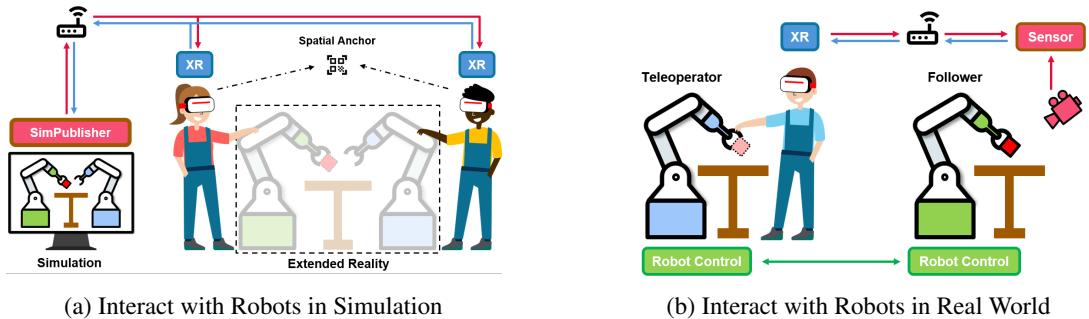
As shown in Figure 2, the system operates over a local Wi-Fi network.
- Left Side (Simulation): The computer runs the physics simulator (like MuJoCo or IsaacSim). It uses a Python library called
SimPublisherto broadcast the state of the world. - Right Side (Real World): A depth camera captures the real world, converts it to point clouds, and transmits it to the headset.
- The Bridge: The headset (using a Unity-based application) receives this data and renders it. Crucially, the headset sends control commands (hand positions, button presses) back to the PC to drive the robot.
This separation is vital. It means the headset doesn’t need to know how to calculate physics; it just needs to know what to draw.
2. The Nervous System: Communication Protocol
How do the PC and Headset find each other? IRIS avoids the heavy overhead of ROS (Robot Operating System) for its core discovery, though it remains ROS-compatible. Instead, it uses a lightweight combination of UDP Broadcasts and ZeroMQ (ZMQ).
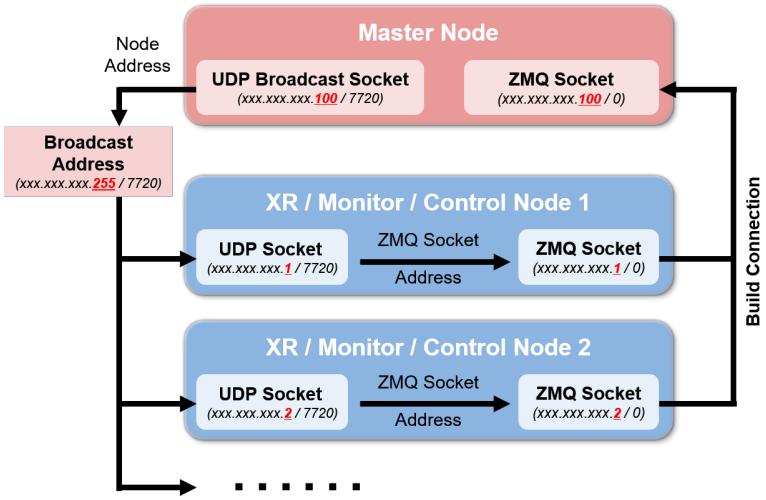
Referencing Figure 10 (above), the process works like a handshake:
- Discovery: The Master Node (the PC) constantly shouts “Here I am!” via UDP broadcasts to the local network.
- Connection: When a headset (XR Node) wakes up, it listens for this shout. Once it hears the Master, it extracts the IP address.
- Data Stream: A dedicated, high-speed ZMQ connection is established. This connection handles the heavy lifting: sending mesh data, textures, and robot joint states.
This architecture supports Cross-User capabilities. Multiple headsets can listen to the same Master Node, allowing multiple people to stand in the same virtual room and collaborate on a task, or simply watch a student teach a robot.
3. The Universal Translator: Unified Scene Specification (USR)
This is arguably the most innovative part of IRIS. In previous systems, if you wanted to load a “coffee mug” in VR, the VR app needed to have that specific coffee mug model pre-installed. IRIS flips this.
IRIS treats the VR headset as a “dumb terminal” that renders whatever the Simulator tells it to. To do this, the researchers developed a Unified Scene Specification.
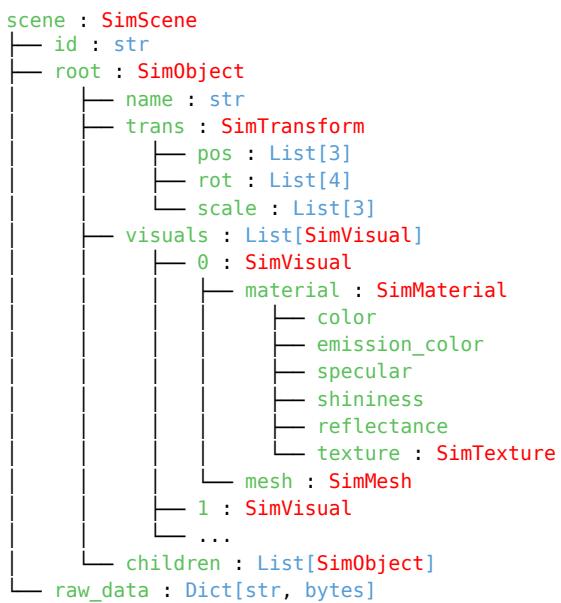
As seen in Figure 11, the PC parses the simulation environment into a generic JSON-like tree structure:
- SimObject: The base unit (e.g., a robot link, a table).
- SimVisual: What it looks like (Mesh, Material, Texture).
- SimTransform: Where it is (Position, Rotation).
When the connection is established, the PC sends this “recipe” to the headset. The headset reads the recipe and dynamically builds the scene from scratch. If the object has a custom texture, the texture is compressed and streamed over the network. This allows IRIS to render arbitrary objects without updating the headset’s software.
4. Cross-Simulator Support
Because the Unified Scene Specification is generic, IRIS can plug into almost any simulator. The researchers just need to write a small “parser” that translates the specific simulator’s format into the IRIS format.
Currently, IRIS supports:
- MuJoCo
- IsaacSim (based on USD format)
- CoppeliaSim
- Genesis
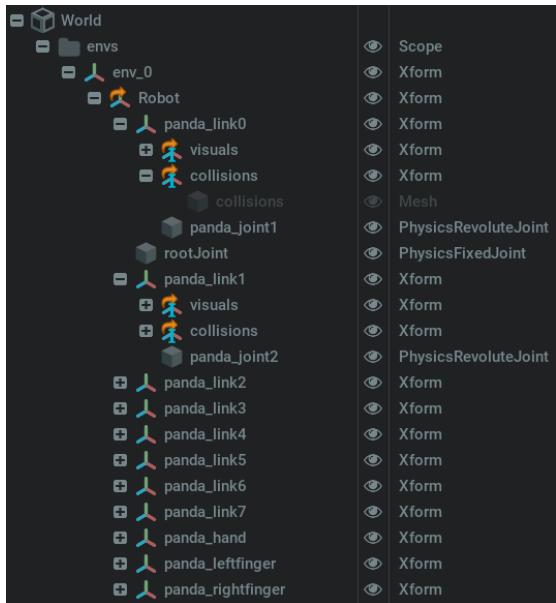
Figure 14 shows the native hierarchy of a robot in IsaacSim. The IRIS parser walks through this tree, converts the “USD” (Universal Scene Description) nodes into “SimObjects,” and sends them to the headset. This abstraction layer is what makes IRIS “simulator agnostic.”
5. Bridging the Gap: Real-World Point Clouds
Simulation is great, but what about controlling a real robot?
In a physical setup, you don’t have perfect 3D meshes of everything on the table. To solve this, IRIS uses Cross-Reality. It employs RGB-D (Depth) cameras, such as the Orbbec Femto Bolt.
The process involves:
- Capture: The camera captures color and depth.
- Projection: Pixels are converted into 3D points (\(X, Y, Z\)).
- Voxel Downsampling: Sending millions of points per second would kill the Wi-Fi. IRIS groups points into small 3D grid boxes (voxels) and averages them. This reduces the data size while keeping the visual shape.
- Rendering: The headset uses a GPU-accelerated particle system to draw these colored dots in 3D space.
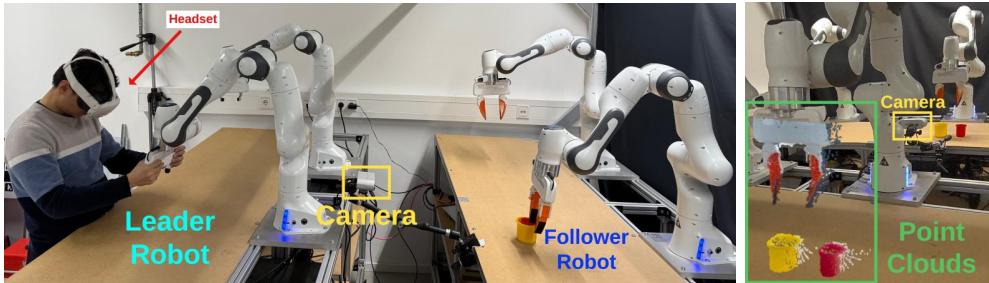
Figure 5 (labeled as Figure 6 in the deck) demonstrates this setup. The user in VR sees a “ghost” representation of the real world made of points. This provides depth perception that a standard 2D video feed cannot offering, making teleoperation much easier.
6. Intuitive Control Interfaces
Once the user can see the environment, how do they move the robot? IRIS supports two primary modes, illustrated in Figure 14:
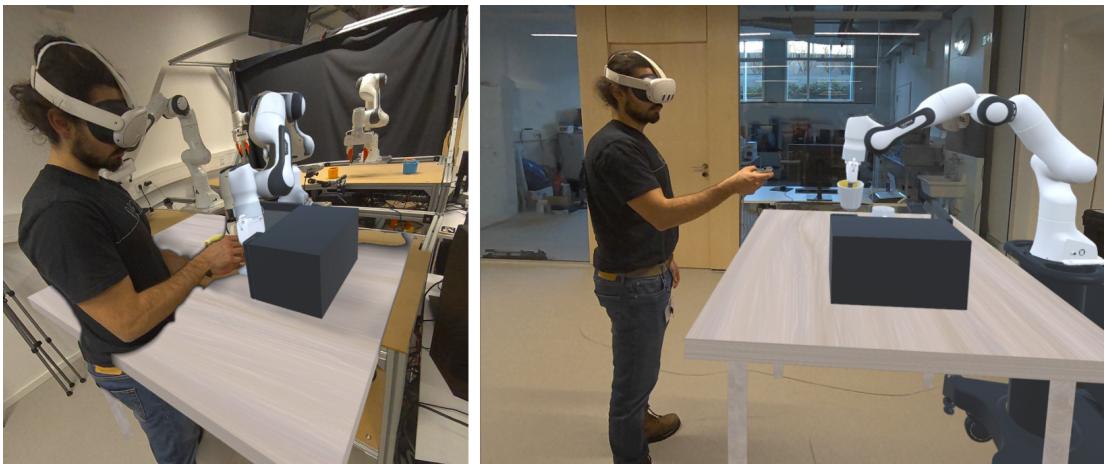
- Kinesthetic Teaching (KT): This mimics physically grabbing the robot. The user grabs the virtual robot’s end-effector (hand) and drags it. The physics engine calculates the Inverse Kinematics (IK) to figure out how the joints should move.
- Motion Controller (MC): The user’s hand controller becomes the robot’s hand. The robot mimics the user’s hand position and rotation in real-time.
Experiments & Results
The researchers didn’t just build the system; they rigorously tested it to answer three questions:
- Is it better for humans? (User Experience)
- Does the data actually work? (Policy Learning)
- Does it work in the real world?
1. User Experience: IRIS vs. Keyboard & Mouse
A user study was conducted using the LIBERO benchmark tasks (like picking up a book or turning off a stove). Participants tried to control the robot using standard interfaces (Keyboard and 3D Mouse) and IRIS (Kinesthetic Teaching and Motion Controller).
The results were stark.
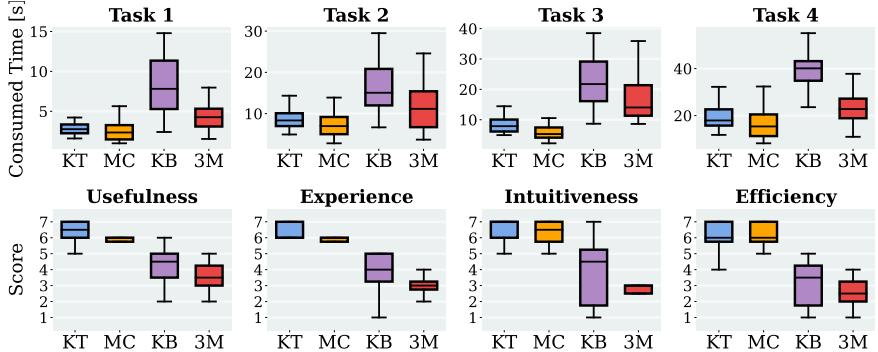
Looking at the graphs in Figure 6 (above):
- Time (Top Row): The time to complete a task using IRIS (KT/MC) was drastically lower than keyboard/mouse controls. In complex tasks (Task 3 & 4), keyboard users struggled to even finish within the time limit.
- Subjective Scores (Bottom Row): Users rated IRIS significantly higher on Intuitiveness, Efficiency, and Experience.
Using a keyboard to control a 7-degree-of-freedom robot arm is cognitively exhausting. Using IRIS feels like simply reaching out and doing the task.
2. Policy Evaluation: The Quality of Data
Ideally, if you train a robot on IRIS-collected data, it should learn just as well as it would from standard datasets. The researchers trained Imitation Learning policies (using BC-Transformer and BESO algorithms) on data collected via IRIS and compared it to the original LIBERO dataset.
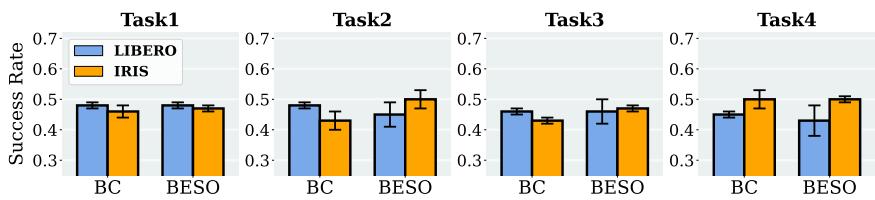
Figure 7 shows that the success rates (the bars) are comparable. This confirms that the data collected via the immersive IRIS system is of high enough quality to train robust AI agents.
3. Advanced Capabilities: Deformable Objects & Real World
One of the unique features of IRIS is its ability to handle deformable objects (like cloth or soft toys) because it streams mesh updates dynamically. Most other XR systems assume objects are rigid blocks.
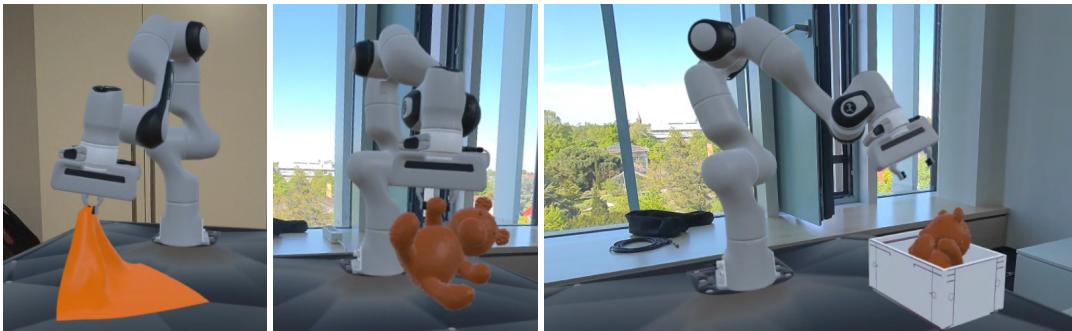
Figure 18 (from the appendix) shows the user interacting with a simulated cloth and a teddy bear. This is a difficult simulation challenge that IRIS handles seamlessly.
Finally, they tested the system on a physical robot performing tasks like “Cup Inserting” and “Picking up Lego.”
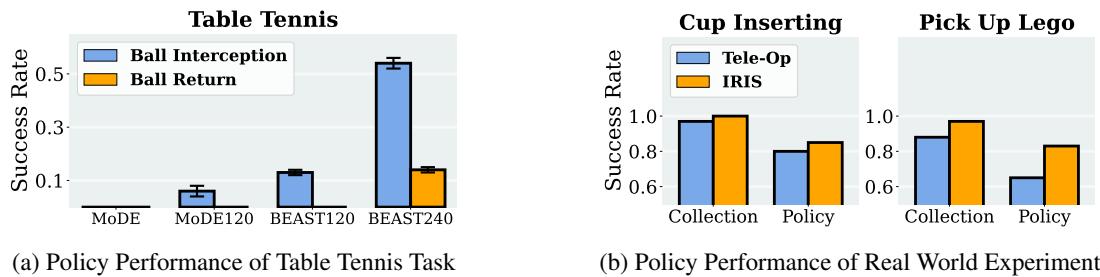
As shown in Figure 8(b), policies trained using IRIS data (orange bars) generally outperformed policies trained using traditional remote teleoperation (blue bars). This suggests that the depth perception and immersive nature of IRIS allow operators to provide cleaner, more accurate demonstrations for the robot to learn from.
Conclusion & Implications
IRIS represents a significant leap forward for the robotics community. By decoupling the visualization (XR) from the logic (Simulation), the authors have created a tool that is:
- Reusable: Use the same headset setup for ten different simulators.
- Reproducible: Researchers can share scene specifications easily.
- Scalable: It supports multi-user collaboration and works on commodity hardware like the Meta Quest 3.
The implications for students and researchers are profound. IRIS lowers the barrier to entry for generating high-quality robotic data. Instead of spending months building a custom visualization tool for a specific experiment, researchers can plug their simulation into IRIS and start collecting data immediately.
Whether dealing with the complex physics of folding a towel in simulation or guiding a real robot arm to sort Lego bricks, IRIS provides a unified, intuitive window into the robot’s world.
Key Takeaways for Students
- XR is more than gaming: It provides high-bandwidth control for robotics that 2D screens cannot match.
- Abstraction is key: By abstracting the scene into a “Unified Scene Specification,” IRIS solves the compatibility hell that plagues research software.
- Data Quality matters: The ultimate test of a data collection tool is not just “does it look cool,” but “does the robot actually learn?” IRIS passes this test with flying colors.