](https://deep-paper.org/en/paper/2502.05165/images/cover.png)
Beyond Copy-Paste: Mastering Multi-Object Compositing with Multitwine
In the rapidly evolving world of Generative AI, editing images has moved far beyond simple pixel manipulation. We are in the era of “subject-driven generation,” where we can ask a model to insert a specific object into a specific scene. However, while tools like Stable Diffusion have mastered the art of generating singular objects, they hit a wall when the task gets complicated.
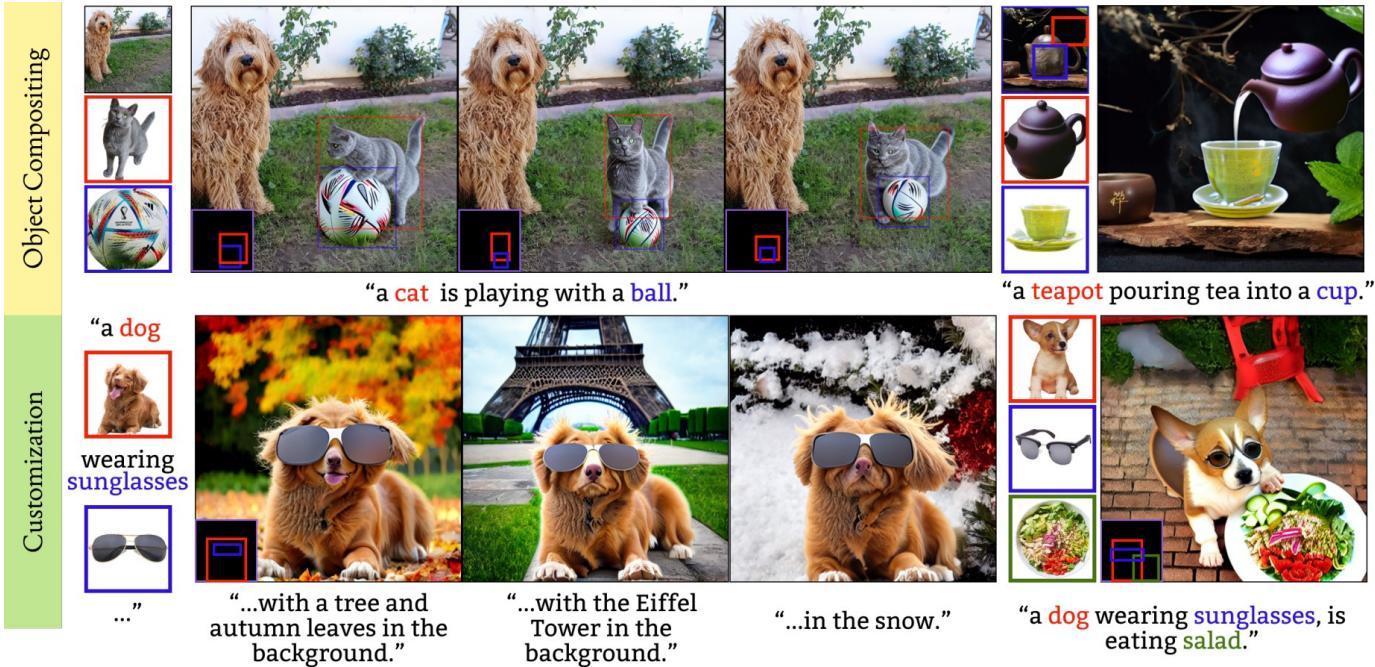
Imagine trying to edit a photo to show a dog playing the cello. If you try to paste a dog, and then paste a cello, the results are often disjointed. The dog isn’t holding the bow correctly; the lighting on the cello doesn’t match the dog’s fur; the interaction feels artificial. This is the “sequential compositing” problem.
Today, we are diving deep into Multitwine, a research paper that proposes a novel solution to this problem. This model introduces the ability to composite multiple objects simultaneously, allowing for complex interactions, shared lighting, and natural posing guided by both text and layout.
The Problem: Why Sequential Editing Fails
To understand why Multitwine is a breakthrough, we must first understand the limitations of current methods. Most generative compositing models (like Paint by Example or AnyDoor) operate on a single object. If you want to build a complex scene with multiple actors, you have to run the model sequentially:
- Insert Object A.
- Take the result, insert Object B.
The issue with this approach is a lack of global context. When Object B is inserted, Object A is already “frozen” in pixels. Object A cannot shift its pose to look at Object B, nor can it physically interact (like hugging or fighting) because the model generating B has no control over A.
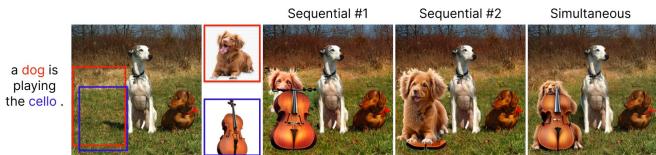
As shown in Figure 2 above, the sequential approach (right) creates a “sticker” effect. The dog and the cello exist in the same frame, but they aren’t interacting. In contrast, the simultaneous approach (left) allows the model to generate the dog playing the cello. The paws move, the posture changes, and the shadows fall naturally across both elements.
The Multitwine Solution
The researchers propose a diffusion-based model capable of handling multiple objects, a background, a layout (bounding boxes), and a text prompt all at once. The core contribution lies in how they balance these inputs to ensure high fidelity to the original objects while allowing the flexibility needed for them to interact.
1. Model Architecture
At its heart, Multitwine uses Stable Diffusion 1.5 as its backbone, but with significant modifications to handle multimodal inputs.
The architecture needs to solve a difficult balancing act:
- Identity Preservation: The output must look like the specific reference objects provided (e.g., this specific cat, not just any cat).
- Text Alignment: The scene must follow the text description (e.g., “playing with”).
- Layout Control: The objects must appear where the user draws the bounding boxes.
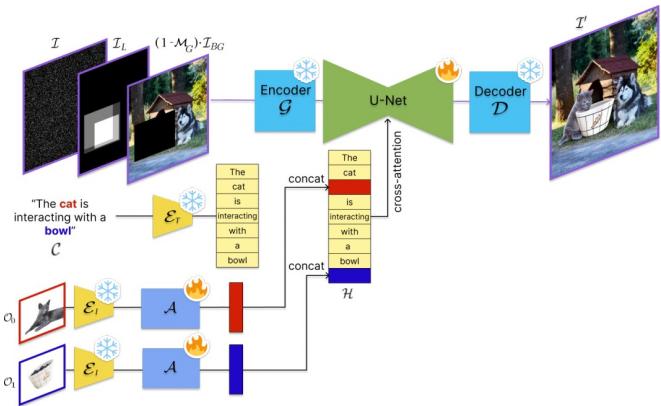
As illustrated in Figure 3, the pipeline works as follows:
- Input Processing: The model takes a background image (masked where the edit should happen), a layout mask (defining where objects go), and a noise tensor. These are concatenated and fed into the U-Net.
- Text & Object Encoding: This is where the magic happens.
- The text prompt \(\mathcal{C}\) is encoded using a CLIP text encoder.
- The reference objects \(\mathcal{O}\) are encoded using a DINO image encoder (known for capturing fine-grained visual details).
- An Adaptor network aligns the image embeddings with the text space.
- Multimodal Embedding: Instead of feeding text and images separately, the researchers concatenate the object embeddings after the text tokens corresponding to them. If the prompt is “A cat playing with a ball,” the embedding for the specific cat image is appended to the “cat” text token. This creates a rich Multimodal Embedding (\(\mathcal{H}\)) that is injected into the U-Net via cross-attention layers.
2. The Challenge of “Identity Leakage”
When you ask a diffusion model to generate two objects simultaneously (e.g., a dog and a cat), a common failure mode is identity leakage. The model might get confused and put the cat’s texture on the dog, or give the dog the cat’s ears.
This happens because of how Attention works in Transformers.
- Cross-Attention maps text/image prompts to pixels. Sometimes, the pixels for the “dog” area might accidentally attend to the “cat” prompt information.
- Self-Attention relates pixels to other pixels. Pixels in the dog’s region might look at the cat’s region for context and accidentally copy visual features.
To solve this, Multitwine introduces two specific loss functions during training.
Cross-Attention Loss (\(\mathcal{L}_c\))
The model knows the ground-truth segmentation (where the dog should be). The Cross-Attention Loss forces the attention maps for a specific object (e.g., the dog) to focus only on the pixels inside the dog’s bounding box.
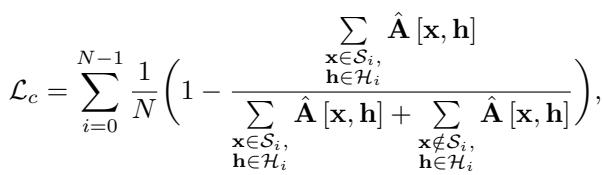
In simple terms, this equation penalizes the model if the “dog” tokens pay attention to the “background” or “cat” pixels.
Self-Attention Loss (\(\mathcal{L}_s\))
This loss prevents pixels belonging to one object from attending too closely to pixels belonging to a different object.
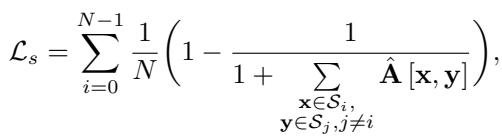
By enforcing these constraints, the model learns to disentangle the identities of the objects.
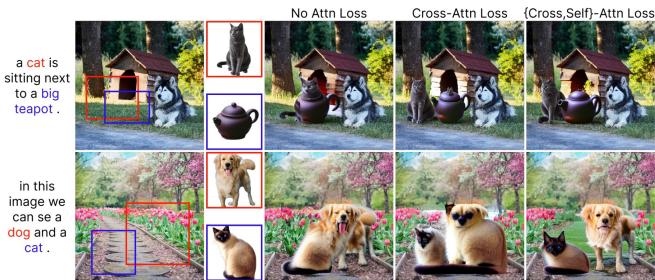
The visual impact of these losses is profound (see Figure 8). Without the losses (middle columns), you might see a cat’s face merging into a teapot or a dog losing its distinct breed features. With the losses (right), the identities remain distinct and clean.
3. Joint Training Strategy
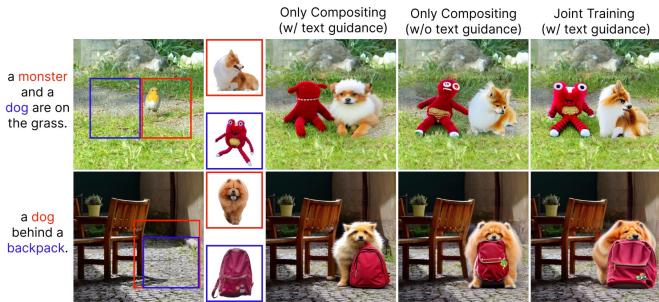
One of the most interesting insights in this paper is the training strategy. The authors found that training only on object compositing (putting objects into holes in images) wasn’t enough. The model would become too rigid, acting like a “copy-paste” machine and failing to repose objects or harmonize lighting.
To fix this, they introduced Customization as an auxiliary task.
- Compositing Task: Give the model a background with a hole and ask it to fill the hole with the objects.
- Customization Task: Give the model a blank canvas (no background) and ask it to generate the objects and a background from scratch based on the text.
They train the model by alternating between these tasks. The Customization task forces the model to learn how to generate the object in new poses and lighting conditions from the ground up, which improves its flexibility when it goes back to the Compositing task.
The Data Bottleneck: A Generative Pipeline
Training a model this complex requires a very specific type of data. You need:
- An image with multiple objects.
- Clean segmentation masks for those objects.
- A text caption describing the relationship between them.
- Separate “reference” images of those same objects in isolation (to serve as the input prompts).
This dataset didn’t exist. So, the authors built a pipeline to generate it using other AI models.
Synthetic Data Generation
They utilized “In-the-Wild” images and processed them through a chain of VLM (Vision Language Models) and segmentation tools.
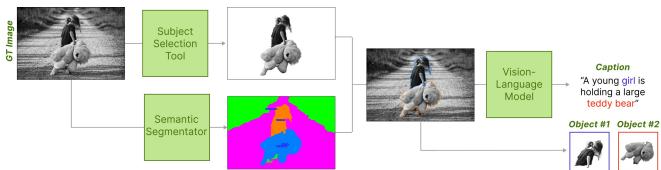
As shown in the figure above, the pipeline works top-down:
- Subject Selection: Identify main objects in a raw image.
- Segmentation: Use a semantic segmentator to cut them out.
- VLM Captioning: Use a model like ViP-LLaVA to “look” at the specific regions (orange box vs. blue box) and generate a caption describing their interaction (e.g., “A girl holding a teddy bear”).
This automated pipeline allowed them to create a massive, high-quality dataset with aligned text, images, and masks, which is crucial for the model to learn complex interactions.
Experimental Results
How does Multitwine compare to the state-of-the-art? The researchers compared their model against leading generative compositing methods like Paint by Example, AnyDoor, and ControlCom.
Qualitative Comparison
The visual differences are striking when the task involves interaction.
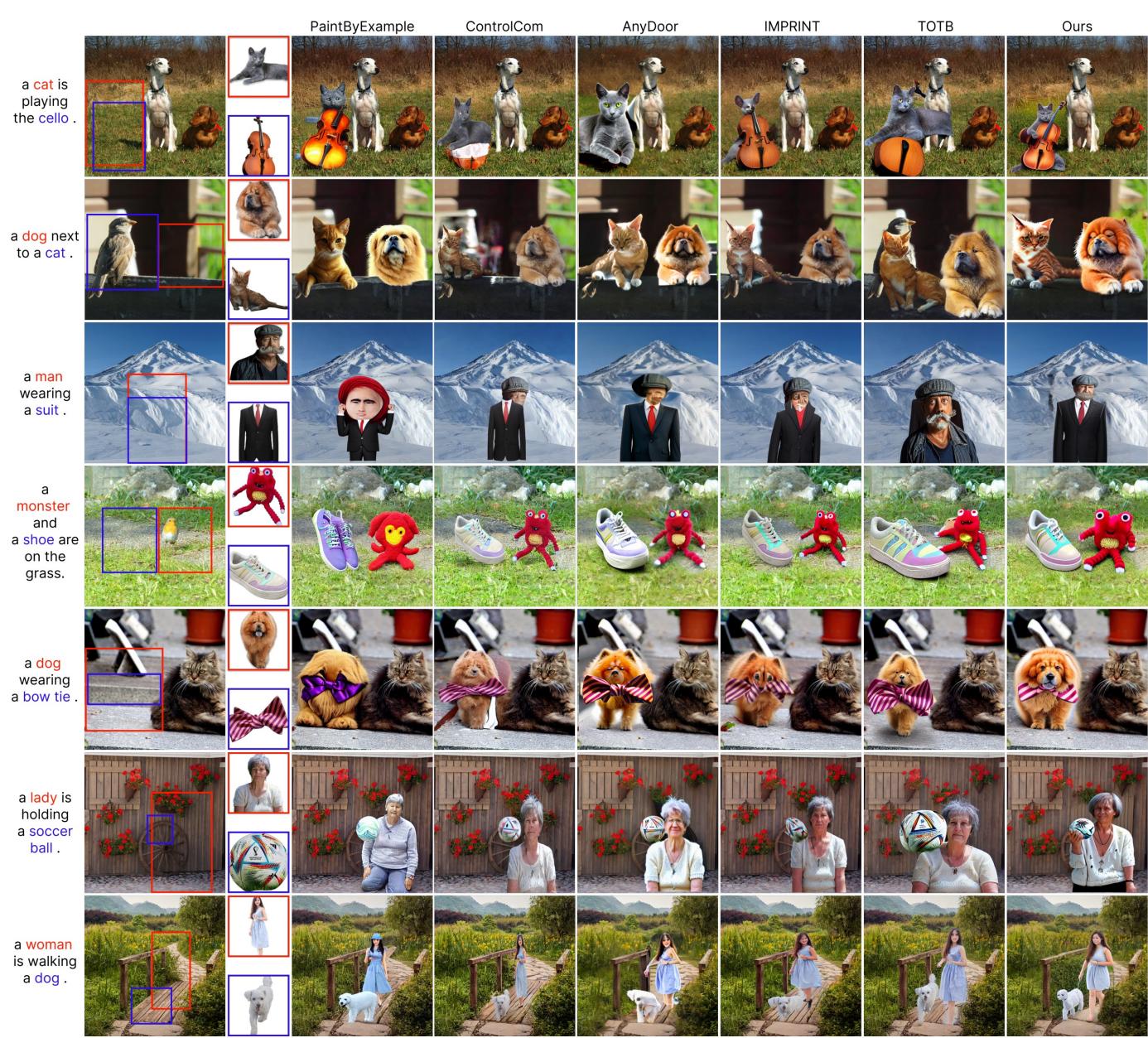
In Figure 4, look at the prompt “a cat playing the cello” (top row).
- Competitors (left/center): Most fail completely. They might paste a cat next to a cello, or generate a messy blob.
- Multitwine (right): It generates a cat with paws positioned on the cello strings. The interaction is semantic—the model understands what “playing” implies for the pose.
Similarly, in row 6 (“using a watering can”), Multitwine generates the water pouring out of the can—a detail that requires understanding the action, not just the object.
Quantitative Metrics
The researchers used standard metrics like CLIP-Score (to measure text alignment) and DINO-Score (to measure identity preservation).
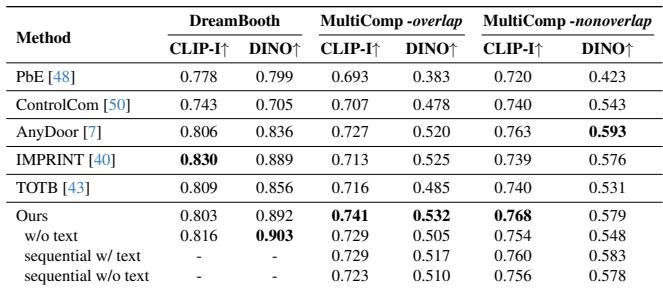
While the numbers (Table 1) show that Multitwine is competitive or superior in identity preservation, the most significant gains are in the MultiComp-overlap category (where objects physically overlap). This confirms that Multitwine excels specifically where previous models fail: close interactions.
User Studies
Metrics like CLIP scores often fail to capture “realism.” To address this, the authors conducted user studies asking participants to judge “Image Quality” and “Realistic Interaction.”
The results (Figure 6) are decisive. For “Realistic Interaction,” users preferred Multitwine over competitors by margins as high as 97.1%. This highlights that while other models might preserve the texture of an object, they fail to place it into the scene naturally.
Applications: Beyond Simple Compositing
Multitwine’s architecture opens the door to several powerful applications beyond just adding two objects to a photo.
1. Subject-Driven Inpainting
The model can fill in missing parts of a scene using specific reference objects. Because it understands the relationship between text and image, it can hallucinate realistic surroundings that fit the objects.
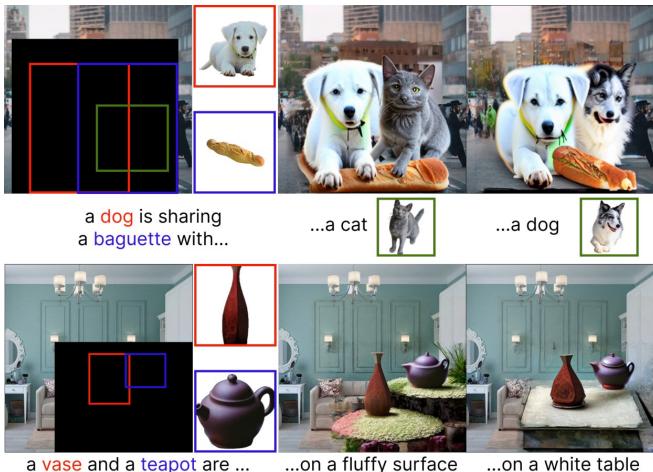
2. Multi-Object Generation (More than 2)
Although trained primarily on pairs, the model shows an emergent ability to handle three or more objects (Figure 9, top), maintaining distinct identities for the dog, the cat, and the baguette.
Conclusion
Multitwine represents a significant step forward in controllable image generation. By shifting from sequential processing to simultaneous compositing, it solves the “sticker effect” that has plagued image editing AI.
The key takeaways from this research are:
- Simultaneity is Key: To get natural interactions (hugs, playing instruments), the model must generate all actors at the same time.
- Attention Control: You cannot simply feed multiple objects to a diffusion model; you must strictly control cross-attention and self-attention to prevent identity blending.
- Data Engineering: Success in complex generative tasks often comes down to building clever pipelines (using VLMs and segmentators) to create high-quality training data.
For students and researchers in computer vision, Multitwine demonstrates that the next frontier isn’t just generating better pixels, but generating better relationships between pixels.