](https://deep-paper.org/en/paper/2502.20732/images/cover.png)
Introduction: The Gap Between AI Art and Engineering
In the last few years, generative AI has transformed how we visualize ideas. Tools like Midjourney or Stable Diffusion can conjure photorealistic scenes from a text prompt, and recent breakthroughs in 3D generation—like DreamFusion or Wonder3D—can turn a single 2D image into a rotating 3D asset.
However, if you are an engineer, a product designer, or a game developer, you likely face a frustrating reality: generated 3D meshes are often useless for manufacturing.
Most 3D generative models produce “dense meshes”—surfaces made of thousands of tiny, unstructured triangles. While they might look like a mechanical part from a distance, they lack the mathematical precision required for Computer-Aided Design (CAD). They are “mushy.” They don’t have perfectly flat planes, true cylinders, or sharp, watertight edges. You cannot easily import them into SolidWorks or Fusion360 to edit a specific hole diameter or extend a flange.
This is the problem addressed by a fascinating new paper titled CADDreamer: CAD Object Generation from Single-view Images. The researchers propose a novel pipeline that takes a single image of a mechanical object and reconstructs a mathematically precise Boundary Representation (B-rep) model.
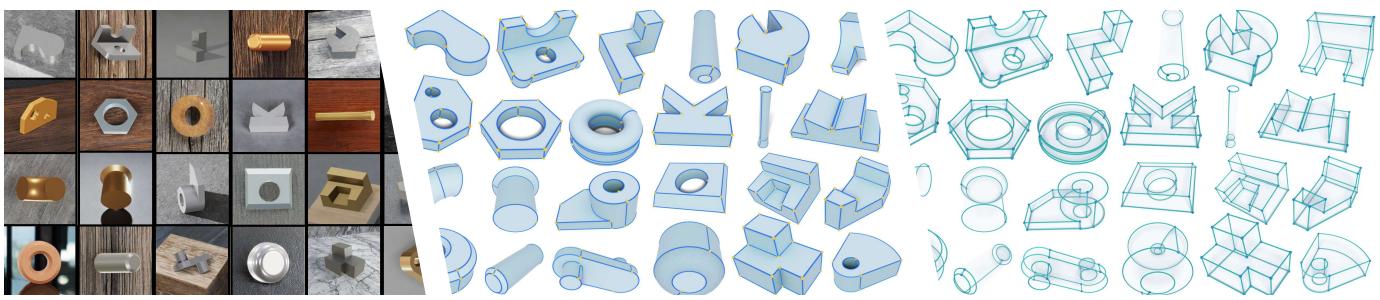
As seen in Figure 1, the system doesn’t just create a blob that looks like the object; it identifies the underlying geometry—nuts, bolts, brackets—and reconstructs them as editable primitives. In this post, we will tear down the architecture of CADDreamer to understand how it bridges the gap between diffusion-based creativity and engineering precision.
Background: Why is this Hard?
To understand the innovation here, we need to understand the difference between a Mesh and a B-rep.
- Triangle Mesh: This is what most 3D scanners and current AI models produce. It creates shape by tiling thousands of tiny polygons. It approximates curves.
- Boundary Representation (B-rep): This is the standard for CAD. A shape is defined by mathematical surfaces (primitives like planes, cylinders, cones) that are “trimmed” by curves where they intersect.
Converting a single 2D image directly into a B-rep is notoriously difficult. A single image has occlusions (hidden parts) and lacks depth information. While diffusion models are great at hallucinating the missing 3D structure, they introduce noise. A generated cylinder might be slightly squashed, or two parallel plates might be slightly askew.
In a mesh, a slightly askew plate is just a visual imperfection. In a B-rep, it is a catastrophic failure. If the math doesn’t align perfectly, the model isn’t “watertight,” meaning it has holes and cannot be manufactured. CADDreamer solves this by combining the creative power of diffusion models with strict geometric optimization algorithms.
The CADDreamer Pipeline
The CADDreamer framework is split into two distinct modules:
- Multi-view Generation: Using AI to dream up the 3D shape and identify what parts are what.
- Geometric & Topological Extraction: Using algorithms to clean up the noise and stitch the parts into a solid CAD model.
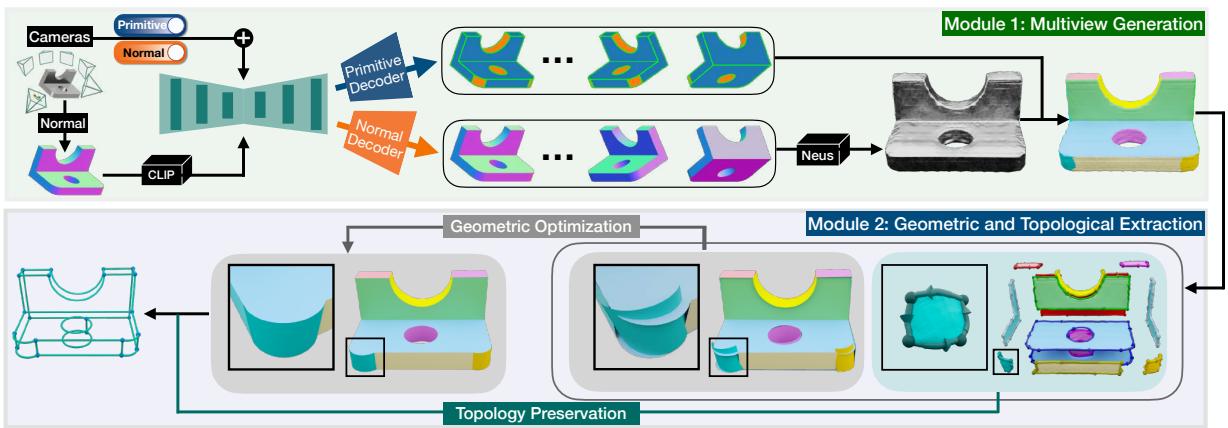
Module 1: Semantic-Enhanced Multi-view Generation
The first challenge is getting a 3D representation from a single 2D photo. The researchers use a technique called cross-domain multi-view diffusion.
Most image-to-3D models try to predict the color (texture) and the surface normals (orientation) of the object from different angles. CADDreamer does something smarter. It recognizes that texture often gets in the way of understanding geometry. A shiny metal surface with reflections can confuse an AI about the object’s actual shape.
Instead, CADDreamer first converts the input image into a Normal Map. Then, it uses a fine-tuned version of Wonder3D (a state-of-the-art diffusion model) to predict two things simultaneously across multiple views:
- Multi-view Normal Maps: The geometry of the object.
- Semantic Primitive Maps: A color-coded map where the color tells us what shape a specific area is. For example, red might represent a plane, while green represents a cylinder.
From Maps to Meshes with NeuS
Once the model has “dreamed” these multi-view maps, they are fed into NeuS (Neural Implicit Surfaces). NeuS is a method for reconstructing a 3D surface from these 2D predictions.
Critically, the researchers remove color/texture reconstruction from this step entirely. They focus purely on geometry. The result is a complete 3D triangular mesh. But a mesh isn’t a CAD model yet. We need to know which triangles belong to which part of the machine.
The Graph Cut Segmentation
This is where the semantic maps come in. The system projects the predicted “primitive colors” back onto the 3D mesh. However, this projection can be messy. To clean it up, the researchers use a Graph Cut process.
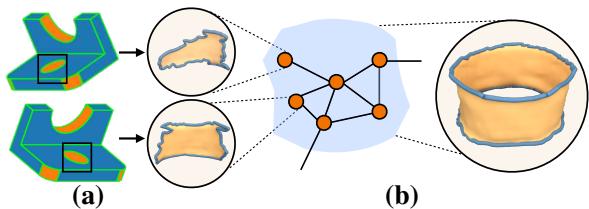
Think of the mesh as a graph where every triangle is a node. The algorithm cuts the graph into patches (segments) ensuring that triangles in the same patch likely belong to the same geometric primitive. As shown in Figure 3, this turns a noisy surface into distinct, color-coded regions, where each region represents a specific mathematical shape (a specific cylinder, a specific plane, etc.).
Module 2: Geometric and Topological Extraction
At this stage, we have a mesh segmented into patches. We know “this patch is a cylinder” and “that patch is a plane.” But we don’t know the exact radius of the cylinder or the exact coordinate of the plane.
The second module turns these rough patches into precise mathematics.
Step 1: Primitive Extraction
The system uses RANSAC (Random Sample Consensus) to fit mathematical shapes to the mesh patches. It looks at the noisy triangles and finds the best-fitting equation for a cylinder, cone, sphere, or torus.
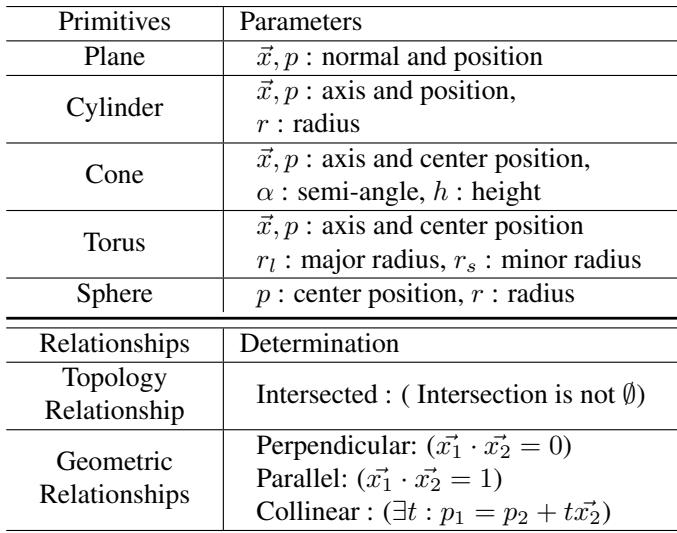
Table 1 lists the mathematical definitions used. For example, a cylinder is defined by an axis (\(\vec{x}\)), a position (\(p\)), and a radius (\(r\)).
Step 2: The Problem of Noise
This is the most critical part of the paper. If you just fit shapes to the noisy AI-generated mesh, the results are messy. A cylinder meant to be perpendicular to a base might be tilted by 1 degree. Two cylinders meant to be parallel might be slightly convergent.
In the world of CAD, these slight errors prevent the parts from connecting.
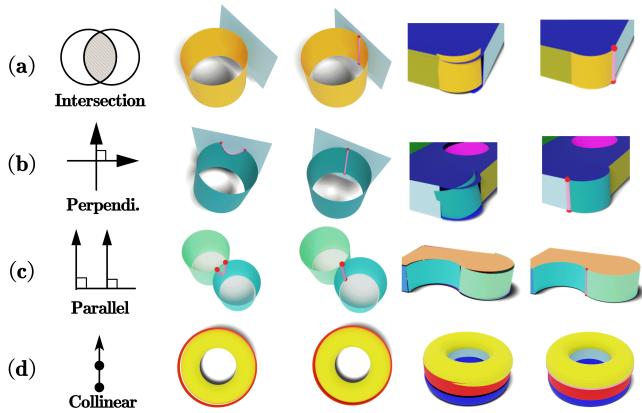
Figure 4 illustrates this danger. Look at column 2 (“Incorrect”). If a cylinder isn’t perfectly perpendicular to the flat surface it intersects, the resulting intersection curve is complex and mathematically ugly, often leading to gaps in the model. If two cylinders aren’t parallel, they won’t stack correctly.
Step 3: Geometric Optimization (The “Stitching” Algorithm)
To fix this, CADDreamer introduces a Geometric Optimization algorithm. It enforces constraints:
- Parallelism: If two axes are close to parallel, force them to be exactly parallel.
- Perpendicularity: If two axes are nearly \(90^{\circ}\), force them to be exactly \(90^{\circ}\).
- Collinearity: If two cylinders share a center line, align them perfectly.
- Intersection: Ensure surfaces that touch actually overlap enough to calculate a clean intersection.
The researchers use a “stitching” technique. They identify boundary points where two shapes meet (stitching vertices) and mathematically pull the surfaces together until they align.
The optimization minimizes the distance between the projection of these stitching vertices on both surfaces:

This equation essentially says: “Move the parameters of Surface A and Surface B until the boundary points lie on both surfaces.”
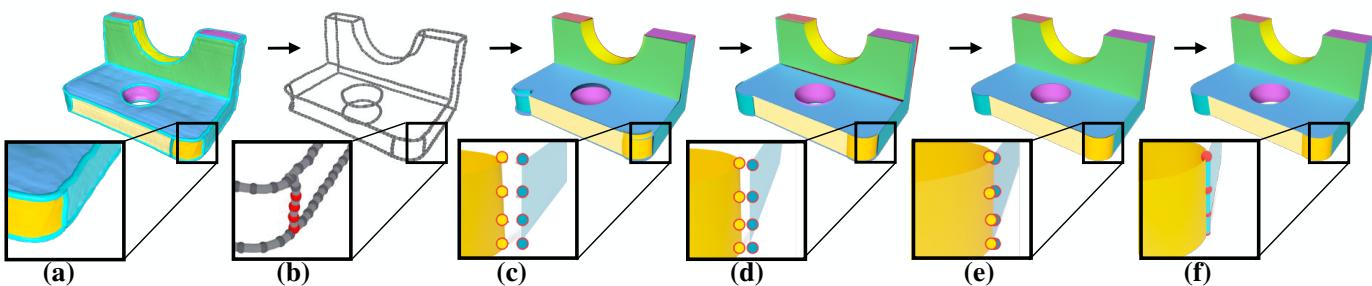
The evolution of this process is visualized in Figure 5. Initially, the yellow cylinder and the grey plane might have a gap or misalignment. By step 100 of the optimization, the algorithm has adjusted the radius and angle of the cylinder to perfectly meet the plane.
Step 4: Topology-Preserving Reconstruction
Once the mathematical surfaces are aligned, the final step is to trim them. The system calculates the exact intersection curves (where the cylinder meets the plane) and creates the Topology—the map of vertices, edges, and faces that makes up the final watertight B-rep.
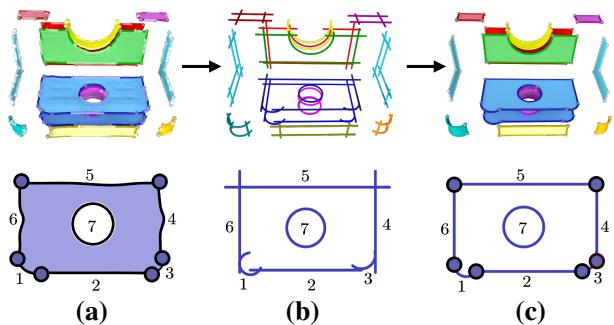
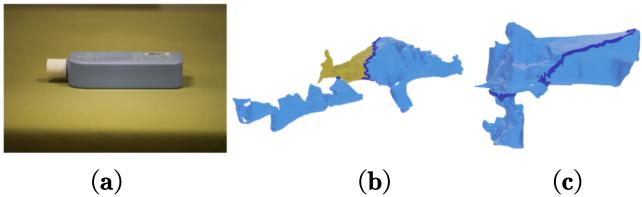
As shown in Figure A1, the system uses the rough boundaries from the initial mesh (a) to guide the calculation of precise CAD curves (b), resulting in a clean, solid model (c).
Experiments and Results
The researchers compared CADDreamer against several state-of-the-art single-view reconstruction methods, including LRM (Large Reconstruction Model), CRM, and SyncDreamer. They used a dataset of 30,000 synthetic CAD models and also tested on real-world photos.
Qualitative Comparison
The visual differences are striking.
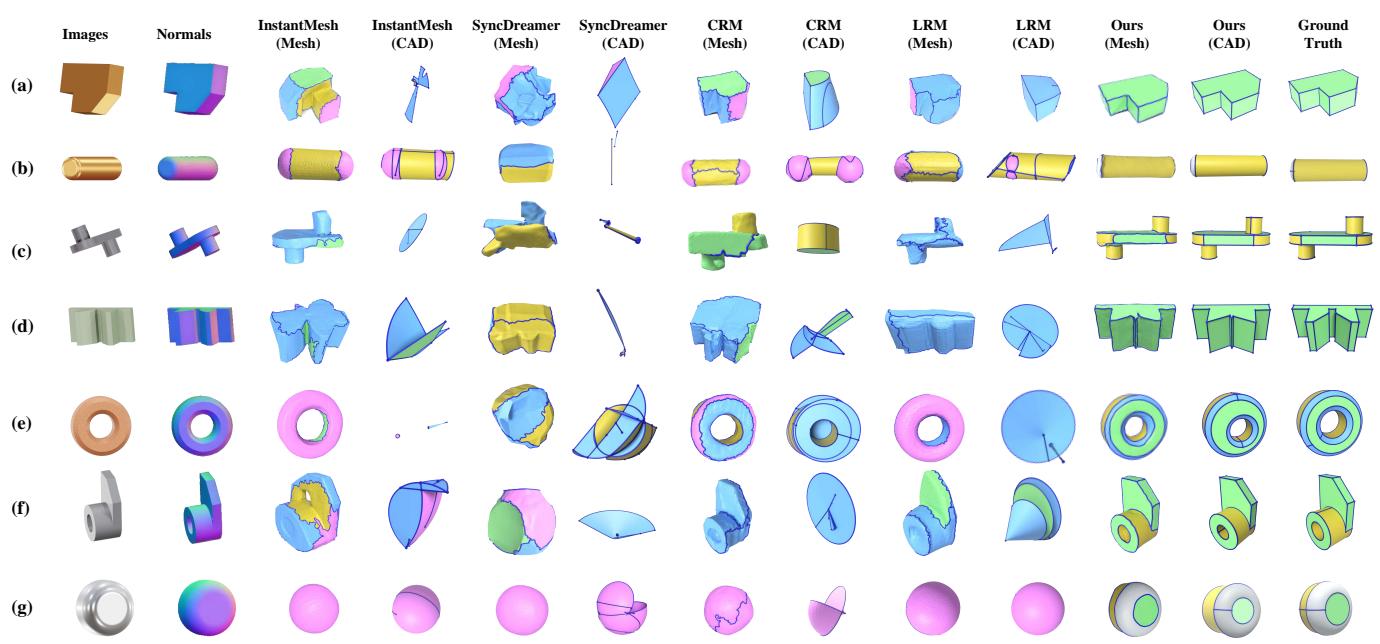
In Figure 6, look at the difference between the “Ground Truth” and the baselines.
- LRM and InstantMesh tend to smooth out sharp edges. They treat a mechanical part like an organic shape, losing the distinct “machine” look.
- SyncDreamer struggles with consistency, leading to distorted geometry.
- CADDreamer (labeled “Ours”) produces sharp, distinctly colored primitives that closely match the Ground Truth. It successfully identifies planes (grey), cylinders (red), and cones (green).
Quantitative Metrics
The researchers measured success using Chamfer Distance (CD) (how close is the surface to the original?) and Hanging Faces (HF) (what percentage of the model is broken/not watertight?).
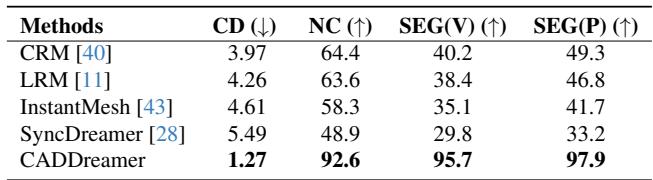
Table 2 shows that CADDreamer achieves a Chamfer Distance of 1.27, drastically lower than the next best competitor (CRM at 3.97). This indicates much higher geometric accuracy.
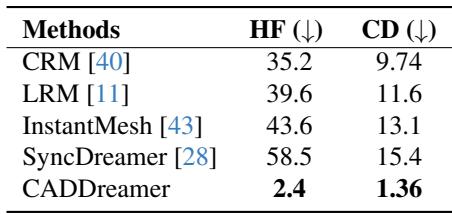
Perhaps the most important metric for engineers is in Table 3: Hanging Faces (HF).
- Competitor methods produce models where 35% to 58% of the faces are “hanging” (disconnected or erroneous). These models are essentially broken.
- CADDreamer reduces this to just 2.4%. This means the resulting CAD files are actually usable.
Real-World Performance
Synthetic data is one thing, but what about a photo taken with a phone?
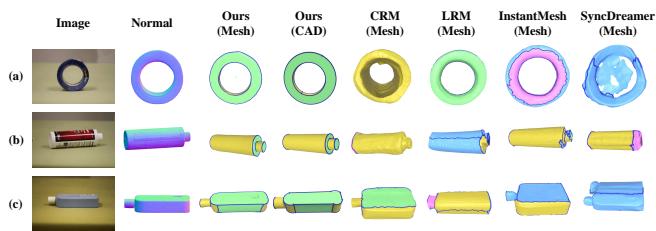
Figure 7 demonstrates the model’s robustness. Even with the lighting variations and shadows of real photography (left column), CADDreamer successfully extracts the CAD structure (middle columns).
It is worth noting that the researchers found that fine-tuning on Normal Maps rather than RGB images was crucial for this real-world success. RGB data contains too much variation (lighting, texture) that distracts the model from the pure geometry.
Limitations
While CADDreamer is a significant leap forward, it isn’t magic. The authors candidly discuss limitations, particularly regarding “Viewpoint Coverage.”
The system relies on generating 6 fixed views of the object. If the object has a complex feature that is hidden from all 6 of those views (like a recessed top face seen from a horizontal angle), the reconstruction will fail.
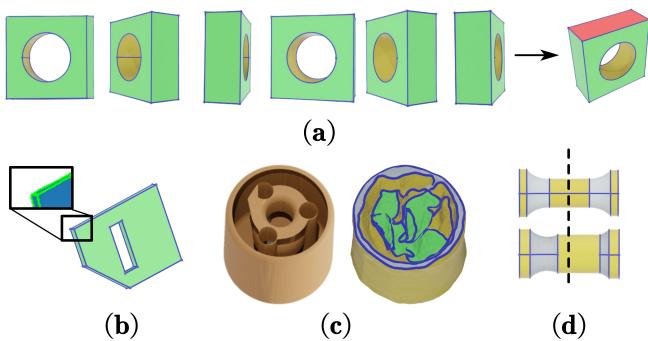
As seen in Figure A3(d), the model also doesn’t strictly enforce global symmetry. While it fixes local connections (like a cylinder hitting a plane), it might not realize that the left side of the object should be a perfect mirror of the right side.
Conclusion
CADDreamer represents a pivotal step in the democratization of 3D design. By moving beyond simple mesh generation and embracing the structured, mathematical nature of CAD (B-reps), it opens the door for generating functional objects, not just visual assets.
The combination of a semantic-aware diffusion model (which understands what it is looking at) and a rigorous geometric optimization engine (which ensures the math checks out) allows for the creation of watertight, sharp-edged models from a single photograph. While there are still hurdles regarding complex occlusions and global symmetry, CADDreamer effectively bridges the gap between the “dreaming” capabilities of AI and the “building” requirements of engineering.
For students and researchers in Computer Vision and Graphics, this paper highlights a vital trend: Integration. The future isn’t just about bigger diffusion models; it’s about integrating those models with domain-specific knowledge—in this case, the strict geometry of CAD—to create tools that are reliable enough for the real world.