](https://deep-paper.org/en/paper/2503.18402/images/cover.png)
If you have been following the field of 3D scene reconstruction, you are likely familiar with the rapid evolution from Neural Radiance Fields (NeRFs) to 3D Gaussian Splatting (3DGS). While NeRFs stunned the world with photorealistic view synthesis, they were notoriously slow to train, often requiring hours or days. 3DGS revolutionized this by representing scenes with explicit Gaussian primitives, cutting optimization times down to tens of minutes.
But for many real-time applications, “tens of minutes” is still too long. Whether for interactive content creation, digital humans, or large-scale mapping, the holy grail is optimization that happens in seconds, not minutes.
In this post, we are diving deep into DashGaussian, a research paper that proposes a clever scheduling scheme to accelerate 3DGS optimization. By fundamentally rethinking how computational resources are allocated during training, DashGaussian achieves high-quality scene reconstruction in just 200 seconds on a consumer GPU.
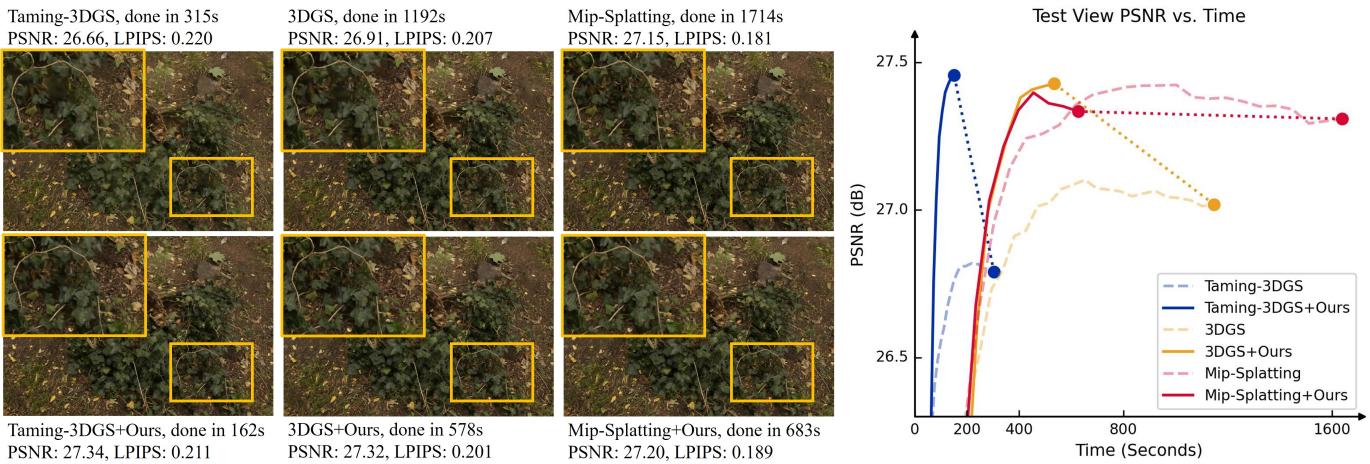
As shown above, DashGaussian doesn’t just match the quality of state-of-the-art methods—it reaches that quality fraction of the time. Let’s explore how it works.
The Core Problem: Optimization Complexity
To understand why 3DGS takes time, we need to look at what happens during optimization. The renderer rasterizes millions of 3D Gaussian primitives onto a 2D screen to calculate loss against a ground truth image.
The computational cost—or Optimization Complexity—is primarily driven by two factors:
- Rendering Resolution: The number of pixels being calculated.
- Number of Primitives: The number of 3D Gaussians in the scene. \[ \text{Cost} \propto \text{Resolution} \times \text{Primitive Count} \] Standard 3DGS optimization is somewhat “brute force.” It often trains on high-resolution images early in the process when the geometry is still crude, and it continues adding primitives late in the process when they yield diminishing returns. This results in wasted computation: rendering high-res details for a blurry, under-optimized scene is inefficient.
Existing acceleration methods usually focus on engineering (writing faster CUDA kernels) or pruning (aggressively deleting primitives). While effective, pruning often hurts visual quality. DashGaussian takes a different approach: algorithmic scheduling. It asks, “What if we dynamically adjust the resolution and primitive count so we only pay for what we need, when we need it?”
The DashGaussian Method
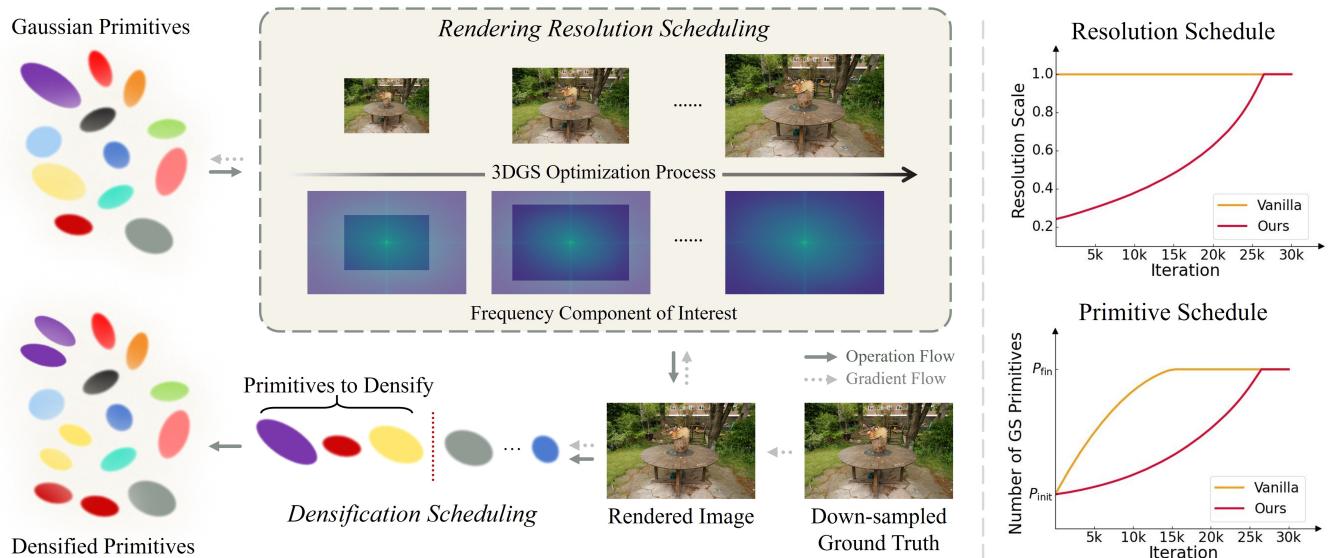
The authors propose a “scheduling scheme” that manages the optimization complexity over time. This consists of three main components: a Frequency-Guided Resolution Scheduler, a Resolution-Guided Primitive Scheduler, and Momentum-Based Budgeting.
Let’s look at the high-level pipeline:
1. The Frequency Perspective
The researchers formulated the optimization problem through the lens of signal processing. An image can be viewed as a collection of frequencies. High-resolution images contain high-frequency details (sharp edges, textures), while low-resolution images contain low-frequency information (general shapes, colors).
When you start training a 3D model, it captures the rough shape first (low frequency). It physically cannot represent high-frequency details yet because the primitives are sparse and unoptimized. Therefore, forcing the model to calculate loss on high-resolution pixels early on is wasteful. The model is trying to learn high-frequency details it isn’t ready to represent.
The Insight: Increasing rendering resolution during optimization is mathematically equivalent to fitting the model to higher levels of frequency components progressively.
2. Frequency-Guided Resolution Scheduling
Instead of training on full-resolution images from start to finish, DashGaussian starts with low-resolution rendering and progressively scales up. However, this isn’t just a linear ramp-up. The authors define a metric to determine when the resolution should increase based on the information content (frequency energy) of the images.
They define the significance (\(\mathcal{X}\)) of an image at a specific resolution based on its frequency map \(\mathbf{F}\):
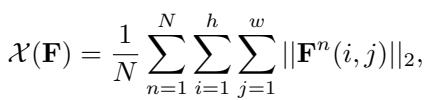
This equation essentially sums up the energy in the frequency domain. To decide how much time to spend on a specific lower resolution \(\mathbf{F}_r\) versus the full resolution \(\mathbf{F}\), they use a fraction function:
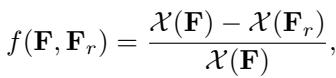
This creates a scene-adaptive schedule. If a scene has very little high-frequency detail (like a smooth wall), the scheduler might spend more time in lower resolutions. If the scene is highly detailed (like foliage), it moves to high resolution faster.
In practice, this looks like the “Resolution Schedule” graph in Figure 2. The resolution stays low to quickly establish geometry, then ramps up to refine details.
3. Resolution-Guided Primitive Scheduling
Adjusting resolution is only half the battle. The number of Gaussian primitives needs to match the resolution.
If you are rendering a \(64 \times 64\) pixel image, having 5 million Gaussian primitives is overkill—multiple primitives would overlap single pixels, wasting memory and compute cycles without improving the gradient signal.
DashGaussian couples the growth of primitives to the current rendering resolution. As the resolution increases, the capacity of the model (number of primitives) is allowed to grow.

Here, \(P_i\) is the target number of primitives at step \(i\). The term \(r^{(i)}\) represents the current resolution. Notice the exponent \((2 - i/S)\). This creates a concave-up growth curve.
- Early stage: Primitives grow slowly (preventing over-densification when resolution is low).
- Late stage: Primitives grow rapidly to capture fine details as resolution hits maximum.
This contrasts with standard 3DGS, where primitive counts often explode early on.
4. Momentum-Based Primitive Budgeting
In the equation above, there is a variable \(P_{fin}\)—the final desired number of primitives. In previous works, this was often a “magic number” or a heuristic based on the initial point cloud size. If you guess too low, quality suffers; guess too high, and optimization slows down.
DashGaussian eliminates this guesswork using a momentum-based approach. It treats the final primitive count as a moving target that adjusts based on how many primitives the scene naturally “wants” to add during densification.

This update rule checks if the model is aggressively trying to add new primitives (\(P_{add}\)). If it is, the budget \(P_{fin}\) increases. If the model stabilizes, the budget stabilizes. This allows the system to find the optimal model size automatically.
Putting It Together: The Math of Rendering
To visualize why these reductions matter, recall the standard rendering equation for a pixel’s color \(\mathbf{C}(\mathbf{u})\):

This summation runs over \(P\) primitives. By keeping \(P\) low during the early stages (Primitive Scheduling) and reducing the number of pixels \(\mathbf{u}\) (Resolution Scheduling), DashGaussian drastically reduces the total floating-point operations required to reach convergence.
Experiments and Results
The researchers integrated DashGaussian into several existing 3DGS backbones, including the original 3DGS, Mip-Splatting, and Taming-3DGS.
Quantitative Speed and Quality
The results are stark. By plugging DashGaussian into “Taming-3DGS” (an already optimized version), they achieved training times as low as 2.20 minutes on the Deep Blending dataset and 2.62 minutes on Tanks & Temples.

Key takeaways from the table:
- Speed: DashGaussian is consistently faster than Reduced-3DGS and Mini-Splatting.
- Quality: Despite the speed, it maintains or exceeds the PSNR (Peak Signal-to-Noise Ratio) of the original slower methods.
- Efficiency: It uses fewer Gaussians (\(N_{GS}\)) to achieve these results, resulting in a lighter model storage footprint.
Visual Quality
Speed means nothing if the resulting images are blurry. Qualitative comparisons show that DashGaussian preserves high-frequency details effectively.
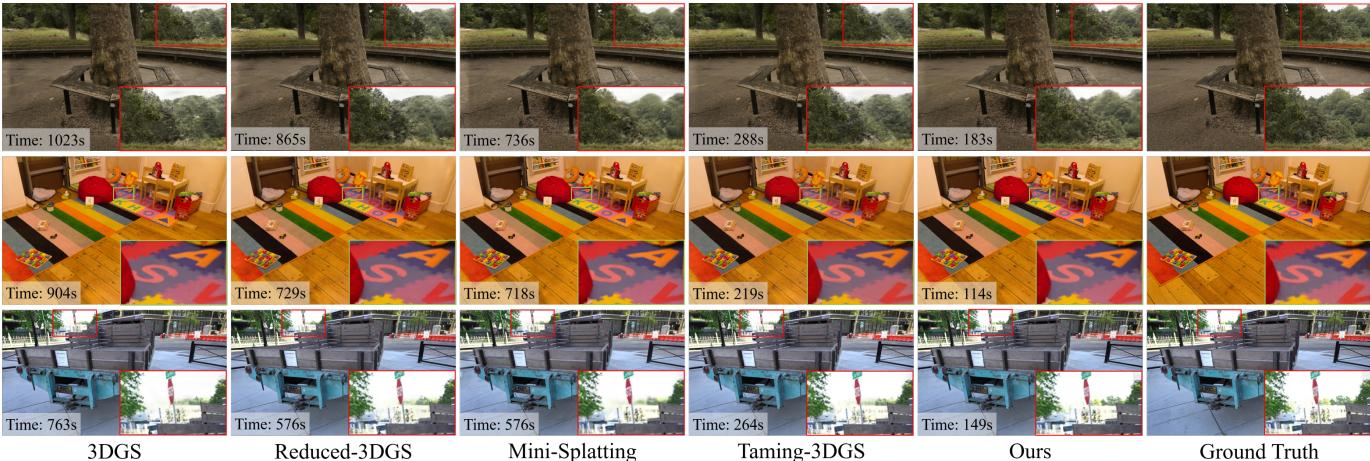
In the “Treehill” and “Truck” scenes above, notice how DashGaussian (bottom rows) maintains sharp edges and texture details comparable to the Ground Truth (GT), whereas other fast methods sometimes introduce blur or artifacts.
Profiling the Speed-Up
Where exactly is the time saved? The authors profiled the three major steps of an iteration: Forward pass, Backward pass, and Optimization step.
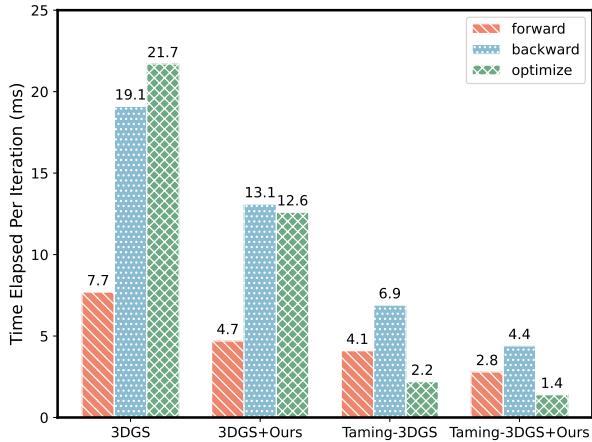
Figure 5 shows that DashGaussian reduces the cost of every stage. Because there are fewer pixels to render and fewer primitives to manage on average throughout the training, the forward and backward passes are significantly lighter.
Dynamic Scheduling in Action
It is fascinating to watch how the scheduler adapts to different scenes.
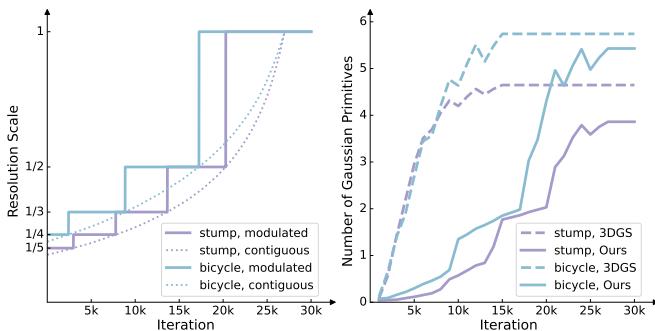
On the left, notice how the resolution schedule (purple and cyan lines) adapts differently for the “bicycle” vs. “stump” scenes. On the right, look at the primitive growth. Standard 3DGS (dashed lines) shoots up to high primitive counts immediately. DashGaussian (solid lines) keeps the count low for the first 10k iterations, then spikes it exactly when high-resolution refinement is needed.
Broad Compatibility
One of the strongest aspects of this paper is that DashGaussian isn’t a standalone renderer; it’s a strategy.
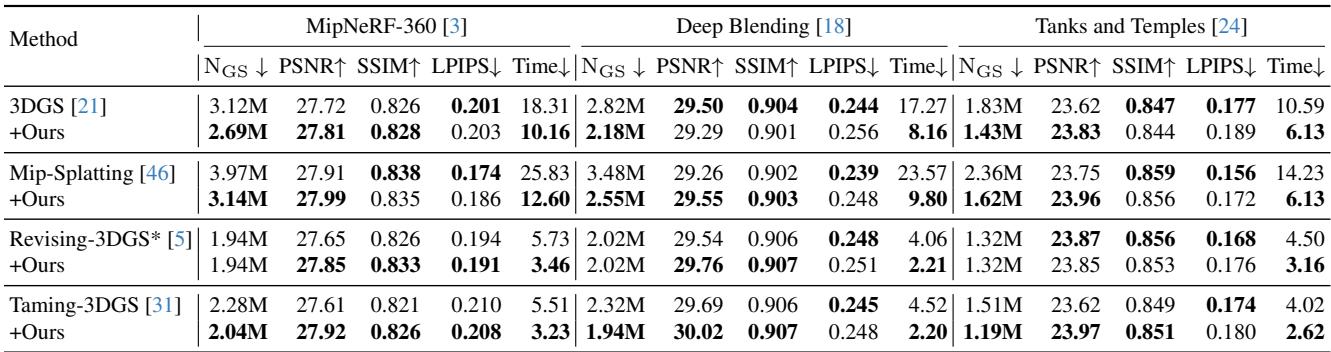
Table 2 demonstrates that applying DashGaussian to any backbone (Original 3DGS, Mip-Splatting, etc.) results in a ~45% speedup on average without losing quality. It is a universal “turbo button” for Gaussian Splatting.
Conclusion
DashGaussian demonstrates that in the world of neural rendering, working smarter is better than working harder. By acknowledging that a model in the early stages of training cannot utilize high-resolution data, the authors devised a scheduling scheme that aligns computational effort with the model’s learning progress.
Key Takeaways:
- Progressive Learning: Start with low-res/low-poly approximations and refine over time.
- Coupled Complexity: Resolution and primitive count must be scaled together.
- Adaptive Budgeting: Let the scene dictate how many primitives it needs, rather than setting arbitrary limits.
- Result: High-fidelity 3D scenes trained in roughly 3 minutes.
This work paves the way for on-device training (e.g., capturing a scene on a phone and training it locally in minutes) and scalable reconstruction of massive city-scale environments where efficiency is paramount.