](https://deep-paper.org/en/paper/2503.19903/images/cover.png)
Introduction
Imagine driving down a highway. In the distance, you spot a sign. To read the text on it, your eyes naturally focus on that specific small area, perceiving it in high detail, while the rest of your peripheral vision remains lower resolution. You don’t process the entire landscape with the same microscopic intensity; that would overwhelm your brain. You prioritize.
Current Artificial Intelligence, however, doesn’t work like that.
Most modern Vision-Language Models (VLMs), like the ones powering GPT-4o or Gemini, struggle with high-resolution inputs. Standard vision encoders (like CLIP or SigLIP) are typically pre-trained at low resolutions, often around \(378 \times 378\) pixels. When these models face a 4K image, they either downsample it—turning that distant highway sign into a blurry mess—or they try to process the whole image in high resolution, which causes computational costs to explode quadratically.
This is the resolution barrier.
In a new paper titled “Scaling Vision Pre-Training to 4K Resolution,” researchers from UC Berkeley and NVIDIA introduce a groundbreaking solution called PS3 (Pre-training with Scale-Selective Scaling).
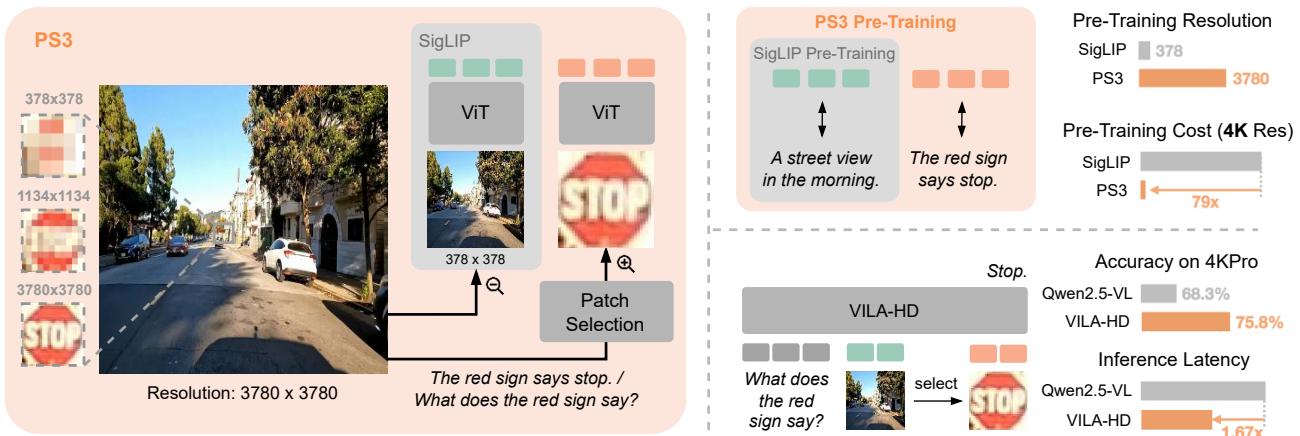
As shown in Figure 1, unlike traditional models that try to swallow the whole image at once, PS3 mimics human vision. It encodes the global context at low resolution and then selectively “zooms in” on the parts that matter. This approach allows for pre-training at 4K resolution with near-constant computational cost, unlocking a new generation of Multi-modal LLMs (MLLMs) that can finally see the details.
The Problem: The Cost of Clarity
Why haven’t we just trained models on 4K images already? The answer lies in the architecture of Vision Transformers (ViTs).
The computational cost of a Vision Transformer grows quadratically (or even quartically) with image resolution. If you double the image size, the compute required doesn’t just double; it skyrockets. This makes pre-training on resolutions higher than 1K feasible only for the largest tech giants, and even then, it is incredibly inefficient.
Existing workarounds, like AnyRes or S\(^2\), try to patch this by taking a low-res pre-trained model and splitting a high-res image into “tiles” during inference. While this helps, it’s suboptimal because the vision encoder was never actually taught to see in high resolution during its training phase. It’s like trying to teach someone to read a microscopic map when they’ve only ever practiced reading large-print books.
The Solution: PS3 (Pre-training with Scale-Selective Scaling)
The core insight of PS3 is Scale-Selectivity.
The researchers argue that to understand a high-resolution image, you don’t need to contrast the entire high-res image with a global caption. Instead, you only need to align local high-resolution regions with local detailed captions.
If an image contains a small “Stop” sign, the model only needs to extract high-res features around the sign and match them to the text “Stop.” It doesn’t need to process the empty sky above it at 4K resolution. This disentangles the computational cost from the image resolution.
To make this work, the authors had to innovate across three pillars: Data, Model Architecture, and Training Algorithms.
1. The Data Pipeline
You cannot learn high-resolution details if your training data only consists of global captions like “A street scene.” You need specific labels for specific tiny regions.
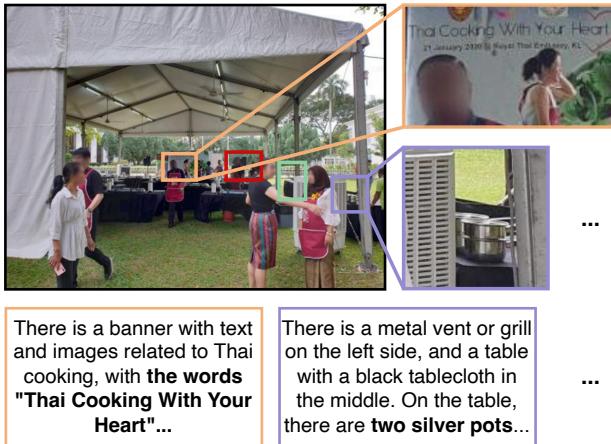
Since such a dataset didn’t exist at scale, the researchers built one. They collected 75 million high-res images (natural scenes and documents) and created an automated pipeline to generate 282 million pairs of local bounding boxes and detailed captions.
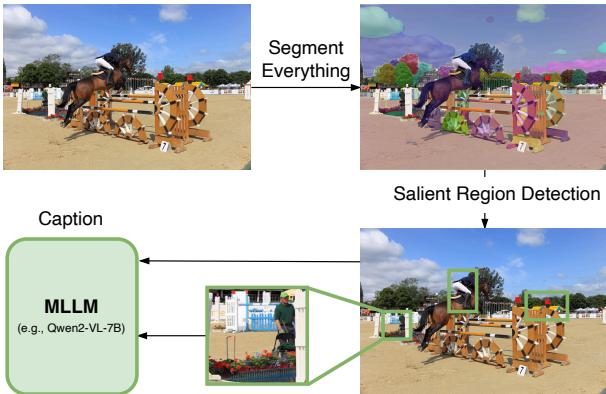
As illustrated in Figure 2, the pipeline works in three steps:
- Segment Everything: Use a segmentation model to identify all objects.
- Salient Region Detection: Identify regions with small or dense masks (which usually indicates high detail).
- Local Captioning: Use a separate MLLM (like Qwen2-VL) to look at the cropped region and describe it in detail based on the global context.
The result is a training set where the model is explicitly told where the details are and what they are.
2. The Model Architecture
The PS3 model is designed to be efficient. It doesn’t just process pixels; it decides which pixels to process. The architecture is divided into three stages:
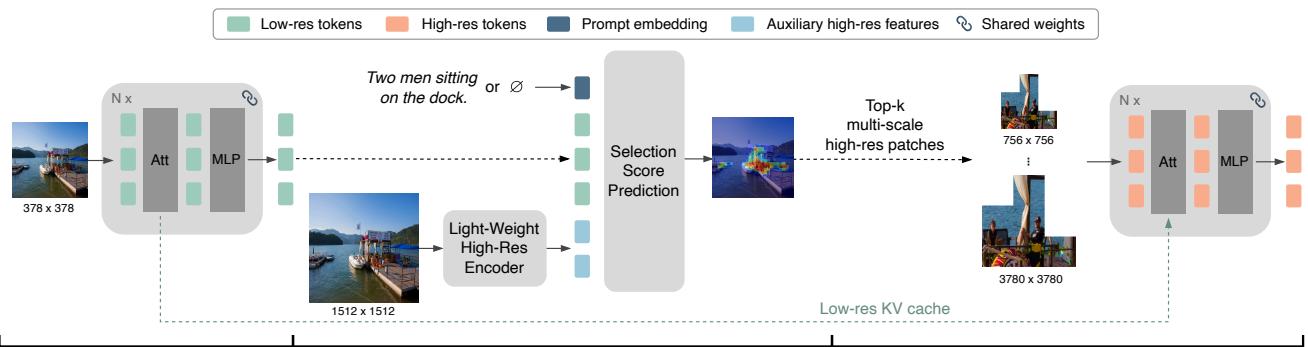
- Stage 1: Low-Res Feature Extraction: The model looks at the whole image at a standard low resolution (\(378 \times 378\)). This gives it the “gist” of the scene.
- Stage 2: Patch Selection: This is the brain of the operation. The model predicts a “selection score” for different regions. This selection can be:
- Top-Down: Guided by a text prompt (e.g., “Find the license plate”).
- Bottom-Up: Guided by visual saliency (e.g., “Look at the busy/detailed parts”).
- Stage 3: High-Res Feature Extraction: The model grabs the high-res patches from the selected regions. Crucially, it uses a Low-Res KV Cache. This connects the high-res patch back to the global low-res context from Stage 1, ensuring the model knows where in the image it is looking.
3. The Training Algorithm
How do you train a model to “zoom in”? The researchers used a dual-objective approach.
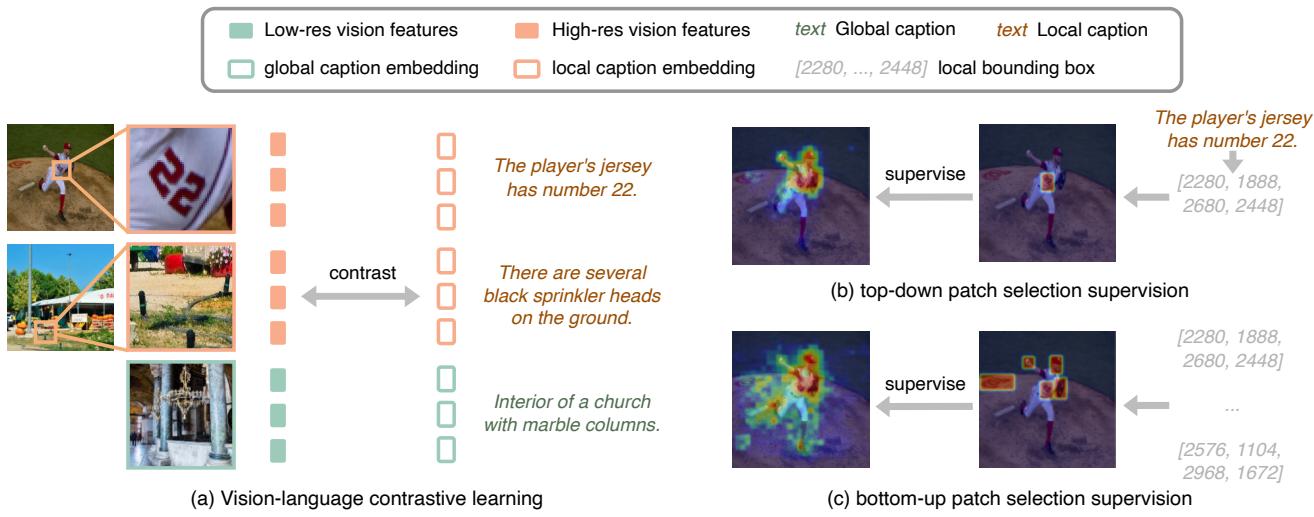
- Localized Contrastive Learning: The model extracts features from a local region and tries to match them to the embedding of that region’s caption (Figure 5a). To keep the model grounded, they mix this with standard global image-text contrastive learning.
- Selection Supervision: The model is explicitly trained to select the “right” patches. Using the bounding boxes generated in the data phase, the model learns to predict high scores for regions that contain salient objects or match the text prompt (Figure 5b & 5c).
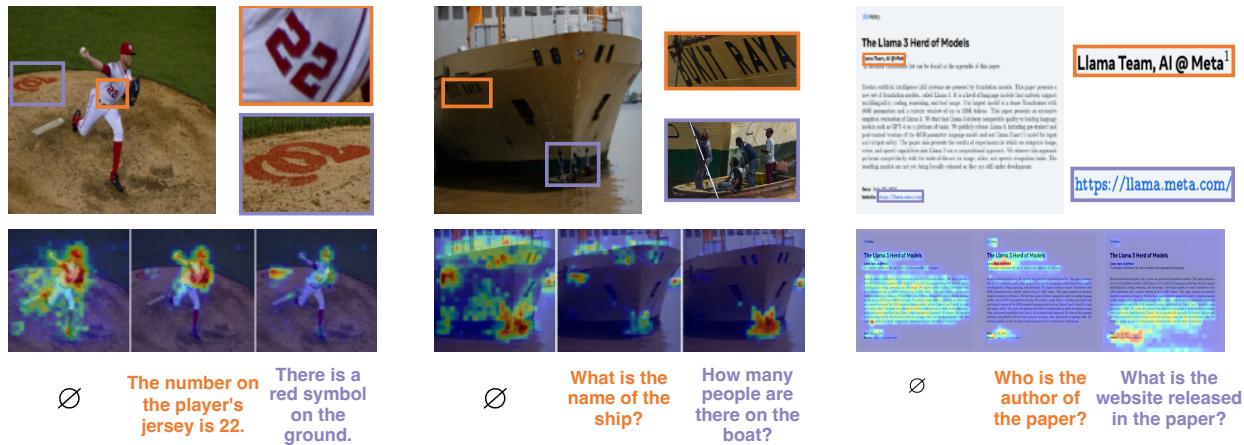
The qualitative results of this selection mechanism are impressive. As seen below, the model learns to focus exactly where a human would look to answer a specific question.
VILA-HD: The High-Res Assistant
PS3 is just the vision encoder—the “eyes.” To make it useful, the researchers plugged it into a Large Language Model to create VILA-HD.
In this setup, the LLM acts as the controller. When a user asks a question, the LLM processes the low-res image features first. Then, it uses the semantic meaning of the user’s question to drive the Top-Down Patch Selection in PS3.
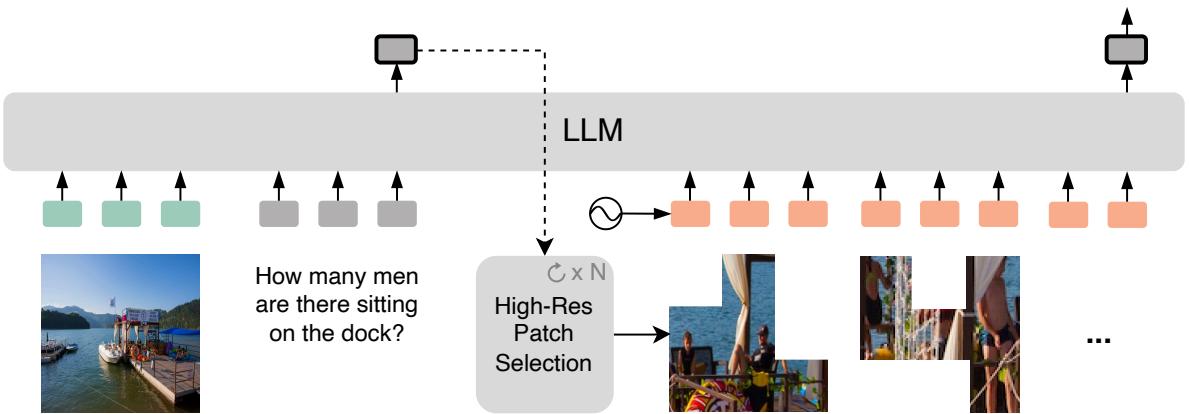
For example, if you provide a 4K image of a store shelf and ask, “What is the price of the milk?”, VILA-HD:
- Scans the low-res image.
- Uses the word “price” and “milk” to identify the relevant shelf area.
- Requests high-res patches for just that area.
- Reads the price tag.
This allows VILA-HD to process massive images while using 4.3\(\times\) fewer tokens than baseline methods like AnyRes.
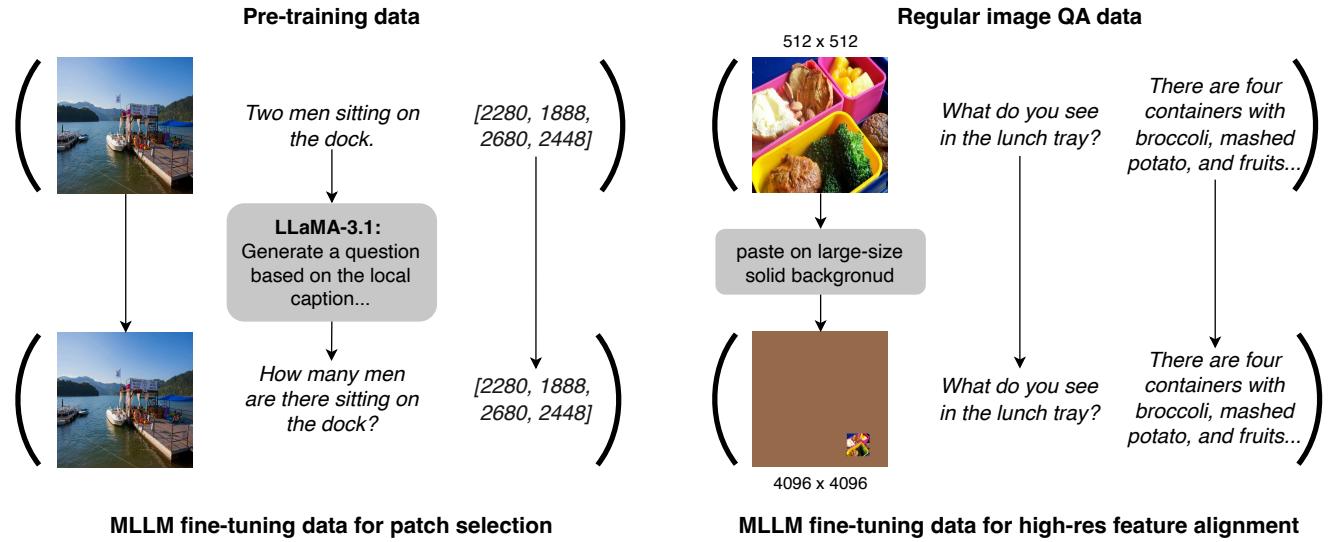
To fine-tune VILA-HD, the researchers also had to be clever. Standard datasets are low-res. To teach the model to align high-res features with text, they created synthetic “High-Res VQA” data by pasting small low-res images onto large blank canvases, forcing the model to find and process the small “high-res” region (Figure 8).
Scaling Properties: Getting More for Less
One of the most exciting findings in the paper is the scaling behavior of PS3. Because the model separates image resolution from compute cost, it unlocks “Free Scaling.”
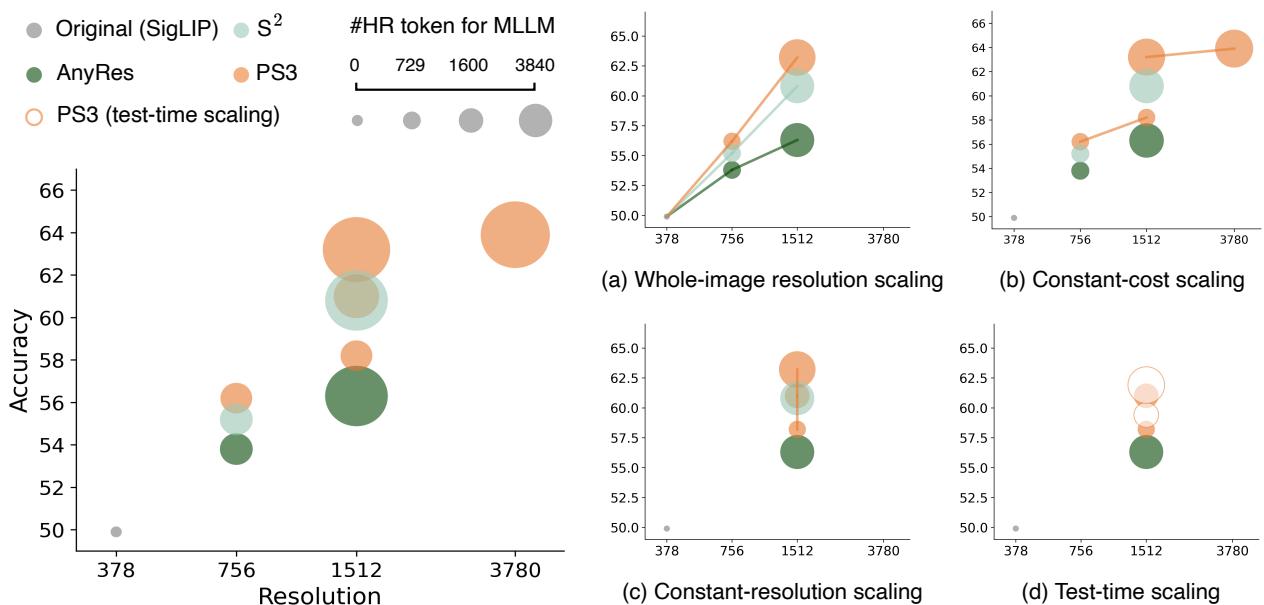
- Whole-Image Scaling (Figure 9a): As you increase the input resolution, PS3’s performance climbs much faster than baselines like SigLIP or AnyRes.
- Constant-Cost Scaling (Figure 9b): Even if you limit the model to process a fixed number of tokens (keeping the speed constant), increasing the input resolution still improves performance. Why? Because the model becomes smarter at selecting better patches from the higher-quality source image.
- Test-Time Scaling (Figure 9d): You can train the model with a limited “budget” of patches but let it use more patches during testing to get better results without retraining.
The 4KPro Benchmark
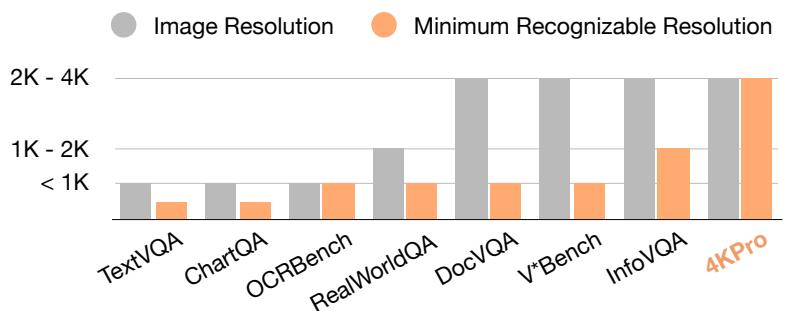
During their research, the authors realized a problem: most “high-resolution” benchmarks don’t actually require high resolution. You can solve them with a 1K image.
To prove the value of 4K pre-training, they introduced 4KPro, a new benchmark covering Autonomous Vehicles, Household scenarios, Gaming, and UI Understanding. These are tasks where the Minimum Recognizable Resolution (MRR) is truly 4K.
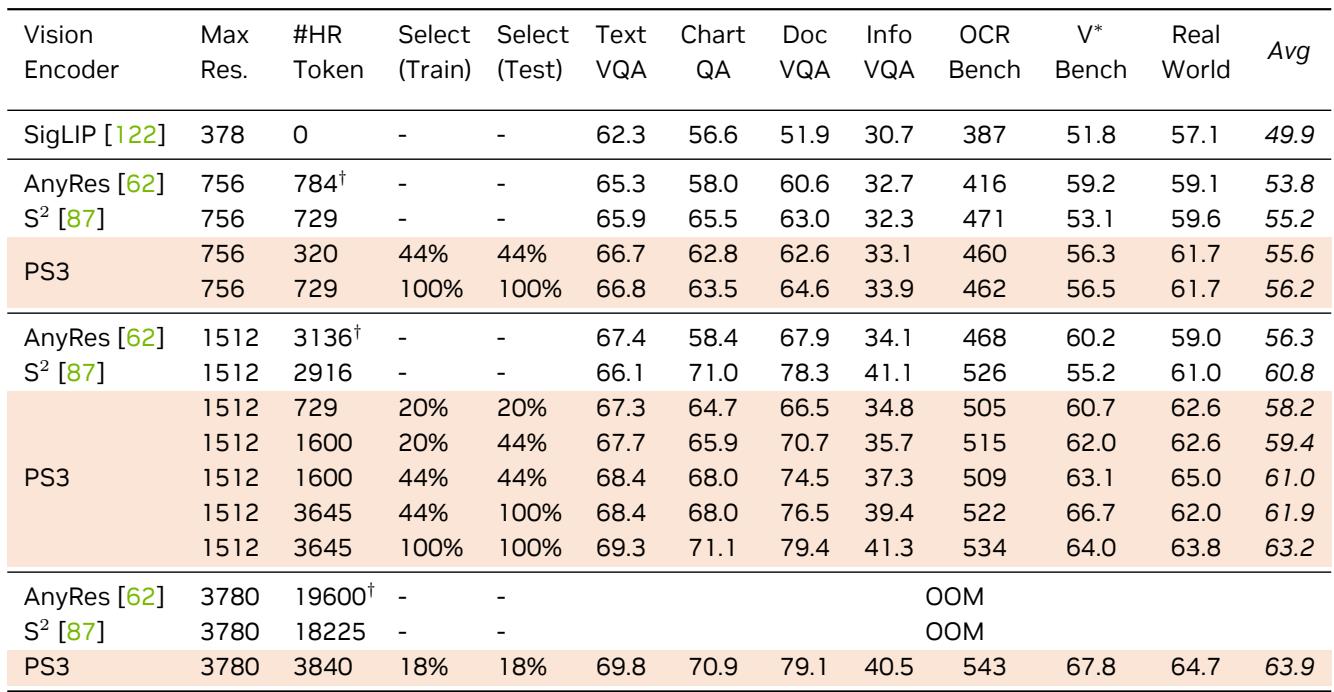
On 4KPro, the difference is stark. VILA-HD achieves state-of-the-art results, outperforming proprietary giants like GPT-4o and open-source leaders like Qwen2.5-VL.
The visual examples in Figure 11 (above) show VILA-HD correctly identifying a highway exit number (“72A”) and a specific RAM usage percentage (“82%”) where other models hallucinate or fail.
In quantitative terms, VILA-HD achieved a 16.1% improvement over GPT-4o and a 7.5% improvement over Qwen2.5-VL on this benchmark, all while running significantly faster.
Visualization: Sharper Eyes
Does PS3 actually “see” better features? The researchers visualized the internal feature maps using PCA (Principal Component Analysis).
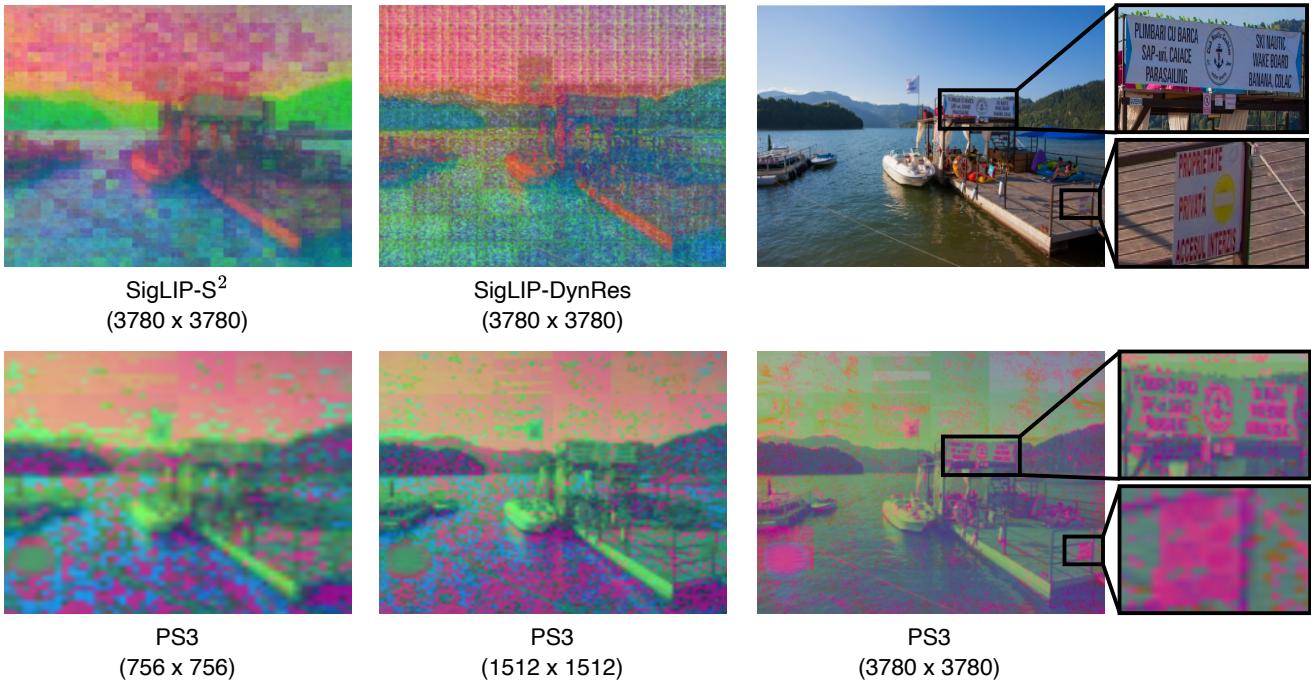
As shown in Figure 14, baselines like AnyRes produce noisy or blurry feature maps when stretched to 4K. PS3, however, produces crisp, coherent features that clearly delineate small objects and text characters.
Efficiency vs. Pruning
Finally, the paper compares PS3 against “Token Pruning” methods—techniques that try to make models faster by deleting “unimportant” parts of the image after the vision encoder has processed them.
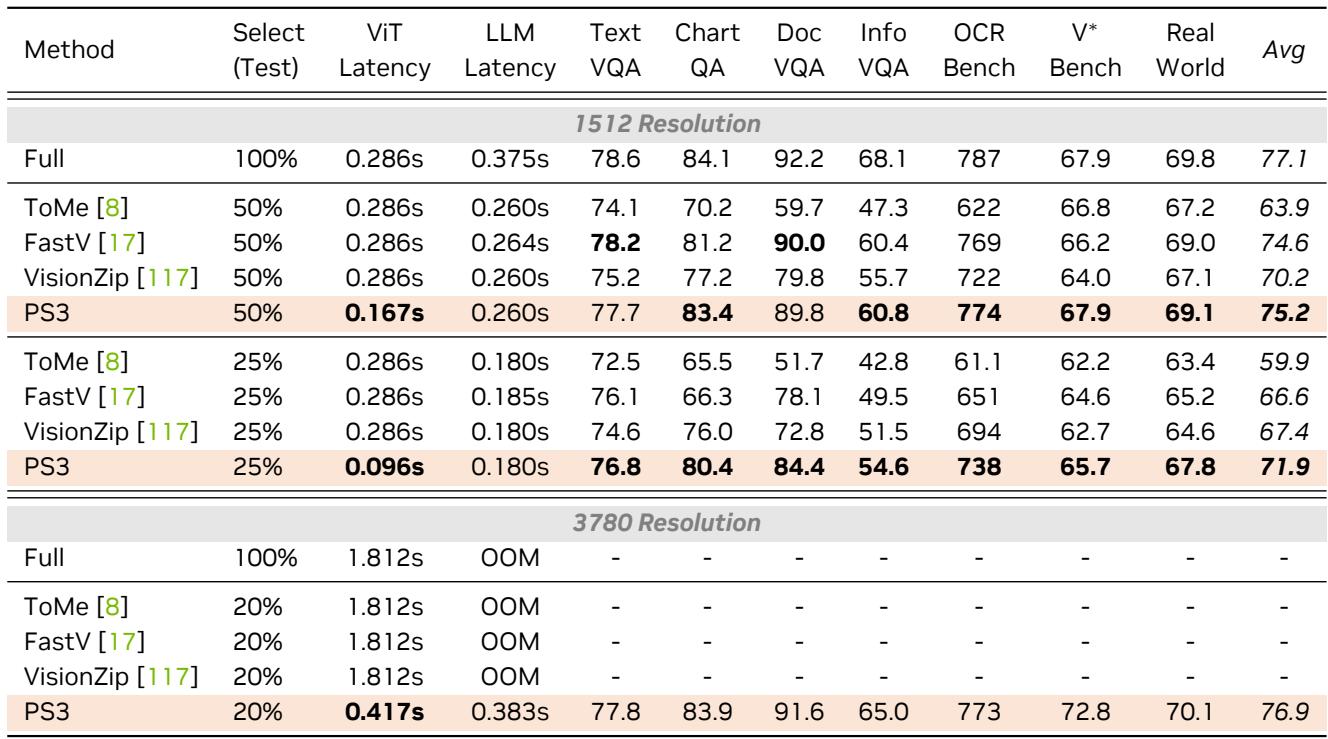
Table 6 highlights that PS3 is superior. Because PS3 selects patches before heavy processing (Top-Down selection), it saves compute in both the Vision Encoder and the LLM. Pruning methods still have to run the vision encoder on the whole image first, leading to higher latency. PS3 was the only method capable of handling 4K resolution without running out of memory (OOM).
Conclusion
The “Scaling Vision Pre-Training to 4K Resolution” paper marks a significant step forward for multimodal AI. By moving away from the brute-force approach of processing every pixel and adopting a human-like strategy of foveal attention—scanning the whole but focusing on the parts—PS3 breaks the quadratic cost barrier.
The resulting model, VILA-HD, demonstrates that:
- Resolution matters: Real-world tasks (driving, reading screens) require 4K.
- Selection matters: We don’t need to process the sky to read a road sign.
- Pre-training matters: “Faking” high resolution by tiling low-res models isn’t enough; the model needs to learn high-res features from the start.
As we move toward AI agents that interact with complex computer UIs or navigate chaotic real-world environments, efficient high-resolution vision like PS3 will be an essential building block.