](https://deep-paper.org/en/paper/2503.21761/images/cover.png)
Imagine recording a video of a busy street corner with your phone. You capture cars driving by, pedestrians crossing the street, and the static buildings towering above. To you, it’s just a video. But to a computer vision researcher, it is a complex puzzle of 3D geometry and time—a “4D” scene.
Reconstructing a full 4D model (3D space + time) from a single, casual video is one of the Holy Grails of computer vision. Traditionally, this is incredibly difficult. You have to figure out where the camera is moving, what part of the scene is static background, what is moving, and how those moving objects change shape over time.
Most recent approaches try to train massive neural networks to solve this end-to-end. But what if we didn’t need to train a new model from scratch? What if the tools we need already exist, hidden within the powerful “Foundation Models” we’ve built for other tasks?
This is the premise of Uni4D, a new framework presented by researchers from the University of Illinois at Urbana-Champaign. Uni4D doesn’t require a single minute of training. Instead, it acts as a conductor, orchestrating a suite of pre-trained visual foundation models to reconstruct high-fidelity 4D scenes.
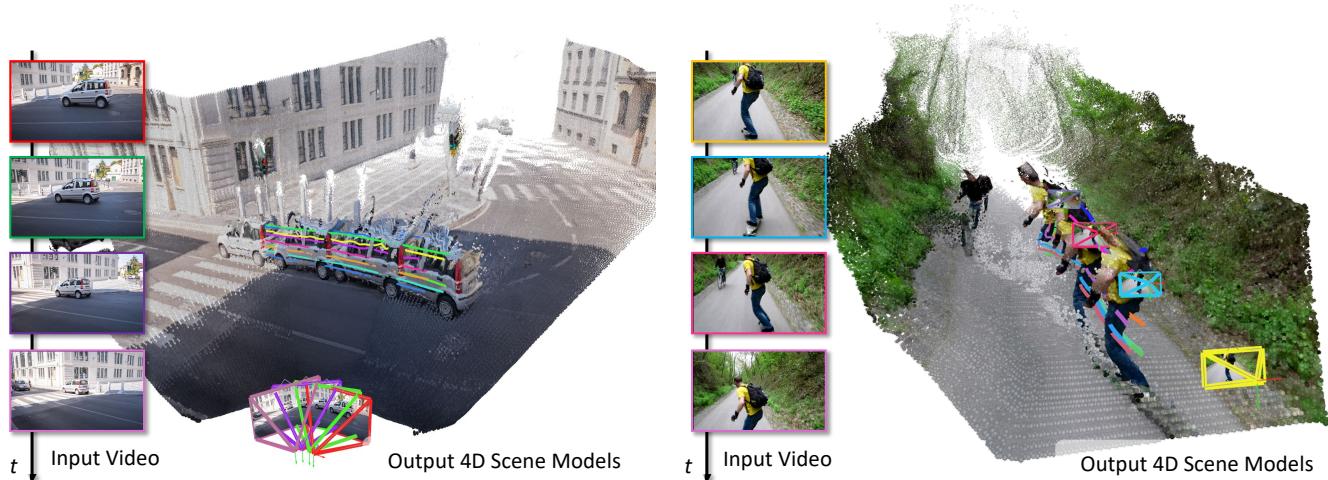
As shown in Figure 1, the system takes a standard video sequence and outputs a textured 3D reconstruction complete with dynamic trajectory overlays, accurately separating the static environment from moving agents like cars and pedestrians.
The Challenge of the 4D World
Why is 4D modeling so hard? In 3D reconstruction (Structure from Motion or SfM), we assume the world is rigid. If a point moves in the image, it’s because the camera moved. This assumption allows algorithms to triangulate points and build a 3D map.
However, in a dynamic scene, points move for two reasons: the camera is moving, and the object itself is moving (or deforming). This creates a massive ambiguity. Did the car move forward, or did the camera move backward? Without specialized data (like multi-view setups), solving this from a single video is mathematically “ill-posed”—there are too many unknowns and not enough equations.
Previous attempts have tried to solve this by learning from massive datasets or making strict assumptions about the objects (e.g., “this is a human, so it must move like a human”). But these methods often struggle to generalize to “wild” videos with arbitrary objects.
The Uni4D Approach: Assemble the Avengers
The core insight of Uni4D is that the computer vision community has already solved many pieces of this puzzle separately. We have models that are excellent at:
- Segmentation: Identifying objects (SAM).
- Depth: Estimating how far away pixels are (UniDepth).
- Tracking: Following points across frames (CoTracker).
Uni4D proposes that we don’t need a new model; we need a way to unify these existing cues. The framework treats these foundation models as sensors that provide “projections” of the 4D world.
- Video Depth is a projection of 4D geometry.
- Motion Tracking is a projection of 4D motion.
- Segmentation is a projection of dynamic object silhouettes.
The goal of Uni4D is to find a 4D representation that mathematically agrees with all these conflicting cues simultaneously.

Figure 3 illustrates the architecture. The process begins with a casually captured video. The system feeds this video into three different “Visual Foundation Cues” streams: Video Depth, Motion Track, and Segmentation. These inputs are then fed into a multi-stage optimization pipeline—not a neural network training loop—that progressively builds the 4D model.
Step 1: Extracting Visual Cues
Before any 3D reconstruction happens, Uni4D processes the video to understand what is looking at.
- Dynamic Segmentation: The system needs to know what is background (static) and what is an object (dynamic). It uses the Recognize Anything Model (RAM) and GPT-4 to identify semantic classes in the video. It then filters for dynamic objects (humans, cars) and uses Grounding-SAM and DEVA to create precise masks for these objects over time.
- Dense Motion Tracking: To understand how things move, the system uses CoTrackerV3. This model tracks dense grids of pixels across time, handling occlusions (when an object goes behind another) much better than traditional optical flow.
- Video Depth: UniDepthV2 provides an initial guess for the depth map of each frame and the camera’s intrinsic parameters.
Step 2: The Energy Formulation
The heart of Uni4D is an optimization problem. The researchers define an “Energy Function”—a mathematical equation that scores how “bad” a current 4D guess is. The goal is to minimize this energy.
The total energy function is defined as:

Let’s break down these four terms, as they represent the different constraints the system balances:
- \(E_{BA}\) (Static Bundle Adjustment): This term ensures that the static parts of the scene (buildings, roads) align correctly based on the camera movement.
- \(E_{NR}\) (Non-Rigid Bundle Adjustment): This term handles the moving objects. It measures the discrepancy between the dynamic 3D points and the 2D pixel tracks observed by CoTracker.
- \(E_{motion}\): A regularization term that forces the motion to be realistic (smooth and physically plausible) rather than chaotic noise.
- \(E_{cam}\): A prior that assumes camera motion should be relatively smooth.
Step 3: Multi-Stage Optimization
You cannot optimize all these variables at once; the system would likely get stuck in a bad solution (a local minimum). Uni4D employs a “Divide and Conquer” strategy across three distinct stages.
Stage 1: Camera Initialization
First, the system needs to figure out where the camera is. It ignores the complex dynamic objects for a moment and focuses on the static background. By combining the initial depth maps from UniDepth and the motion tracks from CoTracker, it estimates a rough camera trajectory.
Stage 2: Static Bundle Adjustment
Now, the system refines the camera pose and the static geometry. It minimizes the Static Bundle Adjustment term:

Here, the system looks at the pixel tracks (\(z\)) that fall into the static background masks (\(\mathcal{M}\)). It tries to minimize the difference between where the 3D points project onto the image (\(\pi_K\)) and where the tracker says they are. This locks in a solid camera path and background geometry.
Stage 3: Non-Rigid Bundle Adjustment
With the camera locked, the system turns its attention to the moving objects. This is the hardest part. The system freezes the camera parameters and optimizes only the dynamic geometry.
It minimizes the Non-Rigid energy term:

However, dynamic reconstruction is notoriously “ill-posed”—meaning there are infinite weird shapes that could technically fit the 2D video. To prevent the moving objects from looking like exploding spikes, Uni4D applies strong Motion Priors:

This includes an As-Rigid-As-Possible (ARAP) term and a smoothness term.
- Smoothness: Points shouldn’t teleport randomly between frames.
- ARAP: Even if a person is walking, their local geometry (like the distance between two points on their arm) stays relatively constant.

The ARAP equation above ensures that the distance between neighboring points (\(p_k\) and \(p_m\)) doesn’t change drastically from time \(t\) to \(t+1\). This effectively forces the model to treat objects like “flexible solids” rather than liquid clouds of points.
From Sparse Points to Dense Models
The optimization process results in a “point cloud”—a collection of dots floating in 3D space. To create the dense, textured models seen in the introduction, Uni4D performs a fusion step. It uses the optimized camera poses and sparse points to correct the original dense depth maps from UniDepth.
This is crucial because raw depth maps from models like UniDepth are often temporally inconsistent—they flicker and jitter over time.
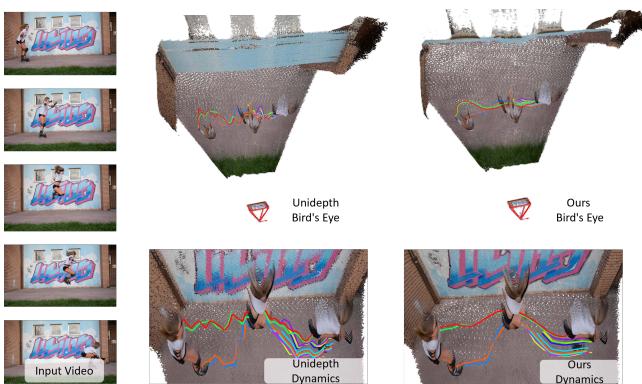
In Figure 8, you can see the difference. The “Unidepth” output (top) results in a layered, messy wall when viewed from above (Bird’s Eye). The “Ours” (Uni4D) output (bottom) aligns the depth maps using the optimized 4D model, resulting in a crisp, thin wall and smooth motion trails.
Experimental Results
Does this “Avengers” strategy actually work? The researchers tested Uni4D on several challenging datasets, including Sintel (synthetic movie clips), DAVIS, and TUM-Dynamics.
Quantitative Success
The results show that Uni4D significantly outperforms existing methods like CasualSAM and MonST3R.
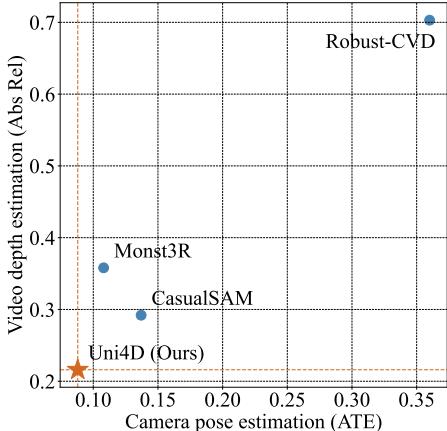
In Figure 2, we see a comparison on the Sintel dataset. The X-axis represents Camera Pose Error (lower is better), and the Y-axis represents Depth Error (lower is better). Uni4D (the orange star) sits in the bottom-left corner, indicating it is the most accurate in both categories.
Qualitative Quality
Visual inspection reveals even starker differences.
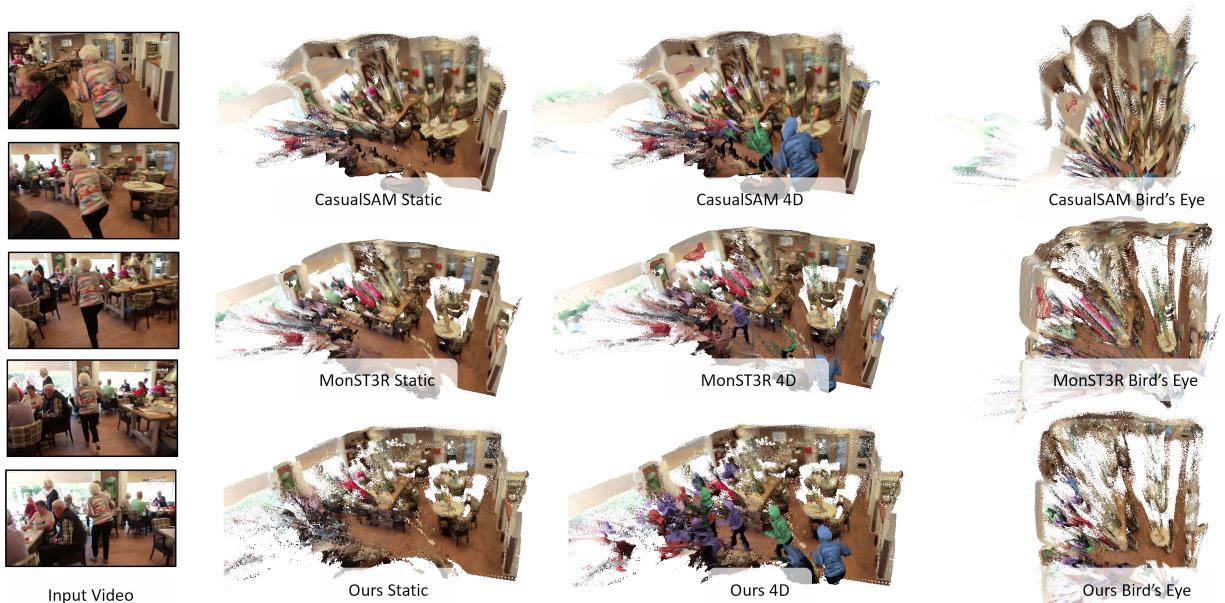
Figure 6 compares the methods on the DAVIS dataset (a room with people).
- CasualSAM: Distorts the room geometry significantly. Look at the “Bird’s Eye” view—the room is warped.
- MonST3R: Struggles with the far corner of the room (noisy geometry) and has incomplete dynamic objects.
- Uni4D: Produces a geometrically accurate room (square walls in the top-down view) and clean, complete dynamic objects.
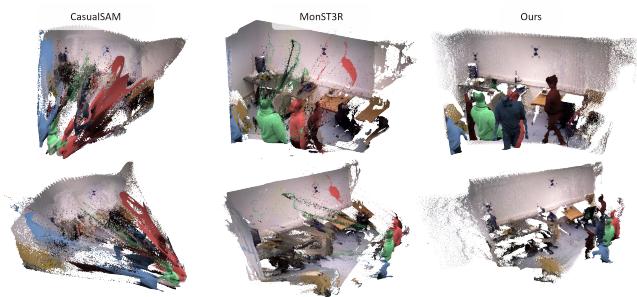
Similarly, in Figure 5 on the Bonn dataset, we see that baselines often leave “trailing artifacts”—ghostly pixels following the moving person. Uni4D resolves the dynamic and static geometry cleanly, separating the person from the background without these artifacts.
Efficiency
One might worry that combining so many large models would be prohibitively slow. However, because Uni4D uses these models for inference (preprocessing) and then runs a standard optimization, it remains reasonable.
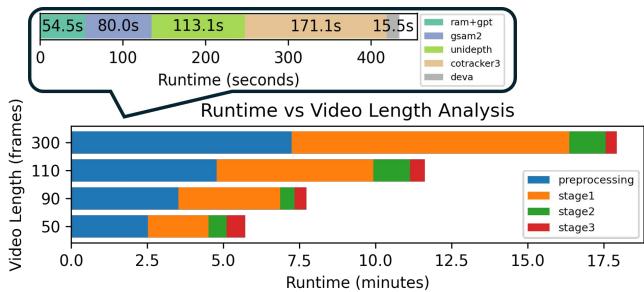
As shown in Figure 9, the runtime is dominated by the preprocessing steps (running CoTracker and UniDepth). The actual optimization stages (Stage 1, 2, and 3) are relatively fast. For a 50-frame video, the total process takes about 5 minutes on a high-end GPU. While not real-time, this is quite efficient for the complexity of the task (4D reconstruction).
Conclusion
Uni4D represents a shift in how we approach complex computer vision problems. Rather than building a bigger, blacker box and training it on more data, Uni4D demonstrates the power of composition. By intelligently combining the specific strengths of modern foundation models—segmentation, depth, and tracking—and binding them together with rigorous physical constraints (energy minimization), we can solve problems that were previously intractable.
The method requires no training data, generalizes to “in-the-wild” videos, and produces results that are spatially and temporally coherent. For students and researchers, Uni4D is a prime example of how classical geometric computer vision (optimization, bundle adjustment) can be married with modern deep learning (foundation models) to achieve the best of both worlds.