](https://deep-paper.org/en/paper/2504.02617/images/cover.png)
Introduction
Imagine you are asking a robot to pick up a specific brand of drill from a cluttered table. If the robot has seen that exact drill a thousand times during its training, this is a trivial task. But what if it’s a brand new tool it has never encountered before? This scenario, known as novel object pose estimation, is one of the “holy grail” challenges in robotic vision.
To interact with the physical world, a robot needs to know an object’s 6D pose—its position (3D coordinates) and its orientation (3D rotation) relative to the camera. Traditionally, accurate pose estimation required expensive depth sensors (RGB-D) to understand the geometry of the scene. While effective, depth sensors increase the cost and complexity of robotic systems.
Doing this accurately with just a standard RGB camera is significantly harder because the 3D geometric information is lost in a 2D image. Current methods often struggle with this, producing noisy, inaccurate predictions that lead to failed robotic grasps.
Enter PicoPose, a new framework presented at CoRL 2025. PicoPose solves this problem by treating pose estimation not as a single shot guess, but as a progressive refinement process. It starts with a rough guess and methodically polishes it until it achieves pixel-perfect accuracy.
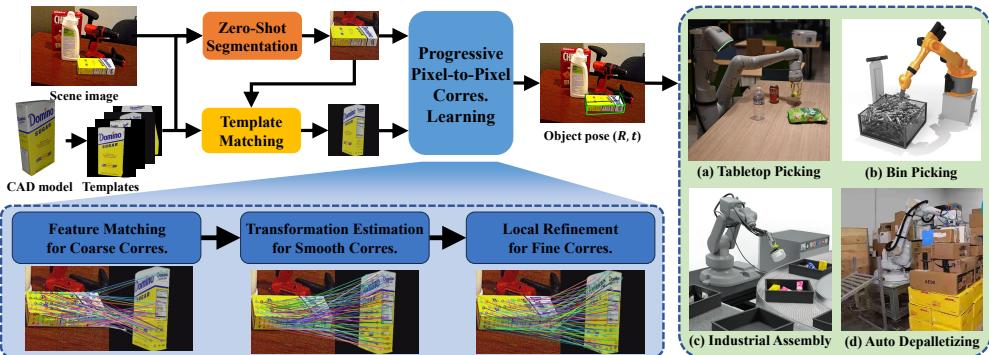
In this post, we will deconstruct how PicoPose achieves state-of-the-art results by breaking down its three-stage architecture: Coarse Matching, Global Smoothing, and Local Refinement.
The Core Problem: Generalization
The central challenge PicoPose addresses is zero-shot generalization. In machine learning, “zero-shot” means the model must perform well on data categories it was never trained on.
For object pose estimation, the standard workflow for handling novel objects usually involves template matching. You take a 3D CAD model of the new object, render it from many different angles (templates), and try to match these templates to what the robot sees in the real world (the RGB observation).
Previous methods like GigaPose or FoundPose attempt to match features between the scene and the templates directly. However, these matches are often “noisy”—lighting differences, occlusions, and background clutter create false matches (outliers), leading to shaky pose estimates. PicoPose improves upon this by introducing a structured, multi-stage pipeline that filters out noise and progressively tightens the alignment.
The PicoPose Architecture
PicoPose is built on a “Pixel-to-Pixel” correspondence learning philosophy. The goal is to figure out exactly which pixel on the 2D image corresponds to which point on the 3D model. Once you have enough of these 2D-3D pairs, you can mathematically solve for the object’s 6D pose.
The framework operates in three distinct stages, as illustrated below:
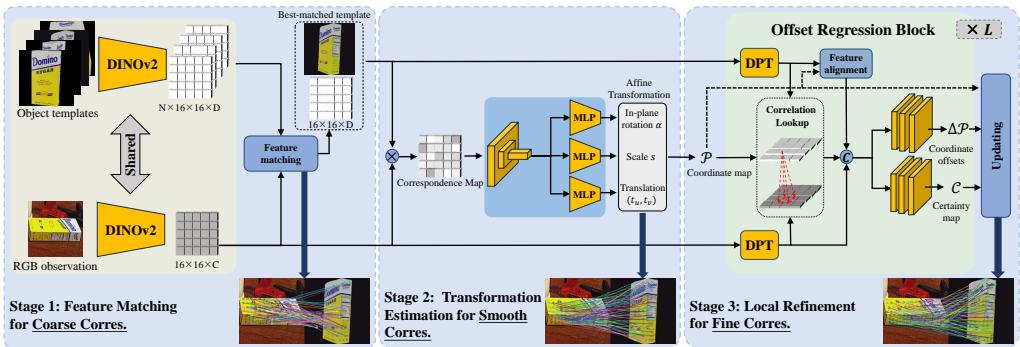
Let’s break down the inputs and the three stages of learning.
The Setup
The system takes two inputs:
- An RGB Image (Observation): The cluttered scene containing the target object.
- Object Templates: Rendered images of the target object’s CAD model from various viewpoints.
Before the main pipeline starts, the system uses a method called CNOS (CAD-based Novel Object Segmentation) to crop the target object from the scene. It also uses DINOv2 (a powerful visual transformer) to extract robust features from both the cropped image and the templates.
Stage 1: Feature Matching for Coarse Correspondences
The first step is to find the “best-matched template”—essentially asking, “Which angle of the 3D model looks most like what we see in the photo?”
PicoPose calculates similarity scores between the image features and the template features. The matching score \(c_i\) for a template is calculated using the cosine similarity of their features:

Here, the system looks at the foreground patches of the image and finds the most similar patches in the template. The template with the highest score is selected as the best match.
At this point, we have a coarse correspondence. We know roughly which template matches the image, and we have a rough idea of which pixels link to each other based on feature similarity. However, these matches are sparse and noisy.
Stage 2: Global Transformation for Smooth Correspondences
This is where PicoPose differentiates itself from many naive matching approaches. Raw feature matches from Stage 1 are often scattered or geometrically impossible (e.g., a pixel on the top-left of the object matching to the bottom-right of the template).
To fix this, Stage 2 enforces a geometric constraint. It assumes that the relationship between the observed image and the template can be approximated by a 2D Affine Transformation. This transformation accounts for:
- Rotation (\(\alpha\)): In-plane rotation.
- Scale (\(s\)): How much larger/smaller the object is.
- Translation (\(t_u, t_v\)): Shifting the object left/right or up/down.
The affine transformation matrix \(\mathcal{M}\) is defined as:

Instead of just guessing this matrix, PicoPose learns it. It takes the noisy feature correlations from Stage 1 and feeds them into a neural network that regresses (predicts) the values for rotation, scale, and translation.
By applying this global transformation to the template, the system aligns the template significantly closer to the observed image.
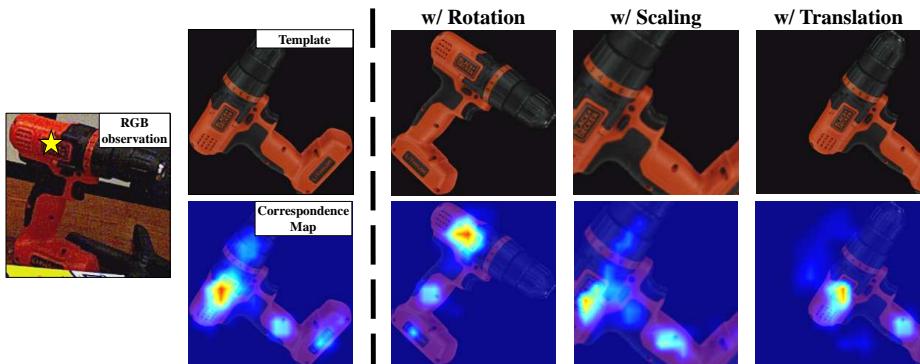
As shown in Figure 3 above, the “Correspondence Map” acts like a heatmap. Even if the object is rotated or scaled, the network can identify the correct geometric relationship. This step effectively “smooths” the noisy correspondences, filtering out outliers that don’t fit the global shape of the object.
Stage 3: Local Refinement for Fine Correspondences
After Stage 2, the template and the image are roughly aligned, but not perfectly. Small local deformations or perspective shifts might still exist. Stage 3 acts as the “fine-tuning” layer.
This stage treats the problem similarly to Optical Flow—a computer vision technique used to track the movement of pixels between frames. PicoPose uses a mechanism similar to the RAFT (Recurrent All-Pairs Field Transforms) architecture.
It calculates offsets—tiny adjustments (\(\Delta P\)) for every pixel to nudge the template features into perfect alignment with the observed image.
The training objective for this stage involves minimizing the difference between the predicted offsets and the ground truth, as well as predicting a “certainty map” (confidence score) for each pixel:

In this equation:
- \(\mathcal{L}_{fine}\) is the loss function we want to minimize.
- \(\Delta \mathcal{P}\) represents the predicted pixel offsets.
- \(\mathcal{C}\) is the certainty (confidence) map.
The network iteratively updates these offsets using multiple regression blocks, getting more precise with each step.
Final Pose Calculation
Once Stage 3 is complete, we have a set of high-quality 2D pixel coordinates in the image that correspond to 3D points on the object model. We filter these points based on the confidence map (only keeping points with >50% certainty).
Finally, these 2D-3D pairs are fed into a classic algorithm called PnP (Perspective-n-Point) with RANSAC. This algorithm solves the geometry puzzle, calculating the final 6D pose (3D rotation and translation matrix) of the object.
Experiments and Results
The researchers trained PicoPose on synthetic datasets (ShapeNet and Google Scanned Objects) and tested it on the BOP Benchmark, a rigorous standard for object pose estimation comprising seven distinct datasets (like LM-O, T-LESS, and YCB-V).
Quantitative Performance
The results are impressive. PicoPose achieves state-of-the-art performance among RGB-based methods.
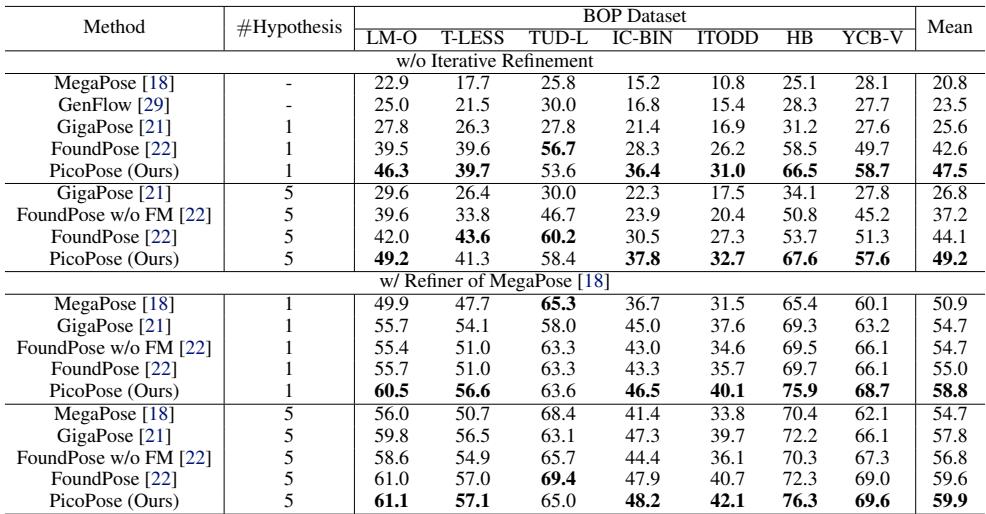
In the table above, look at the “Mean” column.
- Without Refinement: PicoPose scores 47.5, significantly higher than GigaPose (25.6) and FoundPose (42.6).
- With Refinement: Even when combined with an external refiner (like MegaPose), PicoPose leads the pack with a score of 58.8.
This indicates that the “progressive” approach provides a much higher quality starting point for pose estimation than previous one-shot matching techniques.
Visualizing the Improvement
Visual comparisons make the difference clear. In Figure 4 below, look at how tight the green 3D bounding boxes are around the objects compared to the other methods.
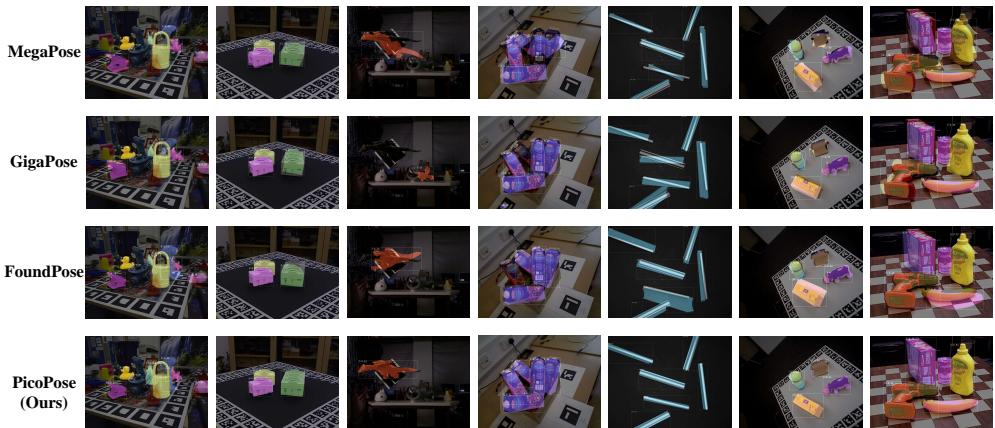
PicoPose (far right column) consistently aligns the 3D model (the green wireframe) with the actual object in the photo, whereas other methods often show significant drift or rotational errors.
Why Does It Work? The Power of Stages
To prove that the three-stage design is necessary, the authors visualized the output of Stage 1 vs. Stage 2.
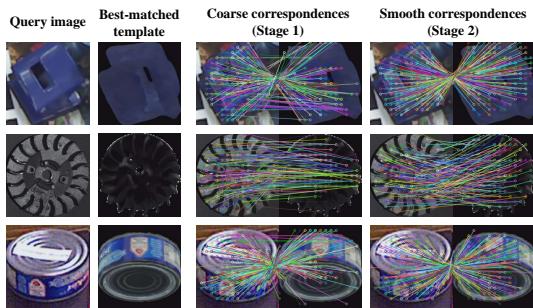
In Stage 1 (Coarse), the correspondences (represented by colored lines) are messy and crisscrossed. This indicates that pixels are being matched to the wrong parts of the template. In Stage 2 (Smooth), the lines become parallel and orderly. This visualizes how the Global Transformation step “combs” the messy data into a coherent geometric structure.
Finally, we can look at the output of Stage 3.
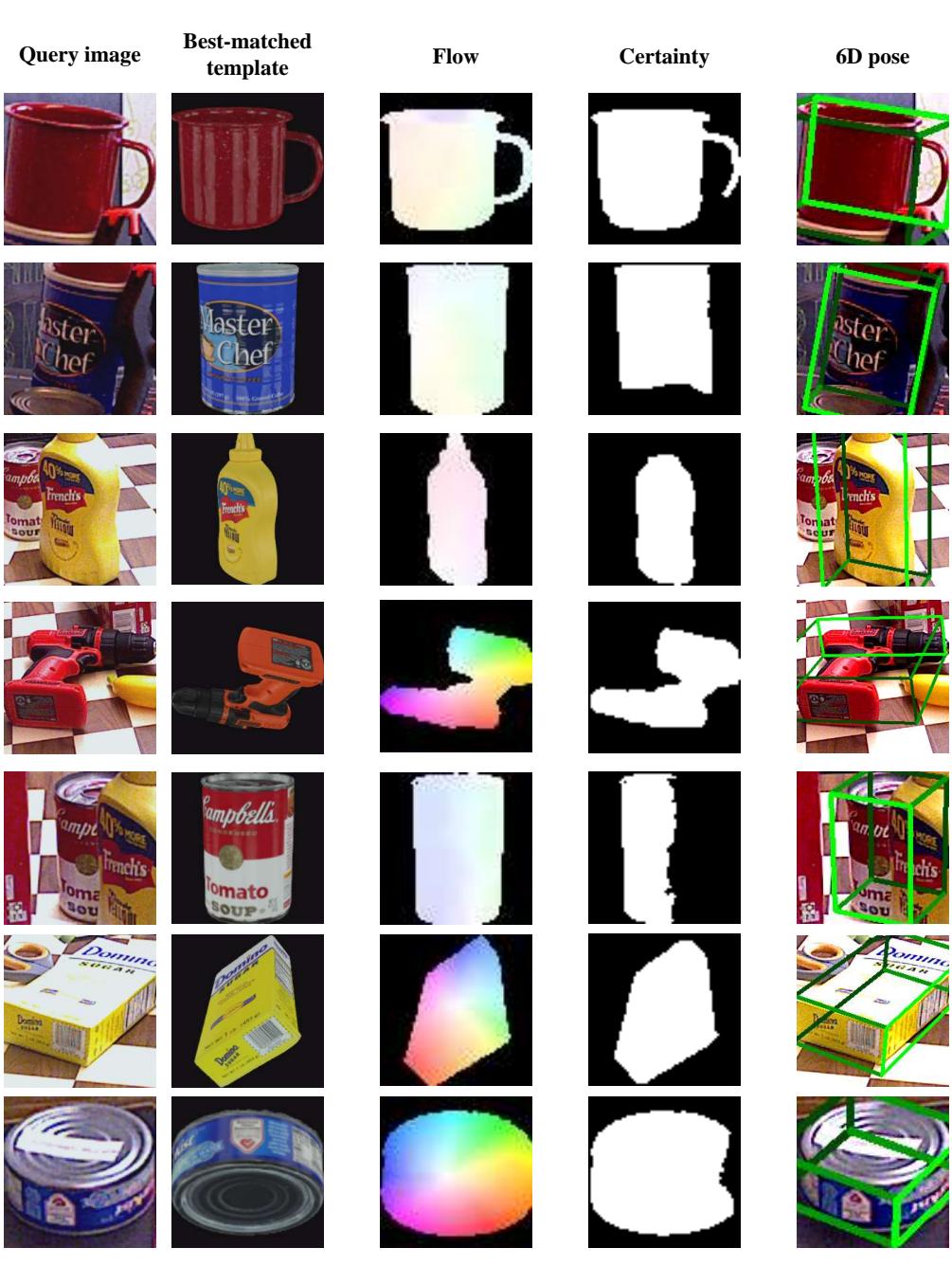
The “Flow” column shows the predicted pixel shifts, and the “Certainty” column shows the model’s confidence. Notice how the model is highly confident (white pixels) exactly where the object is, allowing for precise 2D-3D pairing.
Real-World Application: Robotic Grasping
Theoretical results are great, but does it work in practice? The authors deployed PicoPose in a simulated robotic environment using PyBullet.
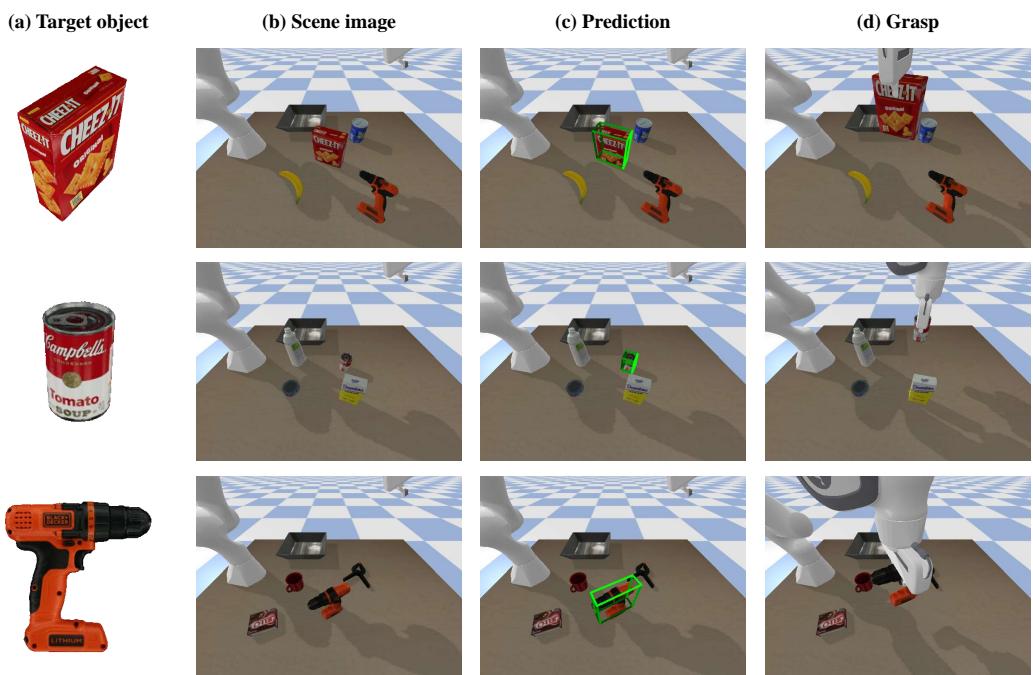
The pipeline is straightforward:
- Image: The robot takes a picture of a cluttered bin.
- Prediction: PicoPose estimates the pose of a target object (e.g., the cracker box).
- Grasp: The pose is converted into robot coordinates, allowing the arm to execute a successful pick.
The experiments showed that PicoPose is robust enough to handle the “Sim-to-Real” gap—training on synthetic data and working on realistic rendering—demonstrating its potential for industrial automation and service robotics.
Conclusion
PicoPose represents a significant step forward in making robots more autonomous and flexible. By moving away from expensive depth sensors and relying on a smart, progressive analysis of standard RGB images, it lowers the barrier to entry for robotic manipulation.
The key takeaway is the power of structured refinement. Instead of trying to solve a complex geometric problem in one go, PicoPose breaks it down:
- Find the object (Stage 1).
- Fix the global geometry (Stage 2).
- Refine the local details (Stage 3).
This “coarse-to-fine” strategy allows the system to filter out the noise that typically plagues RGB-based methods, achieving state-of-the-art accuracy for objects the system has never seen before. As computer vision foundation models like DINOv2 continue to improve, frameworks like PicoPose will likely become the standard for how machines perceive and interact with the physical world.