](https://deep-paper.org/en/paper/2505.21864/images/cover.png)
Introduction
Imagine trying to teach a robot to pour a cup of tea. For a human, this is trivial; we intuitively understand how much pressure to apply to the handle, how to rotate our wrist, and how to adjust if the pot feels heavy. For a robot, however, this requires complex coordination of vision, tactile sensing, and motor control.
The “holy grail” of robotics is dexterous manipulation—giving robots the ability to handle objects with the same versatility as human hands. But there is a major bottleneck: data. To train a robot using Imitation Learning (teaching by demonstration), we need thousands of examples of the task being performed successfully.
Traditionally, researchers use teleoperation (controlling a robot remotely via a joystick or VR controller) to collect this data. But teleoperation is often clunky, lacks haptic feedback (you can’t “feel” what the robot feels), and suffers from lag. The most natural way to demonstrate a task is simply using your own hand. But this introduces the Embodiment Gap: your hand looks and moves differently than a robot’s metal claw. If you train a robot on videos of human hands, it often fails when it sees its own hand during deployment.
Enter DexUMI, a new framework from researchers at Stanford, Columbia, and NVIDIA. DexUMI (Dexterous Universal Manipulation Interface) proposes a clever solution: a wearable exoskeleton combined with a sophisticated AI image processing pipeline. This system allows humans to naturally demonstrate tasks while “translating” those actions into language the robot understands.
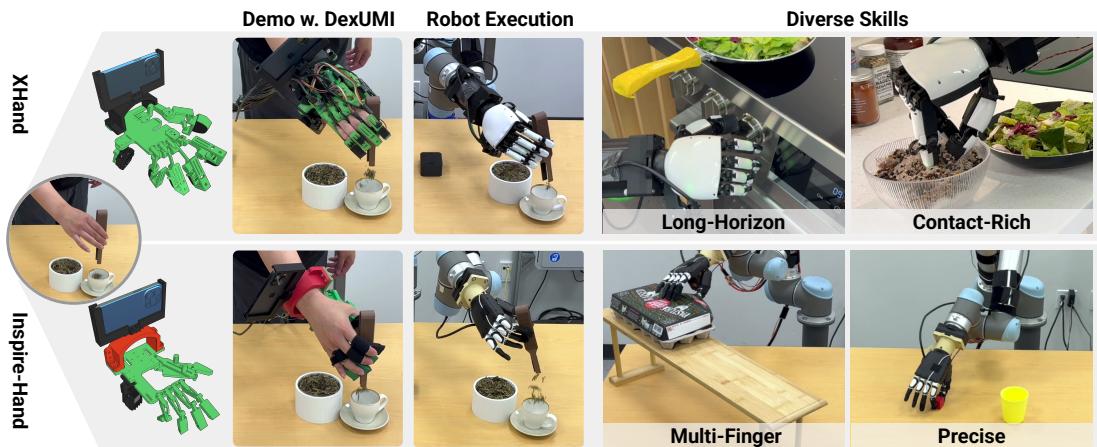
In this post, we will break down how DexUMI bridges the gap between human intuition and robotic execution.
The Core Problem: The Embodiment Gap
To use the human hand as a universal controller for different robots, we have to solve two distinct problems that make up the “embodiment gap”:
- The Kinematic Gap (The “Action” Gap): Human fingers have specific joint limits and lengths. A robot hand might have fewer joints, different finger lengths, or rigid parts where humans have flexible skin. A motion that is easy for a human might be mechanically impossible for a specific robot.
- The Visual Gap (The “Observation” Gap): Robots learn largely through vision. If a robot is trained on video data showing a fleshy human hand holding an apple, but then looks down at its own metal fingers during testing, the visual distribution shift is often massive enough to break the policy.
DexUMI addresses these problems with a two-pronged approach: Hardware Adaptation to fix the motion, and Software Adaptation to fix the vision.
Part 1: Hardware Adaptation (The Exoskeleton)
Instead of a generic motion-capture glove, DexUMI uses a custom-designed, 3D-printed exoskeleton. The genius of this design lies in its specific optimization for the target robot.
Designing for “Shared Workspace”
The researchers realized that for a human demonstration to be useful, the human’s fingertip needs to be in the same position relative to the wrist as the robot’s fingertip would be. However, simply bolting a replica of the robot hand onto a human doesn’t work—robot thumbs often sit in places that would collide with a human hand.
To solve this, the team developed a mechanism optimization framework. They treat the exoskeleton design as a mathematical optimization problem.
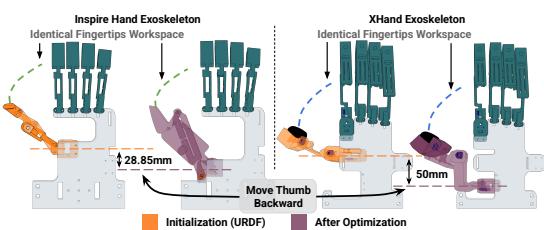
As shown in the image above, the optimization adjusts the link lengths and joint positions of the exoskeleton. The goal is twofold:
- Match the Fingertip Workspace: Ensure that when the human moves their finger, the exoskeleton creates a trajectory that the robot can actually replicate.
- Maintain Wearability: Ensure the device doesn’t crash into the human user’s hand, particularly the thumb, which has a wide range of motion.
Mathematically, the system tries to minimize the difference between the set of all possible poses (workspace) of the exoskeleton and the robot hand. The objective function looks like this:
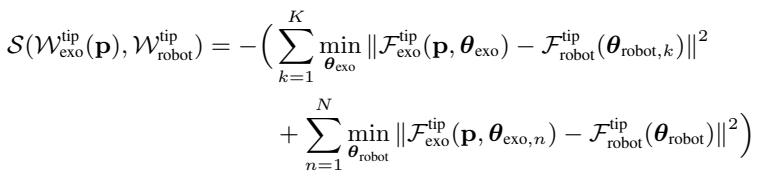
In plain English, this equation finds the best physical dimensions for the exoskeleton so that its movement capabilities (\(W_{exo}\)) overlap as much as possible with the robot’s capabilities (\(W_{robot}\)), while respecting constraints that keep the device wearable.
The Sensor Suite
A major advantage of using a physical exoskeleton over a vision-based tracker (like a camera watching a bare hand) is precision. Cameras can be occluded or noisy. Mechanical linkages are exact.
The DexUMI exoskeleton includes:
- Joint Encoders: High-precision resistive sensors at every joint to capture exact angles.
- Tactile Sensors: The team mounts the exact same tactile sensors on the exoskeleton fingertips as are present on the robot. This means the human feels the object, and the data log captures the exact force profile the robot will experience later.
- Wrist Tracking: An iPhone mounted on the wrist tracks the 6-DoF (Degrees of Freedom) pose of the hand in space.
- Wrist Camera: A wide-angle camera (OAK-1) captures the visual scene exactly from the robot’s perspective.
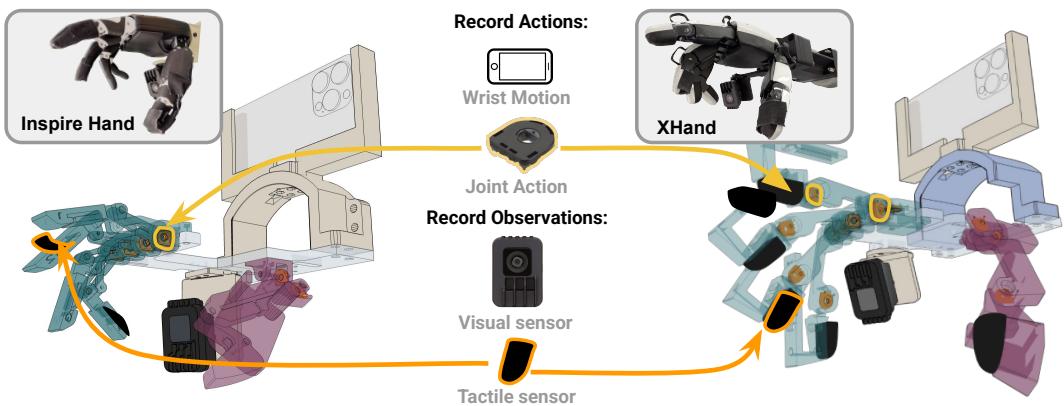
By using this hardware, the “Kinematic Gap” is bridged. The human is physically constrained to move in ways the robot can understand, and the sensors capture clean, precise data.
Part 2: Software Adaptation (Bridging the Visual Gap)
Even with the perfect motion data, we still have the visual problem. The camera records a human hand wearing a 3D-printed device, but the robot needs to operate using its own appearance.
DexUMI solves this using a robust data processing pipeline that “hallucinates” the robot into the video. This ensures that the AI policy is trained on images that look exactly like what the robot will see during deployment.
Here is the step-by-step process, which is automated for every frame of training data:
- Segmentation: The system uses SAM2 (Segment Anything Model 2) to identify and cut out the human hand and the exoskeleton from the video frame.
- Inpainting: Once the hand is removed, there is a hole in the image. The system uses ProPainter, a video inpainting tool, to fill in the background (the table, the object, etc.) based on previous and future frames.
- Robot Replay: Since the exoskeleton captured the exact joint angles, the system replays those angles on the real robot hand (without objects) and records it against a green screen or plain background. This generates a perfect image of the robot hand in that specific pose.
- Composition: Finally, the system merges the “inpainted background” with the “robot hand image.”
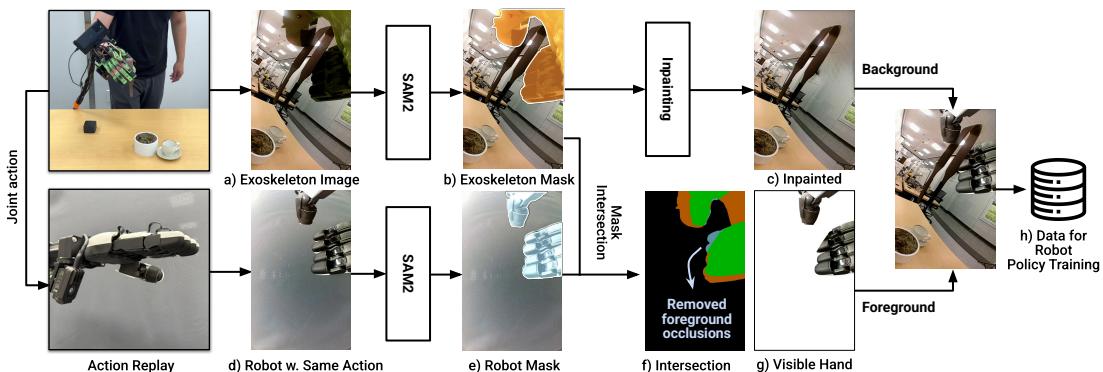
The Occlusion Challenge: Simply pasting the robot hand onto the background isn’t enough. What if the hand is reaching into a jar? The jar should block the view of the fingers.
DexUMI handles this by calculating the intersection of the masks. It compares where the exoskeleton was (from the original video) and where the robot hand is. It only pastes the robot pixels if they overlap with the visible parts of the original action. This preserves natural occlusions, making the training data look physically realistic.
The result is a set of videos that look as if the robot itself performed the task perfectly, even though it was a human all along.
Experiments and Results
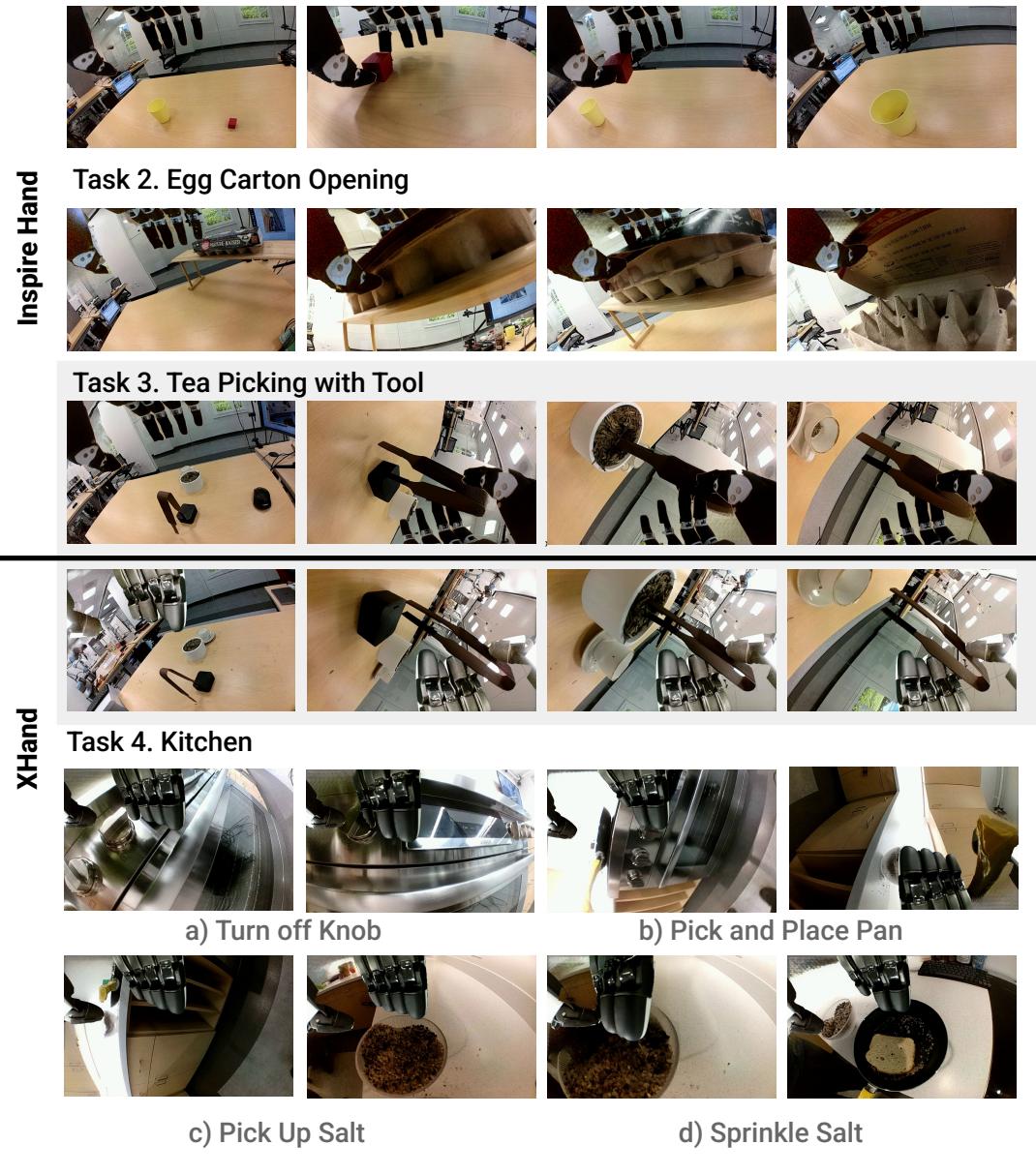
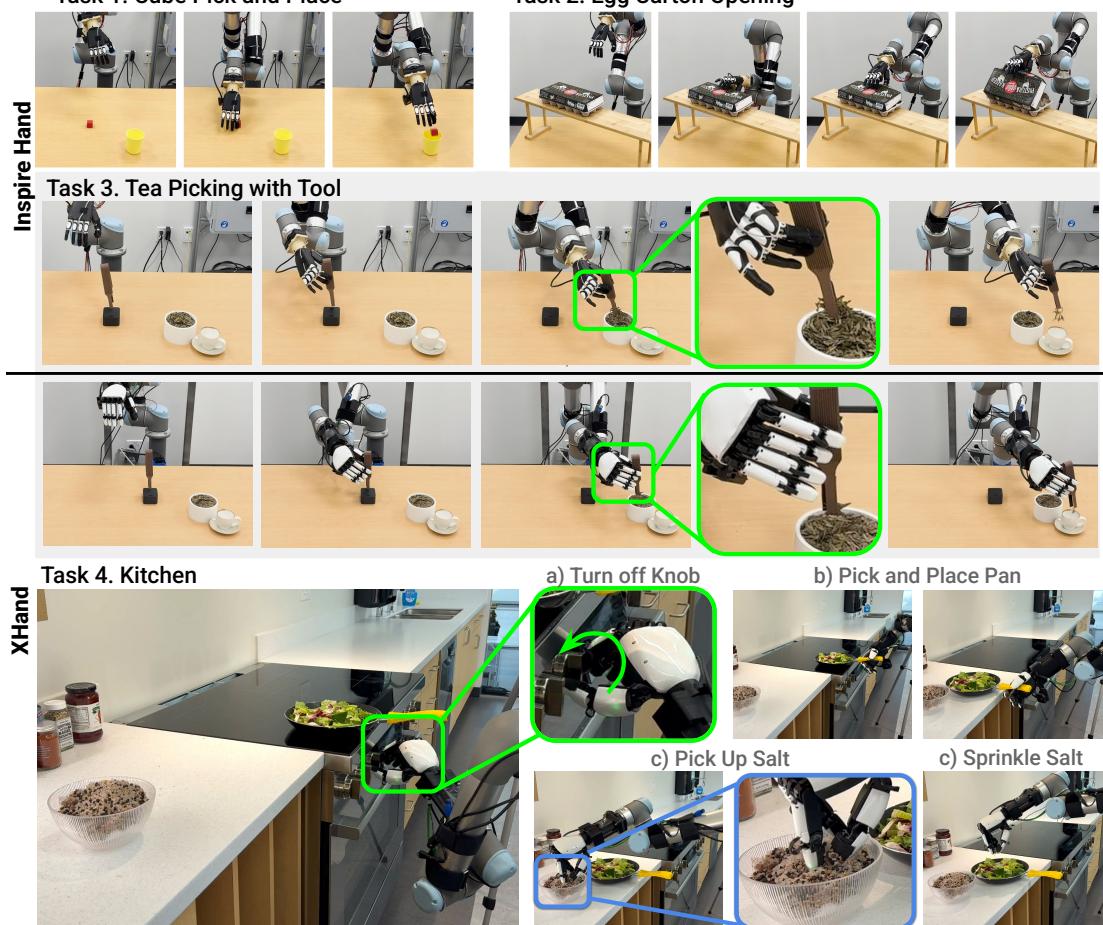
To prove this works, the researchers tested DexUMI on two very different pieces of hardware:
- Inspire Hand: An underactuated hand (6 active motors controlling 12 joints).
- XHand: A fully actuated hand (12 active motors).
They attempted four real-world tasks ranging from simple to complex:
- Cube Picking: Basic precision.
- Egg Carton Opening: Requires multi-finger coordination to unlatch and lift.
- Tea Picking: A delicate task using tweezers (tools) to move tea leaves.
- Kitchen Tasks: A long-horizon sequence involving turning a knob, moving a pan, and sprinkling salt.
Success Rates
The system achieved an impressive 86% average success rate across tasks. This highlights the robustness of the data collected via DexUMI.
Key Finding: Relative vs. Absolute Actions
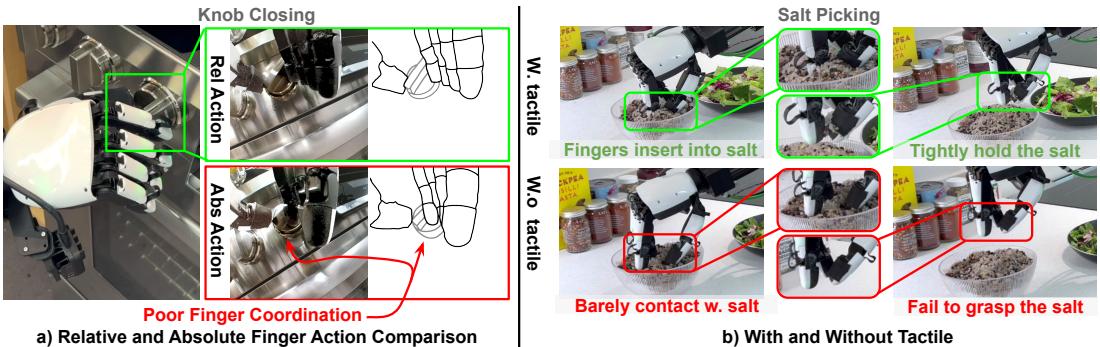
One of the most interesting technical findings was about how the robot should interpret movement.
- Absolute Action: “Move finger to position X.”
- Relative Action: “Move finger a little bit more closed than it is now.”
The experiments showed that Relative Actions were far superior. Because there is always some noise in sensors and slight mechanical differences (backlash) in robot joints, absolute positioning often led to jerky or inaccurate grasping. Relative actions allowed the policy to be more reactive—continuously closing the fingers until contact was made, smoothing out the noise.
Key Finding: The Role of Tactile Sensing
Does feeling the object help? Yes, but with a caveat. In tasks like “Salt Sprinkling,” where the hand obscures the camera’s view of the bowl, tactile sensing was critical. The robot needed to feel when it touched the salt to know when to grasp.
However, tactile sensors can be noisy. If the sensor data drifted (reporting force when there was none), it actually hurt performance in simpler tasks. This suggests that tactile data is powerful but needs to be high-quality and used for tasks where vision is insufficient.
Efficiency: Is it better than Teleoperation?
The team compared DexUMI against standard teleoperation and direct human hand data collection. While collecting data with just a bare hand is obviously the fastest, DexUMI was significantly more efficient than teleoperation.
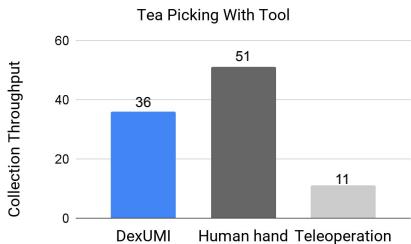
The throughput (successful demos per 15 minutes) for DexUMI was 3.2 times higher than teleoperation. This is a massive gain for research labs trying to collect large-scale datasets.
Conclusion
DexUMI represents a significant step forward in robotic manipulation. By accepting that human hands are the ultimate “universal controller,” the researchers built a bridge to transfer that capability to robots.
The framework’s strength lies in its duality:
- Hardware that respects the mechanical constraints of the robot while leveraging the precision of human motor control.
- Software that alters reality to make the training data visually consistent for the AI.
While there are still limitations—custom exoskeletons must be printed for each new robot hand, and inpainting isn’t always perfect—DexUMI offers a scalable path toward robots that can finally handle the complex, dexterous world we live in. Instead of struggling with joysticks to teach a robot to pour tea, we can now simply show them how it’s done.