](https://deep-paper.org/en/paper/2505.24315/images/cover.png)
Imagine you are building a virtual world. You have a 3D model of a chair and a 3D model of a human. Now, you want the human to sit on the chair. In traditional animation, this is a manual, tedious process. You have to drag the character, bend their knees, ensure they don’t clip through the wood, and place their hands naturally on the armrests.
Now, imagine asking an AI to “make the person sit on the chair,” and it just happens.
This is the promise of Human-Object Interaction (HOI) synthesis. While recent advances in Generative AI have made it easy to create 3D objects from text (like “a red sports car”), creating a realistic interaction between a human and that object is exponentially harder. If you ask a standard image generator to create “a person riding a bicycle,” you often get a Cronenberg-esque nightmare where the person’s legs are fused into the wheels.
In this post, we are diving deep into InteractAnything, a fascinating paper presented at CVPR that proposes a robust framework for Zero-shot Human Object Interaction Synthesis. This method doesn’t just “guess” what an interaction looks like; it uses a Large Language Model (LLM) as a brain to reason about physics and a diffusion model as eyes to understand object geometry.

As seen above, the results are striking. Whether it’s riding a futuristic motorcycle, cradling a baby, or lifting a Tesla, the system handles “open-set” objects (objects it hasn’t explicitly trained on) with surprising physical plausibility.
Let’s unpack how they achieved this.
The Problem: Why is Interaction So Hard?
Before we look at the solution, we need to understand the bottleneck. We currently have powerful “Text-to-3D” models (like DreamFusion or Magic3D). These models use Score Distillation Sampling (SDS), a technique where a 2D image generator (like Stable Diffusion) iteratively critiques a 3D model until it looks like the text prompt.
The equation for SDS generally looks like this:

In simple terms, this formula calculates a gradient that pushes the 3D model parameters (\(\theta\)) to match the text prompt (\(y\)).
However, when you apply this directly to interactions (e.g., “A person holding a cup”), two major things go wrong:
- Spatial Ambiguity: The AI might generate a person next to the cup, or a person with the cup floating inside their chest. It struggles with precise contact.
- Affordance Blindness: “Affordance” is a fancy term for “how an object can be used.” A chair affords sitting; a handle affords grasping. Standard models don’t inherently understand that a human hand should wrap around the handle, not the spout.
The researchers behind InteractAnything identified that to solve this, you need a system that understands relations (where the human is relative to the object) and affordances (where the contact points are).
The InteractAnything Framework
The researchers devised a pipeline that mimics how a human artist might approach the problem:
- Think (LLM Reasoning): “If I’m lifting a chair, I need to grab the legs or the backrest.”
- Look (Affordance Parsing): “Where are the legs on this specific chair?”
- Sketch (Pose Synthesis): “Let me roughly position the body.”
- Refine (Optimization): “Let me tighten the grip so it looks realistic.”
Here is the high-level architecture of their approach:
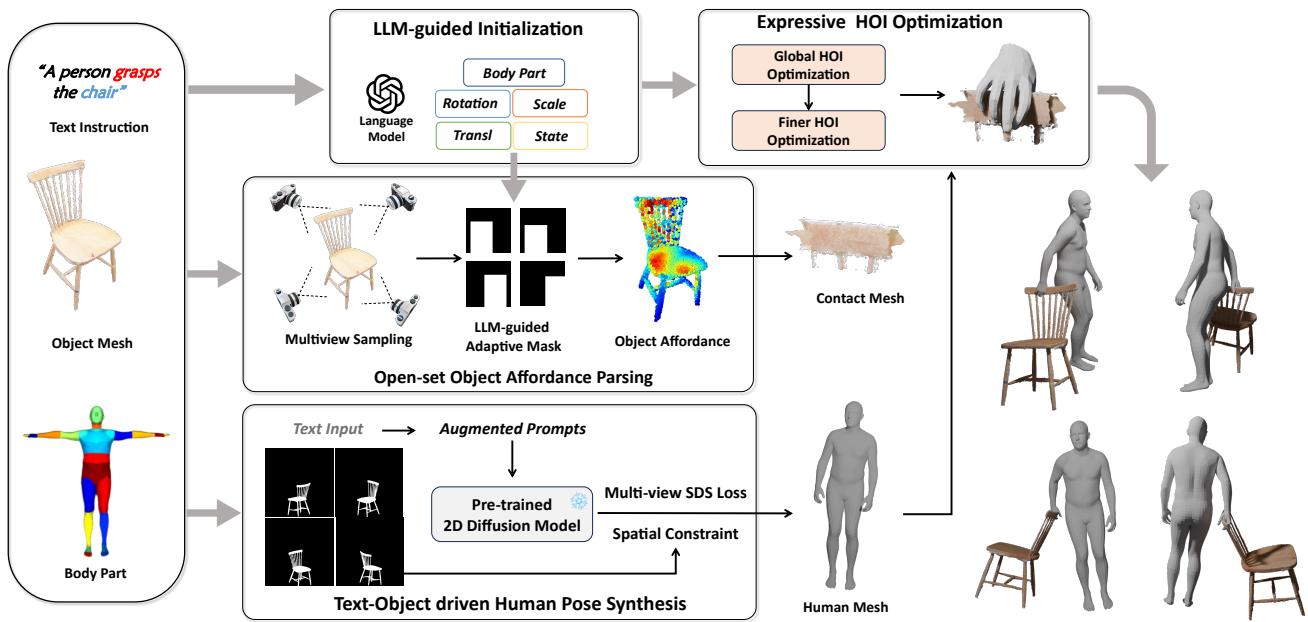
Let’s break down each of these four pillars.
1. The Brain: LLM-Guided Initialization
The first challenge is hallucination. If you just tell a generative model to place a human and an object together, it might place the human upside down.
The authors use an LLM (specifically GPT) to act as a “Director.” When given a prompt like “A person grasps the chair,” the system asks the LLM to reason about the scene. It doesn’t generate the 3D mesh directly; instead, it selects from pre-defined logic to initialize parameters:
- Rotation & Translation: Which way should the object face relative to the human?
- Scale: How big is the object compared to a human?
- State: Is the object on the ground (like a chair) or held in the air (like a cup)?
This step provides a rough “bounding box” initialization, ensuring we don’t start the optimization process with the human standing inside the object.
2. The Eyes: Open-Set Object Affordance Parsing
This is arguably the most clever part of the paper. How do you teach a computer where a human should touch a generic, unseen object (like a bizarrely shaped sci-fi gun) without training on a massive dataset of 3D grasping?
The answer: Leverage 2D Inpainting.
2D diffusion models have seen billions of images. They know what it looks like when a hand holds an object. The researchers exploit this by taking snapshots of the 3D object from different angles and asking a diffusion model to “fill in” (inpaint) a human interacting with it.
The Adaptive Mask
They don’t just randomly inpaint. They use the LLM data to create a “mask”—a guide telling the inpainter where to focus.


These equations describe projecting the 3D setup into a 2D view (\(\mathcal{J}\) is the projection function). This creates a guide for the inpainting model, ensuring it draws the human in a plausible location.
Creating the Heatmap
Once the inpainter generates images of humans interacting with the object from multiple angles, the system uses a 2D pose detector (OpenPose) to find the hands or body parts in those images.
It then calculates a probability map. If the inpainter consistently draws a hand near the handle of the object across multiple views, that area gets a high “contact probability.”

Here, the function \(f_{\text{afford}}\) calculates probability based on the distance \(\|\mathbf{d}_i(\mathbf{p})\|\) between the detected body part and the object point.
By aggregating these 2D probabilities back onto the 3D mesh, they create a 3D Affordance Map.
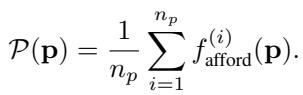
The result is a heatmap on the 3D object that glows where the human should touch it.
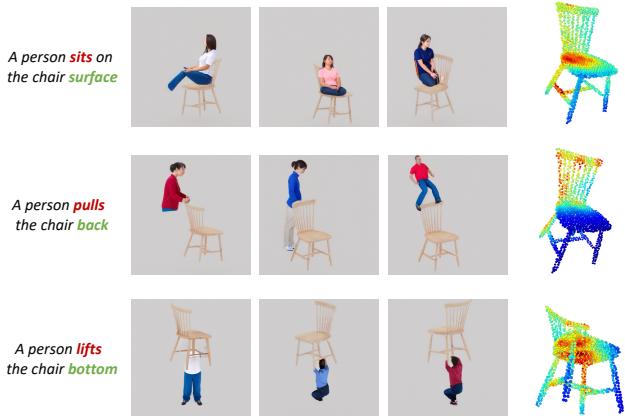
Look at the image above. In the middle column, you see the 2D inpainting results—the AI “imagining” a person interacting. In the right column, you see the red heatmaps generated on the chair. Notice how the heatmap changes based on the text:
- “Sits on”: Heatmap is on the seat.
- “Pulls”: Heatmap is on the backrest.
- “Lifts”: Heatmap is on the legs.
This provides a specific target for the 3D human mesh to latch onto.
3. The Body: Text-Object Driven Pose Synthesis
Now that we know where to touch the object, we need a 3D human body. The paper uses the SMPL-H model. This is a parametric model of the human body that controls shape and pose (including hand joints).

The system initializes a human mesh using the SMPL parameters (\(\beta\) for shape, \(\theta\) for pose). It uses the text prompt and the “Score Distillation Sampling” (SDS) we mentioned earlier to refine the pose.
However, they add a spatial constraint. They penalize the model if the human mesh intersects with the object mesh during this phase. This prevents the “ghost” effect where the human walks through the furniture.
4. The Fine-Tuning: Expressive HOI Optimization
At this stage, we have a human near an object, and we know where they should touch it. The final step is optimization to make it look physically real.
The authors break this into two phases: Global and Finer.
Global Optimization
This aligns the human and object roughly. The loss function looks like this:

This composite loss function includes:
- \(L_{\text{inter}}\): Interaction loss. It pulls the specific body parts (like hands) toward the “hotspots” on the affordance heatmap we generated earlier.
- \(L_{\text{pene}}\): Penetration loss. Keeps the human from clipping inside the object.
- \(L_n\): Normal consistency. Ensures the hand surface is parallel to the object surface (palm touching surface).
The interaction loss is specifically defined as:

It minimizes the Chamfer distance (\(f_{\text{cham}}\)) between the human hand points (\(\mathcal{P}_h\)) and the object points (\(\mathcal{P}_o\)), weighted by the affordance map (\(W_{\mathcal{M}}\)). Essentially: Move the hand to the red zone on the heatmap.
Finer Optimization (The Physics Bit)
Getting a hand near an object is easy. Making it look like a firm grasp is hard. For this, the authors introduce a physics-inspired concept called Force Closure.
In robotics, force closure means a grasp is stable if the forces applied by the fingers can resist external forces. The authors translate this into a loss function:

Where the Force Closure term (\(L_{fc}\)) is:
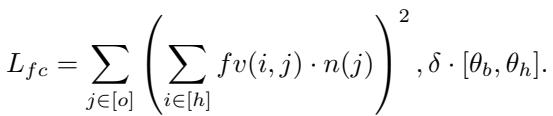
This equation tries to minimize the net force and torque on the object, simulating a stable grip. It forces the fingers to wrap around the geometry rather than just resting near it.
Does It Work? Experiments and Results
The results are visually superior to previous methods. The authors compared InteractAnything against state-of-the-art methods like Magic3D, DreamFusion, and DreamHOI.
Qualitative Comparison
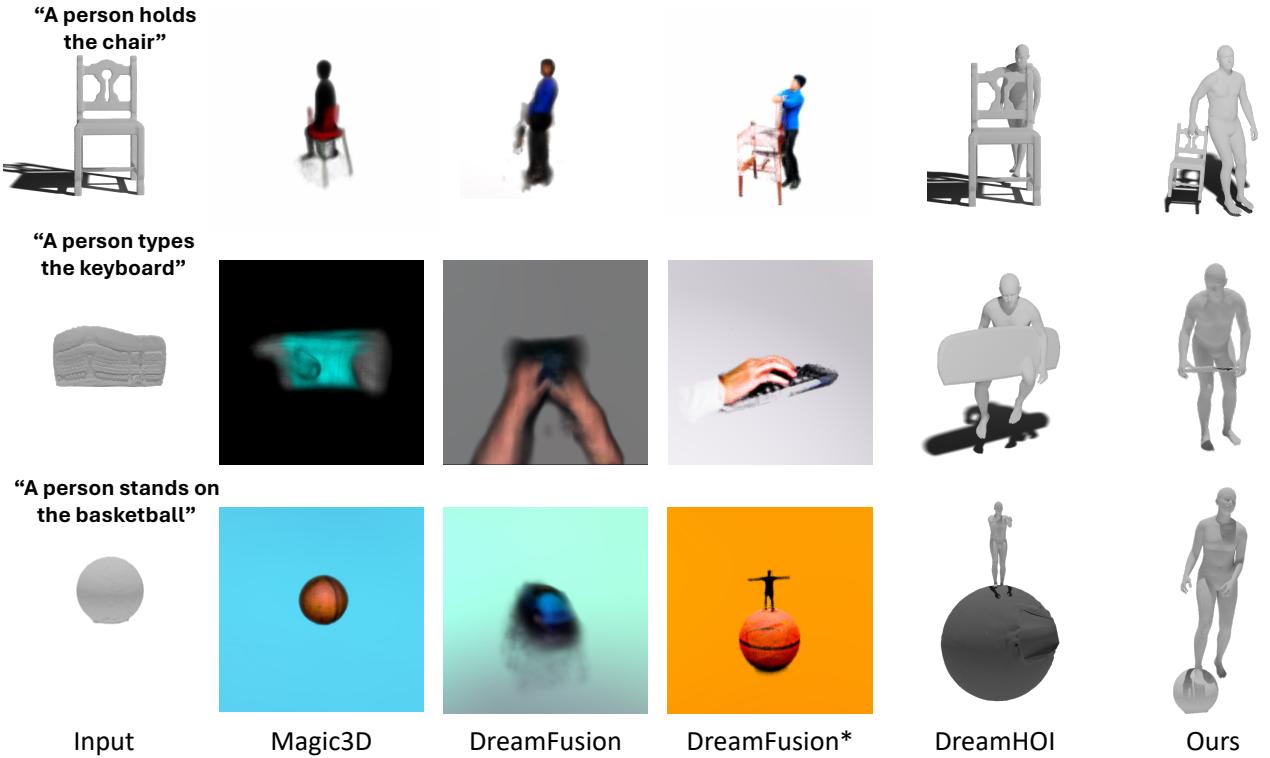
In Figure 3, look at the prompt “A person holds the chair”:
- DreamFusion creates a blurry mess.
- DreamHOI creates a person, but the contact is floaty and unconvincing.
- Ours (InteractAnything) shows a distinct human figure with hands clearly gripping the chair’s backrest structure.
The difference is even more stark in “A person types the keyboard.” Previous methods struggle to separate the hands from the keys, whereas InteractAnything places the palms correctly above the device.
The Power of Fine-Grained Optimization
Does that complex “Force Closure” math actually matter? The ablation study suggests yes.
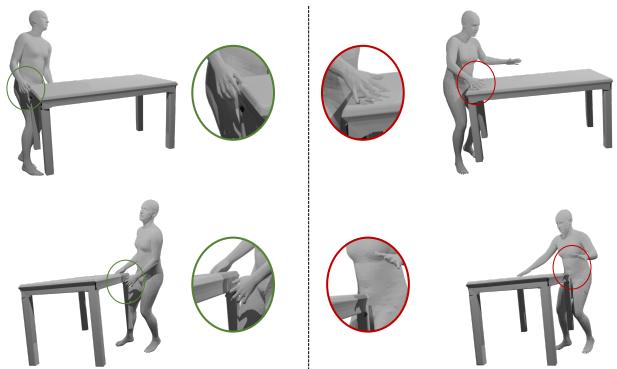
On the left (red circle), without fine-grained optimization, the hand floats near the table edge. It looks like a glitch. On the right (green circle), the hand is planted firmly, fingers curled slightly over the edge. This subtle detail is the difference between a “glitchy game” look and a “professional animation” look.
Quantitative Metrics
The researchers used CLIP scores (which measure how well the image matches the text) and GPT-4V (Visual) to act as a judge.

As shown in Table 1, InteractAnything achieves the highest CLIP score, indicating better semantic alignment.

In Table 2, when GPT-4V was asked to pick the best image (blind test), it selected InteractAnything’s result over 45% of the time generally, and over 52% of the time specifically for contact quality.
Scene Populating
The method isn’t limited to white-void renders. The generated interactions can be placed into full 3D scenes.
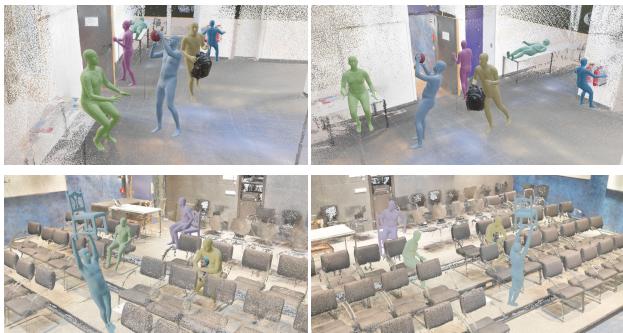
Figure 6 shows how these generated characters can be used to populate a gym or an auditorium, interacting with equipment naturally. This suggests massive potential for generating background characters in video games or digital twins.
Conclusion
InteractAnything represents a significant step forward in generative 3D. By decomposing the problem—using LLMs for high-level logic, Diffusion models for low-level visual cues, and Physics-based optimization for geometry—it solves the “floating hand” and “clipping body” problems that plague standard text-to-3D models.
Key takeaways for students:
- Hybrid Pipelines are Powerful: Pure end-to-end models often fail at complex tasks. Breaking the task into “Reasoning” (LLM) and “Perception” (Diffusion) often yields better control.
- Priors are Everywhere: You don’t always need a 3D dataset. The authors used 2D inpainting models to learn 3D affordances. This is a clever way to bypass data scarcity.
- Physics Matters: Visuals aren’t enough. Adding constraints like force closure ensures that the generated content makes physical sense.
While the method still relies on the quality of the underlying 2D diffusion models (and can suffer if the inpainting fails), it opens the door to a future where we can populate virtual worlds simply by typing a story.