](https://deep-paper.org/en/paper/2506.09343/images/cover.png)
Read the Manual! Why Robots Need Instructions to Master Household Appliances
Imagine you’ve just bought a high-end espresso machine. It has four knobs, a lever, and a digital screen. You want to make a double-shot latte. Do you just start pushing buttons at random? Probably not. You pull out the user manual, find the “Getting Started” section, identify which button controls the steam wand, and follow the steps.
Now, imagine a robot trying to do the same thing. Until now, most robotic research has relied on “common sense” or training data where a robot sees a handle and assumes it should be pulled. But sophisticated appliances don’t always follow common sense. A button on a microwave could start the heating process, or it could just set the clock. Without reading the manual, a robot is just guessing.
In this post, we are diving deep into CheckManual, a fascinating research paper that introduces a new benchmark for manual-based appliance manipulation. The researchers argue that for robots to be truly useful in our homes, they must be able to read user manuals, understand the specific functions of an appliance’s parts, and execute complex tasks based on those instructions.
The Problem: Common Sense vs. Specific Instructions
In recent years, we have seen Large Language Models (LLMs) and Vision-Language-Action (VLA) models enable robots to perform impressive tasks. However, these models mostly rely on general knowledge learned from the internet.
If you ask a robot to “pick up the apple,” it uses general knowledge: apples are small, round, and graspable. But if you ask a robot to “defrost meat using the microwave,” general knowledge hits a wall. The robot might recognize the microwave, but it doesn’t know this specific microwave’s interface. Does the top knob control time or power? Is the defrost function a button or a setting on a screen?
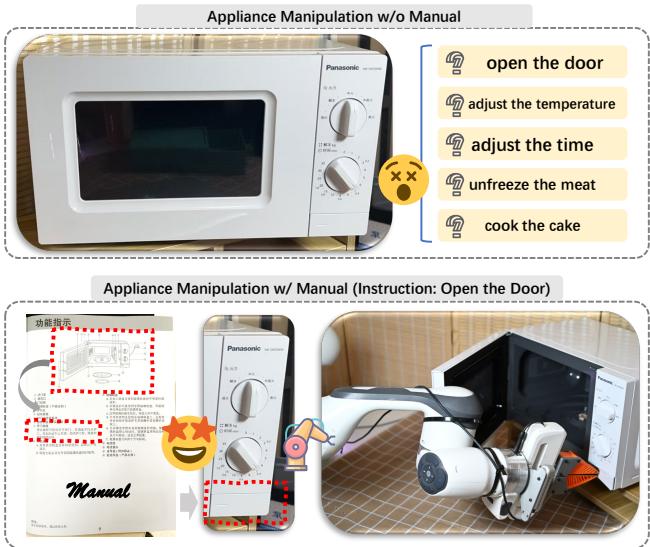
As shown in Figure 1, without the manual (top), the robot is confused. It sees parts but doesn’t know their functions. With the manual (bottom), the robot can link the instruction “Open the Door” to the specific handle mechanics described in the document.
Existing research has touched on this, but with significant limitations:
- Manipulation Models (like RT-1 or VoxPoser) rely on internal common sense and struggle with multi-page documents.
- NLP Datasets exist for answering questions about manuals (QA tasks), but they are purely text-based. They don’t connect to physical appliance models (CAD) or simulation environments, meaning you can’t test if a robot can actually do the task.
The Solution: CheckManual
To bridge this gap, the researchers created CheckManual, the first benchmark that aligns appliance manuals with 3D CAD models of the appliances. This allows for a complete evaluation pipeline: reading the manual, planning the actions, and executing them in a simulator.
Part 1: Building the Dataset
Creating a dataset like this is incredibly difficult. You can’t just download manuals from the internet because of copyright issues, and more importantly, real-world PDF manuals aren’t linked to 3D CAD models that a robot simulator can use.
The authors devised a clever, semi-automated pipeline to generate synthetic—yet realistic—manuals for 3D objects found in the PartNet-Mobility dataset.
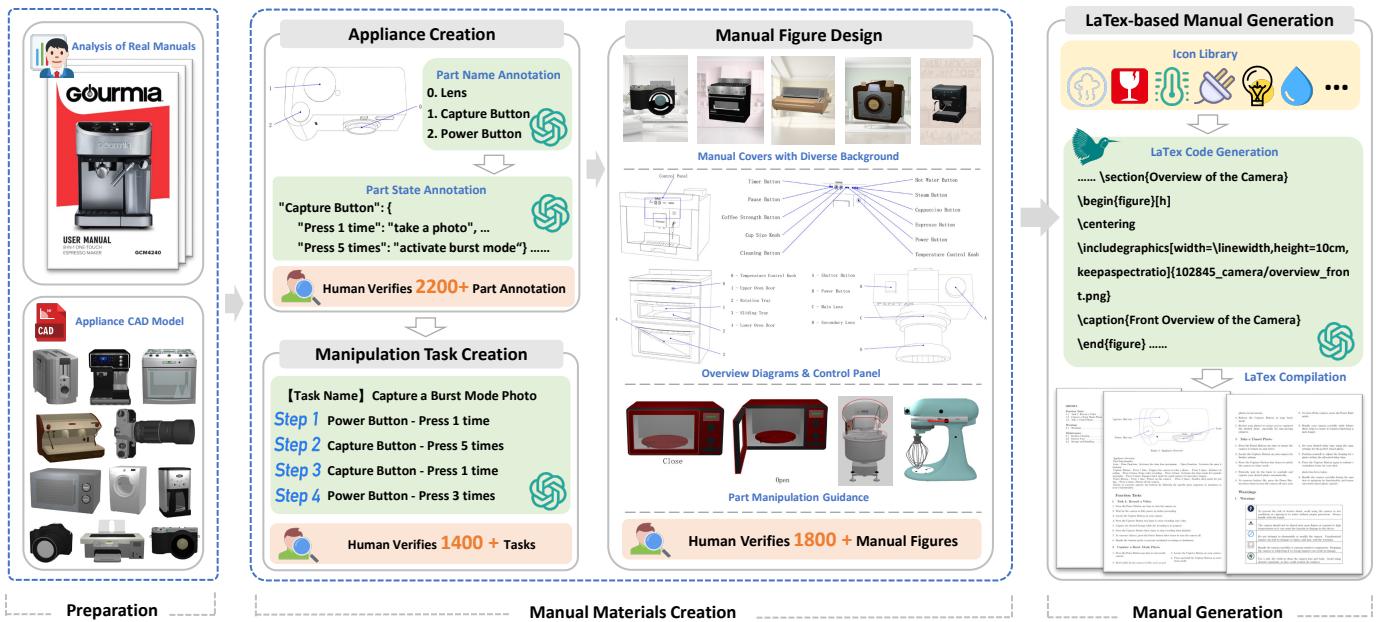
Figure 2 illustrates this comprehensive workflow, which consists of several key stages:
Preparation & Analysis: The team first analyzed 110 real-world manuals to understand their structure. They looked at how manufacturers label parts (lines connecting text to buttons), how they show movement (arrows for rotation), and how they list steps.
Appliance Creation (The “Brain”): Using the CAD models of appliances (like ovens, coffee makers, and printers), they used Multimodal LLMs (MLLMs) to assign functions to specific parts.
- Example: The AI analyzes a knob on a 3D oven model and decides, “This is the Temperature Knob.” It then defines states for it, such as “0 degrees” to “250 degrees.”
- Human Verification: This is crucial. AI can hallucinate. It might suggest an oven knob goes to 5000°C. Human annotators verified every single part function to ensure it made physical sense.
Task Creation: The system generated realistic tasks, such as “Heat bread for 2 minutes.” These tasks were broken down into steps linked to the specific parts defined in the previous step.
Visual Design: To make the manuals look real, the pipeline generated cover images using Stable Diffusion (placing the appliance in a kitchen setting) and created technical diagrams using edge detection on the 3D models.
LaTeX Generation: Finally, all this text and imagery was fed into an LLM to write LaTeX code, which was compiled into a professional-looking PDF manual.
The Resulting Data
The output is a massive dataset that looks surprisingly authentic.
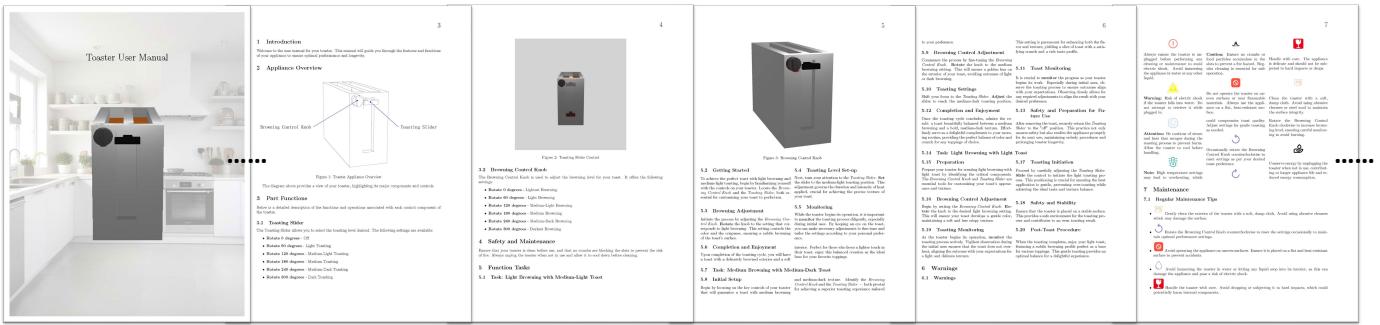
As seen in Figure 3, the manuals include safety warnings, part names, overview diagrams, and step-by-step instructions.
The scale of CheckManual is impressive. It covers 11 categories of appliances (from washing machines to cameras), 369 unique appliances, and over 1,100 generated manuals.

Figure 4 breaks down the statistics. Notice the distribution of tasks (Graph D); while many tasks are short, some require up to 18 sequential steps to complete. This complexity is what makes the benchmark so challenging for robots.
Part 2: The Challenges
With the data in hand, the researchers defined three specific challenges, ranging from theoretical planning to full-blown robotic execution.
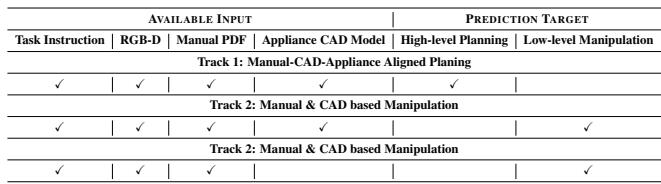
Table 1 outlines these tracks:
- Track 1: CAD-Appliance Aligned Planning
- Goal: Read the manual and create a plan.
- Assistance: The robot knows exactly which part in the manual corresponds to which part on the 3D model.
- Challenge: Can the robot understand the text and logic of the manual?
- Track 2: Manual & CAD-based Manipulation
- Goal: Execute the task in a simulator.
- Assistance: The robot is given the 3D CAD model of the appliance.
- Challenge: The robot must map the manual to the CAD model, and then interact with the object using a robotic gripper.
- Track 3: Pure Manual-based Manipulation (The “Real World” Scenario)
- Goal: Execute the task in a simulator.
- Assistance: None. No CAD models. Just the camera feed (RGB-D) and the PDF manual.
- Challenge: This is the hardest track. The robot must look at the physical object, look at the manual’s diagrams, figure out that “Button A” in the PDF is the button it sees on the camera, and then physically press it.
Part 3: The Baseline Model (ManualPlan)
To test these challenges, the authors proposed a baseline model called ManualPlan. This serves as a reference point for future researchers to beat.
The ManualPlan architecture mimics how a human might approach the problem: Read, Plan, Locate, Act.
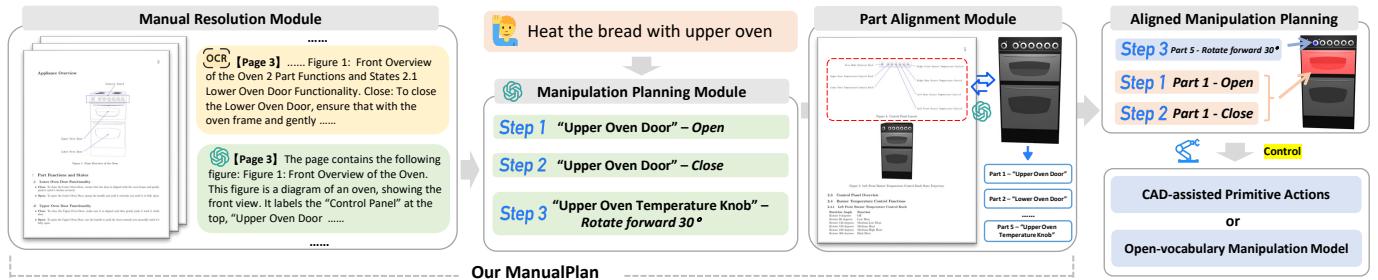
Let’s break down the architecture shown in Figure 5:
1. Manual Resolution (Reading)
The system takes the PDF manual and processes it.
- OCR (Optical Character Recognition): Extracts all the text.
- Layout Analysis: Identifies where the images and diagrams are.
- Result: A structured understanding of the manual’s content.
2. Manipulation Planning (Thinking)
An LLM (like GPT-4) acts as the brain. It takes the user’s instruction (“Bake a cake”) and the extracted manual content. It outputs a plan:
- Open the door.
- Place item inside.
- Close door.
- Rotate Temp Knob to 180.
3. Part Alignment (Locating)
This is the most critical visual step. The robot has a plan (“Rotate Temp Knob”), but where is that knob in the real world?
- Set-of-Mark (SoM): The model uses object detection to find all potential parts in the camera view and assigns them IDs.
- Matching: An MLLM looks at the manual’s diagram (which labels the “Temp Knob”) and the camera view (with the IDs). It reasons: “The knob labeled ‘Temp’ in the diagram looks like Object #3 in the camera view.”
4. Execution (Acting)
Once the part is identified, the robot needs to move.
- If the CAD model is available (Track 2), the robot uses pre-calculated Primitive Actions (e.g., “Rotate grasping pose”).
- If no CAD model is available (Track 3), the system uses an Open-Vocabulary Manipulation Model (specifically, a model called VoxPoser). VoxPoser takes the movement description and generates the robot arm’s trajectory.
Experiments and Results
The researchers tested ManualPlan in the SAPIEN simulator. The results were revealing—and somewhat humbling for current AI capabilities.
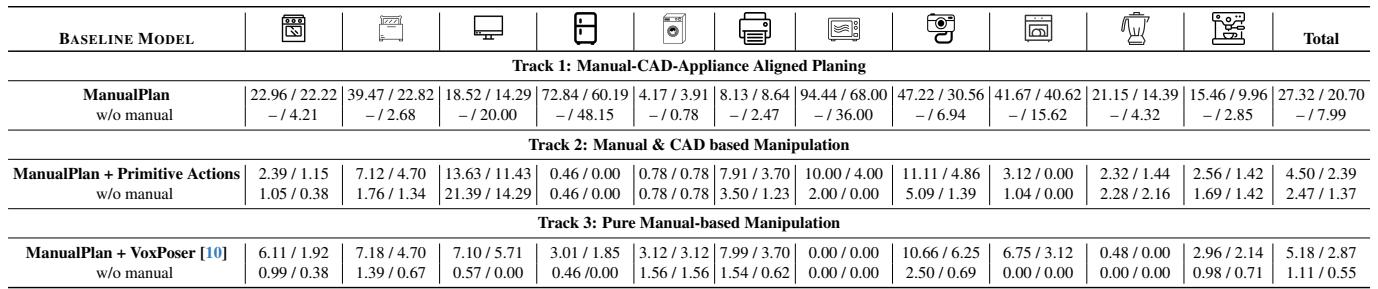
Table 2 highlights the key findings:
- The Manual is Essential: The rows labeled “w/o manual” (without manual) show abysmal performance. For example, in Track 3, the success rate for Microwaves drops from 0.67% (with manual) to 0.00% (without). Without the manual, the robot is essentially blind to the device’s functions.
- It’s Still Very Hard: Even with the manual, success rates are low. In Track 3 (the realistic scenario), the total task success rate is only 0.55%.
- Why? Error accumulation. If the robot misidentifies the knob in step 1, the whole task fails. If the planner misses a safety step, the task fails. If the robotic hand slips, the task fails.
- Alignment is the Bottleneck: Track 1 (Planning) has higher scores (~20% planning success). This suggests that LLMs are decent at reading the manual, but the breakdown happens when trying to match the manual to the physical world and executing the movements.
Real Robot Deployment
The authors didn’t just stay in simulation. They deployed Track 3 on a real Franka Panda robot arm. The robot successfully read a manual, identified the buttons on a real kitchen device, and pressed them. While the success rate wasn’t perfect, it proved the concept works in the real world.
Conclusion and Future Implications
The CheckManual paper represents a significant shift in robotic manipulation. It moves us away from assuming robots can “figure it out” based on shape alone, and towards a world where robots can acquire new skills by reading instructions—just like humans do.
Key Takeaways:
- Benchmarks Drive Progress: By creating a dataset that aligns manuals, CAD models, and simulation, CheckManual provides a standard yardstick for the robotics community.
- Multimodal Reasoning is Key: Success requires tight integration of text (manuals), 2D images (diagrams), and 3D vision (camera feed).
- We Are Early: The low success rates indicate that we are at the beginning of this journey. The gap between reading a plan and physically executing it remains large.
For students and researchers, this paper opens up exciting avenues. Improving the “Part Alignment” module or developing better “Low-level Manipulation” policies that can handle the uncertainty of real-world physics could significantly boost performance on this benchmark. One day, thanks to work like this, you might actually trust your robot to make that double-shot latte without exploding the machine.