](https://deep-paper.org/en/paper/2508.02146/images/cover.png)
Introduction
Imagine a robot walking into a kitchen. To be useful, it can’t just look at the scene; it needs to interact with it. It needs to know that the fridge door swings open (a revolute joint), the drawer slides out (a prismatic joint), and the laptop on the table flips up. This is the challenge of articulated object recognition.
Traditionally, teaching robots to understand these movable parts has been cumbersome. Previous methods often relied on depth cameras (which struggle with transparent or shiny surfaces like glass cabinet doors), required humans to manually specify how many joints an object has, or used complex, multi-stage processing pipelines that could fail at any step.
In this post, we are diving deep into ScrewSplat, a new research paper that proposes a refreshing, end-to-end solution. By combining the geometric flexibility of Gaussian Splatting with the kinematic precision of Screw Theory, ScrewSplat allows robots to figure out the 3D shape and motion of objects using only standard RGB images.

As shown in Figure 1 above, the system takes simple RGB images of an object in different positions and automatically reverse-engineers its “kinematic structure”—figuring out what parts are rigid, what parts move, and exactly how they move.
Background: The Building Blocks
To understand how ScrewSplat works, we need to understand the two pillars it stands on: Screw Theory and 3D Gaussian Splatting.
Screw Theory: The Math of Motion
How do we describe motion mathematically? In robotics, we often deal with two specific types of joints:
- Revolute joints: Things that rotate (like a door hinge or a laptop lid).
- Prismatic joints: Things that slide (like a drawer or a window).
Screw theory provides a unified way to describe both. It represents motion using a “screw axis.” A screw axis \(\mathcal{S}\) is a 6-dimensional vector containing rotational information (\(\omega\)) and translational information (\(v\)).
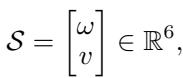
If the rotation component \(\omega\) is present, it acts like a revolute joint. If there is no rotation (\(\omega = 0\)), it acts like a prismatic joint.
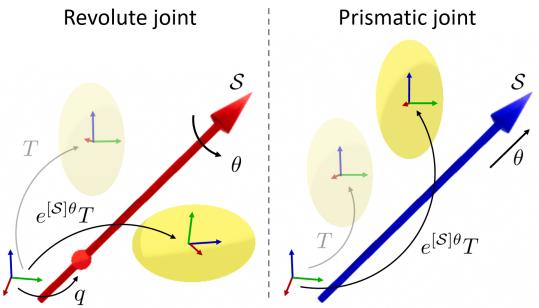
As illustrated in Figure 2, whether an object is rotating or sliding, its transformation from one state (\(T\)) to another (\(T'\)) can be calculated using the matrix exponential of the screw axis multiplied by the angle or distance of movement (\(\theta\)).
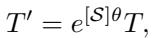
This mathematical elegance allows the researchers to treat different types of joints uniformly during the learning process.
3D Gaussian Splatting
The second pillar is 3D Gaussian Splatting. This is a modern technique for rendering 3D scenes. Instead of using triangles (meshes) or voxels, it represents a scene as a cloud of 3D Gaussians (ellipsoids).
Each Gaussian has a position, orientation, scale, color, and opacity. To render an image, these 3D Gaussians are projected (“splatted”) onto a 2D plane. The contribution of each Gaussian to a pixel is determined by its opacity and how close it is to that pixel.

The final color of a pixel is calculated by blending these overlapping Gaussians from front to back.
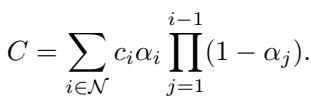
Gaussian Splatting is popular because it is fast, differentiable (we can train it), and produces high-quality visuals.
The Core Method: ScrewSplat
The genius of ScrewSplat lies in how it merges these two concepts. The goal is to perform a joint optimization: simultaneously figuring out the 3D geometry of the object and its mechanical joints.
The Challenge
This is a “chicken and egg” problem. To know the geometry of a moving part, you need to know how it moves (to align observations from different frames). But to know how it moves, you need to know which parts of the geometry belong to the moving component.
ScrewSplat solves this by making the assignment of parts probabilistic rather than hard-coded.
Part-Aware Gaussians and Screw Primitives
The method introduces two key components:
- Screw Primitives (\(A_j\)): The system initializes a set of random potential screw axes. Each axis has a “confidence score” (\(\gamma\)) that the system learns. If a screw axis is useful for explaining the motion, its confidence goes up.
- Part-Aware Gaussians (\(H_i\)): Standard Gaussians are upgraded. In addition to position and color, each Gaussian carries a probability vector (\(m_i\)). This vector tells us how likely it is that this specific Gaussian belongs to the static base or to one of the moving parts associated with a screw primitive.

The “Replication” Rendering Process
How do we render an image if we don’t know for sure which part a Gaussian belongs to? The authors use a replication strategy, visualized in the right half of Figure 3 above.
For every single “Part-Aware Gaussian” in the system, the renderer creates multiple copies (replicates):
- One copy stays on the static base.
- Other copies are transformed (moved) according to the different Screw Primitives.
The opacity of these copies is scaled by the probability vector \(m_i\). If a Gaussian is 99% likely to be on the laptop lid (moving part), the copy attached to the lid’s screw axis will be very visible, while the copy on the static base will be invisible.
Mathematically, the replicated Gaussians are defined as:

This formulation makes the whole process differentiable. The system can now simply compare the rendered image to the real RGB photograph and calculate the error.
Optimization and Loss Function
The training process adjusts the Gaussians (shape, color), the Screw Axes (orientation, position), and the probability assignments all at once.
The loss function has two main parts:
- Rendering Loss: Does the generated image look like the photo?
- Parsimony Loss: We want the simplest explanation. An object usually has 1 or 2 joints, not 20. This term encourages the model to use the fewest number of screw axes possible by penalizing the sum of confidence scores.
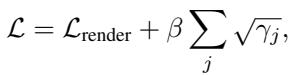
By minimizing this loss, ScrewSplat automatically “discovers” the correct joints. The probability vectors converge, effectively segmenting the object into rigid parts (like the base and the door) without any human labeling.
Beyond Recognition: Controlling the Object
Once ScrewSplat has learned the model of an object, it acts as a differentiable renderer. This means we can ask: “What joint angle \(\theta\) would make the object look like X?”
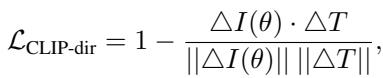
The authors take this a step further by integrating CLIP, a vision-language model. This allows for text-guided manipulation. You don’t need to give the robot a target angle; you can just give it a text prompt like “Open the laptop.”

As shown in Figure 4, the system:
- Takes the current image of the object.
- Uses CLIP to compute the difference between the current state and the text prompt (e.g., “Open laptop”).
- Optimizes the joint angle parameters until the rendered image matches the text description.
- Calculates the trajectory for a robot arm to physically achieve that state.
The optimization uses a Directional CLIP Loss, which focuses on the direction of change in the semantic space, ensuring the motion aligns with the user’s intent.
Experiments and Results
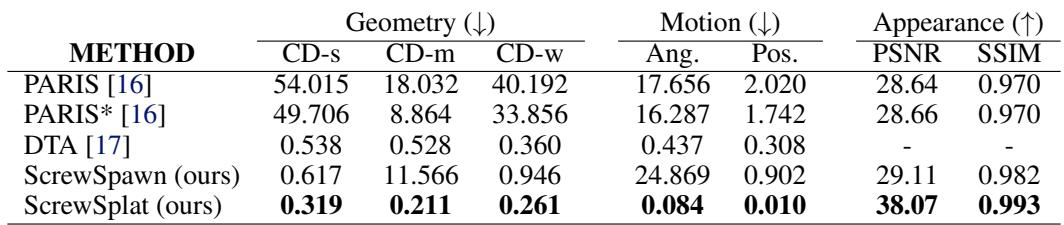
The researchers compared ScrewSplat against state-of-the-art baselines like PARIS and DTA. Importantly, ScrewSplat uses only RGB images, while DTA and PARIS* (an enhanced version) were given depth information as well.
Single-Joint Objects
In tests with objects like folding chairs, laptops, and cabinets, ScrewSplat showed superior reconstruction.
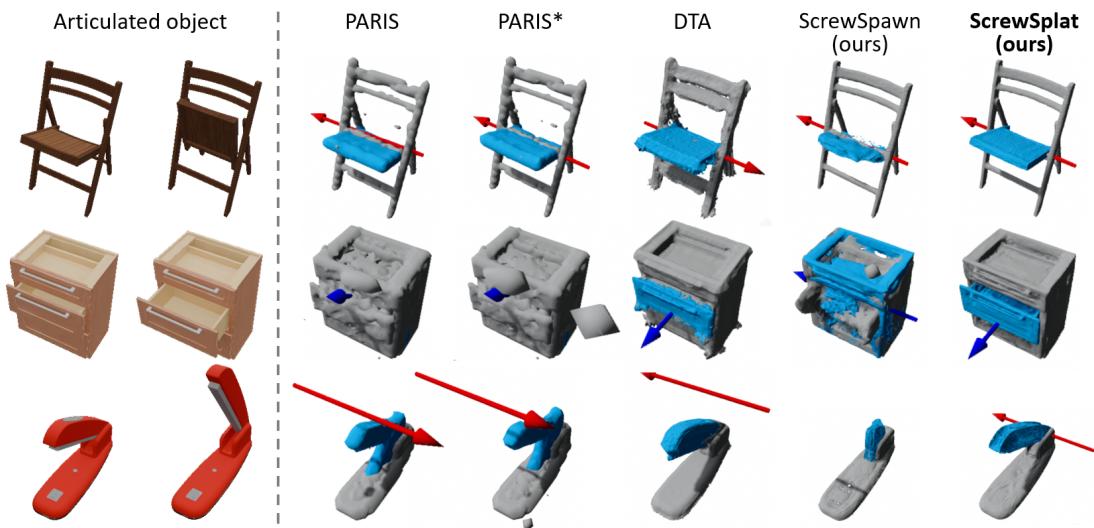
Looking at Figure 5, you can see that baseline methods (PARIS, DTA) often struggle with geometry (gray artifacts) or misalign the axis of rotation (red arrows). ScrewSplat (bottom row) produces clean geometry and precise axes.
The quantitative data backs this up. In Table 1 below, ScrewSplat achieves the lowest Chamfer Distance (CD—a measure of geometric error) and angular error.
Multi-Joint Objects
The method also scales to more complex objects with multiple moving parts, such as a cabinet with two doors or a drawer and a door.
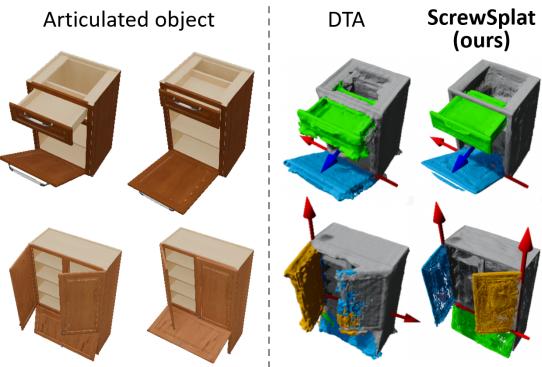
Figure 6 shows that DTA (left) struggles to separate multiple moving parts cleanly, often blurring them or missing the second axis. ScrewSplat (right) correctly identifies and segments multiple independent joints.

Real-World Application
The ultimate test is the real world. The authors set up a pipeline where a robot observes an object, builds a ScrewSplat model, and then manipulates it based on text commands.
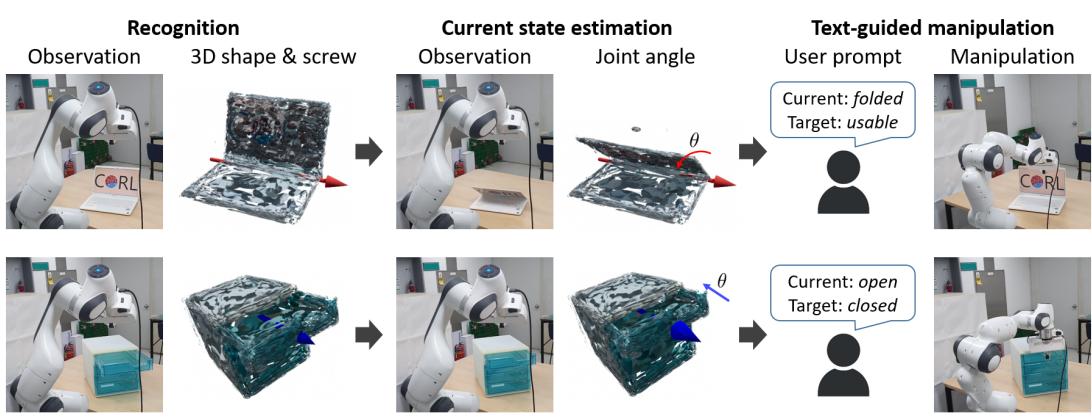
The system successfully handled objects like a translucent storage drawer—a nightmare scenario for depth cameras—by relying purely on RGB cues and the robust Gaussian representation.

Conclusion and Future Directions
ScrewSplat represents a significant step forward in robotic perception. By fusing Screw Theory with Gaussian Splatting, the authors created a system that is:
- End-to-End: No complex pre-processing or multi-stage pipelines.
- Data-Efficient: Works with standard RGB cameras; no expensive depth sensors required.
- General: Handles revolute and prismatic joints without needing to know the number of parts beforehand.
Limitations
However, no method is perfect. The authors note a few limitations visualized in Figure 9:
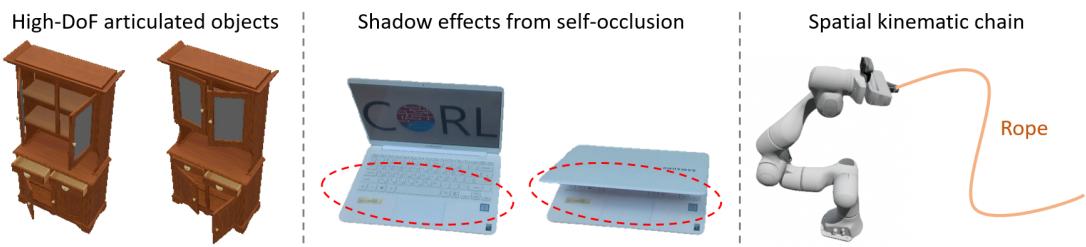
- High-DoF Objects: For objects with many joints (like the 6-joint object on the left), the optimization can struggle to find a stable solution.
- Shadows: Moving parts cast changing shadows (middle image). Since Gaussian Splatting largely assumes static lighting, these shifting shadows can sometimes be mistaken for geometry changes.
- Kinematic Chains: Currently, the method assumes parts move relative to a static base. It doesn’t yet handle “chains” where one moving part is attached to another moving part (like a robot arm).
Despite these limitations, ScrewSplat offers a powerful new way for robots to “see” and “understand” the mechanics of the world around them, paving the way for more intelligent and capable autonomous agents.