](https://deep-paper.org/en/paper/2508.08113/images/cover.png)
In the world of first-person shooter (FPS) video games, players rely heavily on a simple UI element: the crosshair. Without it, estimating the exact center of the screen—and consequently, where your character is aiming—is incredibly difficult. The crosshair provides an explicit, visual anchor that connects the player’s intent with the game world’s geometry.
Now, imagine playing that game without a crosshair. You would likely struggle to align your aim with objects, missing targets that should be easy to hit. Surprisingly, this is exactly how we have been training state-of-the-art robots to manipulate the world.
Modern robotic control often relies on Visuomotor Policies—complex neural networks that take raw camera pixels as input and output motor actions. While these models, particularly Vision-Language-Action (VLA) models, have become incredibly capable, they often suffer from a lack of “spatial grounding.” They see the image, but they don’t inherently “know” where their hand is pointing within that 2D grid of pixels.
Enter AimBot.
In a recent paper titled “AimBot: A Simple Auxiliary Visual Cue to Enhance Spatial Awareness of Visuomotor Policies,” researchers from the University of Michigan and Lambda Labs propose a method as simple as it is brilliant: give the robot a crosshair.
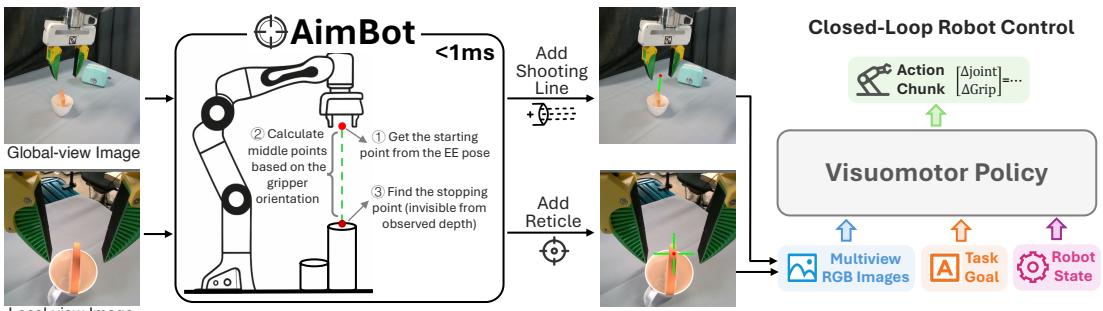
As shown in Figure 1 above, AimBot is a lightweight visual augmentation technique. It projects the robot’s end-effector (gripper) state directly onto the camera feed in the form of shooting lines and scope reticles. By “painting” these cues onto the images before the AI sees them, AimBot explicitly encodes spatial relationships, boosting performance in complex manipulation tasks without requiring any changes to the neural network architecture.
In this deep dive, we will explore why robots struggle with aiming, how AimBot mathematically constructs these visual cues in less than a millisecond, and the impressive results it achieves in both simulation and the real world.
The Problem: Pixels Lack Proprioception
To understand why AimBot is necessary, we first need to look at how modern robots “see” and “act.”
The VLA Paradigm
Recent advancements in robotics have been driven by Vision-Language-Action (VLA) models. These are large foundation models (similar to the LLMs behind ChatGPT) that have been fine-tuned to output robot actions. Models like OpenVLA or \(\pi_0\) take two main inputs:
- Visual Observations: RGB images from cameras mounted on the robot or in the room.
- Language Instructions: A command like “Put the bread in the toaster.”
The model processes these inputs and predicts how the robot should move its joints.
The Spatial Disconnect
While these models are great at semantic understanding (knowing what a “toaster” looks like), they often struggle with precise spatial alignment. The robot knows where its arm is via internal sensors (proprioception), but this data is usually a separate vector of numbers (e.g., joint angles or XYZ coordinates).
The challenge is that the neural network has to learn a complex mapping between those abstract XYZ numbers and the pixels in the camera feed. It has to implicitly learn “If my hand is at coordinate (0.5, 0.2, 0.1), that corresponds to pixel (150, 200) in the camera image.” This mapping is hard to learn and prone to errors, leading to robots that grasp near the object but not on it.
Previous attempts to fix this involved asking the model to predict specific keypoints or using expensive “visual prompting” techniques that require running heavy inference models during execution. AimBot takes a different approach: direct, geometric projection.
The Core Method: Constructing the Crosshair
The beauty of AimBot lies in its simplicity and speed. It does not use a neural network to generate the visual cues. Instead, it uses classical computer vision geometry. The process takes less than 1 millisecond per image, making it virtually free in terms of computational cost.
The goal is to overlay two specific types of visual cues onto the robot’s camera feeds:
- Shooting Lines: For global cameras (fixed in the room), showing the trajectory of the gripper.
- Scope Reticles: For the wrist camera (moving with the hand), showing exactly what the gripper is pointing at.
Let’s break down the algorithm step-by-step.
Step 1: From World to Pixels
First, the system needs to know where the robot’s hand is in the 3D world and translating that location onto the 2D camera image. This is done using the Pinhole Camera Model.
We start with a point in the 3D world, \(\mathbf{p}_{\text{wld}}\) (the center of the gripper). We need to project this point into the camera’s coordinate frame using the camera’s Extrinsic Matrix (\(\mathbf{E}\)). This matrix represents the camera’s position and rotation in the world.

Once we have the coordinates relative to the camera (\(\mathbf{p}_{\text{cam}}\)), we project them onto the 2D image plane using the Intrinsic Matrix (\(\mathbf{K}\)), which accounts for the camera’s focal length and optical center.
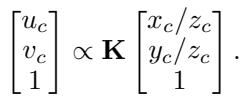
This gives us the pixel coordinates \((u_c, v_c)\) representing where the center of the gripper appears in the image.
Step 2: The Visibility Check
Simply drawing a dot at \((u_c, v_c)\) isn’t enough. What if the robot’s hand is behind a box or a wall? If we draw the cue on top of the obstacle, we give the robot false information, making it think the hand is visible when it is actually occluded.
To solve this, AimBot utilizes depth images. Most modern robotic setups use RGB-D cameras (like Intel RealSense) which provide a depth map indicating how far away every pixel is.
The system compares the calculated distance of the gripper (\(z_c\)) with the actual depth value observed by the camera at that pixel (\(D[v_c, u_c]\)).

If the projected depth (\(z_c\)) is roughly equal to the observed depth (within a small margin \(\epsilon\)), the point is visible. If the observed depth is significantly smaller, it means there is an object in front of the gripper, and the system should not draw the overlay.
Step 3: Ray Marching (The “Shooting” Logic)
To draw a line that indicates direction, not just position, AimBot performs a “ray marching” operation. It takes the starting point (the gripper’s center) and iteratively steps forward along the direction the gripper is facing (\(\mathbf{d}\)).

At every step (denoted by \(\delta\)), the algorithm projects the new 3D point onto the image and checks if it is visible. It continues this process until the “ray” hits an object (the depth check fails) or reaches a maximum distance.
This effectively simulates a laser pointer attached to the robot’s hand.
Visualizing the Result
The result of this geometry pipeline is a set of augmented images that explicitly encode the robot’s state.
Global View: The Shooting Line
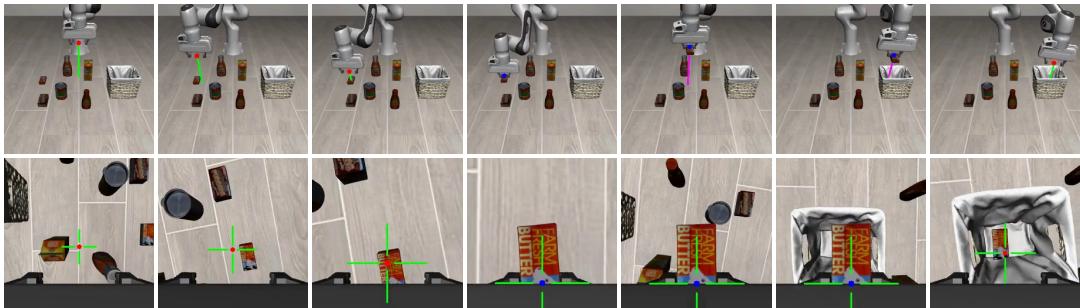
For cameras mounted on the robot’s shoulder or in the environment, AimBot draws a shooting line.
- Origin: The calculated position of the gripper.
- End: The point where the “laser” hits a surface.
- Color Coding: The line changes color based on the gripper state (e.g., Green for Open, Purple for Closed).
Local View: The Scope Reticle
For the camera mounted directly on the robot’s wrist, AimBot draws a crosshair (reticle). This is where the design gets clever. A static crosshair wouldn’t tell you how far away the surface is. AimBot modulates the size of the crosshair based on distance.
The algorithm calculates a scaling factor based on the distance to the surface (\(z_w\)):

It then uses this scaling factor to adjust the length of the reticle lines:

This creates a dynamic visual effect: as the robot gets closer to an object, the crosshair expands. This provides the neural network with a strong visual cue about “Time to Collision” or proximity, which is critical for soft handling of objects.
The figure below demonstrates these augmentations in action within the LIBERO simulation benchmark. Notice the green shooting line in the top row (global view) and the crosshair in the bottom row (wrist view).
Experimental Results
The researchers integrated AimBot into three leading VLA models: OpenVLA, \(\pi_0\), and \(\pi_0\)-FAST. They then tested these enhanced models against the vanilla versions in both simulation and real-world scenarios.
Simulation: The LIBERO Benchmark
The LIBERO benchmark is a standard suite for testing lifelong robot learning. It is divided into varying levels of difficulty, with LIBERO-Long being the hardest as it involves long-horizon tasks requiring multiple steps.
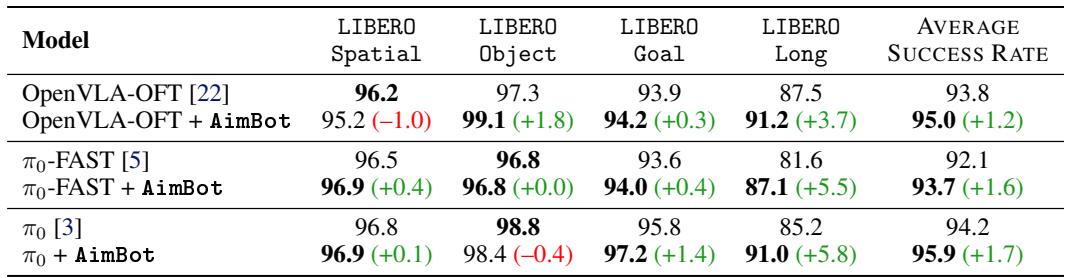
The results, summarized in Table 1 below, show a consistent trend. While performance gains on simple tasks (Spatial, Object) are modest (since the baselines are already quite good), the gains on LIBERO-Long are significant.
For example, on the challenging LIBERO-Long suite:
- \(\pi_0\) improved from 85.2% to 91.0%.
- OpenVLA-OFT improved from 87.5% to 91.2%.
- \(\pi_0\)-FAST improved from 81.6% to 87.1%.
These jumps in performance suggest that the spatial cues help the model maintain coherence over long sequences of actions, likely by reducing small errors that accumulate over time.
Real-World Validation
Simulations are useful, but the real test of any robotic theory is the physical world. The team set up a 7-DoF Franka Emika Panda robot with three RealSense cameras (left shoulder, right shoulder, wrist).
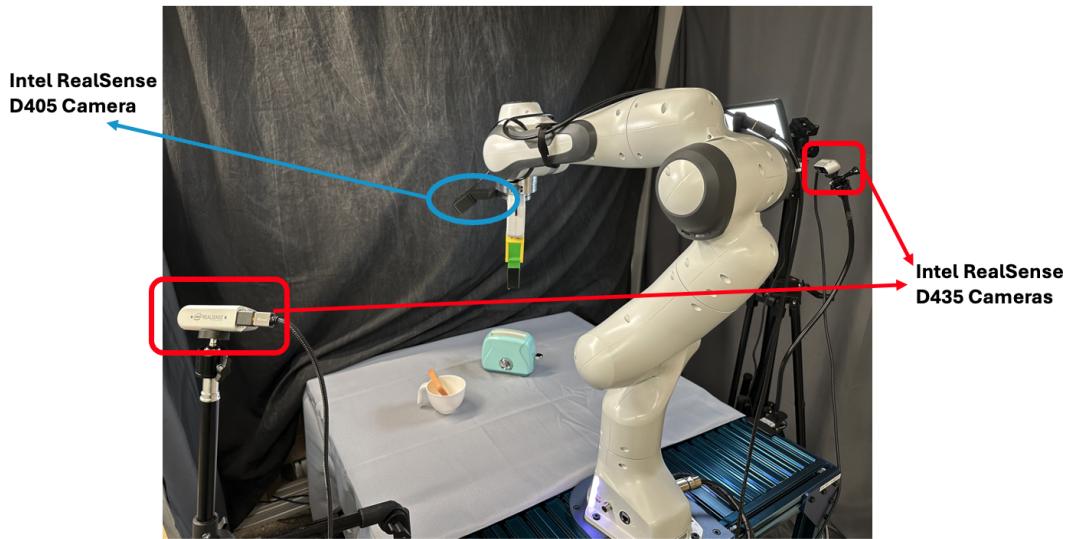
They designed five contact-rich tasks that require precision:
- Fruits in Box: Pick-and-place multiple objects.
- Tennis Ball in Drawer: Open a drawer, insert ball, close drawer.
- Bread in Toaster: Precise insertion task.
- Place Coffee Cup: Orientation-sensitive placement.
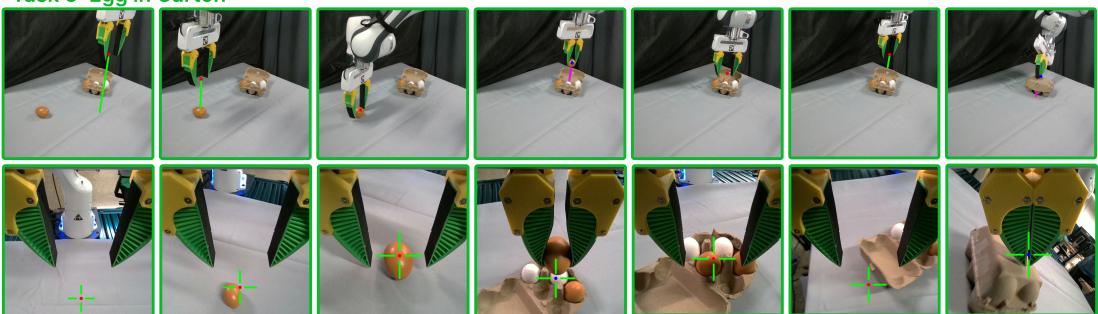
- Egg in Carton: Delicate handling and lid closing.

The visual augmentations for these tasks look intuitive. In the figure below, you can see how the shooting lines (left) and reticles (right) highlight the target objects, like the green toaster or the tennis ball.
Performance vs. Baselines
The results were compelling. AimBot significantly outperformed the standard models and other visual prompting baselines.
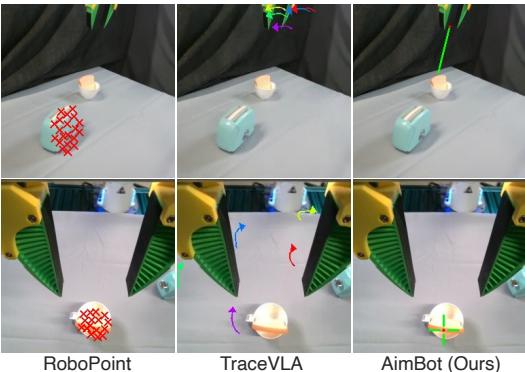
The researchers compared AimBot against:
- RoboPoint: Uses a VLM to predict affordance points (red crosses).
- TraceVLA: Visualizes motion history arrows.
As seen in Figure 4, AimBot (right) provides a clean, centered cue (the green cross) directly over the target. RoboPoint (left) is often noisy or slightly off-target, and TraceVLA (center) clutters the screen with arrows that may distract from the immediate spatial goal.
Quantitatively, across 50 total trials (10 per task), the \(\pi_0\)-FAST + AimBot model achieved 47/50 successes, compared to just 42/50 for the baseline. In specific hard tasks like “Bread in Toaster,” the improvement was stark, jumping from 40% success to near-perfect execution.
Furthermore, AimBot is fast.
- RoboPoint: ~5 seconds inference (way too slow for real-time).
- TraceVLA: ~0.3 seconds.
- AimBot: < 0.001 seconds.
This efficiency allows AimBot to be used in high-frequency control loops without slowing down the robot.
Analysis: Why Does It Work?
Why does drawing a simple green cross make a multi-billion parameter neural network smarter? The researchers conducted several analyses to find out.
1. Improved Attention
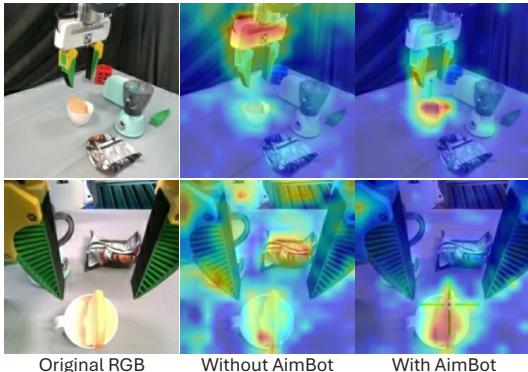
By visualizing the attention weights of the VLA model (specifically Layer 1, Head 11), the researchers found that AimBot fundamentally changes where the model looks.
In the figure below, the top row shows the attention map of a standard model—it is often diffuse, looking at the background or irrelevant objects. The bottom row shows the model with AimBot. The attention is tightly focused on the target object and the gripper. The visual cue acts as an “attention magnet,” guiding the model’s processing power to the most relevant pixels.
2. Reducing Misalignment
The primary cause of failure in robotic manipulation is misalignment—grasping just a centimeter too far to the left, or approaching at a slight angle.
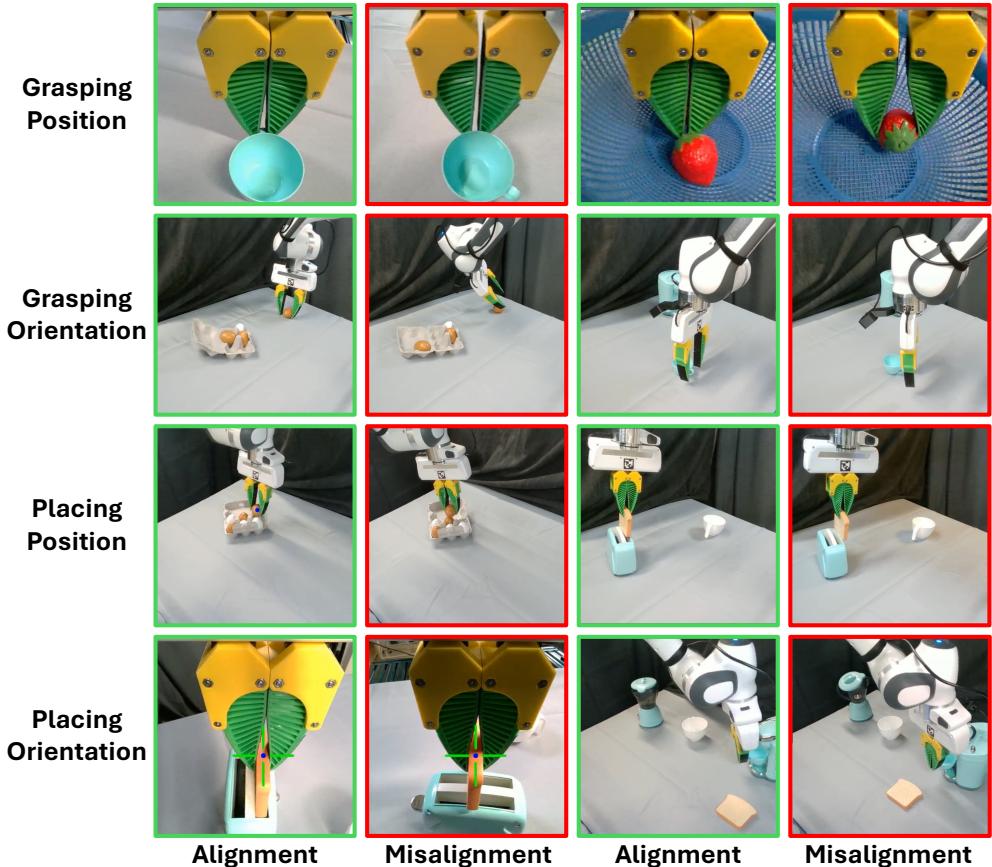
The researchers categorized failure modes in their real-world experiments. As shown in Figure 10, common errors include grasping the air next to a strawberry or hitting the rim of a cup. AimBot drastically reduced these geometric errors. For “Grasping Position” errors specifically, AimBot reduced the failure count from 22 (baseline) to just 7.
3. Generalization (Out-of-Distribution)
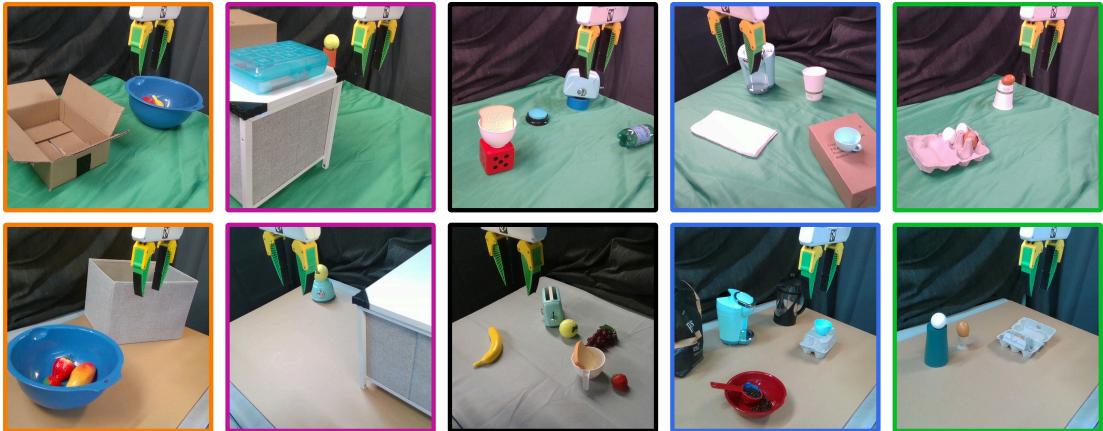
One of the most surprising findings was AimBot’s robustness. When the researchers changed lighting conditions (flashing lights, warm/cool tints) or swapped background textures—scenarios that usually break visual policies—AimBot provided a stable anchor.
Because AimBot relies on depth (geometric truth) rather than just RGB texture, the reticle remains accurate even if the lighting creates weird shadows. This geometric consistency helps the neural network ignore the visual noise and focus on the task.
Conclusion
The AimBot paper teaches us a valuable lesson about the intersection of classical robotics and modern AI. While end-to-end learning (pixels to actions) is a powerful paradigm, it sometimes discards useful information that we already have.
We know where the robot is. We know the camera parameters. By using simple geometry to project this known state back into the visual domain—effectively translating “proprioception” into “pixels”—we can give VLA models a massive helping hand.
Key Takeaways:
- Simplicity Wins: No complex auxiliary networks, just geometry.
- Speed Matters: <1ms overhead means it can be deployed on any system.
- Spatial Grounding: Explicit visual cues help deep networks attend to the right features.
AimBot serves as a reminder that sometimes, the best way to improve an AI’s vision is to simply draw an “X” where it needs to look. As we move toward more general-purpose robots, hybrid approaches that combine the robustness of classical geometry with the flexibility of neural networks will likely lead the way.