](https://deep-paper.org/en/paper/32_motion_blender_gaussian_spl-2462/images/cover.png)
Introduction
Imagine watching a video of a cat stretching or a person waving their hand. Now, imagine you could reach into that video, grab the cat’s paw, and move it to a different position, or re-animate the hand to wave in a completely new pattern. This is the dream of dynamic scene reconstruction: transforming a flat video into a fully interactive, 3D digital twin.
In recent years, a technique called 3D Gaussian Splatting (3DGS) has revolutionized how we render static 3D scenes. It’s fast, high-quality, and photorealistic. However, extending this to dynamic scenes (scenes that move) has hit a roadblock. Most current methods treat motion as a “black box.” They use neural networks to predict how pixels move, which looks great on playback but is impossible to control. You can replay the video in 3D, but you can’t change the movement.
This lack of control is a major bottleneck, especially for robotics. A robot needs to understand how an object moves so it can plan how to manipulate it. If the motion is hidden inside a neural network, the robot can’t use it.
Enter Motion-Blender Gaussian Splatting (MBGS). In a new paper from Rutgers University, researchers propose a method that combines the rendering power of Gaussian Splatting with the control of classical animation techniques. By explicitly modeling motion using “skeletons” and graphs, they allow us to not just replay reality, but edit it.

As shown in Figure 1, this framework doesn’t just reconstruct the scene; it extracts a control structure (like the skeleton of a hand or a graph for a cat) that allows for novel animations, robot training data synthesis, and visual planning.
Background: The Problem with “Black Box” Motion
To understand why MBGS is significant, we first need to look at how dynamic Gaussian Splatting typically works.
In standard 3D Gaussian Splatting, a scene is represented by millions of 3D blobs (Gaussians). Each Gaussian has a position, shape (covariance), color, and opacity. To make a static image, the computer “splats” these blobs onto a 2D plane.
To handle dynamic scenes (video), we need these Gaussians to move over time. The standard equation for the position of a Gaussian at time \(t\) usually looks something like this:

Here, \(f\) is a deformation function parameterized by \(\theta\). In most state-of-the-art methods (like 4D-Gaussians or Deformable-GS), \(f\) is a neural network. The network takes the initial position and time as input and outputs the new position.
The problem? Neural networks are implicit functions. They don’t give you a “handle” to pull. You cannot easily ask the network to “lift the arm higher” or “bend the knee.” The motion is baked in. This limits these methods to playback only.
The Core Method: Motion Blender Gaussian Splatting
The researchers asked a fundamental question: Can we use a sparse, explicit motion representation—like the skeletons used in video games—without losing the photorealism of Gaussian Splatting?
Their answer is MBGS. Instead of a dense neural network affecting every Gaussian individually, they use a Motion Graph. This is a sparse set of nodes and links (like a stick figure) that drives the motion of the millions of dense Gaussians.
The Framework Overview
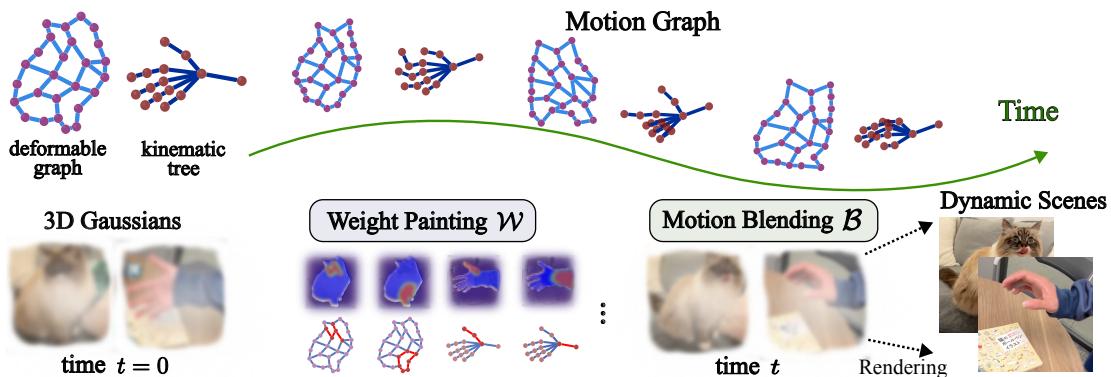
The MBGS pipeline (Figure 2) consists of three main stages:
- Sparse Dynamic Graph: A lightweight structure representing the object’s physics.
- Weight Painting: Determining which part of the graph influences which Gaussians (e.g., the “hand” bones should move the “finger” Gaussians).
- Motion Blending: Using Dual Quaternion Skinning to smoothy propagate the graph’s movement to the visible scene.
The Mathematical Foundation
The core innovation lies in how the position of a Gaussian is calculated. Instead of the black-box function \(f\), MBGS uses a structured blending equation:

Let’s break this down:
- \(\mathcal{R}\) calculates the movement of the links in the motion graph from time 0 to time \(t\).
- \(\mathcal{W}\) is the Weight Painting Function. It calculates how much influence each link has on a specific Gaussian based on proximity.
- \(\mathcal{B}\) is the Motion Blending Function. This combines the movements of various links, weighted by their influence, to determine the final position of the Gaussian.
The authors implement \(\mathcal{B}\) using Dual Quaternion Skinning (DQS). In computer graphics, DQS is preferred over linear skinning because it prevents “candy-wrapper artifacts”—where a mesh collapses on itself when twisted (like twisting a candy wrapper). This ensures the reconstructed objects maintain their volume during complex movements.
Two Types of Motion Graphs
Not all objects move the same way. A human moves differently than a plush toy. To address this, the authors introduce two types of parametric motion graphs.

1. Kinematic Trees (For Articulated Objects)
Shown on the left of Figure 3, Kinematic Trees are hierarchical. They have a root and branches, much like a standard skeleton rig in animation software (Blender, Maya).
- Best for: Humans, robots, rigid mechanical objects.
- Parameters: Joint rotation angles and the root pose.
- Mechanism: Forward kinematics propagate rotations down the chain.
2. Deformable Graphs (For Soft Objects)
Shown on the right of Figure 3, Deformable Graphs have no strict hierarchy. Nodes can move freely in 3D space.
- Best for: Clothing, soft toys, animals, or objects with non-rigid surfaces.
- Parameters: The 3D positions of the joints themselves.
The “Stretching” Challenge: In a deformable graph, the distance between nodes can change (imagine stretching a rubber band). Standard rigid transformations (rotation/translation) can’t describe a line getting longer. To solve this, the authors devised a clever projection method.
They project a Gaussian onto a link and define its motion based on how that projection point moves. If a link stretches, the projection point slides proportionally:

This allows them to decouple the “stretch” from the “pose,” enabling them to use rigid Look-At transformations even on non-rigid objects:

Weight Painting: Connecting Gaussians to the Graph
How does a Gaussian know which bone it belongs to? The system learns a Weight Painting Function. This is conceptually similar to “skinning weights” in 3D modeling, but learned automatically from the video.
The influence is determined by a kernel function based on distance:

Here, \(\gamma\) (gamma) is a learnable parameter that controls the radius of influence. If a Gaussian is close to a bone, the weight is high.
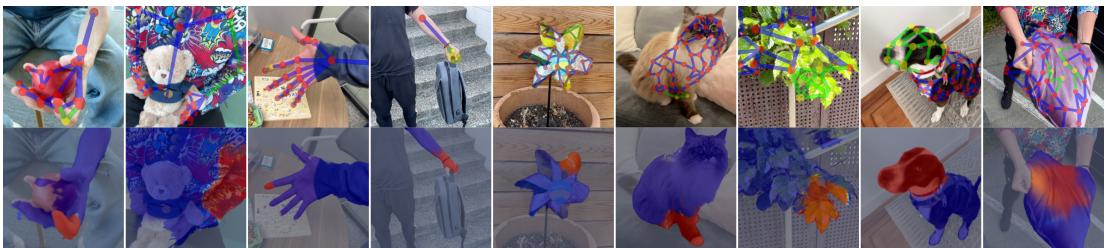
Figure 4 visualizes this beautifully. In the bottom row, you can see red “heat maps” indicating the influence of the green graph links. Notice how the influence creates a smooth gradient—this ensures that when the graph moves, the “skin” (the Gaussians) deforms naturally without tearing.
Initialization Strategy
You can’t just throw random points into 3D space and expect them to align with a video. The system needs a good starting point.

As detailed in Figure 6, the authors use modern foundation models to bootstrap the process:
- Grounding SAM2: Provides instance segmentation masks (separating the “bear” from the “human”).
- SAPIENS: Estimates 2D skeletons for humans.
- Depth Maps: Used to lift these 2D cues into 3D point clouds.
The motion graph is initialized to fit this 3D point cloud, and then the whole system (Gaussians + Graph + Weights) is optimized end-to-end to minimize the difference between the rendered images and the source video.
Experiments and Results
The researchers evaluated MBGS on two challenging datasets: the iPhone dataset (hand-held videos of dynamic scenes) and HyperNeRF (VR rig data). They compared their method against state-of-the-art approaches like Shape-of-Motion and 4D Gaussians.
Quantitative Success
The primary metric used was LPIPS (Learned Perceptual Image Patch Similarity). Unlike PSNR (which measures raw pixel differences), LPIPS measures how “human” the image looks—how sharp and perceptually accurate it is.
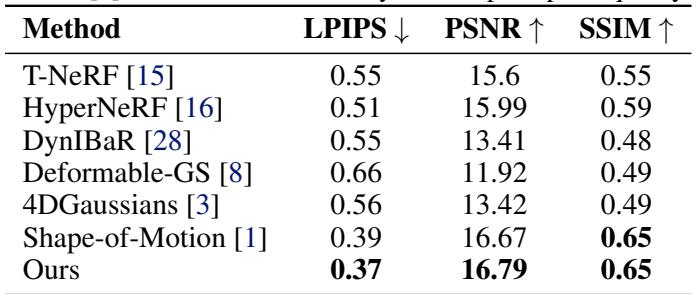
On the iPhone dataset (Table 1), MBGS achieves the lowest (best) LPIPS score, beating the current state-of-the-art, Shape-of-Motion.
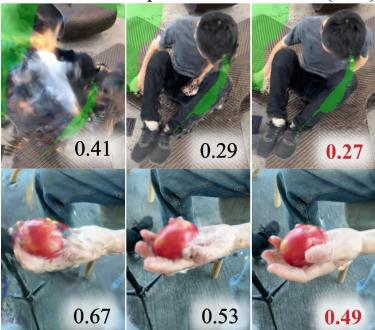
Figure 7 visually reinforces this. Look at the crop of the hand holding the apple (bottom row). The MBGS output (right) retains texture details that are blurred out in other methods.
Similarly, on the HyperNeRF dataset, MBGS remains highly competitive.
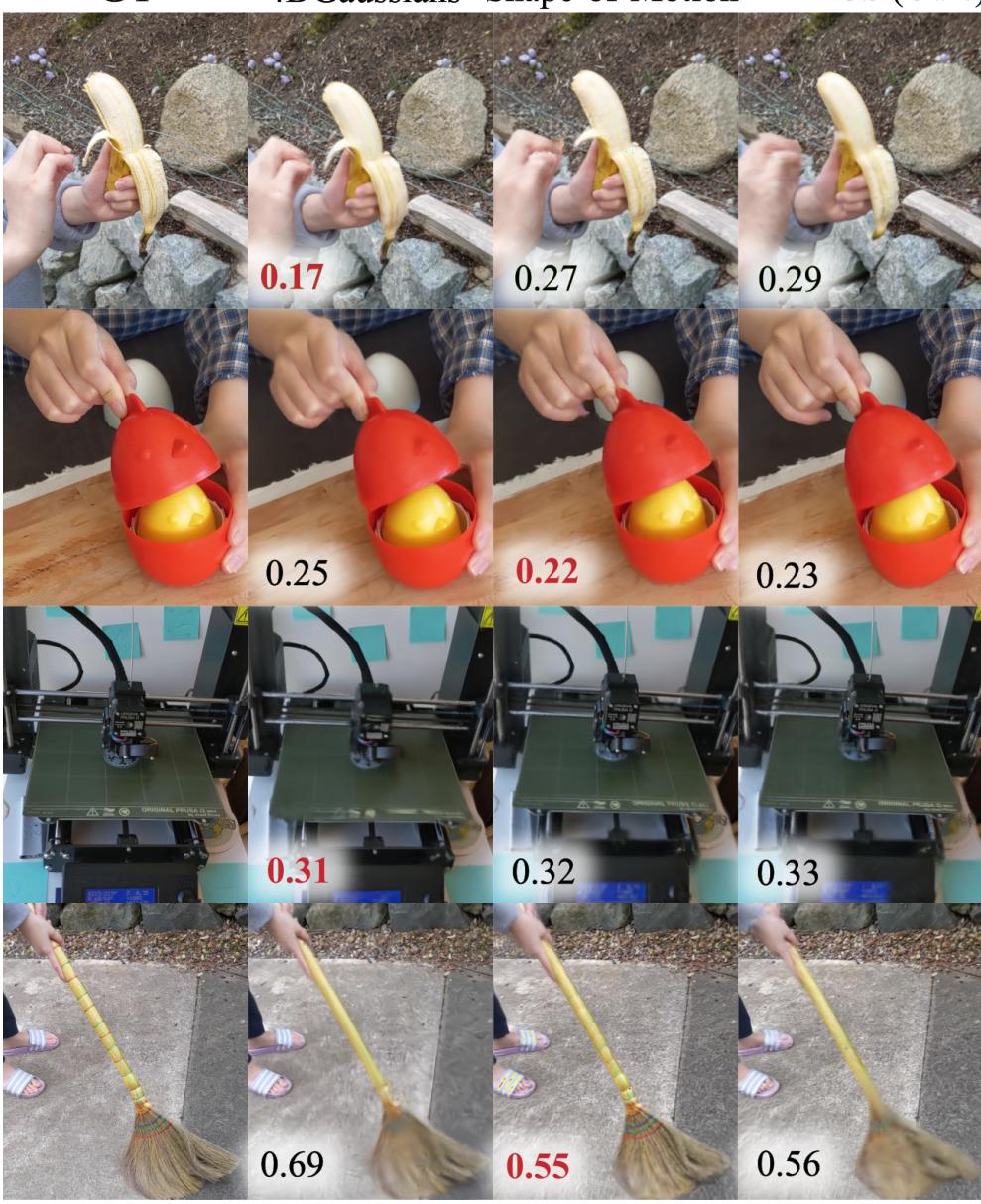
In Figure A5, looking at the “Broom” row (bottom), MBGS captures the thin structure of the broomstick and the texture of the shirt effectively. While 4D Gaussians sometimes achieves higher raw pixel scores (PSNR), the authors argue that their method provides comparable visual quality plus the massive advantage of explicit controllability.
Applications: Why This Matters
The true power of MBGS isn’t just slightly better rendering; it’s the utility of the representation. Because the motion is stored in a graph, not a black-box neural network, we can manipulate it.
1. Novel Pose Animation
Once the scene is reconstructed, you can grab the motion graph and twist it.
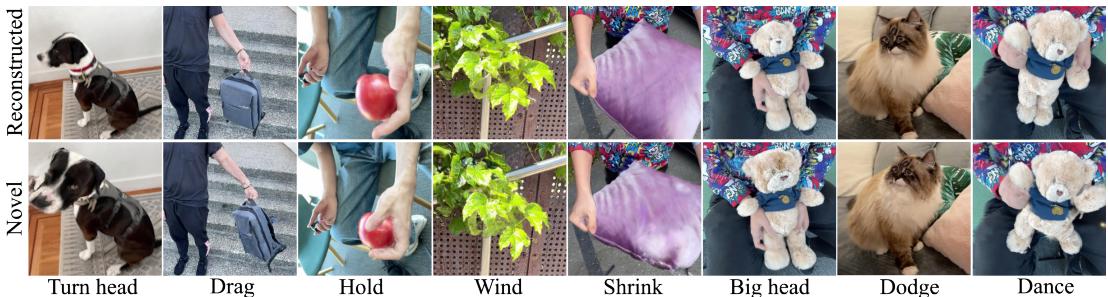
In Figure 5, the top row shows the original video reconstruction. The bottom row shows novel poses—images that never existed in the video. The researchers successfully rotated the cat’s head, dragged the teddy bear’s arm, and rotated the windmill. This is essentially “Photoshop for 3D Video.”
2. Robot Demonstration Synthesis
Training robots is hard because collecting data is expensive. You usually have to teleoperate a robot for hours. MBGS offers a shortcut: Sim-to-Real transfer from Human Videos.
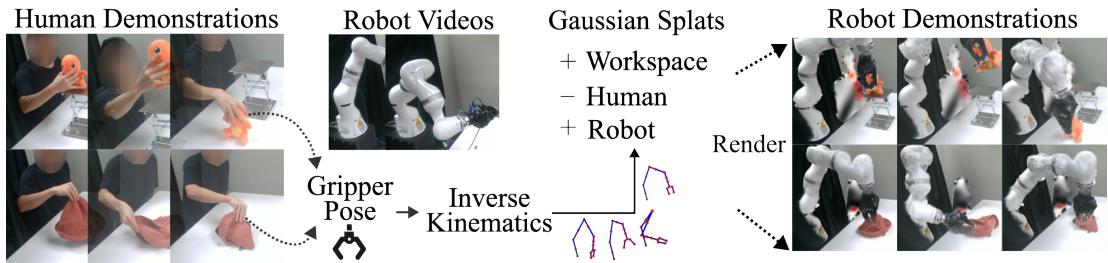
The pipeline shown in Figure 9 is fascinating:
- Record a human doing a task (e.g., folding cloth).
- Reconstruct the scene using MBGS.
- Swap the human’s “Motion Graph” for a robot’s kinematic chain (using Inverse Kinematics to match the hand positions).
- Render the scene with the robot instead of the human.
This generates synthetic video data of a robot performing a task, derived purely from human demonstration, which can then be used to train robot policies.
3. Robotic Visual Planning
Finally, robots can use this internal model to “think” before they act.
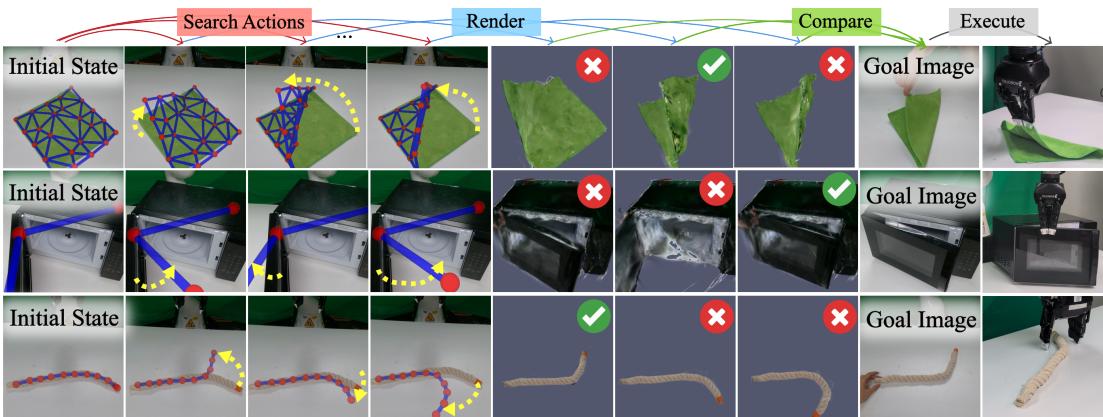
In Figure 10, the robot needs to manipulate a rope or close a microwave door.
- It observes the object and builds an MBGS model instantly.
- It “imagines” different movements by tweaking the motion graph in simulation.
- It compares the rendered outcomes to a goal image.
- It executes the motion that maximizes success.
This visual planning allows the robot to interact with deformable objects (like cloth and rope) without needing complex physics engines—the visual model is the physics engine.
Limitations
No method is perfect. The authors candidly discuss limitations, particularly with fast motion and topology mismatches.
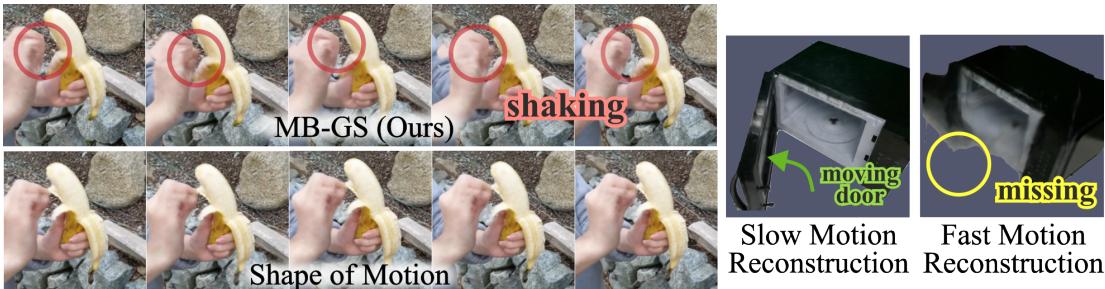
As seen in Figure 13, fast-moving objects (like a shaking hand or a rapidly opening door) can cause artifacts or missing geometry. This is because the optimization relies on temporal consistency; if an object moves too fast, the “glue” between frames breaks.
Additionally, because the method is purely visual, it lacks true physical constraints. A reconstructed robot arm might accidentally clip through a table or a piece of cloth because the Gaussian model doesn’t “know” the table is solid.
Conclusion
Motion-Blender Gaussian Splatting represents a significant step forward in dynamic scene reconstruction. By bridging the gap between high-fidelity neural rendering and classical, controllable animation graphs, it solves a major pain point in the field.
It allows us to decompose complex videos into interpretable, editable parts—background, object, skeleton, and skin. For content creators, this means new ways to edit video. For roboticists, it offers a scalable way to teach robots by showing them human videos, rather than laboriously guiding their hands. While challenges with fast motion and physics remain, MBGS lays the groundwork for a future where digital twins are not just statues, but playable, manipulatable realities.