](https://deep-paper.org/en/paper/file-1905/images/cover.png)
Smart Sensors: How Computing Inside the Pixel enables 3000 FPS Feature Tracking
Computer vision has a bottleneck problem. In a traditional setup—whether it’s a smartphone, a VR headset, or a drone—the camera sensor acts as a “dumb” bucket. It captures millions of photons, converts them to digital values, and then sends a massive stream of raw data to an external processor (CPU or GPU) to figure out what it’s looking at.
This data transfer is costly. It consumes power, creates latency, and limits how fast the system can react. If you shake a standard camera violently, the image blurs, and the processor loses track of where it is. But what if the sensor wasn’t just a bucket? What if every single pixel had its own brain?
That is the premise behind Pixel Processor Arrays (PPAs). In a fascinating paper titled “Descriptor-In-Pixel: Point-Feature Tracking for Pixel Processor Arrays,” researchers from The University of Manchester and Visionchip Limited present a method where the sensor itself performs high-speed feature tracking, eliminating the need to send images to a computer.
The result? A system that runs at over 3000 Frames Per Second (FPS) and tracks points reliably even during violent motion.
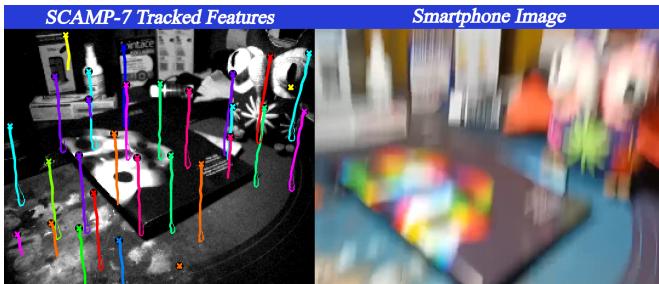
As shown in Figure 1, while a standard smartphone camera turns into a blurry mess under shaking, the PPA system maintains clear, continuous tracking. Let’s dive into how they achieved this.
The Hardware: What is a Pixel Processor Array?
To understand the software, we first need to understand the hardware. The researchers used the SCAMP-7, a prototype PPA sensor. Unlike a CCD or CMOS sensor found in your phone, the SCAMP-7 doesn’t just have photodiodes.
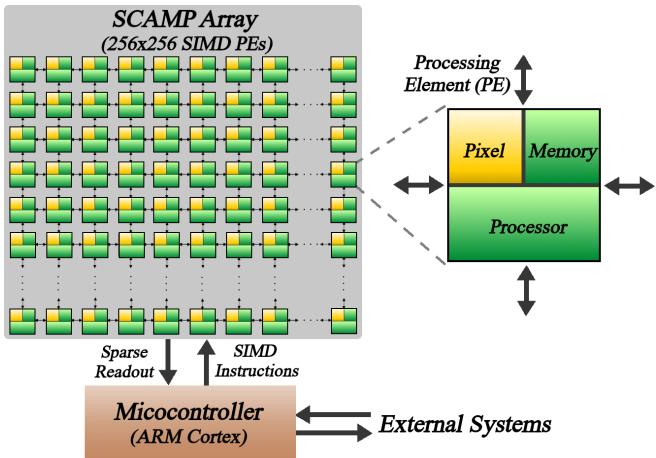
As illustrated in Figure 2, the sensor consists of a \(256 \times 256\) grid of Processing Elements (PEs). Each PE contains:
- A Light Sensor: To capture the pixel value.
- Local Memory: A mix of digital registers (for binary data) and analogue registers (for continuous values).
- A Processor: Capable of performing arithmetic and logic operations.
- Neighbor Interconnects: Allowing pixels to talk to their neighbors.
The entire array operates in SIMD (Single Instruction Multiple Data) mode. This means a central controller broadcasts one instruction (like “add register A to register B”), and all 65,536 pixels execute it simultaneously on their own local data. This massively parallel architecture is what makes the “Descriptor-In-Pixel” approach possible.
The Core Concept: Descriptor-In-Pixel
In traditional computer vision (like SLAM or Visual Odometry), we track specific points of interest—corners or edges—called point-features. To track a point from one frame to the next, the computer usually extracts a “descriptor,” which is a unique digital fingerprint describing the visual texture around that point.
The researchers introduce a paradigm called Descriptor-In-Pixel. Instead of sending the image to a CPU to calculate these fingerprints, each pixel-processor calculates and stores the descriptor for its own location.
1. Creating the Descriptor
The system uses a binary descriptor similar to the popular BRIEF or BRISK methods. A descriptor is formed by comparing the brightness of pairs of pixels around a central point.
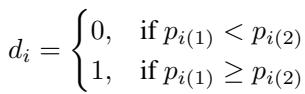
As the equation above shows, if pixel \(p_{i(1)}\) is brighter than pixel \(p_{i(2)}\), the bit is 1; otherwise, it is 0. Because memory on the SCAMP-7 is tight, the researchers used short 8-bit descriptors. This seems small, but because the frame rate is so high, it is sufficient for tracking.
2. The Response Map
Once every pixel has a descriptor stored, the system needs to find where features are located. It does this by computing a Response Map.
In every frame, the system compares the descriptor stored in a pixel’s memory against the current image data. The PPA calculates how well the stored descriptor matches the new image. Because this happens in parallel, the entire sensor generates a “heat map” of similarity instantly.
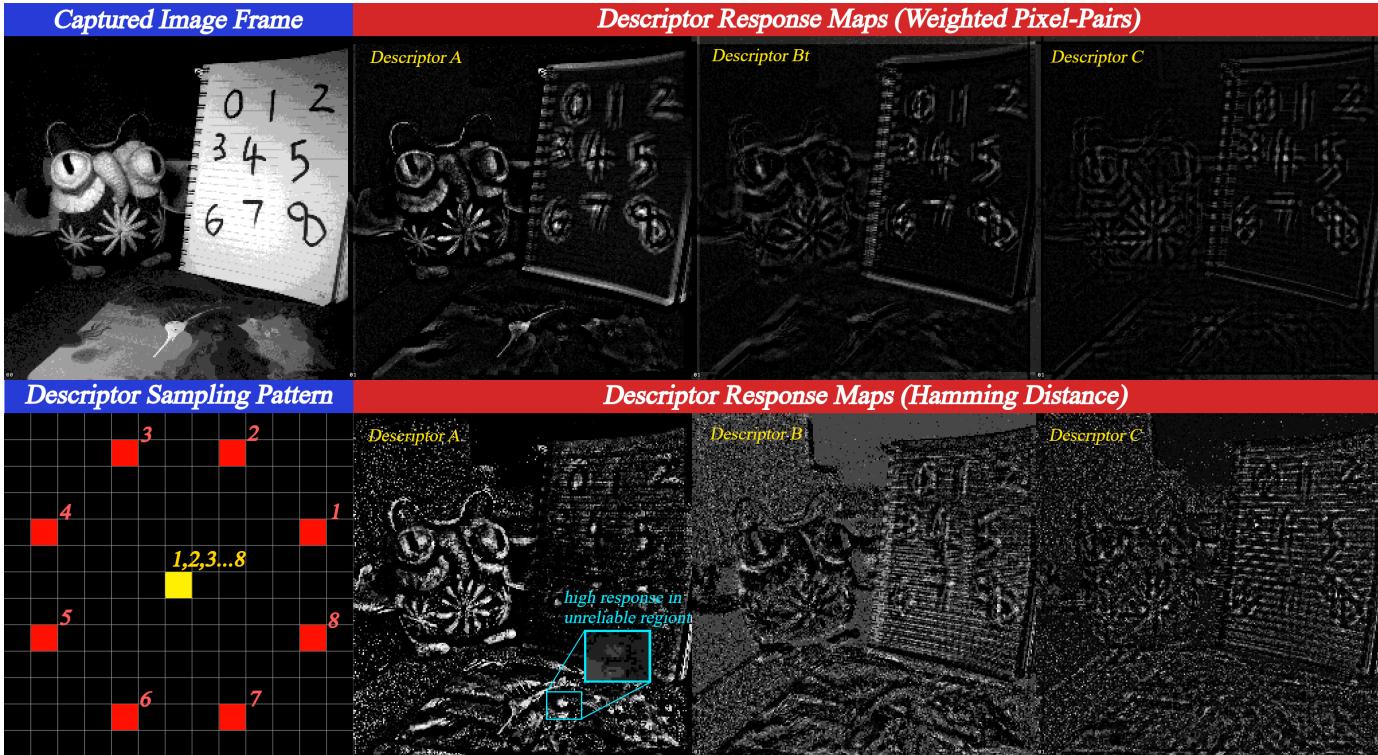
Figure 3 shows this process. The top-left is the input image. The colored maps show where specific descriptors “match” the image.
The researchers improved on standard binary matching (Hamming distance) by using the PPA’s analogue capabilities. Instead of just counting matching bits, they weight the match by the intensity difference of the pixels.
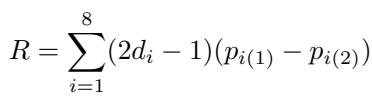
This formula ensures that strong visual features produce strong responses, while weak, noisy areas (like flat walls) produce low responses, making tracking much more reliable.
The “Patchwork” Strategy
Here is where the method gets clever. To perform simultaneous detection (finding new features) and tracking (following old ones), the researchers divide the pixel array into different zones.
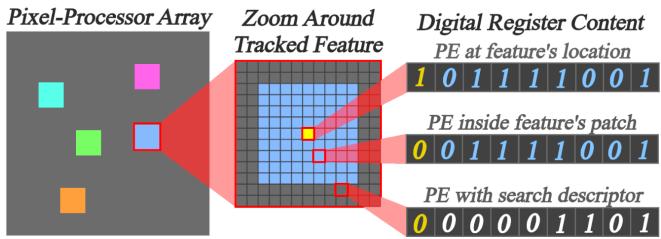
As shown in Figure 4:
- Tracking Patches: If a feature is currently being tracked, its specific descriptor is copied into a small \(9 \times 9\) patch of pixels surrounding its last known location.
- Search Areas: Everywhere else (the white areas in the diagram), the pixels are loaded with a generic “search descriptor” to look for new, interesting points.
This creates a Patchwork Response Map.
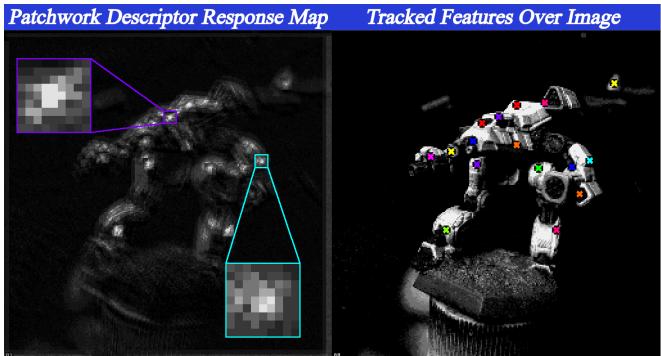
In Figure 5 (Left), you can see the result. The map is mostly dark, but you can see bright spots. Some spots correspond to tracked features inside their \(9 \times 9\) boxes. Others are new features popping up in the search areas.
How the Algorithm Runs
The entire process runs cyclically on the sensor. The beauty of this approach is that no raw image data ever leaves the chip. The sensor only outputs the coordinates of the features.
Here is the step-by-step pipeline:
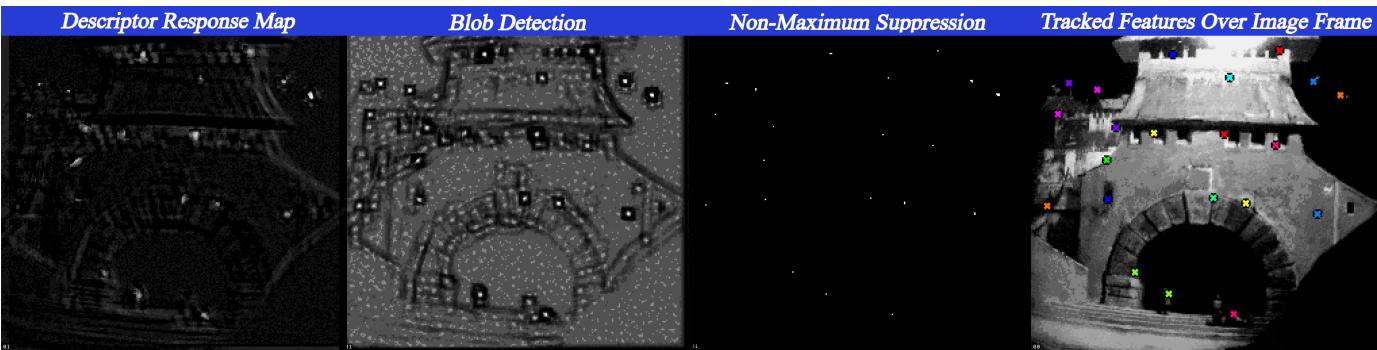
- Update Layout: The system decides which pixels are “tracking” pixels and which are “searching” pixels based on the previous frame.
- Compute Response: The parallel array calculates the response map (as discussed above).
- Blob Detection: The system looks for bright “blobs” in the response map.
- Non-Maximum Suppression (NMS): To locate the exact center of a feature, it suppresses neighbor pixels that aren’t the peak brightness.
- Location Update: The new coordinates of the features are recorded. If a feature moves slightly, the \(9 \times 9\) patch will center on the new location in the next frame.
If a tracked feature’s response drops too low (meaning it was occluded or lost), the system drops it and that area becomes available for searching new features.
Why Speed Changes Everything
You might wonder: Why do we need 3000 FPS? Is that overkill?
For this specific tracking method, high speed is actually a requirement that makes the problem easier.
- No Motion Blur: At 3000 FPS, the exposure time is tiny. Even if you shake the camera, the image remains sharp.
- Small Search Window: In a standard 30 FPS camera, a point might jump 50 pixels between frames. You have to search a huge area to find it again. At 3000 FPS, a point moves very little—usually less than a pixel. This allows the researchers to use those small \(9 \times 9\) tracking patches.
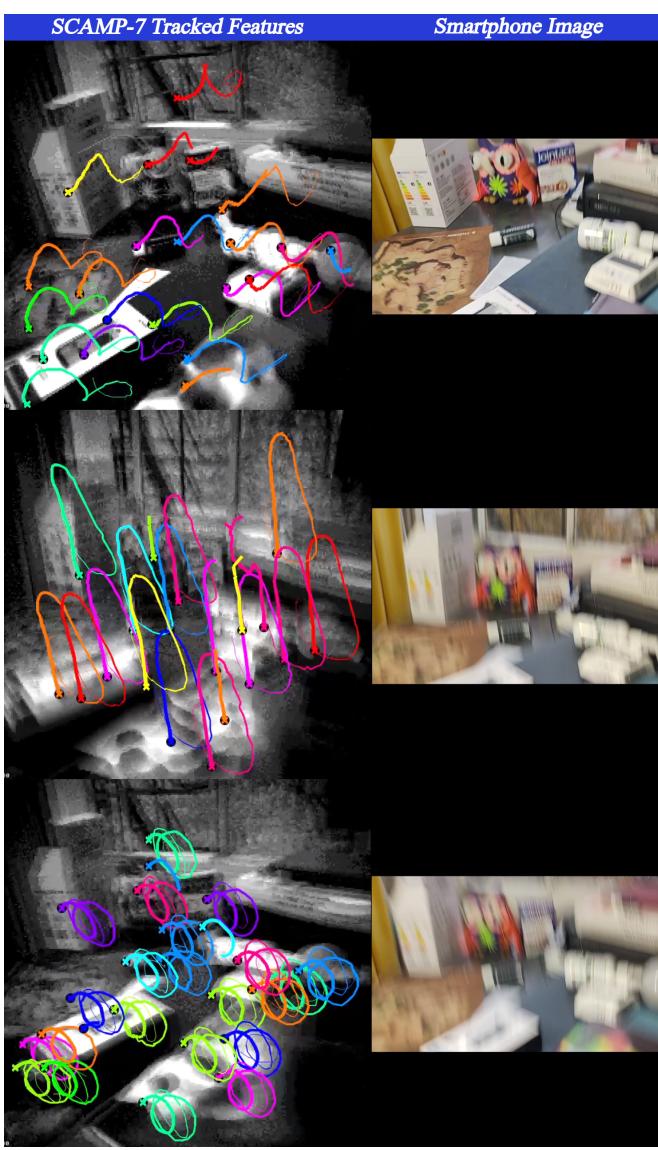
Figure 7 visually demonstrates the difference. The smartphone video (Right) is a blur of colors. The SCAMP-7 (Left) shows crisp trails of features (the colored lines) tracking the structure of the scene perfectly.
Performance and Results
The researchers implemented this on the SCAMP-7 prototype and achieved over 3000 FPS.
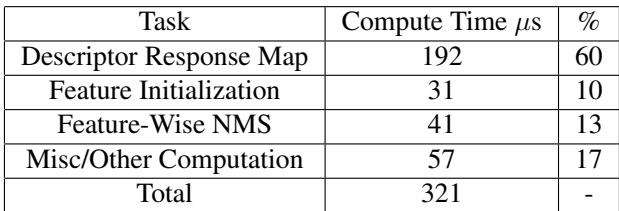
Table 1 shows where the time goes. Computing the response map takes the longest (192 \(\mu\)s), but the total time per frame is still only roughly 321 \(\mu\)s.
Comparison with FAST
To validate the robustness, they compared their method against a standard FAST corner detector running on the same hardware. They subjected both methods to different types of motion: shaking, sweeping, and translating.
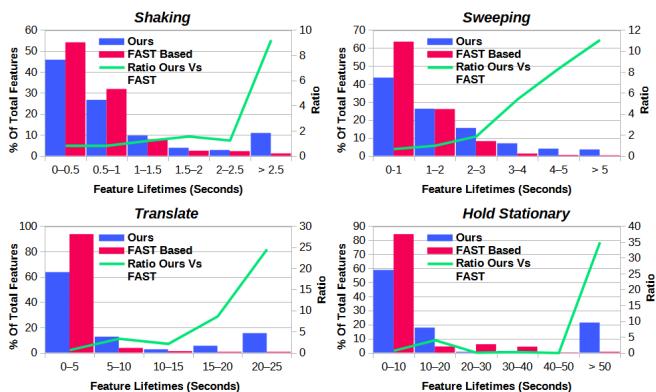
Figure 8 reveals the results. The graphs show “Feature Lifetime”—how long a feature was successfully tracked.
- Blue bars (Ours): Shows that many features were tracked for several seconds.
- Red bars (FAST): Most features were lost almost immediately (0-0.5 seconds).
- Green line (Ratio): The proposed method is drastically better, sometimes retaining features 20x to 40x longer than the standard approach during violent motion.
Conclusion
The “Descriptor-In-Pixel” paper demonstrates a fundamental shift in how we can approach computer vision. By moving the “brain” into the “eye,” the researchers eliminated the bandwidth bottleneck that plagues modern cameras.
The system achieves a >1000x reduction in data transfer compared to raw images, consumes only around 1 Watt of power, and operates at speeds that make motion blur a thing of the past. While the current implementation uses simple 8-bit descriptors due to prototype limitations, the concept proves that Pixel Processor Arrays are a promising technology for agile robots, drones, and VR systems where speed and efficiency are paramount.