](https://deep-paper.org/en/paper/file-2179/images/cover.png)
Introduction
Imagine you are a robot. I hand you a toy you have never seen before—a uniquely shaped, hand-carved wooden animal. I ask you to track its movement in 3D space as I wave it around.
For a human, this is trivial. For a computer vision system, this is a nightmare scenario.
Most state-of-the-art 3D object tracking systems rely on priors. They either need a precise 3D CAD model of the object beforehand (Model-based), or they need to have “seen” thousands of similar objects during a massive training phase (Training-based). If you don’t have the CAD file and you haven’t trained a neural network on that specific category of object, the system fails.
This reliance on priors creates a bottleneck for embodied intelligence. We cannot pre-scan every object in the world, nor can we train networks on every conceivable shape.
In this post, we are diving into a CVPR paper that proposes a solution to this “chicken and egg” problem. The paper, “Prior-free 3D Object Tracking,” introduces a method called Bidirectional Iterative Tracking (BIT).
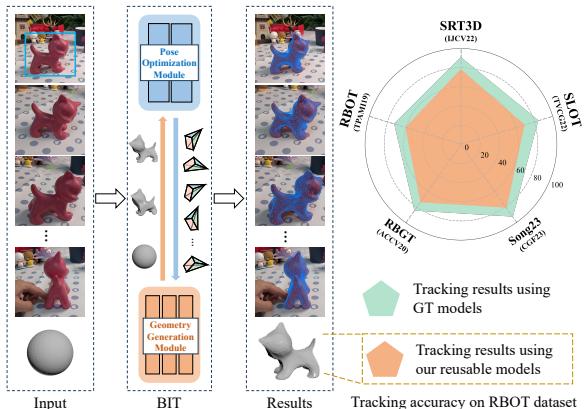
BIT is fascinating because it starts with nothing but a single RGB image. It simultaneously learns the shape of the object (geometry generation) and tracks its movement (pose optimization). It effectively builds the map while navigating the terrain.
The Context: Why “Prior-Free” Matters
To appreciate BIT, we need to understand the limitations of the current landscape in 6DoF (6 Degrees of Freedom) pose estimation.
The Model-Based Approach
These methods are the “gold standard” for accuracy. If you have a perfect laser scan of an object, algorithms like SLOT or RBOT can track it with incredible precision by matching the edges and colors in the video to the 3D model.
- The Catch: You need the model. In dynamic environments (like a service robot in a new home), you can’t stop to 3D scan every coffee mug or toy before picking it up.
The Training-Based Approach
These methods use Deep Learning. You train a network on large datasets (like ShapeNet) so it learns general features of objects.
- The Catch: Generalization is hard. A network trained on cars struggles with shoes. Furthermore, collecting annotated 3D training data is expensive and time-consuming.
The Prior-Free Dream
The researchers behind BIT asked: Can we track an object without any given model and without any training phase? Can the system generate its own data on the fly?
The Core Method: Bidirectional Iterative Tracking (BIT)
BIT operates on a simple but powerful feedback loop. It consists of two main modules that act like two artists collaborating on a portrait:
- Geometry Generation Module: The “Sculptor.” It tries to build a 3D mesh of the object based on what the camera sees.
- Pose Optimization Module: The “Observer.” It tracks how the object moves and finds new viewing angles to help the Sculptor.
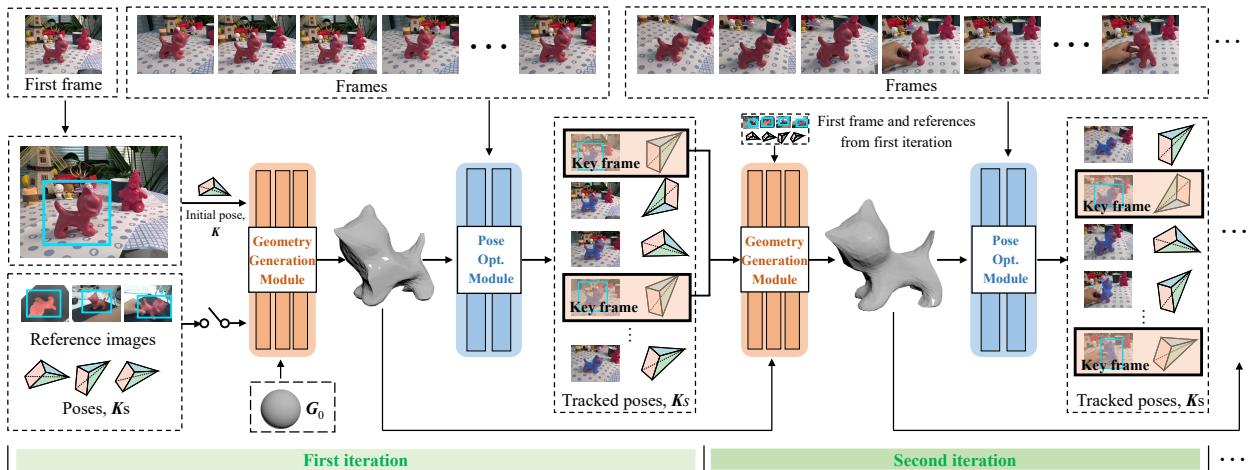
As shown in Figure 2, the process is cyclical. The system starts with a generic sphere. The “Sculptor” deforms the sphere to look like the object in the first frame. The “Observer” takes this rough shape, tracks the object in the next few frames, and captures new angles. These new angles are sent back to the Sculptor, who refines the shape. This cycle repeats, with both the shape and the tracking accuracy improving in real-time.
Let’s break down exactly how these two modules work.
1. The Geometry Generation Module
This module’s job is Inverse Rendering. Forward rendering turns a 3D model into a 2D image. Inverse rendering does the opposite: it takes 2D images and figures out what 3D shape created them.
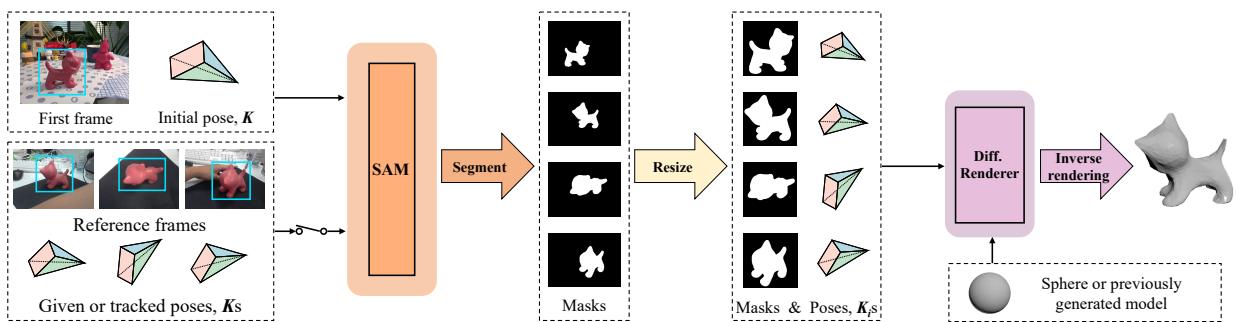
The input is the first video frame (and a bounding box) plus any “reference frames” the tracker has collected so far.
Step A: Segmentation with SAM
First, the system needs to know which pixels belong to the object and which are background. The authors utilize Segment Anything (SAM), a powerful segmentation model. Using the bounding box as a prompt, SAM creates a binary mask (silhouette) of the object.
Step B: Differentiable Rendering (SoftRas)
The system initializes a 3D mesh as a simple sphere. It then uses a technique called Differentiable Rendering (specifically, SoftRas).
Here is the intuition: The system “imagines” (renders) what the current sphere looks like from the camera’s perspective. It compares this imaginary silhouette to the actual mask provided by SAM. Naturally, they won’t match at first—a sphere doesn’t look like a toy dog.
Because the renderer is differentiable, the system can calculate a gradient. This allows it to mathematically ask: “How should I move the vertices of this sphere so that its shadow looks more like the toy dog?”
The Loss Function
The optimization is guided by a specific loss function:

- \(\mathcal{L}_{IoU}\): This measures the overlap between the projected model and the real object mask (Intersection over Union). We want to maximize this.
- \(\mathcal{L}_{l}\): This is a Laplacian regularization term. It prevents the mesh from becoming spiky or messy, ensuring the surface remains smooth.
- \(\mu\): A balancing weight.
By minimizing this loss, the sphere morphs into the shape of the target object.
2. The Pose Optimization Module
Once the Geometry Module creates a rough mesh, it passes it to the Pose Optimization Module.
This module has two responsibilities:
- Track the object: Estimate the position and rotation (Pose) of the object in the current video frame.
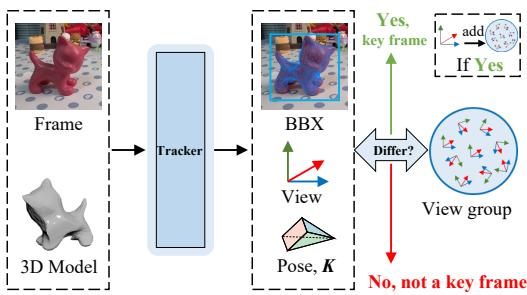
- Hunt for data: Identify “Key Frames”—new viewpoints that provide fresh information about the object’s shape.
Tracking Strategy
For tracking, the authors use a baseline method called SLOT. SLOT doesn’t use neural networks (keeping the system training-free). Instead, it optimizes the object’s pose based on color features around the projected mask. It creates an energy function that aligns the 3D model with the 2D image.
Key Frame Selection
This is a critical part of the BIT logic. To build a good 3D model, you need to see the object from different sides. If the user just holds the object still, the system learns nothing new.
The module maintains a “View Group” (\(\mathcal{V}\)), which is a collection of all the unique viewing angles it has seen so far.

For every tracked frame, the system calculates the current viewing angle (\(v_i\)) based on the rotation matrix (\(R\)) and translation vector (\(t\)):
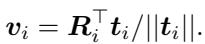
It then checks if this new angle is sufficiently different from everything in the View Group. It uses the dot product to calculate the angular difference:

If the angle difference (\(\Delta a_i\)) is larger than a threshold (e.g., \(3^{\circ}\)), the frame is flagged as a Key Frame. These Key Frames are sent back to the Geometry Generation Module to refine the 3D mesh.
Experimental Results
The authors tested BIT on standard datasets like MOPED and RBOT, as well as real-world scenarios captured with a standard webcam.
Accuracy on MOPED Dataset
The MOPED dataset contains real-world video of objects. The authors compared BIT against several state-of-the-art methods, including:
- PoseRBPF and LatentFusion (Training-based, using RGB-D).
- Gen6D (Generalizable method).
The results are striking. Even the version of BIT that uses zero reference frames (Ours(0)) outperforms complex Deep Learning methods that were trained on massive datasets.

When BIT is allowed to accumulate just 3 reference frames (Ours(3)), the accuracy jumps significantly (Avg 86.2 vs 73.7 for the next best). This proves that the iterative loop—improving the model as you track—is a superior strategy to relying on static pre-training.
Visual Evolution
It is helpful to visualize the “Sculptor” at work. In the figure below, you can see how the model evolves.
- Left: The video input.
- Right: The generated mesh.
Initially, the mesh is rough. But within 3 iterations, it captures the distinct geometry of the airplane and the drill.
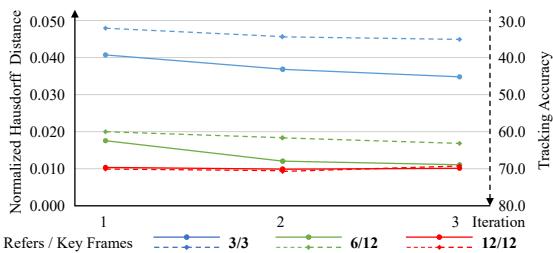
Figure 6 (the graph in the image above) quantitatively demonstrates this convergence. The solid lines represent Model Accuracy (Hausdorff distance, lower is better), and the dashed lines represent Tracking Accuracy. Both metrics improve rapidly over just 3 iterations.
Reusability: The Ultimate Test
One of the most exciting claims of this paper is that BIT generates reusable assets. The 3D models created on-the-fly aren’t just temporary mathematical constructs; they are legitimate meshes that can be saved and used by other tracking systems.
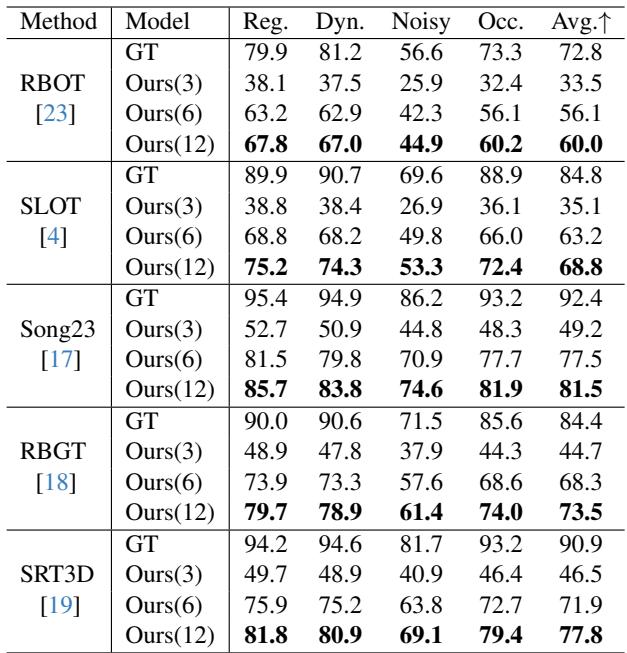
To prove this, the authors took the models generated by BIT and fed them into other standard model-based trackers (like SRT3D and RBGT).
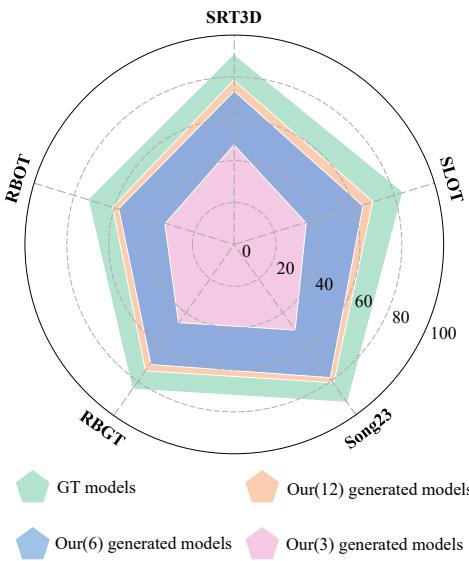
The radar chart above (Figure 9) compares tracking performance using Ground Truth (GT) CAD models (green) versus BIT-generated models (orange).
- Result: The BIT models perform nearly as well as the perfect CAD models.
This effectively solves the “Model-Free” problem by converting it into a “Model-Based” problem. You don’t need to download a CAD file; you just let BIT run for 30 seconds, and it makes the CAD file for you.
Here is a visual comparison of the generated meshes vs. the Ground Truth on the RBOT dataset:
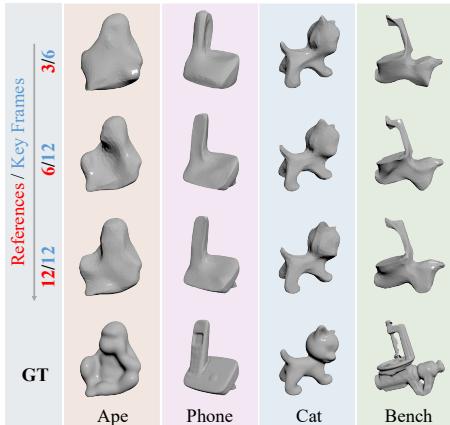
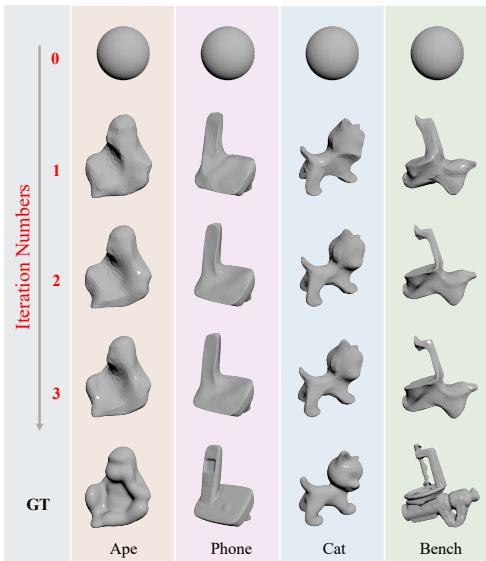
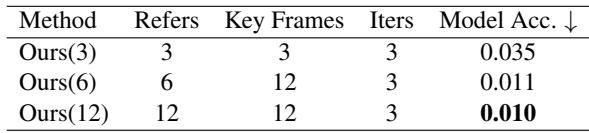
Notice how the specific geometry of the “Ape” and “Cat” becomes clear and smooth by the final iteration. Table 2 below quantifies this geometric accuracy.
Finally, Table 3 reinforces the reusability claim. When standard trackers use BIT’s models (specifically Ours(12)), their success rates are comparable to when they use Ground Truth models.
Real-World Performance
The authors also tested the system in messy, real-world environments with occlusion (fingers covering the object) and dynamic movement.
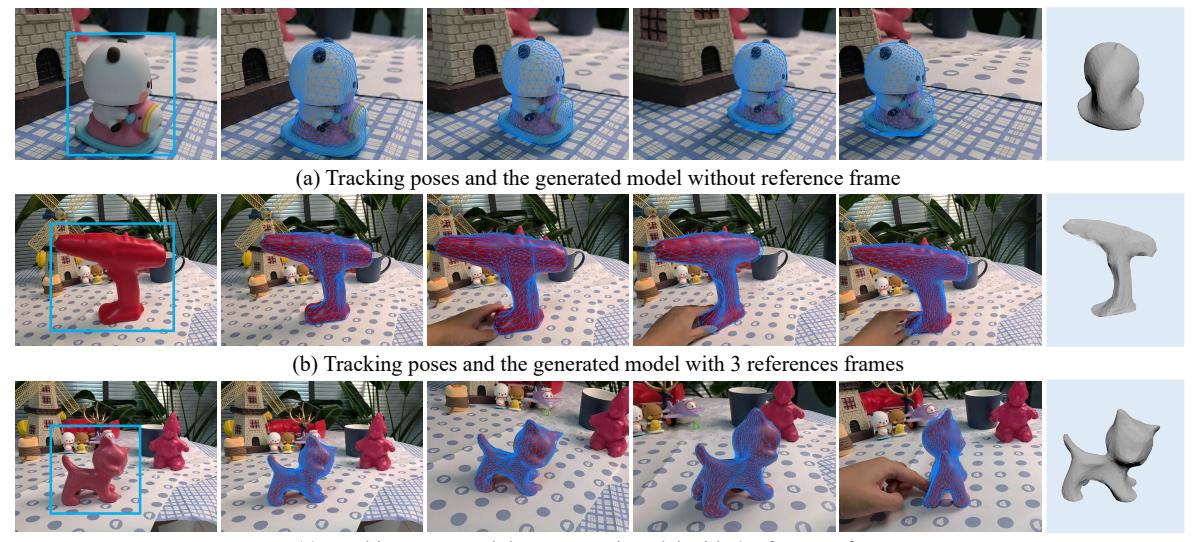
The system maintains a lock on the object (the blue wireframe overlay) even as it is rotated and manipulated by hand.
Conclusion & Future Implications
The Prior-free 3D Object Tracking (BIT) paper represents a significant step forward for computer vision. By coupling Geometry Generation (using SAM and Differentiable Rendering) with Pose Optimization (Tracking and Key Frame selection), the researchers created a system that is greater than the sum of its parts.
Key Takeaways:
- Truly Prior-Free: No CAD models and no training data required. This democratizes 3D tracking, making it accessible for novel objects in new environments.
- Bidirectional Synergy: Tracking helps build the model; the model helps tracking. This loop solves the cold-start problem.
- Reusability: BIT acts as a 3D scanner. The models it generates can be stored and used by other robotic systems or tracking algorithms later.
Limitations
The method isn’t magic. It relies on the silhouette of the object, so it struggles with concavities (hollow spots) or topological holes (like the handle of a mug or a donut shape) because a silhouette cannot capture depth inside a hole. Additionally, if SAM fails to segment the object due to camouflage or poor lighting, the geometry generation will fail.
However, as embodied AI and robotics move from controlled factory settings into unstructured homes and offices, the ability to pick up an unknown object, understand its shape, and track it instantly—without phoning home for a CAD file—is a critical capability. BIT proves that with the right iterative approach, robots can learn to see on the fly.