](https://deep-paper.org/en/paper/file-3023/images/cover.png)
Introduction
In the world of data, the spreadsheet is king. From small businesses to Fortune 500 companies, Microsoft Excel and Google Sheets are the default operating systems for structured data. Yet, for all their ubiquity, spreadsheets remain a massive blind spot for today’s most powerful Artificial Intelligence tools.
While Large Language Models (LLMs) like GPT-4 and Llama 3 have mastered prose, code, and even poetry, they struggle significantly with the two-dimensional grid of a spreadsheet. Why? Because LLMs read text sequentially—left to right, top to bottom. A spreadsheet, however, is spatial. A cell at Z100 might be mathematically dependent on A1, but they are miles apart in a linear text stream. Furthermore, the sheer volume of tokens required to represent a sparse, formatted grid often creates a “context overflow,” crashing the model’s token limit before it can even begin to reason.
In a recent paper titled “Encoding Spreadsheets for Large Language Models,” researchers from Microsoft present a breakthrough framework called SHEETENCODER. This system doesn’t just feed raw data to an LLM; it fundamentally reimagines how a spreadsheet is serialized, compressed, and presented to an AI. By achieving a 25x compression ratio and boosting accuracy by over 12%, SHEETENCODER might finally be the key to unlocking the massive reserves of knowledge currently trapped in .xlsx files.
In this post, we will tear down the architecture of SHEETENCODER, exploring how it turns a sprawling grid into a concise, semantic prompt that LLMs can actually understand.
The Problem: Why Spreadsheets Break LLMs
Before understanding the solution, we must appreciate the difficulty of the problem. Spreadsheets are not just tables. They are flexible, unbounded grids that often contain:
- Multiple Tables: A single sheet might host three distinct tables and a chart.
- Formatting Cues: Bold headers, background colors, and borders often define the semantic structure more than the text itself.
- Sparsity: A spreadsheet might have data in row 1 and row 10,000, with nothing in between.
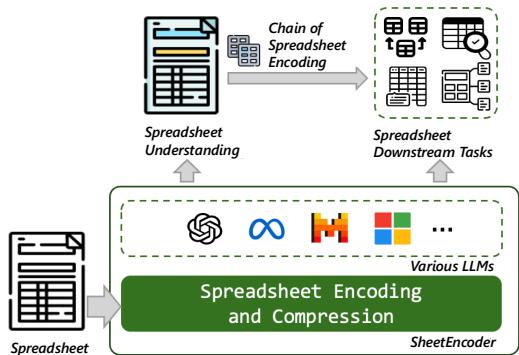
As shown in Figure 1, the goal is to create a pipeline where a raw spreadsheet passes through an encoder (the green box) before reaching the LLM. The LLM then performs tasks like “Spreadsheet Understanding” (detecting tables) or downstream reasoning (answering questions like “Which product had the highest revenue in Q3?”).
However, standard encoding methods fail here.
- Markdown/HTML: These are token-heavy. Representing empty cells requires repeated tags or separators (
| | | |), which eats up context windows rapidly. - Linearization: Reading row-by-row destroys the vertical context. If a table has 1,000 rows, by the time the LLM reads row 1,000, it has likely “forgotten” the headers in row 1.
The researchers discovered that directly feeding a large spreadsheet to GPT-4 often results in the model getting “lost in the middle,” degrading performance significantly as file size increases.
The Solution: SHEETENCODER
The researchers propose SHEETENCODER, a framework designed to compress spreadsheets while retaining their structural skeleton. It moves beyond simple serialization to intelligent extraction.
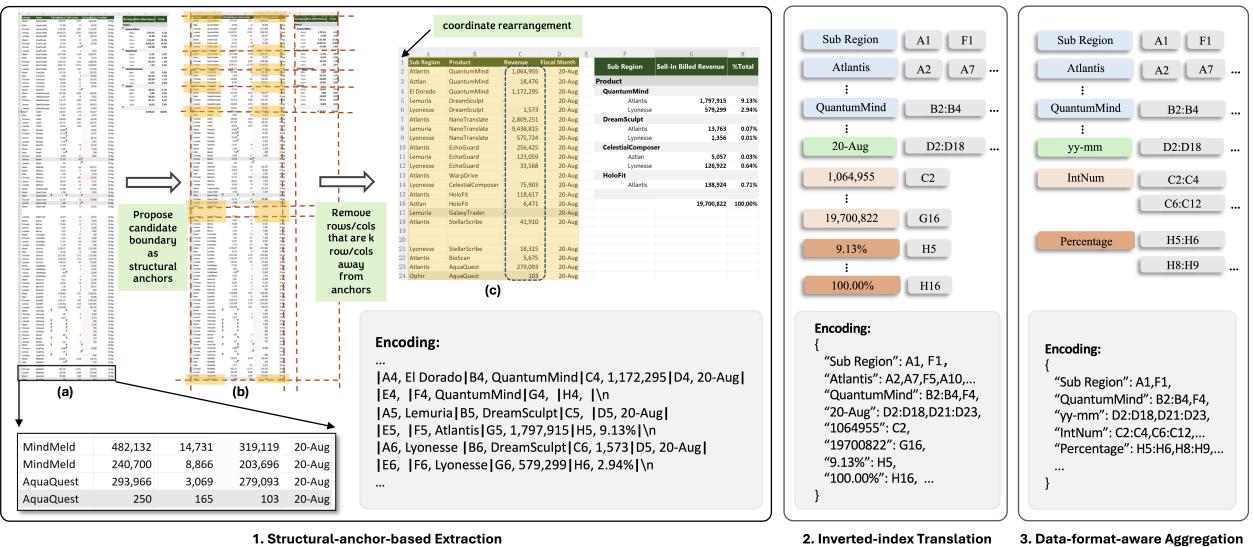
Figure 2 above provides the high-level roadmap of the method. It transforms a massive, sprawling spreadsheet (left) into a highly compressed, token-efficient representation (right). This transformation happens through three specific modules, which we will detail below.
1. The Vanilla Encoding Strategy
Before compression, the paper establishes a baseline “Vanilla” encoding. Instead of just dumping text, they explicitly encode the coordinate, value, and format of every cell.
The format looks roughly like this:
Address, Value, Format
For example:
B2, Sales, Bold | B3, 500, Normal
While this preserves the 2D information (the address B2 tells the LLM exactly where the data lives), it is incredibly verbose. For large sheets, this method alone is impractical because it exceeds token limits. This necessity for efficiency led to the development of three compression modules.
2. Module I: Structural-Anchor-Based Extraction
The first major insight of the paper is that you don’t need to read every row to understand the table structure.
Consider a sales report with 10,000 rows. Rows 5 through 9,995 are likely identical in structure—they all contain a date, a product name, and a dollar amount. Reading all of them provides no new information about the layout of the table.
SHEETENCODER uses a heuristic algorithm to identify “Structural Anchors.” These are the boundaries of tables—headers, footers, and edge columns.
- The Skeleton Approach: The system identifies the top, bottom, left, and right boundaries of potential tables.
- The Neighborhood (\(k\)): It keeps the anchor rows/columns and a small neighborhood of \(k\) surrounding rows (e.g., 4 rows).
- Pruning: It discards the homogeneous middle section.
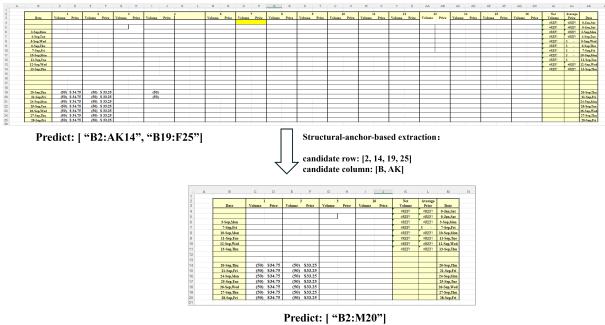
Figure 7 illustrates the impact of this module.
- Top (Before): The raw spreadsheet is huge. The model sees empty space and disjointed data, leading it to hallucinate two separate tables (
B2:AK14andB19:F25). - Bottom (After): The extraction module removes the empty middle ground and compresses the repetitive rows. The remaining “skeleton” is compact (
B2:M20).
Crucially, after extraction, the system performs coordinate re-mapping. It effectively “stitches” the table back together so the LLM perceives it as a continuous, albeit shorter, grid. This step alone filters out 75% of the content while preserving 97% of the structural boundaries.
3. Module II: Inverted-Index Translation
Even after removing middle rows, spreadsheets are plagued by empty cells and repeated values (e.g., a “Category” column where “Office Supplies” appears 500 times).
Traditional grid encoding (Row 1, Row 2, Row 3…) forces you to write out every empty cell to maintain alignment. SHEETENCODER flips this on its head by using Inverted-Index Translation.
Instead of:
Cell A1: "Cat", Cell A2: "Cat"
The system encodes it as a dictionary (JSON style):
"Cat": ["A1", "A2"]
"Dog": ["B1:B5"]
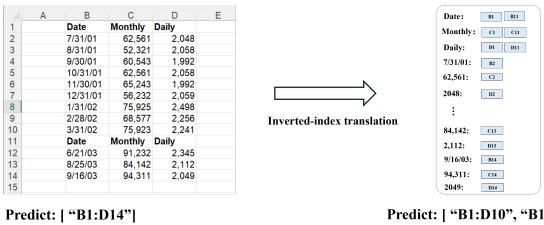
Figure 8 demonstrates the power of this shift.
- Left (Standard): The model struggles to see the relationship between distant cells and predicts one giant, incorrect table.
- Right (Inverted): By grouping cells by their value, the encoding naturally handles sparse data without wasting tokens on empty space. The dictionary format is lossless—no data is deleted—but the token count drops largely. This allows GPT-4 to correctly identify two distinct tables instead of merging them.
4. Module III: Data-Format-Aware Aggregation
The final compression step requires a leap of abstraction. For tasks like Table Detection (finding where a table starts and ends), the specific value of a number doesn’t matter. Whether a cell contains “\(10.50" or "\)1,000,000,” the structural fact is that it is a “Currency” cell.
SHEETENCODER utilizes Data-Format-Aware Aggregation. It looks at the Number Format String (NFS)—the hidden metadata in Excel that defines if a cell is a Date, Percentage, Currency, or Text.
The algorithm clusters adjacent cells that share the same data type.
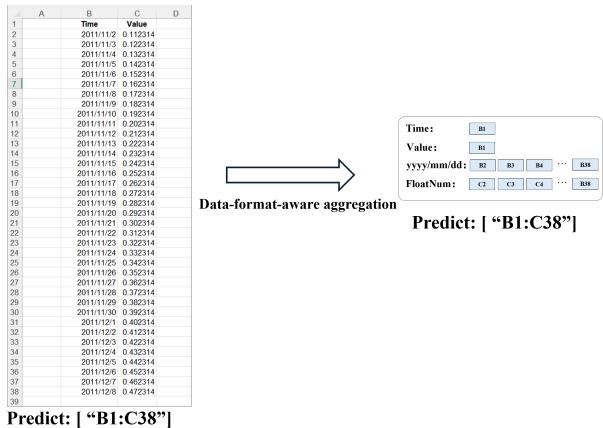
Look at Figure 9:
- Before: The encoder lists every single date and float value. This is token-expensive.
- After: The system recognizes that
B2throughB38are all “Value” types (floats). It replaces the individual numbers with a single token representing the range and type. - The Result: The LLM sees a simplified map: “Header at B1, Float Numbers from B2 to B38.”
This abstraction allows the LLM to understand the shape and type of the data without getting bogged down in the content.
Experimental Results
Does this complex pipeline actually work? The researchers tested SHEETENCODER on two primary tasks: Spreadsheet Table Detection and Spreadsheet QA.
The Compression Ratio
First, let’s look at efficiency. The combination of the three modules results in massive token savings.

As shown in Table 1, the full pipeline (Module 1&2&3) achieves a compression ratio of nearly 25x. A spreadsheet that originally required ~1.5 million tokens (far beyond GPT-4’s limit) is compressed down to ~62k tokens. This makes it possible to feed massive enterprise spreadsheets into current LLM context windows.
Accuracy in Table Detection
Compression is useless if it destroys information. To test accuracy, the researchers fine-tuned models (including GPT-4, Llama 2, and Mistral) to detect table boundaries.
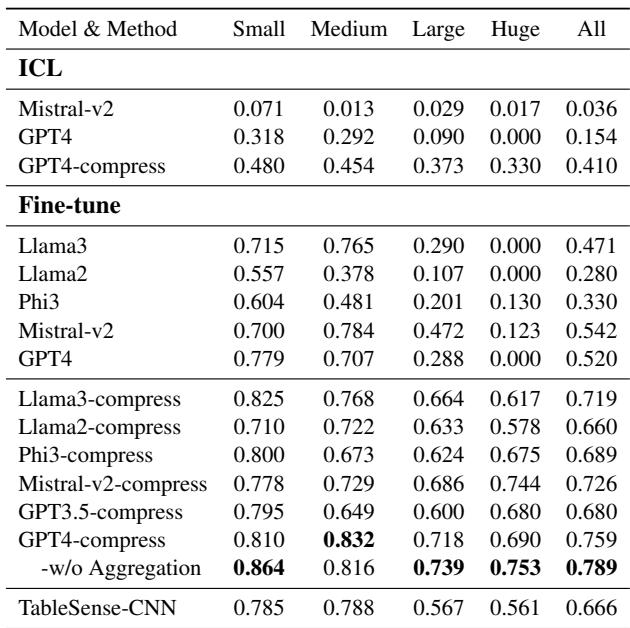
Table 2 highlights the performance using the F1 score (a mix of precision and recall):
- GPT-4 with SHEETENCODER (Fine-Tuned): Achieves an F1 score of 0.789 (w/o aggregation), significantly outperforming the previous state-of-the-art, TableSense-CNN (0.666).
- Huge Spreadsheets: The difference is most stark on “Huge” datasets. Standard GPT-4 scores 0.000—it essentially fails completely because the prompts are too long. With SHEETENCODER, even on huge sheets, the model maintains high accuracy.
Cost Reduction
Because LLM APIs charge by the token, compression equals savings. The authors note that SHEETENCODER reduces the average cost of processing a spreadsheet by 96%. For enterprise applications processing thousands of files daily, this is a game-changer.
Chain of Spreadsheet Encoding (CoS)
The researchers didn’t stop at just identifying tables. They extended the framework to Spreadsheet QA—answering user questions about the data.
They introduced a pipeline called Chain of Spreadsheet Encoding (CoS), inspired by Chain-of-Thought reasoning:
- Detect: Use the compressed SHEETENCODER prompt to find the relevant table boundaries.
- Extract: Pull only that specific table from the original file.
- Reason: Feed the uncompressed (or lightly compressed) target table to the LLM to answer the specific question.
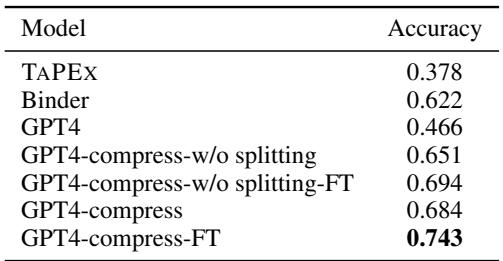
Table 4 shows that this two-step approach beats existing table-QA models like TAPEX and Binder. By first locating the data using the compressed “skeleton” and then zooming in for the answer, the model avoids the noise of the rest of the spreadsheet.
Conclusion
SHEETENCODER represents a significant step forward in making tabular data accessible to AI. It moves away from the naive approach of “treat everything as text” and embraces the unique properties of spreadsheets: their visual layout, their sparsity, and their typed formatting.
By implementing Structural Anchors, Inverted Indices, and Format Aggregation, the framework turns the weakness of spreadsheets (their massive, sparse grids) into a strength (structured, compressible patterns).
For students and researchers in NLP and Data Science, this paper offers a crucial lesson: Representation matters. Simply scaling up the model isn’t always the answer. Sometimes, you need to redesign how you feed the data to the model to unlock its true potential.
- Key Takeaway: If you are working with LLMs and structured data, stop feeding raw grids. Look for the “skeleton” of your data—the headers, the boundaries, and the types—and let the LLM reason about the structure before it drowns in the details.