](https://deep-paper.org/en/paper/file-3112/images/cover.png)
We have all been there. You are finishing up a crucial essay, a business proposal, or a complex report in Microsoft Word. The content is golden, but the formatting is a mess. The font sizes are inconsistent, the indentation is slightly off, and for some reason, the third paragraph is in a different shade of black than the rest.
You spend the next hour clicking through menus, dragging rulers, and hunting for the “remove spacing after paragraph” button. It is tedious, repetitive, and kills your creative flow.
But what if you could just tell the computer, “Make all headers blue and bold, and double-space the third paragraph,” and have it happen instantly?
This is the premise behind a fascinating new paper titled “Free your mouse! Command Large Language Models to Generate Code to Format Word Documents”. The researchers propose a system where Large Language Models (LLMs) act as an engine to convert your natural language commands into executable code that formats your Word documents automatically.
In this deep dive, we will explore how they built this system, the unique dataset they created to test it, and the sophisticated prompting strategies that make it work.
The Problem: Why Can’t We Just “Ask” Word?
Microsoft Word is powerful, but its power is locked behind a Graphical User Interface (GUI). To format a document, you have to use a mouse to select specific text and click specific buttons. This is a “manual” process.
With the rise of code generation models (like GitHub Copilot or GPT-4), we have seen how AI can turn natural language into Python or SQL. The researchers asked a simple question: Can we treat document formatting as a code generation task?
Instead of simulating a mouse click, the goal is to generate a script (specifically, JavaScript using the Office Add-ins API) that performs the formatting programmatically.
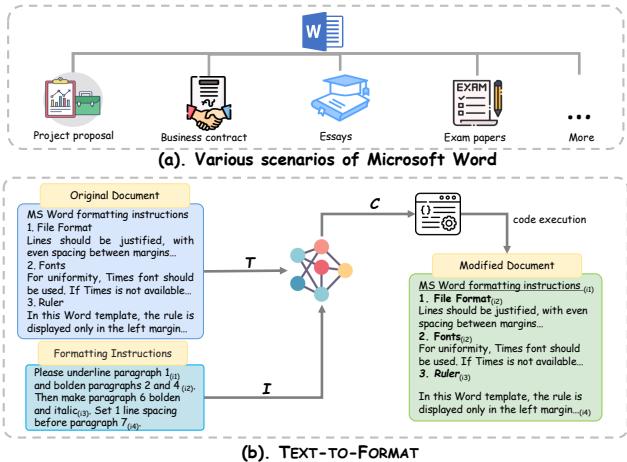
As shown in Figure 1 above, the concept is straightforward. On the left (b), you have the original document and a set of natural language instructions (e.g., “Bold the 2nd paragraph”). These pass through a code generation model (C) which outputs a script. When that script runs, you get the “Modified Document” on the right.
However, making this work in the real world is surprisingly difficult. Standard LLMs are great at Python, but they often struggle with the specific, niche syntax of the Microsoft Word JavaScript API. Furthermore, there hasn’t been a proper way to evaluate whether an AI is actually good at this task—until now.
Building the Foundation: DOCFORMEVAL
Before you can solve a problem, you need to measure it. Existing code benchmarks (like HumanEval) focus on algorithmic logic, not document layout. To address this, the authors constructed a brand-new evaluation dataset called DOCFORMEVAL.
Creating a dataset for document formatting isn’t as simple as scraping the web. The data needs to be precise, executable, and diverse. The researchers used a clever bottom-up approach to build this dataset.
The Construction Pipeline
The team didn’t just write random instructions. They reverse-engineered the formatting process.
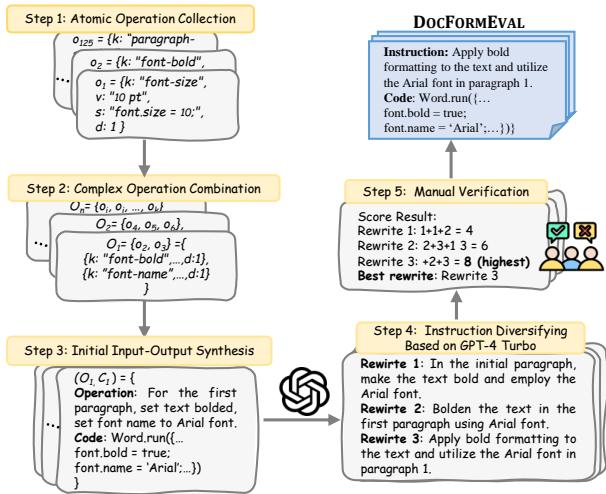
As illustrated in Figure 2, the process involves several steps:
- Atomic Operation Collection: They started by identifying “atomic” operations—the smallest possible formatting actions, like “set font size to 12” or “make font bold.” They mapped these to the actual Word API properties (key-value pairs).
- Complex Operation Combination: Real-world instructions are rarely simple. We usually want to do multiple things at once. The system randomly combines these atomic operations to create complex formatting “backbones.”
- Initial Synthesis: Using templates, they turned these backbones into basic natural language instructions and corresponding ground-truth code.
- GPT-4 Diversification: Template-generated text sounds robotic (e.g., “Set font size to 12. Set color to red.”). To make the dataset realistic, they used GPT-4 Turbo to rewrite these instructions into natural, varied human language.
- Manual Verification: Finally, human annotators reviewed the data to ensure the rewritten instructions actually matched the code.
What’s in the Dataset?
The result is a robust dataset of 1,911 high-quality samples. What makes this dataset challenging is the variety of complexity.
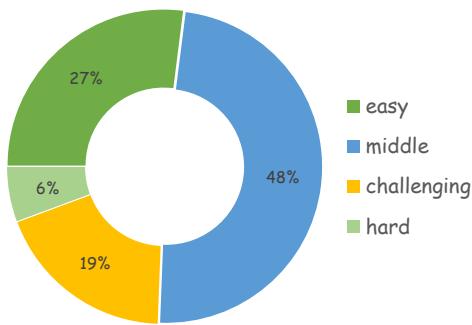
Figure 10 shows the complexity distribution. While about 27% of the tasks are “easy” (requiring 1-5 lines of code), a significant portion falls into the “middle” or “challenging” categories, requiring complex scripts to execute. This ensures that the model isn’t just memorizing simple commands but is actually reasoning through complex requirements.
The Core Method: TEXT-TO-FORMAT
Now that we have the dataset, let’s look at the solution. The authors proposed a framework called TEXT-TO-FORMAT.
Simply asking an LLM to “format this document” usually fails. The model might hallucinate API calls that don’t exist or write code that creates syntax errors. To solve this, TEXT-TO-FORMAT employs a four-stage pipeline designed to guide the LLM toward the correct solution.
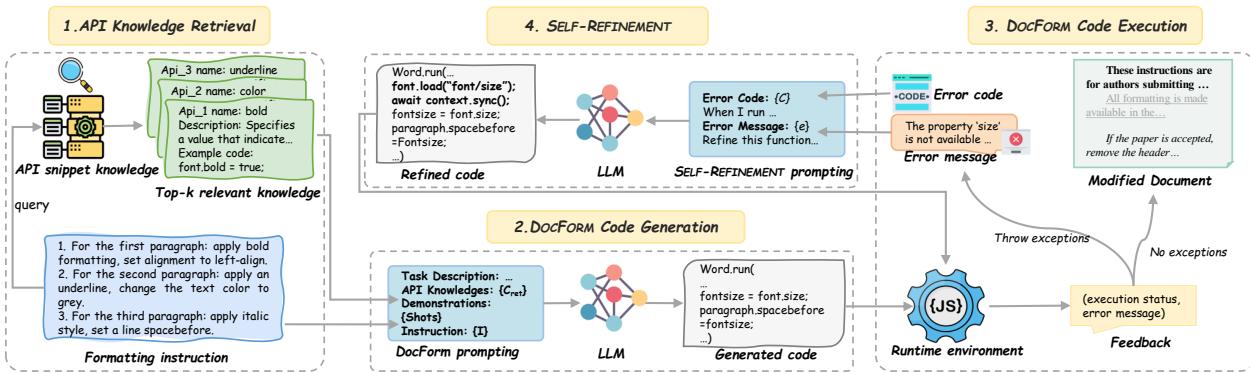
Let’s break down the architecture shown in Figure 3.
1. API Knowledge Retrieval (RAG)
Large Language Models have seen a lot of code, but they might not have memorized the specific documentation for the Microsoft Word JavaScript library.
To fix this, the system uses Retrieval-Augmented Generation (RAG). The researchers built a knowledge base of correct API snippets. When a user asks for a specific format (e.g., “highlight the text”), the system acts as a search engine. It converts the user’s instruction into a vector and searches the knowledge base for the most relevant API documentation.
\[ C _ { r e t } = R ( I , k , C _ { a p i } ) \]As described in the equation above, the retrieval function \(R\) takes the instruction \(I\) and retrieves the top-\(k\) relevant API snippets (\(C_{ret}\)). This context is crucial because it gives the LLM the “cheat sheet” it needs to write the correct syntax.
2. Code Generation
Next, the system constructs a prompt. It combines:
- The user’s instruction.
- The retrieved API knowledge.
- (Optional) Few-shot examples (demonstrations of previous successful code).
This rich prompt is sent to the LLM, which generates the formatting code.
3. Execution
Here is where this task differs from writing an essay. Code must run. The generated script is executed in a runtime environment (a sandbox simulating Word).
4. Self-Refinement
This is the “smart” part of the system. If the generated code crashes (throws an exception), the system doesn’t just give up. It captures the error message and feeds it back to the LLM.
The prompt essentially says: “You tried to write this code, but it failed with this error message. Please fix it.”
This loop allows the model to self-correct, significantly improving reliability.
Experiments and Results
So, how well does it work? The researchers tested this framework using various LLMs, including open-source models (like Qwen2 and DeepSeek) and commercial giants (like GPT-4 Turbo).
They used three key metrics:
- Formatting Accuracy (FA): Did the code run and produce the correct visual result?
- Execution Exception Rate (EER): Did the code crash?
- Formatting Error Rate (FER): Did the code run but produce the wrong result?
The Power of Prompting Strategies
The results, summarized in the table below, reveal a massive gap between naive prompting and the full TEXT-TO-FORMAT pipeline.
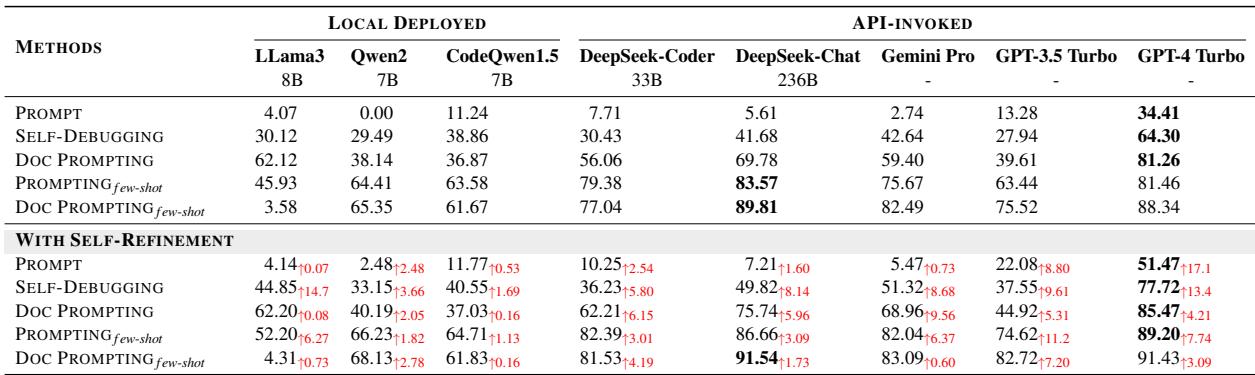
Note: In the table above, “Prompt” refers to asking the model directly. “Doc Prompting” refers to the RAG method.
Key Takeaways from the Results:
- Zero-shot fails: Simply asking GPT-4 Turbo to generate the code (“Prompt” row) only results in 34.41% accuracy. It simply doesn’t know the API well enough.
- RAG is a game changer: Adding the retrieved documentation (“Doc Prompting”) boosts GPT-4’s accuracy to 81.26%.
- Self-Refinement seals the deal: When you combine RAG, Few-shot learning (showing examples), and Self-Refinement, the accuracy hits 91.43%.
This proves that even the most powerful models need external knowledge and feedback loops to handle specialized tasks like this.
The Difficulty of Complexity
The system isn’t perfect. As the instructions get more complicated, performance drops.
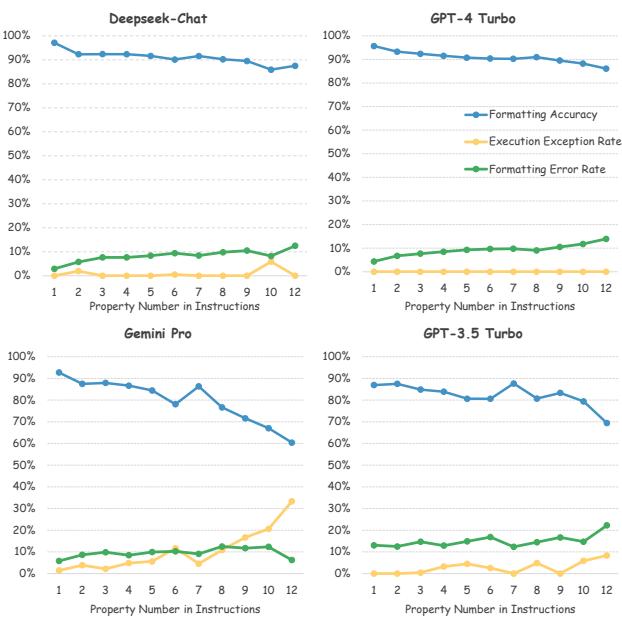
Figure 4 shows the performance trends for different models.
- Blue Line (Accuracy): Notice how accuracy dips as the “Property Number” (the number of things you want to format at once) increases.
- Orange Line (Exceptions): For weaker models like Gemini Pro, the code starts crashing more frequently as complexity rises.
- However, stronger models like GPT-4 Turbo (top right graph) maintain a relatively flat curve, indicating they are much more robust even when handling 10+ formatting commands simultaneously.
The Cost of Accuracy
There is a trade-off. To get that 91% accuracy, the system uses “Few-shot” prompting, which involves feeding the model many examples of correct code before asking it to generate new code. This consumes a lot of “tokens” (units of text processing cost).
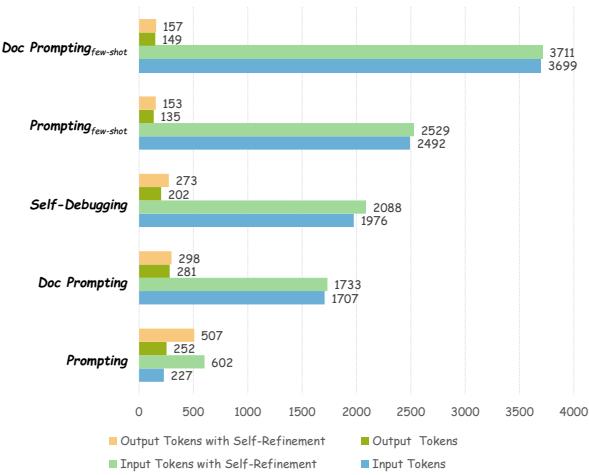
Figure 6 illustrates the token usage. The bars on the far left (“Doc Prompting few-shot”) are the highest. While this method is the most accurate, it is also the most expensive to run. The “Input Tokens” (blue/light green) are very high because the model has to read through all the examples and API documentation every time.
Conclusion and Future Implications
The TEXT-TO-FORMAT paper demonstrates a significant leap forward in office automation. By treating document formatting as a code generation problem, the researchers have opened the door to a future where we interact with software through conversation rather than clicks.
Key Takeaways:
- Specialized Data Matters: The creation of DOCFORMEVAL fills a critical gap, allowing researchers to measure how well AI interacts with office software APIs.
- Context is King: LLMs cannot do this alone. They need Retrieval-Augmented Generation (RAG) to access specific API documentation to write working code.
- Self-Correction Works: Allowing the model to see its own error messages and “try again” drastically reduces failure rates.
Perhaps the most exciting implication is for privacy. The experiments showed that open-source models (like DeepSeek or CodeQwen), when deployed locally with these techniques, can achieve respectable performance. This means companies could run these formatting tools offline, ensuring confidential contracts or legal documents never leave their secure servers.
While we aren’t quite at the point where we can throw away our mouse entirely, this research proves that the days of fighting with paragraph spacing and font inconsistencies are numbered. Soon, you might just type, “Make this look like a professional business letter,” and let the AI handle the rest.