](https://deep-paper.org/en/paper/file-3530/images/cover.png)
Introduction
If you have ever asked ChatGPT or GitHub Copilot to write a Python script or a JavaScript function, you know the results can be magically accurate. These models have been trained on billions of lines of code from popular languages, making them incredibly proficient at standard programming tasks.
But what happens when you step off the beaten path?
When you ask an LLM to generate code for low-resource languages—domain-specific languages (DSLs) like Microsoft Power Query M, OfficeScript, or complex Excel formulas—the performance drops significantly. These languages don’t have the massive repositories of open-source code required to train a model effectively.
To solve this, developers typically use Retrieval Augmented Generation (RAG). They feed the model relevant documentation or code examples at runtime to help it figure out the task. However, standard retrieval methods have a flaw: they usually treat documentation and examples as separate, independent silos. You grab the top 5 relevant examples or the top 5 relevant documentation pages, throw them into the prompt, and hope for the best.
In a recent paper titled “RAR: Retrieval-augmented retrieval for code generation in low-resource languages,” researchers from Microsoft propose a smarter way. They introduce Retrieval-Augmented Retrieval (RAR), a two-step process that mimics how human developers actually work: using examples to find the right documentation, or using documentation to find the best examples.
In this post, we will break down how RAR works, why independent retrieval fails for low-resource languages, and how this new method significantly boosts code generation accuracy.
The Challenge of Low-Resource Languages
Low-resource languages present a unique paradox. They are often critical for business logic (like Excel formulas or data transformation scripts), but they are underrepresented in the training data of Large Language Models (LLMs).
To bridge this gap, we rely on two main sources of external knowledge:
- Documentation (D): The official manual. It contains the grammar, function definitions (e.g.,
ExcelScript.Workbook.getActiveWorksheet), and rules. - Examples (E): Snippets of code paired with natural language descriptions (utterances) that show how to use the grammar.
The Problem with Current Retrieval
Existing methods typically use a “Retrieve-then-Generate” approach. They might search an example bank for code snippets similar to the user’s request, or search documentation for relevant functions.
The problem is that these two sources are often disconnected during retrieval.
- Documentation is abstract: Knowing that a function
OrderByDescendingexists doesn’t tell the model how to combine it with other functions to “highlight top 5 projects.” - Examples are prone to overfitting: If the model sees an example that looks similar but solves a slightly different problem, it might copy the example blindly rather than adapting it.
The researchers realized that to generate good code, you need both structure (grammar) and context (examples), and crucially, you need to ensure they are related to each other.
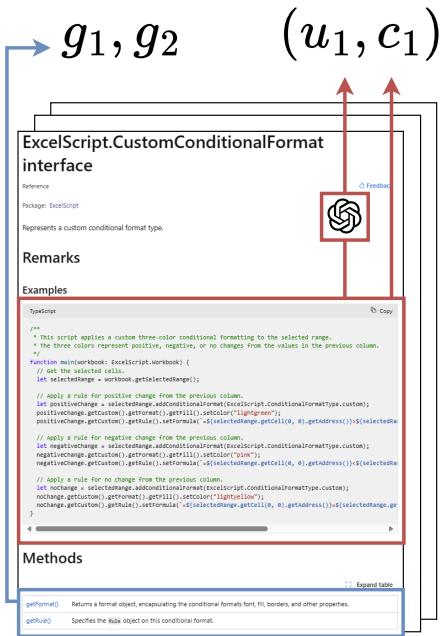
As shown in Figure 1, the researchers build their dataset by scraping official documentation. They extract specific grammar elements (marked in blue) and code examples (marked in red). This ensures that the retrieval system has a clean, structured source of truth.
The Core Method: Retrieval-Augmented Retrieval (RAR)
The core innovation of this paper is the move from independent retrieval to dependent (two-step) retrieval.
In a standard RAG setup, you might run two parallel searches: one for examples and one for documentation. In RAR, the retrieval is sequential. The output of the first retriever (the Driver) is used to guide the second retriever (the Influenced).
This creates a bridge between the “what” (the user’s request) and the “how” (the specific syntax and usage).
The Architecture
The RAR process works in two main directions, as illustrated in the architecture diagram below:
- Examples \(\rightarrow\) Grammar (\(E \rightarrow D\)): The system first finds code examples similar to the user’s request. It then analyzes the code in those examples to find the specific grammar definitions (documentation) used in them.
- Grammar \(\rightarrow\) Examples (\(D \rightarrow E\)): The system first predicts which functions or classes are needed. It then searches for examples that utilize those specific grammar elements.
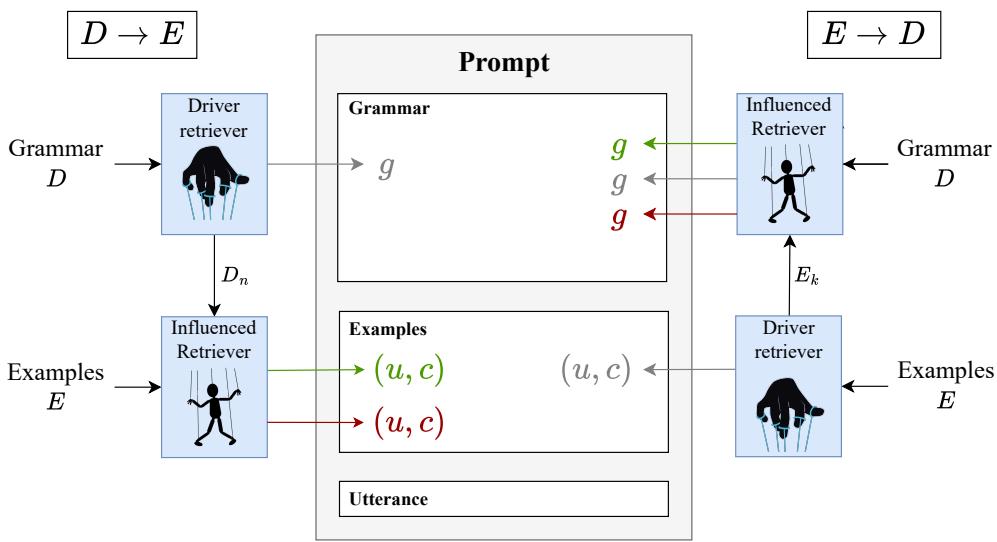
Let’s look closely at Figure 3 above. You can see the flow:
- Left Side (\(D \rightarrow E\)): The Driver picks Grammar (\(D_n\)). The Influenced Retriever then uses that grammar to find Examples. Notice the green and red arrows? We’ll get to those in a moment—they are critical for handling errors.
- Right Side (\(E \rightarrow D\)): The Driver picks Examples. The Influenced Retriever looks at the code in those examples to pull the relevant Grammar.
How Embeddings Connect Language to Code
Before retrieval happens, the system needs to understand the relationship between natural language (what the user asks) and code entities (the functions needed). Standard embedding models (like OpenAI’s ada-002) are great at general text, but they might not know that “highlight top 5” implies TopBottomConditionalFormat.
To fix this, the researchers fine-tune an embedding model. They train it to minimize the distance between a user utterance \(u\) and a grammar element \(g\) only if that grammar element actually appears in the code for that utterance.

This equation ensures that the vector representation of a user’s request is mathematically close to the specific functions required to solve it, bridging the gap between natural language and programming syntax.
Mapping Code to Grammar
One technical challenge is accurately identifying which grammar elements are present in a piece of code. Simply string-matching function names isn’t enough (e.g., getFormat might exist in both Chart and Image classes).
The researchers use an Abstract Syntax Tree (AST) to resolve these ambiguities.
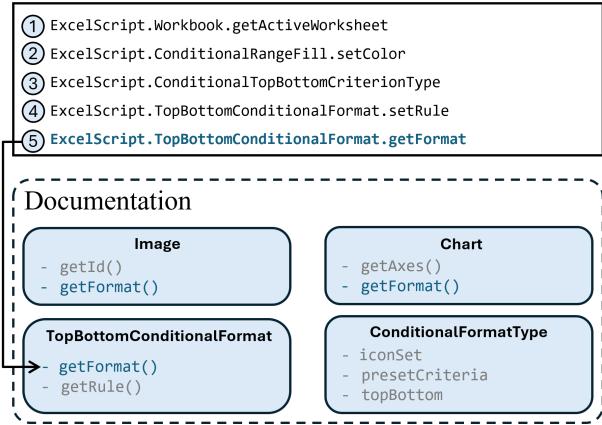
In Figure 2, we see this resolution in action. Look at item ⑤ (getFormat). A simple search might confuse this with Chart.getFormat. However, by tracing the AST, the system correctly identifies that this getFormat belongs to ExcelScript.TopBottomConditionalFormat. This precision is vital for the Influenced Retriever to pull the correct documentation.
The “Negative Influence” Heuristic
Here is the smartest part of RAR. What if the Driver Retriever makes a mistake?
If step 1 retrieves irrelevant examples, and step 2 relies solely on them, the whole process fails. To mitigate this, RAR uses Negative Influence.
The Influenced Retriever selects items based on two criteria:
- Positive Influence: Items that are similar to the Driver’s output (assuming the Driver was right).
- Negative Influence: Items that are dissimilar to the Driver’s output (assuming the Driver might be wrong).
By deliberately including diversity (items that are not like the first retrieval), RAR creates a “safety net” in the prompt, giving the LLM alternative options if the primary retrieval path was off-target.
Experiments and Results
The researchers tested RAR on three low-resource languages:
- OfficeScript: JavaScript-based automation for Excel.
- Power Query M: A data transformation language.
- Excel Formulas: Complex spreadsheet calculations.
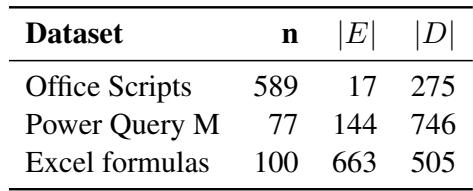
The datasets were constructed directly from documentation, highlighting the “low-resource” nature of the task.
Metric: Execution Match vs. Sketch Match
The evaluation didn’t just check if the code “looked” right. They used two strict metrics:
- Sketch Match: Does the structure of the code (ignoring variable names/constants) match the solution?
- Execution Match: When the code is actually run on a table, does it produce the correct result? (This is the gold standard).
Results: Dependent vs. Independent Retrieval
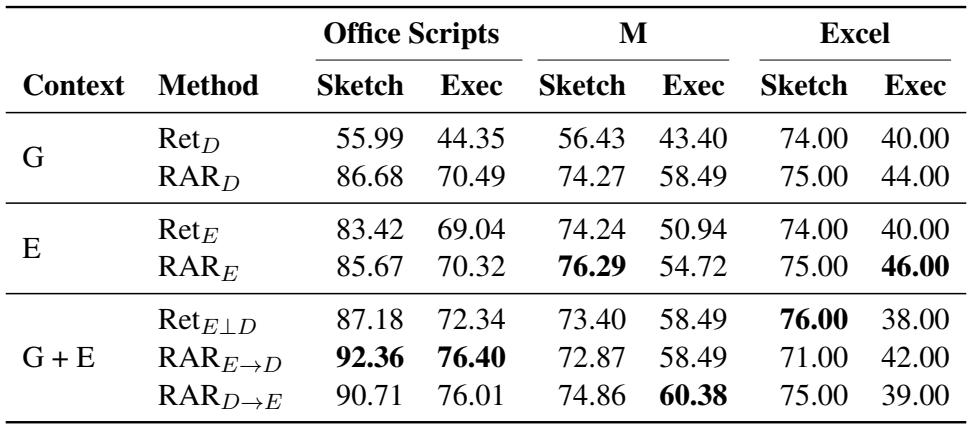
So, does the two-step RAR process actually beat the standard approach? The results in Table 4 are conclusive.
Key Takeaways from the Results:
- RAR Wins Across the Board: Look at the Office Scripts column. Standard retrieval of grammar (\(\operatorname{Ret}_D\)) achieves an execution match of 44.35%. RAR (\(\operatorname{RAR}_D\)) jumps to 70.49%. That is a massive improvement solely by changing how the documentation was found.
- Combined Context is King: The best performance comes from the bottom rows (\(\operatorname{RAR}_{E\to D}\) and \(\operatorname{RAR}_{D\to E}\)), where both examples and grammar are provided. For OfficeScript, \(\operatorname{RAR}_{E\to D}\) reaches 76.40% accuracy.
- Grammar Helping Examples: In Power Query M, using grammar to find examples helps significantly. The grammar acts as a search filter, ensuring the retrieved examples actually use the functions the model is likely to need.
Does Prompt Length Matter?
A common counter-argument in RAG research is: “Are you just doing better because you stuffed more tokens into the context window?”
The researchers analyzed performance as a function of token length (the amount of text fed to the LLM).
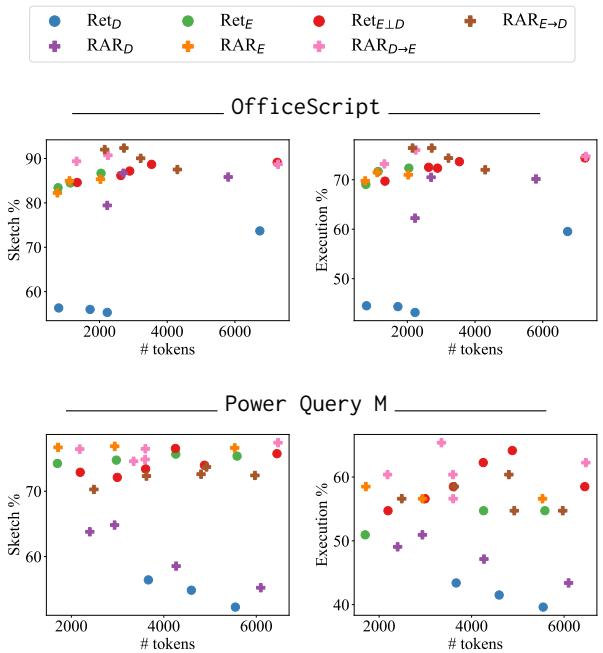
Figure 4 reveals two interesting trends:
- Efficiency: RAR (the lines with squares and diamonds) consistently outperforms the baselines (circles) even at lower token counts. You don’t need massive prompts to get the benefit; you just need relevant prompts.
- Plateau: Performance peaks around 3,000 tokens. Adding more context after that point often confuses the model rather than helping it, validating the need for precise retrieval over massive retrieval.
Is the Second Step Just Copying the First?
Finally, one might wonder: Is the Influenced Retriever (\(R_I\)) actually doing anything useful, or is it completely dependent on the Driver (\(R_D\))?
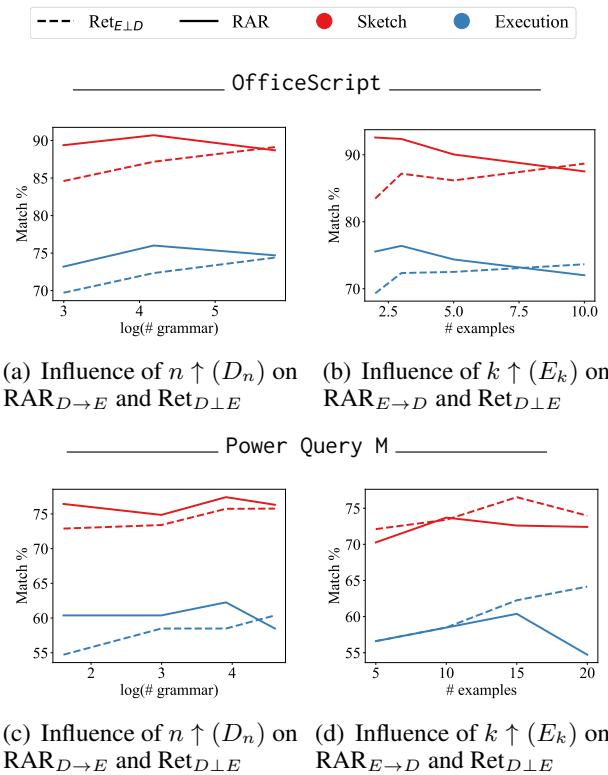
Figure 5 compares RAR against a baseline where the context from the Driver is identical. Since RAR (solid lines) consistently beats the baseline (dashed lines), it proves that the Influenced Retriever is actively adding value. It successfully filters and selects complementary information that the Driver missed.
Conclusion and Implications
The RAR paper provides a compelling blueprint for improving code generation in specialized domains. By acknowledging that documentation and examples are two sides of the same coin, the researchers demonstrated that sequential retrieval is far superior to parallel retrieval.
Key Takeaways for Students and Developers:
- Context Relationship Matters: Don’t just retrieve “relevant stuff.” Retrieve “stuff that explains the other stuff.”
- Documentation is Powerful: For low-resource languages, a well-structured grammar (documentation) can be just as valuable as few-shot examples, provided the model knows how to navigate it.
- Plan for Failure: The “Negative Influence” technique is a great lesson in robust system design. Always assume your first retrieval step might be wrong and provide the model with diverse alternatives.
As we move toward more specialized AI agents—ones that need to write obscure database queries or control proprietary software—techniques like RAR will be essential for turning general-purpose LLMs into domain experts.